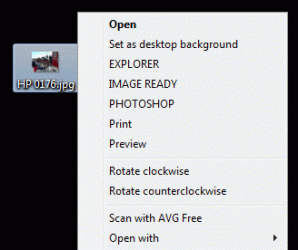
Real Title: Change you default image editing software (right-click -> edit)
I've done some digging (due to this http://www.sevenforums.com/customization/9902-right-click-context-menus.html post) and have found the exact registry key needed to change the default application that is run when you right-click an image file and select Edit. Regardsless of the 'Default' application for each file type, mspaint stays ar the default right-click->edit application.
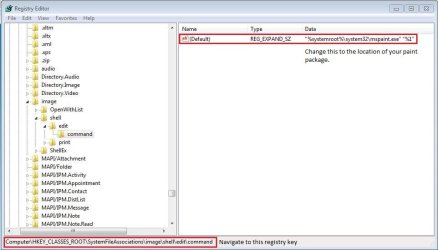
Open up regedit (type "regedit" in the start menu search box) and navigate to
HKEY_CLASSES_ROOT\SystemFileAssociations\image\shell\edit\command
Change the default to the location of the executable file of your image editing software:
e.g. "c:\program files\adobe\photoshopCS4\photoshopCS4.exe" "%1"
NOTE: You need to encase the text in quotes ("") & add "%1" in order for your chosen piece of software to open the file you have selected.
Now, when you right-click and select Edit, your newly chosen application will run.
I've done some digging (due to this http://www.sevenforums.com/customization/9902-right-click-context-menus.html post) and have found the exact registry key needed to change the default application that is run when you right-click an image file and select Edit. Regardsless of the 'Default' application for each file type, mspaint stays ar the default right-click->edit application.
Open up regedit (type "regedit" in the start menu search box) and navigate to
HKEY_CLASSES_ROOT\SystemFileAssociations\image\shell\edit\command
Change the default to the location of the executable file of your image editing software:
e.g. "c:\program files\adobe\photoshopCS4\photoshopCS4.exe" "%1"
NOTE: You need to encase the text in quotes ("") & add "%1" in order for your chosen piece of software to open the file you have selected.
Now, when you right-click and select Edit, your newly chosen application will run.
Attachments
My Computer
- Computer Manufacturer/Model Number
- Compaq Desktop
- OS
- Windows 7 Ultimate x64
- CPU
- AMD Sempron Dual Core
- Memory
- 3GB
- Graphics Card(s)
- NVIDIA GeForce 6150SE nForce 430
- Screen Resolution
- 1024x768
- Hard Drives
- 150GB Sata