Solved Changing from nVidia to AMD; What is involved???

BuckSkin

Member
Power User
VIP
Local time
9:26 AM
Messages
523
I currently have a nearly-new EVGA/invidia video-card and drivers installed; this card has been nothing but a constant source of headaches; $70-plus total waste.

My wife's identical machine has a Gigabyte/AMD card that easily outperforms my invidia and has never given any problems; it just does it's job and does it well.

Thus, I have ordered an identical Gigabyte/AMD card to replace the invidia in my machine.

My question is, so far as the drivers are concerned, what procedure should I follow when I replace the invidia with the AMD; do I uninstall the invidia drivers just before shutting down the machine for card replacement or what ?

Thanks for reading.
 

My Computer My Computer

At a glance

Windows 7 Pro x64Intel Core Two Duo E8600 3.33 ghz8GBGigabyte Radeon R7 240
Computer type
PC/Desktop
Computer Manufacturer/Model Number
Dell Optiplex 780m "mini-tower"
OS
Windows 7 Pro x64
CPU
Intel Core Two Duo E8600 3.33 ghz
Motherboard
Whatever DELL put in it
Memory
8GB
Graphics Card(s)
Gigabyte Radeon R7 240
Monitor(s) Displays
HP 2159m
PSU
750 Watt Corsair CX750
Keyboard
Logitech Wireless
Mouse
Logitech Wireless
Browser
Chrome, Firefox, IE
Remove drivers using DDU (display driver uninstaller). Remove card. Install new card. Install new drivers.
 

My Computer My Computer

At a glance

Windows 7 Professional 64bitIntel i7-5960X64GB Corsair Dominator 2400MHz3 EVGA GTX980's
Computer type
PC/Desktop
Computer Manufacturer/Model Number
custom build
OS
Windows 7 Professional 64bit
CPU
Intel i7-5960X
Motherboard
EVGA X99 Classified
Memory
64GB Corsair Dominator 2400MHz
Graphics Card(s)
3 EVGA GTX980's
Sound Card
on board
Monitor(s) Displays
3 Dell E2715H 27"
Screen Resolution
1920x1080 (5760x1080)
Hard Drives
Samsung 950 Pro 1TB M.2 SSD,
Western Digital Black 2TB HDD's x5
Western Digital Black 1TB HDD's x3
PSU
Corsair AX1200i
Case
Corsair 750D
Cooling
Corsair H110i GT
Keyboard
Corsair K70
Mouse
Corsair M45
Internet Speed
250 down/10 up
Antivirus
Microsoft Security Essentials
Browser
IE 11, Google Chrome
I made the NVidia to AMD change a few years ago. Never looked back. Most folks here seem to be Nvidia boosters with a few AMD'ers. I've just had good luck with AMD boards and gotten lots of value and performance for the money.
 

My Computer My Computer

At a glance

Win 7 Home Prem x64 SP1AMD FX6350 Vishera 3.9Ghz16Gb Ballistix Sport 2x8Gb DDR3-1600nVidia GEForce 1050Ti 4mg
Computer type
PC/Desktop
Computer Manufacturer/Model Number
Custom Build
OS
Win 7 Home Prem x64 SP1
CPU
AMD FX6350 Vishera 3.9Ghz
Motherboard
ASUS M5A97 R2.0
Memory
16Gb Ballistix Sport 2x8Gb DDR3-1600
Graphics Card(s)
nVidia GEForce 1050Ti 4mg
Sound Card
on board Realtek HD w/Logitech 2.1 speakers
Monitor(s) Displays
AOC 2243w
Screen Resolution
1920x1080
Hard Drives
500g Samsung Evo 850 OS SSD,
250g Samsung Evo 850 SSD for data,
1Tb Toshiba SSD for b/u's.
PSU
Corsair CX750 modular
Case
MasterCooler Elite 330
Cooling
2x case, Coolermaster Viper CPU stack
Keyboard
ms wireless desktop 2000
Mouse
ms wireless desktop 2000
Internet Speed
Cable:Average about 250Mbps down, 25Mbps Up +/-
Antivirus
MSE, Cclnr, MwBytes, SA-S
Browser
IE11
Remove drivers using DDU (display driver uninstaller). Remove card. Install new card. Install new drivers.

Thanks! That is simple enough; I even already have DDU.

I made the NVidia to AMD change a few years ago. Never looked back. Most folks here seem to be Nvidia boosters with a few AMD'ers. I've just had good luck with AMD boards and gotten lots of value and performance for the money.

With the experience I have had, both with the invidia card and EVGA support, I will never buy another.

My experience is exactly why I bought AMD for the wife and then another for me.
 

My Computer My Computer

At a glance

Windows 7 Pro x64Intel Core Two Duo E8600 3.33 ghz8GBGigabyte Radeon R7 240
Computer type
PC/Desktop
Computer Manufacturer/Model Number
Dell Optiplex 780m "mini-tower"
OS
Windows 7 Pro x64
CPU
Intel Core Two Duo E8600 3.33 ghz
Motherboard
Whatever DELL put in it
Memory
8GB
Graphics Card(s)
Gigabyte Radeon R7 240
Monitor(s) Displays
HP 2159m
PSU
750 Watt Corsair CX750
Keyboard
Logitech Wireless
Mouse
Logitech Wireless
Browser
Chrome, Firefox, IE
Just the opposite for me, I never really had any issues with ATI (now AMD) cards. I've read about problems (with ATI) while deciding on parts for my first build and decided on NVidia, haven't had a problem yet.
My friend and I just built him a PC and he chose AMD, he hasn't had any issues either. Both companies have really improved their offerings.

One thing I recommend is to wait before installing the newest driver. I usually wait about a month or two and see what bugs show up with the newest one.
 

My Computer My Computer

At a glance

Windows 7 Professional 64bitIntel i7-5960X64GB Corsair Dominator 2400MHz3 EVGA GTX980's
Computer type
PC/Desktop
Computer Manufacturer/Model Number
custom build
OS
Windows 7 Professional 64bit
CPU
Intel i7-5960X
Motherboard
EVGA X99 Classified
Memory
64GB Corsair Dominator 2400MHz
Graphics Card(s)
3 EVGA GTX980's
Sound Card
on board
Monitor(s) Displays
3 Dell E2715H 27"
Screen Resolution
1920x1080 (5760x1080)
Hard Drives
Samsung 950 Pro 1TB M.2 SSD,
Western Digital Black 2TB HDD's x5
Western Digital Black 1TB HDD's x3
PSU
Corsair AX1200i
Case
Corsair 750D
Cooling
Corsair H110i GT
Keyboard
Corsair K70
Mouse
Corsair M45
Internet Speed
250 down/10 up
Antivirus
Microsoft Security Essentials
Browser
IE 11, Google Chrome
One thing that I have noticed is that AMD and nVidia cards support audio in different ways that can cause issues in some circumstances

The basic difference is that although Both cards support audio Via HDMI only nVidia cards support sound through the DVI ports so you can be "Forced" to purchase additional audio hardware when using multiple monitors and changing from AMD to nVidia cards.
 

My Computers My Computers

  • At a glance

    Windows 11 Pro x64 [Latest Release and Releas...Ryzen 9 5950X, 3.8 - 5.2 MHz64GB [2 x 32GB] DDR4 3200MHz4GB NVIDIA GEFORCE GTX 1650 Ti
    Computer type
    PC/Desktop
    Computer Manufacturer/Model Number
    ChillBlast - Custom to my design
    OS
    Windows 11 Pro x64 [Latest Release and Release Preview]
    CPU
    Ryzen 9 5950X, 3.8 - 5.2 MHz
    Motherboard
    Asus Prime X570-Pro
    Memory
    64GB [2 x 32GB] DDR4 3200MHz
    Graphics Card(s)
    4GB NVIDIA GEFORCE GTX 1650 Ti
    Sound Card
    On-board SPDIF to 5.1 System + HDMI [5.1 system]
    Monitor(s) Displays
    32" UHD 32 Bit HDR Monitor + 43" UHD 4K 32Bit HDR TV
    Screen Resolution
    2 x 3840 x 2160 @60Hz
    Hard Drives
    1TB M2 SSD OS, 500GB Fast Access SSD, 2 x 8TB Data + Various Externals from 1TB to 4TB, 10TB NAS
    PSU
    NZXT C750 80 PLUS Gold 750W Modular PSU
    Case
    Workstation Case [Matt Black]
    Cooling
    NZXT Kraken X63 280mm CPU Cooler +2x Quiet Case fans
    Keyboard
    Logitech Wireless MX Keys & K400 + others
    Mouse
    Logitech Wireless MX Master 3S
    Internet Speed
    920 MB Down 50 MB Up
    Antivirus
    BitDefender Total Security Pro
    Browser
    Chrome (always run latest Non-Beta)
    Other Info
    Also run ...
    Laptop - Quad 8GB - Windows 10 Pro x64
    Nexus 7 Android tablet x2
    Samsung 10.2" tablet
    Blackview TAB 8 4G Android Tablet c/w Keyboard
    Wacom Intuos Pro Medium Pen Pad
    Wacom Intuos Pro Small Pen Pad
    Wacom Expresskeys Remote
    Loopdeck+ Graphics Controller
    Shuttle Pro v2 Control
  • At a glance

    Windows 11 Pro x64 Latest RPIntel I7 10750H 5.0GHz32GB [2x16GB] DDR4 2933 MHznVidia GTX1650Ti 4 GB GDDR6
    Computer type
    Laptop
    System Manufacturer/Model Number
    Dell XPS 17 10750H
    OS
    Windows 11 Pro x64 Latest RP
    CPU
    Intel I7 10750H 5.0GHz
    Motherboard
    Dell XPS
    Memory
    32GB [2x16GB] DDR4 2933 MHz
    Graphics Card(s)
    nVidia GTX1650Ti 4 GB GDDR6
    Sound Card
    Stock [Realtek] 4 Speaker
    Monitor(s) Displays
    17" IPS UHD+ Infinity Edge Touchscreen
    Screen Resolution
    3840 x 2400
    Hard Drives
    2TB M2 NVMe, 4TB External + various 500GB & 1TB External NVMe (also have access to spinner HDD from
    PSU
    Stock
    Case
    Stock XPS Aluminium & Carbon Fibre
    Cooling
    Stock - Active Fan Control
    Keyboard
    Backlit + Various Logitech
    Mouse
    Stock Track Pad + Logitech MX Trackball
    Internet Speed
    72 MB Down 18MB Up
    Browser
    Chrome
    Other Info
    Also run ...
    Laptop - Quad 8GB - Windows 10 Pro x64
    Nexus 7 Android tablet x2
    10.2" tablet
    Sony Z3 Android Smartphone
    Wacom Intuos Pro Medium Pen Pad
    Wacom Intuos Pro Small Pen Pad
    Wacom Expresskeys Remote
    Loopdeck+ Graphics Controller
    Shuttle Pro v2 Control Pad
    10TB NAS
Hi,
You really don't say which card/ exact model GT/ GTX... you're having issues with
I have 2 evga GTX gpu's and they both rock :)
 

My Computer My Computer

At a glance

Win-7-Pro64bit 7-H-Prem-64biti7-5930K 2nd i9-9940x both water blocked VRM'...Trident-z 3200C14 2nd Trident-z 3600C16EVGA 1080ti ftw3 2nd Titan Xp both water blocked
Computer type
PC/Desktop
Computer Manufacturer/Model Number
Custom assembled by me :}
OS
Win-7-Pro64bit 7-H-Prem-64bit
CPU
i7-5930K 2nd i9-9940x both water blocked VRM's too
Motherboard
ASUS SABERTOOTH X99 2nd ASUS x299 Apex
Memory
Trident-z 3200C14 2nd Trident-z 3600C16
Graphics Card(s)
EVGA 1080ti ftw3 2nd Titan Xp both water blocked
Sound Card
Built-in Realtek
Monitor(s) Displays
1-AOC G2460PG 24"G-Sync 144Hz/ 2nd 1-ASUS VG248QE 24" 144Hz
Screen Resolution
1920 x 1080 144Hz
Hard Drives
2-Samsung M.2 Evo & Evo Plus
2-Samsung 850 EVO 500GB SSD's/ 3-2.5 W.D. Black 1tb-&3-1tb/3-3.5 WD Black 1tb hdd's
PSU
EVGA SuperNOVA 1000-P2 2nd 1200-P2
Case
2-Corsair Obsidian Series 450D Black ATX Mid Tower
Cooling
Custom water loops
Keyboard
Logitech G710+/ 2nd Logitech G910
Mouse
2-RedDragon M901 Perdition 16400 dpi Gaming mouse = wired
Internet Speed
Comcast Ping 19ms 89.31mbps download speed 6.12mbps upload
Antivirus
Malwarebytes Pro/ Superantispyware Pro
Browser
FireFox & Pale moon
Other Info
2nd ASUS X299 Apex/Intel i9-9940x with Custom water loop/7H-Prem-x64/Corsair 450D case/Ram Trident-z 3600C16 4x8gb / Samsung970Evo plus 500gb SSD/Dual ssd EZ swap evo/PSU EVGA SuperNova 1200w-P2 80+Platinum/GPU Titan Xp /8-ML-140 on push-pull on 2-280GTX rads
I have to say that while I am a little disenchanted with AMD's CPU and motherboard offerings (poor benchmarks, GPU card graphics lanes on MB being slow), I will say that their graphics cards seem to be of high quality lately.

I absolutely love my R9 280. It's never given me any trouble, and it runs all of my games on the highest settings. It doesn't benchmark as well as an Nvidia card in its same class, but I think that is because it is using a slower graphics lane because of the motherboard I have. It's very hard to find an AMD motherboard with my CPU socket which has a x16 PCI 3.0 compliant socket, unfortunately. My next build will be Intel based, but I will probably just move my current GPU over to the new build to save money.
 

My Computer My Computer

At a glance

Win 7 Pro x64/Win 10 Pro x64 dual bootAMD FX 8350 Vishera @ 420016 GB Mushkin Blackline DDR3-2400 @ 1866 (9-1...XFX Radeon R9 280 Double D Black Edition
Computer type
PC/Desktop
Computer Manufacturer/Model Number
Mellon Labs (custom build)
OS
Win 7 Pro x64/Win 10 Pro x64 dual boot
CPU
AMD FX 8350 Vishera @ 4200
Motherboard
ASUS M5A97 R2.0
Memory
16 GB Mushkin Blackline DDR3-2400 @ 1866 (9-10-10-10-31)
Graphics Card(s)
XFX Radeon R9 280 Double D Black Edition
Sound Card
Realtek HD Audio on MB. Sounds great.
Monitor(s) Displays
Acer 24", Acer 22"
Screen Resolution
3840 x 1080
Hard Drives
1 x Mushkin Chronos 120 GB SSD (Win 10)
1 x Samsung 850 EVO 250 GB SSD (Win 7)
1 x WD 1TB SATA Blue
1 x WD 1TB SATA Green
PSU
Corsair TX-750
Case
CoolerMaster HAF 912+
Cooling
Coolermaster Seidon 240M Liquid AIO. 6 case fans
Keyboard
Logitech G710+
Mouse
Logitech G500s
Internet Speed
Much better since I got fiber, but still way overpriced.
Antivirus
MSE, Malware Bytes for scanning
Browser
Firefox
Other Info
Corsair VOID USB headphones.

A Mellon Labs X-1 - LCD Smartie driven system status display.

Brought to you by the letter E
I've used both NVIDIA and AMD/ATi cards. I've never had any problems with both but all I can say is pick the ones that you want more and works best for you.

NVIDIA needs to update their Control panel though, it looks like something you'd see during the Windows 98 era.
 

My Computer My Computer

At a glance

Windows 7 Home Premium 64-BITAMD A8 7200P8GB 1600mhzRadeon R5 (APU) + Radeon R5 M230 2GB Dual Gra...
Computer type
PC/Desktop
Computer Manufacturer/Model Number
ASUS X550ZE
OS
Windows 7 Home Premium 64-BIT
CPU
AMD A8 7200P
Motherboard
N/A
Memory
8GB 1600mhz
Graphics Card(s)
Radeon R5 (APU) + Radeon R5 M230 2GB Dual Graphics
Sound Card
Realtek ALC269 with SonicMaster
Monitor(s) Displays
Laptop Display
Screen Resolution
1920 x 1080 @60hz
Hard Drives
WDC WD50 00LPVX-80V0TT0 (500GB)
PSU
Laptop Charger
Mouse
ARMAGGEDON TEXTRON SCORPION 7
Internet Speed
100 mbps DOWN / 50 mbps UP
Antivirus
Windows Defender
Browser
Mozzila FireFox, Valve Steam in-game internet browser
Someone asked which invidia card has caused me nothing but problems; random screen blackouts that there seems to be no fix for and crashing photo programs just at the crucial "save as" moment.

EVGA GeForce GT 730 2GB GDDR5 64bit DVI/HDMI/VGA Low Profile Graphics Card 02G-P3-3733-KR

If I were paid $2/hour for all the time I have wasted on this card, I could retire.
 

My Computer My Computer

At a glance

Windows 7 Pro x64Intel Core Two Duo E8600 3.33 ghz8GBGigabyte Radeon R7 240
Computer type
PC/Desktop
Computer Manufacturer/Model Number
Dell Optiplex 780m "mini-tower"
OS
Windows 7 Pro x64
CPU
Intel Core Two Duo E8600 3.33 ghz
Motherboard
Whatever DELL put in it
Memory
8GB
Graphics Card(s)
Gigabyte Radeon R7 240
Monitor(s) Displays
HP 2159m
PSU
750 Watt Corsair CX750
Keyboard
Logitech Wireless
Mouse
Logitech Wireless
Browser
Chrome, Firefox, IE

My Computer My Computer

At a glance

Win-7-Pro64bit 7-H-Prem-64biti7-5930K 2nd i9-9940x both water blocked VRM'...Trident-z 3200C14 2nd Trident-z 3600C16EVGA 1080ti ftw3 2nd Titan Xp both water blocked
Computer type
PC/Desktop
Computer Manufacturer/Model Number
Custom assembled by me :}
OS
Win-7-Pro64bit 7-H-Prem-64bit
CPU
i7-5930K 2nd i9-9940x both water blocked VRM's too
Motherboard
ASUS SABERTOOTH X99 2nd ASUS x299 Apex
Memory
Trident-z 3200C14 2nd Trident-z 3600C16
Graphics Card(s)
EVGA 1080ti ftw3 2nd Titan Xp both water blocked
Sound Card
Built-in Realtek
Monitor(s) Displays
1-AOC G2460PG 24"G-Sync 144Hz/ 2nd 1-ASUS VG248QE 24" 144Hz
Screen Resolution
1920 x 1080 144Hz
Hard Drives
2-Samsung M.2 Evo & Evo Plus
2-Samsung 850 EVO 500GB SSD's/ 3-2.5 W.D. Black 1tb-&3-1tb/3-3.5 WD Black 1tb hdd's
PSU
EVGA SuperNOVA 1000-P2 2nd 1200-P2
Case
2-Corsair Obsidian Series 450D Black ATX Mid Tower
Cooling
Custom water loops
Keyboard
Logitech G710+/ 2nd Logitech G910
Mouse
2-RedDragon M901 Perdition 16400 dpi Gaming mouse = wired
Internet Speed
Comcast Ping 19ms 89.31mbps download speed 6.12mbps upload
Antivirus
Malwarebytes Pro/ Superantispyware Pro
Browser
FireFox & Pale moon
Other Info
2nd ASUS X299 Apex/Intel i9-9940x with Custom water loop/7H-Prem-x64/Corsair 450D case/Ram Trident-z 3600C16 4x8gb / Samsung970Evo plus 500gb SSD/Dual ssd EZ swap evo/PSU EVGA SuperNova 1200w-P2 80+Platinum/GPU Titan Xp /8-ML-140 on push-pull on 2-280GTX rads
Hi,
Thanks according to the psu requirements it takes a 300w or better to run this card was that requirement met on the machine ?
EVGA - Product Specs - EVGA GeForce GT 730 2GB (Low Profile)


PSU requirement is met by better than twice the minimum with a 750-watt Corsair.

The Gigabyte AMD Radeon R7 240 DDR3-2GB DVI-D/HDMI/D-SUB OC Video Graphics Cards GV-R724OC-2GI REV2.0 in the wife's otherwise identical machine outperforms it in every way with only the stock 305-watt PSU.

I have another AMD exactly like hers on the way; hopefully the one I am getting will be as good as the one she has.

I just used the drivers supplied with the included disk when I set hers up and it is performing perfectly; I cannot count how many different drivers I have tried with the invidia and none have helped.

I wish I had of paid more heed to the numerous 1-star reviews before I bought the invidia, as I am far from being alone in having the screen blackout problems.

All EVGA support was good for was to play a delaying action until my 30 days was up, then any further attempts to access my support account took me to a "sorry; this site is under repairs" page.
I don't believe the human I finally got on the phone knew as much about things as I did and that is very little.
 

My Computer My Computer

At a glance

Windows 7 Pro x64Intel Core Two Duo E8600 3.33 ghz8GBGigabyte Radeon R7 240
Computer type
PC/Desktop
Computer Manufacturer/Model Number
Dell Optiplex 780m "mini-tower"
OS
Windows 7 Pro x64
CPU
Intel Core Two Duo E8600 3.33 ghz
Motherboard
Whatever DELL put in it
Memory
8GB
Graphics Card(s)
Gigabyte Radeon R7 240
Monitor(s) Displays
HP 2159m
PSU
750 Watt Corsair CX750
Keyboard
Logitech Wireless
Mouse
Logitech Wireless
Browser
Chrome, Firefox, IE
No way the GT 730 requires 300W. It only needs a 280W unless you're gonna fry it up.

The GT 730 isn't really a big upgrade to people with Haswell Processors anyways.
 

My Computer My Computer

At a glance

Windows 7 Home Premium 64-BITAMD A8 7200P8GB 1600mhzRadeon R5 (APU) + Radeon R5 M230 2GB Dual Gra...
Computer type
PC/Desktop
Computer Manufacturer/Model Number
ASUS X550ZE
OS
Windows 7 Home Premium 64-BIT
CPU
AMD A8 7200P
Motherboard
N/A
Memory
8GB 1600mhz
Graphics Card(s)
Radeon R5 (APU) + Radeon R5 M230 2GB Dual Graphics
Sound Card
Realtek ALC269 with SonicMaster
Monitor(s) Displays
Laptop Display
Screen Resolution
1920 x 1080 @60hz
Hard Drives
WDC WD50 00LPVX-80V0TT0 (500GB)
PSU
Laptop Charger
Mouse
ARMAGGEDON TEXTRON SCORPION 7
Internet Speed
100 mbps DOWN / 50 mbps UP
Antivirus
Windows Defender
Browser
Mozzila FireFox, Valve Steam in-game internet browser
Okay, I used DDU (in SAFE mode) and thought I had uninstalled the nvidia drivers and such; the monitor even had the appearance of the drivers being gone.
However, I did select "Clean and shut-down" in DDU and it did not automatically shut-down; I had to manually go to "start" and shut-down.

Old (nearly brand-new) invidiaEVGA out and new AMD in; fired up and installed the AMD drivers from the disk.
As soon as the AMD drivers installed and restart, everything is looking and working good.

However, when I look in Control Panel>Programs, the nvidia audio and video drivers are still listed, along with that Vulcan whatever it is that showed up along with the nvidia drivers.

The nvidia control panel appears to be gone and the nvidia folder is gone from the start menu.

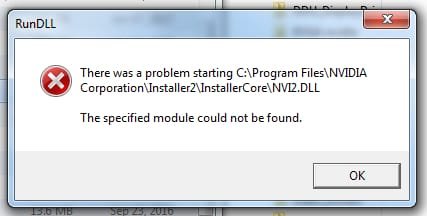
I tried to remove the nvidia drivers from "programs" using GEEK-Uninstaller and got this:

Windows Alert_001.jpg

So far, the presence of the nvidia stuff in "programs" does not seem to have any negative effect on anything, but I would feel better to have it gone.

Thanks for everyone's help and input in this situation.
 

My Computer My Computer

At a glance

Windows 7 Pro x64Intel Core Two Duo E8600 3.33 ghz8GBGigabyte Radeon R7 240
Computer type
PC/Desktop
Computer Manufacturer/Model Number
Dell Optiplex 780m "mini-tower"
OS
Windows 7 Pro x64
CPU
Intel Core Two Duo E8600 3.33 ghz
Motherboard
Whatever DELL put in it
Memory
8GB
Graphics Card(s)
Gigabyte Radeon R7 240
Monitor(s) Displays
HP 2159m
PSU
750 Watt Corsair CX750
Keyboard
Logitech Wireless
Mouse
Logitech Wireless
Browser
Chrome, Firefox, IE
Used Ati hd7870 and hd7770 after that gtx 780.
Just install the different driver suite and you are good to go.
 

My Computer My Computer

At a glance

windows 7 Ultimate x64Intel i7 4790kCorsair ddr3Gtx 780
Computer type
PC/Desktop
OS
windows 7 Ultimate x64
CPU
Intel i7 4790k
Motherboard
Asrock z97 extreme4
Memory
Corsair ddr3
Graphics Card(s)
Gtx 780
Hard Drives
Samsung 840 Evo 120gb
Western Digital 500gb
However, when I look in Control Panel>Programs, the nvidia audio and video drivers are still listed, along with that Vulcan whatever it is that showed up along with the nvidia drivers.
You've probably got an Nvidia entry left over in your registry that is making the entry show up in "Programs and Features". Not really a problem unless it really bugs you. The program and drivers are gone, and even if there are remnants, they won't be used by, or affect the AMD card.

Vulkan is a part of the AMD driver pack, and it's a runtime for the AMD system. Don't remove it or the AMD drivers might act funny.
 

My Computer My Computer

At a glance

Win 7 Pro x64/Win 10 Pro x64 dual bootAMD FX 8350 Vishera @ 420016 GB Mushkin Blackline DDR3-2400 @ 1866 (9-1...XFX Radeon R9 280 Double D Black Edition
Computer type
PC/Desktop
Computer Manufacturer/Model Number
Mellon Labs (custom build)
OS
Win 7 Pro x64/Win 10 Pro x64 dual boot
CPU
AMD FX 8350 Vishera @ 4200
Motherboard
ASUS M5A97 R2.0
Memory
16 GB Mushkin Blackline DDR3-2400 @ 1866 (9-10-10-10-31)
Graphics Card(s)
XFX Radeon R9 280 Double D Black Edition
Sound Card
Realtek HD Audio on MB. Sounds great.
Monitor(s) Displays
Acer 24", Acer 22"
Screen Resolution
3840 x 1080
Hard Drives
1 x Mushkin Chronos 120 GB SSD (Win 10)
1 x Samsung 850 EVO 250 GB SSD (Win 7)
1 x WD 1TB SATA Blue
1 x WD 1TB SATA Green
PSU
Corsair TX-750
Case
CoolerMaster HAF 912+
Cooling
Coolermaster Seidon 240M Liquid AIO. 6 case fans
Keyboard
Logitech G710+
Mouse
Logitech G500s
Internet Speed
Much better since I got fiber, but still way overpriced.
Antivirus
MSE, Malware Bytes for scanning
Browser
Firefox
Other Info
Corsair VOID USB headphones.

A Mellon Labs X-1 - LCD Smartie driven system status display.

Brought to you by the letter E
You've probably got an Nvidia entry left over in your registry that is making the entry show up in "Programs and Features". Not really a problem unless it really bugs you. The program and drivers are gone, and even if there are remnants, they won't be used by, or affect the AMD card.

Thanks for alleviating my worries; as for really bugging me, I tend to lean toward obsessive/compulsive where such things are concerned and often would be better off if I just left things be.....

Vulkan is a part of the AMD driver pack, and it's a runtime for the AMD system. Don't remove it or the AMD drivers might act funny.

It must be some vital necessity for nvidia as well, as it installed with the nvidia drivers; I will leave it be.


It has been 24 hours since the switch to AMD and I haven't had the first glitch; ......maybe I shouldn't brag just yet.
 

My Computer My Computer

At a glance

Windows 7 Pro x64Intel Core Two Duo E8600 3.33 ghz8GBGigabyte Radeon R7 240
Computer type
PC/Desktop
Computer Manufacturer/Model Number
Dell Optiplex 780m "mini-tower"
OS
Windows 7 Pro x64
CPU
Intel Core Two Duo E8600 3.33 ghz
Motherboard
Whatever DELL put in it
Memory
8GB
Graphics Card(s)
Gigabyte Radeon R7 240
Monitor(s) Displays
HP 2159m
PSU
750 Watt Corsair CX750
Keyboard
Logitech Wireless
Mouse
Logitech Wireless
Browser
Chrome, Firefox, IE
Just an update on my changeover from nvidia to AMD:

It has now been some six weeks since I installed the AMD card.
Like on the wife's machine, I just used the drivers supplied on the disc that came in the box.
During this time, I have not had a single negative issue, no screen blackouts, no screen flickerings showing pieces of open windows behind the active window, no program crashes.
Everything just WORKS, and works as it should.
With the nvidia card, if I had more than a couple programs open, everything was slow as mud; with the AMD, I can have a dozen programs open at once and I cannot tell any difference in performance compared to when only a single program is open.

I am very happy with this new AMD card; I just wish I could get back the seventy-some-odd hard to get dollars that I wasted and all the sleep and time I lost trying to get satisfaction from the nvidia.


I wish to thank all of you guys for all of your help and advice; it is appreciated, thank you !
 

My Computer My Computer

At a glance

Windows 7 Pro x64Intel Core Two Duo E8600 3.33 ghz8GBGigabyte Radeon R7 240
Computer type
PC/Desktop
Computer Manufacturer/Model Number
Dell Optiplex 780m "mini-tower"
OS
Windows 7 Pro x64
CPU
Intel Core Two Duo E8600 3.33 ghz
Motherboard
Whatever DELL put in it
Memory
8GB
Graphics Card(s)
Gigabyte Radeon R7 240
Monitor(s) Displays
HP 2159m
PSU
750 Watt Corsair CX750
Keyboard
Logitech Wireless
Mouse
Logitech Wireless
Browser
Chrome, Firefox, IE
Back
Top