Chkdsk Results - Frequent Crashes for Unknown Reason

CommanderZel

New member
Local time
6:16 AM
Messages
9
Hello all, I need assistance in understanding the chkdsk results. The issue I am experiencing is this: whenever I boot up a game, my computer crashes. This happens in a varied timeframe; sometimes I can get away with playing for half an hour or 45 minutes or so, and other times I'll have the game running for a couple of minutes and the computer will crash right away. When it crashes, the screen freezes, audio stops, and nothing gets rid of it except for a hard shutoff. I cleared my temp files and ran chkdsk, but I have no idea what the chkdsk results mean, so I'm hoping someone here can break them down for me. I should also say that this computer is probably close to ten years old or so and was a mid-range machine when it was built, so I know I need an upgrade.

Here are the chkdsk results:

Checking file system on C:
The type of the file system is NTFS.


A disk check has been scheduled.
Windows will now check the disk.

CHKDSK is verifying files (stage 1 of 3)...
Cleaning up instance tags for file 0x4e82f.
Cleaning up instance tags for file 0x7f282.
920576 file records processed. File verification completed.
2327 large file records processed. 0 bad file records processed. 2 EA records processed. 96 reparse records processed. CHKDSK is verifying indexes (stage 2 of 3)...
1078098 index entries processed. Index verification completed.
0 unindexed files scanned. 0 unindexed files recovered. CHKDSK is verifying security descriptors (stage 3 of 3)...
920576 file SDs/SIDs processed. Cleaning up 3980 unused index entries from index $SII of file 0x9.
Cleaning up 3980 unused index entries from index $SDH of file 0x9.
Cleaning up 3980 unused security descriptors.
Security descriptor verification completed.
78762 data files processed. CHKDSK is verifying Usn Journal...
33944848 USN bytes processed. Usn Journal verification completed.
Windows has made corrections to the file system.

976657407 KB total disk space.
717648316 KB in 479764 files.
282764 KB in 78763 indexes.
0 KB in bad sectors.
1053807 KB in use by the system.
65536 KB occupied by the log file.
257672520 KB available on disk.

4096 bytes in each allocation unit.
244164351 total allocation units on disk.
64418130 allocation units available on disk.

Internal Info:
00 0c 0e 00 c9 85 08 00 ca 4a 0f 00 00 00 00 00 .........J......
7f 02 00 00 60 00 00 00 00 00 00 00 00 00 00 00 ....`...........
00 00 00 00 00 00 00 00 00 00 00 00 00 00 00 00 ................

Windows has finished checking your disk.
Please wait while your computer restarts.


Thanks in advance for any info, because I really do not know what is wrong.
 

My Computer My Computer

At a glance

Windows 7 Professional x64AMD FX-83508gb
Computer type
PC/Desktop
Computer Manufacturer/Model Number
Custom build
OS
Windows 7 Professional x64
CPU
AMD FX-8350
Memory
8gb
What type of graphics card? Have you installed the recent driver? If not you'll need to go into safe mode, uninstall the currenct driver and then boot normally and install the new one. If after that you still have issue we can go further on a possible solution.

chkdsk indicates your hard drive is fine.

Is it the same game or all games?

To get into safe mode, restart the PC and as the computer boots keep hitting the F8 key. Just the first safe mode option will do. Download the new graphics driver first.
 

My Computer My Computer

At a glance

Windows 7 Ultimate x64
Computer type
PC/Desktop
OS
Windows 7 Ultimate x64
Graphics card is a GeForce GTX 660, and the driver is the most up-to-date version available (through GeForce experience, at any rate).

Crashes happen with all games, but more quickly in some versus others. I'm often able to get upwards of an hour in Warframe, for instance, but Metro Redux crashed after about 20 minutes.

Is there a different or better way to update the necessary driver? Or is the GeForce experience driver update not what I needed to do?
 

My Computer My Computer

At a glance

Windows 7 Professional x64AMD FX-83508gb
Computer type
PC/Desktop
Computer Manufacturer/Model Number
Custom build
OS
Windows 7 Professional x64
CPU
AMD FX-8350
Memory
8gb
Check disk did find some errors on the disk
Did you run chkdsk C: /f ? Run it again.

I have see the freezing behavior related to over temperature. Do you have a Hardware monitor? Extract and run.

410640d1578336605-choosing-right-ram-stick-my-laptop-hard_mon.jpg
 

My Computers My Computers

  • At a glance

    Windows 7 HP 64i5 6600K - 800MHz to 4200MHz4+4G GSkill DDR4 3000IG - Intel 530
    Computer type
    PC/Desktop
    Computer Manufacturer/Model Number
    custom build
    OS
    Windows 7 HP 64
    CPU
    i5 6600K - 800MHz to 4200MHz
    Motherboard
    GA-Z170-HD3P
    Memory
    4+4G GSkill DDR4 3000
    Graphics Card(s)
    IG - Intel 530
    Monitor(s) Displays
    Samsung 226BW
    Screen Resolution
    1680x1050
    Hard Drives
    (1) -1 SM951 – 128GB M.2 AHCI PCIe SSD drive for Windows 7 and Lubuntu
    (2) -1 WD SATA 3 - 1T for Data
    (3) -1 WD SATA 3 - 1T for backup
    PSU
    Thermaltake 450W TR2 gold
    Keyboard
    Old and good Chicony mechanical keyboard
    Mouse
    Logitech mX performance - 9 buttons (had to disable some)
    Internet Speed
    500Mb/s
    Browser
    Firefox 64
    Other Info
    TinyWall firewall
  • At a glance

    Windows 7 Proi7-4500U 800MHz to 3.0GHz(4+4)G DDR3 1600IG intel 4400 + NVIDIA GeForce GT 745M
    Computer type
    Laptop
    System Manufacturer/Model Number
    Asus Q550LF
    OS
    Windows 7 Pro
    CPU
    i7-4500U 800MHz to 3.0GHz
    Motherboard
    Asus Q550LF
    Memory
    (4+4)G DDR3 1600
    Graphics Card(s)
    IG intel 4400 + NVIDIA GeForce GT 745M
    Sound Card
    Realtek
    Monitor(s) Displays
    LG Display LP156WF4-SPH1
    Screen Resolution
    1920 x 1080
    Hard Drives
    BX500 120G SSD for Windows and programs +
    1T HDD for data
    Internet Speed
    500 Mb/s
    Browser
    Firefox
    Other Info
    TinyWall firewall
Here are the chkdsk C: /f results:


Checking file system on C:
The type of the file system is NTFS.


A disk check has been scheduled.
Windows will now check the disk.

CHKDSK is verifying files (stage 1 of 3)...
920576 file records processed. File verification completed.
2326 large file records processed. 0 bad file records processed. 2 EA records processed. 97 reparse records processed. CHKDSK is verifying indexes (stage 2 of 3)...
1078900 index entries processed. Index verification completed.
0 unindexed files scanned. 0 unindexed files recovered. CHKDSK is verifying security descriptors (stage 3 of 3)...
920576 file SDs/SIDs processed. Cleaning up 44 unused index entries from index $SII of file 0x9.
Cleaning up 44 unused index entries from index $SDH of file 0x9.
Cleaning up 44 unused security descriptors.
Security descriptor verification completed.
79163 data files processed. CHKDSK is verifying Usn Journal...
36429416 USN bytes processed. Usn Journal verification completed.
Windows has checked the file system and found no problems.

976657407 KB total disk space.
721084600 KB in 486165 files.
287288 KB in 79164 indexes.
0 KB in bad sectors.
1056179 KB in use by the system.
65536 KB occupied by the log file.
254229340 KB available on disk.

4096 bytes in each allocation unit.
244164351 total allocation units on disk.
63557335 allocation units available on disk.

Internal Info:
00 0c 0e 00 5b a0 08 00 62 7a 0f 00 00 00 00 00 ....[...bz......
7d 02 00 00 61 00 00 00 00 00 00 00 00 00 00 00 }...a...........
00 00 00 00 00 00 00 00 00 00 00 00 00 00 00 00 ................

Windows has finished checking your disk.
Please wait while your computer restarts.


I ran the hardware monitor and took a report before I caused a crash, and I saved a report after rebooting as well, but I don't know if any of the report data is useful for tracking temperature during the crash, and I can't access the hardware monitor during the crash to pull a report at the actual time of the crash. I'm just using Open Hardware Monitor, so if there's a better option I can use a different one.

Both reports are attached as .txt files.
 

Attachments

Last edited:

My Computer My Computer

At a glance

Windows 7 Professional x64AMD FX-83508gb
Computer type
PC/Desktop
Computer Manufacturer/Model Number
Custom build
OS
Windows 7 Professional x64
CPU
AMD FX-8350
Memory
8gb
First, NVIDIA's "experience" crap rats you out with telemetry. Don't ever install it, and it adds more fluff then you need. If you uninstall the driver and reinstall without experience, the driver will still rat you out. If you want to know how to block it on the hosts file I'll tell you.

Now, run WhoCrashed.

Go to the start orb and in search enter event viewer. Expand Windows Logs. Right click Application and save the event logs. Right click System and save the event logs. Zip both and upload here as an attachment.

Go to to the start orb and in search enter dxdiag. Click each tab. Do you see errors listed? At the bottom chose the 64 bit option, now also click each tab. Any errors?
 

My Computer My Computer

At a glance

Windows 7 Ultimate x64
Computer type
PC/Desktop
OS
Windows 7 Ultimate x64
I'm at work right now, so I'll have to do this when I get home.

I don't use any of the features that might make it worth it (like screen recording), my computer is so old that my "optimized" settings are usually the lowest available options, and one of the reasons I put off updating my drivers for so long was how shitty the GeForce interface is, so I would definitely be interested to hear how I can avoid using it in the future.

I'll download and run whocrashed tonight and post the update then. Thanks!
 

My Computer My Computer

At a glance

Windows 7 Professional x64AMD FX-83508gb
Computer type
PC/Desktop
Computer Manufacturer/Model Number
Custom build
OS
Windows 7 Professional x64
CPU
AMD FX-8350
Memory
8gb
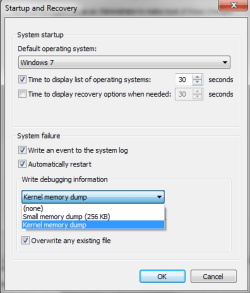
I've installed who crashed, but now I've run into another problem: neither automatic nor complete memory dumps are an option in my crash dump configuration menu, and kernel and small dumps (the two options I do have) won't generate for some reason. I have 8gb of ram, and based on extremely cursory reading it sounds like it could be a problem with the page file size, but truthfully I've got no idea.

To pre-empt any questions about why I don't know what's happening with this computer: my friend built it almost ten years ago and passed it on to me when I went off to college.
 

My Computer My Computer

At a glance

Windows 7 Professional x64AMD FX-83508gb
Computer type
PC/Desktop
Computer Manufacturer/Model Number
Custom build
OS
Windows 7 Professional x64
CPU
AMD FX-8350
Memory
8gb

Attachments

  • Capture.PNG
    Capture.PNG
    11.8 KB · Views: 10

My Computer My Computer

At a glance

Windows 7 Professional x64AMD FX-83508gb
Computer type
PC/Desktop
Computer Manufacturer/Model Number
Custom build
OS
Windows 7 Professional x64
CPU
AMD FX-8350
Memory
8gb
An update: I have edited my registry to enable complete crash dumps and edited my page file to allow for a larger dump. My page file size is now set to a 12256mb initial size and a 24001mb maximum size. These are the parameters I've read are appropriate for 8gb of RAM, but I really have no idea.

Despite this, my computer is not writing dump reports after crashes. Every time I run the WhoCrashed analysis, it returns "No valid crash dumps have been found on your computer."

I went through the dxdiag steps you recommended and found no errors on any of the tabs, including the x64 diagnostic. I was able to pull the event logs though, so I've attached them here.
 

Attachments

My Computer My Computer

At a glance

Windows 7 Professional x64AMD FX-83508gb
Computer type
PC/Desktop
Computer Manufacturer/Model Number
Custom build
OS
Windows 7 Professional x64
CPU
AMD FX-8350
Memory
8gb
The reason why the crash dumps are not showing up is simply because there aren't any.

This may be an Origin or a Steam issue.

First, got to the start orb and in search type in services.msc. Now find Origin Web Helper Service and set it to manual start and not automatic start. Source.

Try clearing the Steam cache. Clear download cache - How To's - Knowledge Base - Steam Support

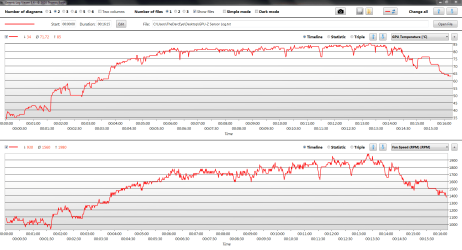
Run GPU-Z and under the Sensors tab what is the temperature when you game? Is there fan speed when you game? GPU-Z Graphics Card GPU Information Utility
 

My Computer My Computer

At a glance

Windows 7 Ultimate x64
Computer type
PC/Desktop
OS
Windows 7 Ultimate x64
I've uploaded a screenshot of the log viewer so you can see it for yourself (I imagine it will mean more to you than it does to me).

This was from the first test I ran that did not result in the crash issue, although I did have an earlier crash after fixing the origin issue and clearing the steam cache.

My fan speed topped out at 1980rpm and my GPU temp topped out at 85c, and both of these max values took place at the same time while gaming.
 

Attachments

  • Capture.PNG
    Capture.PNG
    66.9 KB · Views: 2

My Computer My Computer

At a glance

Windows 7 Professional x64AMD FX-83508gb
Computer type
PC/Desktop
Computer Manufacturer/Model Number
Custom build
OS
Windows 7 Professional x64
CPU
AMD FX-8350
Memory
8gb
Were you gaming for only 16 minutes during this test? 85 is pretty hot.
 

My Computer My Computer

At a glance

Windows 7 Ultimate x64
Computer type
PC/Desktop
OS
Windows 7 Ultimate x64
Yes, that graph shows the whole period I was gaming. I've been replicating the crashes by replaying the same piece of content so that my tests are fairly consistent. This is the first time it hasn't resulted in a crash. The graph starts about five minutes before I started the game and ends immediately after I closed it out.

85 is listed as the upper limit of the GPU I'm using, so it definitely seems problematic. I'm just not sure what to do about it as I don't really know what all is in the computer.
 

My Computer My Computer

At a glance

Windows 7 Professional x64AMD FX-83508gb
Computer type
PC/Desktop
Computer Manufacturer/Model Number
Custom build
OS
Windows 7 Professional x64
CPU
AMD FX-8350
Memory
8gb
Back
Top