Choice of Network to use came up unexpectedly

shokan2

New member
Member
VIP
Local time
3:52 PM
Messages
108
My laptop was on all night connected to the internet, my usual practice. In the morning, I found a dialog was on my desktop asking me to choose which network to use. Home, Public, something else. I chose Home and a few dialogs later, I was given a PW to write down for future connectivity.

What are the possible reasons this dialog should appear unexpectedly? I hadn't been doing anything related to network; there has only ever been just the laptop. I was just browsing all day the day before, as usual.
 

My Computer My Computer

At a glance

Windows 7 Pro 64bit
OS
Windows 7 Pro 64bit
Some items come to mind:
You can check for an event that may have triggered this:
http://www.sevenforums.com/tutorials/226084-event-viewer-open-use-windows-7-a.html

http://www.sevenforums.com/tutorials/179257-wake-source-read-event-viewer-log.html

http://www.sevenforums.com/tutorials/160855-shut-down-view-details-last-shutdown-computer.html

http://www.sevenforums.com/tutorials/122012-lastwake-command.html


It is troubling and I would also want to know what happened if it was me, but I don't think it is cause for much alarm.
What do you use for protection on your machine? Run your anti-virus on full scan to check for any abnormalities.

You may also want to run a disk check and http://www.sevenforums.com/tutorials/1538-sfc-scannow-command-system-file-checker.html
 

My Computer My Computer

At a glance

Originally Win 7 Hm Prem x64 Ver 6.1.7600 Bui...Intel i3 530 2.93GHz, 2933MHz 2 Cores 4 Logic...6GB of 1,333MHz DDR3 SDRAM32MB Intel Graphics Media Accelerator HD IGChip
Computer type
PC/Desktop
Computer Manufacturer/Model Number
Gateway DX4831-01e (Mid-Tower Desktop)
OS
Originally Win 7 Hm Prem x64 Ver 6.1.7600 Build 7601-SP1 | Upgraded to Windows 10 December 14, 2019
CPU
Intel i3 530 2.93GHz, 2933MHz 2 Cores 4 Logical Processors
Motherboard
Gateway H57M01 133 megahertz
Memory
6GB of 1,333MHz DDR3 SDRAM
Graphics Card(s)
32MB Intel Graphics Media Accelerator HD IGChip
Sound Card
Realtek High Definition Audio
Monitor(s) Displays
Gateway HX2000 20inch TFT active matrix TN
Screen Resolution
1600 x 900 x 59 hertz
Hard Drives
WDC WD10EADS-00M2B0 [HDD] (1000.20 GB) -- drive 0,
HL-DT-ST DVDRAM GH41N [CD-ROM dr]
Four card readers, and Four USB 2.0
PSU
300watts.
Case
Mid-Tower Desktop
Cooling
Stock from Gateway
Keyboard
Natural Ergonomic Keyboard 4000, see Other Info
Mouse
Orig. Gateway wore out now using Insignia USB wired optical
Internet Speed
Vz FIOS 10ms png 57.64Mbps down 65.53Mbps up Speedtest.org
Antivirus
Zamana Anti-logger with Anti-malware, MSE, Windows Firewall,
Browser
IE11.0.9600.19399-Upd ver11.0.135, Firefox 68.0.1 x64
Other Info
System Specs by Belarc.

BIOS: American Megatrends Inc. P01-A0 11/17/2009

Replaced the MS 'Natural' Standard PS/2 Enhanced 101-102 Keyboard with a new Natural Ergonomic Keyboard 4000 on August 1st 2014.

Canon Pixma MG3222 Printer.

Updated to IE11 on 12102015 | Fios Quantum Router g1100

Additional AV: SpywareBlaster, manual Mbam, SAS
Some items come to mind:You can check for an event that may have triggered this

It is troubling and I would also want to know what happened if it was me, but I don't think it is cause for much alarm.
What do you use for protection on your machine? Run your anti-virus on full scan to check for any abnormalities.
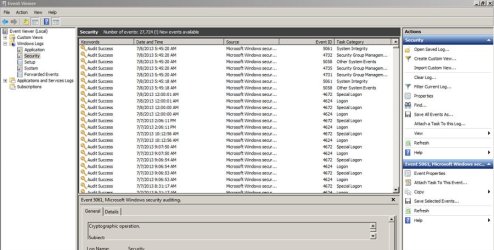
I wouldn't recognize suspicious activity in an event log if I saw it. Here is a capture from the security event log from a time I was asleep. Anything unusual there?

Avast Free, btw.
 

Attachments

  • security events July 8 2013.jpg
    security events July 8 2013.jpg
    80.5 KB · Views: 3

My Computer My Computer

At a glance

Windows 7 Pro 64bit
OS
Windows 7 Pro 64bit
My laptop was on all night connected to the internet, my usual practice. In the morning, I found a dialog was on my desktop asking me to choose which network to use. Home, Public, something else. I chose Home and a few dialogs later, I was given a PW to write down for future connectivity.

What are the possible reasons this dialog should appear unexpectedly? I hadn't been doing anything related to network; there has only ever been just the laptop. I was just browsing all day the day before, as usual.

You may not have realized it at the time but when Windows does this you are actually creating a Homegroup network without even realizing it. The password that you received is so other machines can join the Homegroup. You can add machines to your Homegroup or leave the Homegroup if you don't need one. :)
 

My Computer My Computer

At a glance

Windows 7 Ult, Windows 8.1 Pro,Q9650-4.275GHz, E8600 4.5GHz, E6750-3.8GHzG.Skill PC2 9600 1200Mhz 5 5 5 15 2TGTX480
Computer type
PC/Desktop
Computer Manufacturer/Model Number
Home built
OS
Windows 7 Ult, Windows 8.1 Pro,
CPU
Q9650-4.275GHz, E8600 4.5GHz, E6750-3.8GHz
Motherboard
Evga 780i FTW
Memory
G.Skill PC2 9600 1200Mhz 5 5 5 15 2T
Graphics Card(s)
GTX480
Sound Card
Asus Xonar D2
Monitor(s) Displays
HannsG
Screen Resolution
1680X1050
Hard Drives
GSkill Phoenix Pro 120GB SSD
PSU
ThermalTake Toughpower 1000Watt modular
Case
ThermalTake XaserV
Cooling
Xigmatek S1283
Keyboard
Logitech G15
Mouse
Logitech G9
Internet Speed
T1
My laptop was on all night connected to the internet, my usual practice. In the morning, I found a dialog was on my desktop asking me to choose which network to use. Home, Public, something else. I chose Home and a few dialogs later, I was given a PW to write down for future connectivity.

What are the possible reasons this dialog should appear unexpectedly? I hadn't been doing anything related to network; there has only ever been just the laptop. I was just browsing all day the day before, as usual.

You may not have realized it at the time but when Windows does this you are actually creating a Homegroup network without even realizing it. The password that you received is so other machines can join the Homegroup. You can add machines to your Homegroup or leave the Homegroup if you don't need one. :)
Yes, but why did the prompt dialogue to do this appear by itself during the night? As I said in my original post, I had done nothing but browse the internet the day before. Nothing else.
 

My Computer My Computer

At a glance

Windows 7 Pro 64bit
OS
Windows 7 Pro 64bit
Back
Top