
Clock forcefully set in the future & apps crashing

andwan0

New member
Local time
7:35 PM
Messages
6
I left my Windows 7 PC on overnight (with lots of apps left open - mainly development IDEs & web browsers). It has latest virus scanner and latest Windows 7 updates (auto-updates).
It shouldn't lock when idle.

When I came back in the morning, the PC was locked. Fair enough.
When I unlocked it, lots of apps were crashing. Then I looked at the clock:
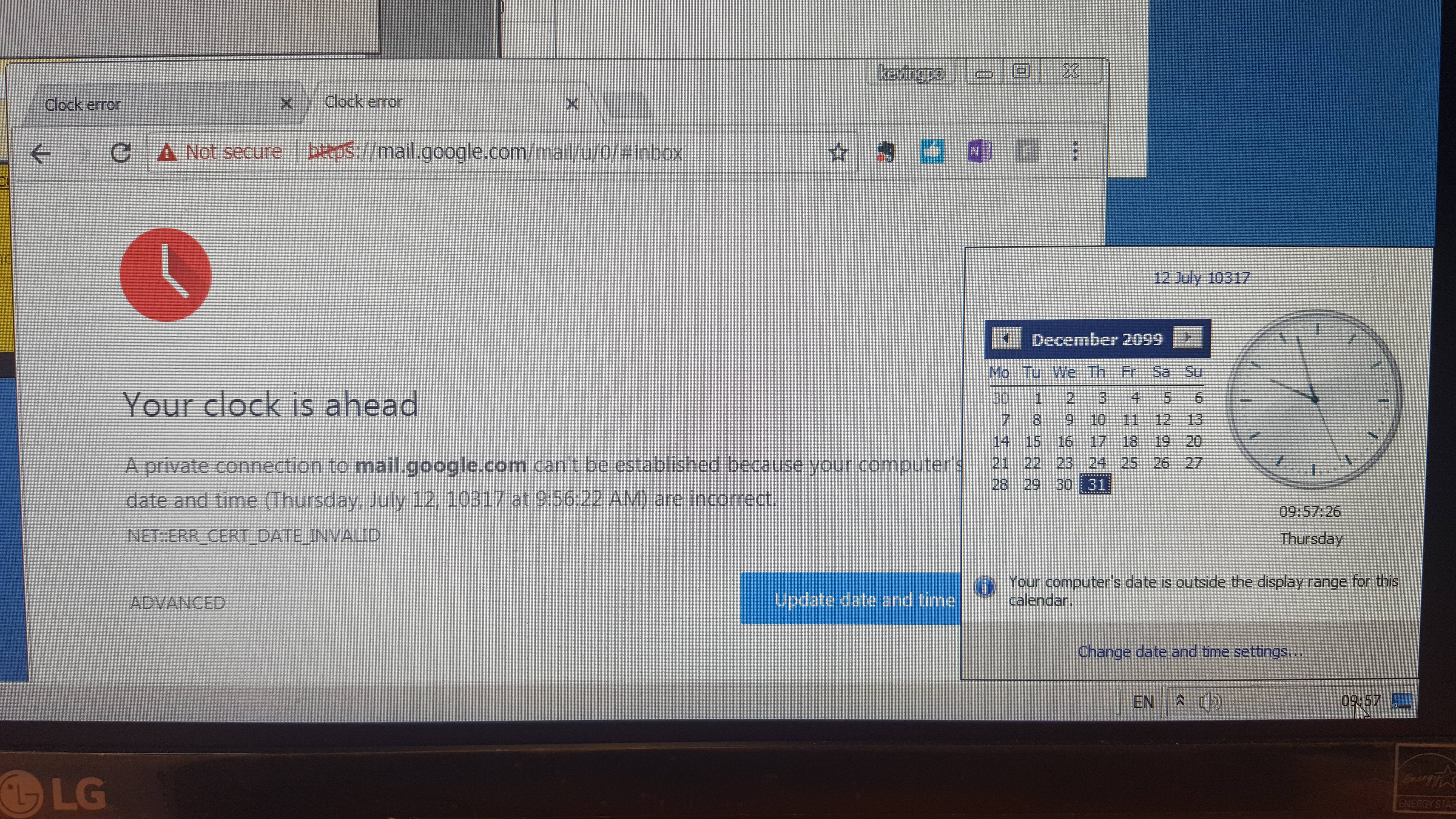
gUauiby.jpg

http://imgur.com/gUauiby

Anyone have any idea why this happened?
 

My Computer

Computer type
PC/Desktop
Computer Manufacturer/Model Number
Dell XPS
OS
Windows Ultimate x64
CPU
i7
Hard Drives
Samsung SSD 840 EVO + original Dell XPS HDD
HI andwan0,

have a look in your event viewer, it should tell you if/what program changed the time setting.

Roy
 

My Computer

Computer type
PC/Desktop
Computer Manufacturer/Model Number
medionl/Aspire 6930G/acer x55a
OS
W7 home premium 32bit/W7HP 64bit/w10 tp insider ring
CPU
E5300 dual core
Motherboard
medion MS7366
Memory
3gb
Graphics Card(s)
Nvidia Geforce 7100 Nforce 630i
Monitor(s) Displays
avixc
Internet Speed
n (isp resticted to 72)
Antivirus
mse/pands
Browser
palemoon
Other Info
Belkin Fd7050 n USB using Railink RT2870 drivers, more upto date
*You're traveling through another dimension, a dimension not only of sight and sound but of mind. A journey into a wondrous land whose boundaries are that of imagination. That's the signpost up ahead - your next stop, the Twilight Zone!*
 

My Computer

Computer type
PC/Desktop
Computer Manufacturer/Model Number
HP p6-2020t
OS
Win 7 Ult 64-bit
CPU
G620 2.6GHZ Pentium R
Memory
6 GB
Monitor(s) Displays
25" HPLV2311
Screen Resolution
1920 x 1200
Hard Drives
1 SATA, 1 exterior SATA
Case
HP
Cooling
PSU
Antivirus
Glasswire
Browser
Waterfox; Firefox; Chrome for work
Other Info
Firewall--Glasswire
Similar specs in Gateway DX4200
Verizon FIOS Wired network

1 other Win7 computer-- has SSD
Back
Top