
clone hdrive to SS drive - same size drv - using Macrium Reflect Pro ?

maryeleek

New member
Member
Local time
11:20 PM
Messages
69
Sorry to sound dense but want to do this right.

I use Windows 7 Pro with a WD 1 tb hard drive

I have Macrium Reflect Pro installed

I have created a recovery disk (need to test but expect it to allow me to boot from my optial drive D.)

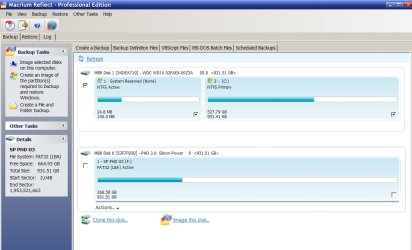
I have attached an image of what I can select to be cloned; a system partition and a C: partition on my hard drive.

IF I elect to CLONE the two partitions that are shown as disk 1 to my new Sunsung 850pro SS drive, can I 'reasonably' expect', if no errors are introduced during the cloning process, that I can then replace my current C: hard drive with the new SS drive, reboot and use my computer as before? I shouldn't have to worry over setting the trim? or other tasks that make me nervous? :0(

The new drive doesn't appear here as I've not yet received it. If I understand, I will need to connect it to my computer as a new drive, have windows recognize it and then select it to use as the drive to clone to. Will Windows or Macrium Reflect offer to format it to NTFS prior to the cloning or should that be done ahead of time. I hope my cloning software will allow me to use verify on the cloned image or is that to be expected on this type of process?

I do own a retail copy of Windows 7 Pro plus retail copies of my software and can always install everything from scratch but would prefer to do this the quick and easy way, if possible.

My thanks for taking the time to read and advise proper steps. You guys make this forum a wonderful resource.

MEL
 

Attachments
  • drv image.jpg
    drv image.jpg
    88 KB · Views: 3

My Computer My Computer

At a glance

Windows 7 Pro sp1 64 biti7 quad core16ATI Radeon HD 5700 series
Computer type
PC/Desktop
Computer Manufacturer/Model Number
Dell Studio XPS 8100
OS
Windows 7 Pro sp1 64 bit
CPU
i7 quad core
Motherboard
Dell flavor
Memory
16
Graphics Card(s)
ATI Radeon HD 5700 series
Hard Drives
esata 1 tb
SS 1 tb
Antivirus
BitDefender
Browser
Firefox; IE
partitioning and formatting will be done automatically on clone.
Just do the clone but be sure to let the 100MB partition same size! And make it active. type=primary
The new C on SSD should use all the remaining blocks. type=primary

It just a copy of 2 partitions as explained here: Partition Alignment
Be sure to have alignment=win7.

All stuff I told you are in the dialog!
Don't attach old drive to system on first succesfull boot!
http://www.sevenforums.com/tutorials/681-startup-repair.html can be used to modify to bootmenu to reflect the changes.
 

My Computer My Computer

At a glance

Microsoft Windows 7 Home Premium 64-bits 7601...Intel(R) Core(TM) i3 CPU M 370 @ 2.40GHz4,00 GBATI Mobility Radeon HD 5400 Series
Computer type
Laptop
Computer Manufacturer/Model Number
ACER ASPIRE 5742G
OS
Microsoft Windows 7 Home Premium 64-bits 7601 Multiprocessor Free Service Pack 1
CPU
Intel(R) Core(TM) i3 CPU M 370 @ 2.40GHz
Motherboard
Acer Aspire 5742G
Memory
4,00 GB
Graphics Card(s)
ATI Mobility Radeon HD 5400 Series
Sound Card
(1) AMD High Definition Audio Device (2) Realtek High Defi
Screen Resolution
1366 x 768 x 32 bits (4294967296 colors) @ 60 Hz
Hard Drives
WDC WD5000BEVT-22ZAT0
Do you really need "system reserved". Only needed if you use bitlocker. Or is handy as a seperqate partition for bootmanager. But ypu don't have dual boot. You don't gonna use bitlocker I assume?
 

My Computer My Computer

At a glance

Microsoft Windows 7 Home Premium 64-bits 7601...Intel(R) Core(TM) i3 CPU M 370 @ 2.40GHz4,00 GBATI Mobility Radeon HD 5400 Series
Computer type
Laptop
Computer Manufacturer/Model Number
ACER ASPIRE 5742G
OS
Microsoft Windows 7 Home Premium 64-bits 7601 Multiprocessor Free Service Pack 1
CPU
Intel(R) Core(TM) i3 CPU M 370 @ 2.40GHz
Motherboard
Acer Aspire 5742G
Memory
4,00 GB
Graphics Card(s)
ATI Mobility Radeon HD 5400 Series
Sound Card
(1) AMD High Definition Audio Device (2) Realtek High Defi
Screen Resolution
1366 x 768 x 32 bits (4294967296 colors) @ 60 Hz
Hard Drives
WDC WD5000BEVT-22ZAT0
C drive has 527GB in use now. Are you buying a SSD with at least that capacity?!
 

My Computer My Computer

At a glance

Microsoft Windows 7 Home Premium 64-bits 7601...Intel(R) Core(TM) i3 CPU M 370 @ 2.40GHz4,00 GBATI Mobility Radeon HD 5400 Series
Computer type
Laptop
Computer Manufacturer/Model Number
ACER ASPIRE 5742G
OS
Microsoft Windows 7 Home Premium 64-bits 7601 Multiprocessor Free Service Pack 1
CPU
Intel(R) Core(TM) i3 CPU M 370 @ 2.40GHz
Motherboard
Acer Aspire 5742G
Memory
4,00 GB
Graphics Card(s)
ATI Mobility Radeon HD 5400 Series
Sound Card
(1) AMD High Definition Audio Device (2) Realtek High Defi
Screen Resolution
1366 x 768 x 32 bits (4294967296 colors) @ 60 Hz
Hard Drives
WDC WD5000BEVT-22ZAT0
Yes, my new SSD is 1 TB capacity so should be about the same size as my current hard drive.
 

My Computer My Computer

At a glance

Windows 7 Pro sp1 64 biti7 quad core16ATI Radeon HD 5700 series
Computer type
PC/Desktop
Computer Manufacturer/Model Number
Dell Studio XPS 8100
OS
Windows 7 Pro sp1 64 bit
CPU
i7 quad core
Motherboard
Dell flavor
Memory
16
Graphics Card(s)
ATI Radeon HD 5700 series
Hard Drives
esata 1 tb
SS 1 tb
Antivirus
BitDefender
Browser
Firefox; IE

My Computer My Computer

At a glance

Microsoft Windows 7 Home Premium 64-bits 7601...Intel(R) Core(TM) i3 CPU M 370 @ 2.40GHz4,00 GBATI Mobility Radeon HD 5400 Series
Computer type
Laptop
Computer Manufacturer/Model Number
ACER ASPIRE 5742G
OS
Microsoft Windows 7 Home Premium 64-bits 7601 Multiprocessor Free Service Pack 1
CPU
Intel(R) Core(TM) i3 CPU M 370 @ 2.40GHz
Motherboard
Acer Aspire 5742G
Memory
4,00 GB
Graphics Card(s)
ATI Mobility Radeon HD 5400 Series
Sound Card
(1) AMD High Definition Audio Device (2) Realtek High Defi
Screen Resolution
1366 x 768 x 32 bits (4294967296 colors) @ 60 Hz
Hard Drives
WDC WD5000BEVT-22ZAT0
No dual boot. I'm not certain what bitlocker is? :-) Actually, this configuration is the original Dell setup. I can't remember if I made any changes after delivery. I only have one hard drive installed and I use a USB drive for backup files plus on line Carbonite BU.
 

My Computer My Computer

At a glance

Windows 7 Pro sp1 64 biti7 quad core16ATI Radeon HD 5700 series
Computer type
PC/Desktop
Computer Manufacturer/Model Number
Dell Studio XPS 8100
OS
Windows 7 Pro sp1 64 bit
CPU
i7 quad core
Motherboard
Dell flavor
Memory
16
Graphics Card(s)
ATI Radeon HD 5700 series
Hard Drives
esata 1 tb
SS 1 tb
Antivirus
BitDefender
Browser
Firefox; IE
No dual boot. I'm not certain what bitlocker is? :-) Actually, this configuration is the original Dell setup. I can't remember if I made any changes after delivery. I only have one hard drive installed and I use a USB drive for backup files plus on line Carbonite BU.
Best way is to clone OS partition (So C ) only.
Make sure in win7 the new SSD has NO drive letter. Or even better.... has no partitions at all. So win7 doesn't think there's something on SSD.

Then..... do the cloning.

In clone dialog make new partition primary and active, and align=win7 and let it use whole new ssd. When done succesfully.... shutdown, power off and detach old drive. Now boot from win7 install dvd or system repair disc and perform "startup repair" 3 times with reboots in between to recreate the boot menu. Then boot normally. All fine??? If os... you can reattach the old drive as well. Be sure to boot from the correct drive! Be sure the SSD is called C!

http://www.sevenforums.com/tutorials/2083-system-repair-disc-create.html
http://www.sevenforums.com/tutorials/681-startup-repair.html
 

My Computer My Computer

At a glance

Microsoft Windows 7 Home Premium 64-bits 7601...Intel(R) Core(TM) i3 CPU M 370 @ 2.40GHz4,00 GBATI Mobility Radeon HD 5400 Series
Computer type
Laptop
Computer Manufacturer/Model Number
ACER ASPIRE 5742G
OS
Microsoft Windows 7 Home Premium 64-bits 7601 Multiprocessor Free Service Pack 1
CPU
Intel(R) Core(TM) i3 CPU M 370 @ 2.40GHz
Motherboard
Acer Aspire 5742G
Memory
4,00 GB
Graphics Card(s)
ATI Mobility Radeon HD 5400 Series
Sound Card
(1) AMD High Definition Audio Device (2) Realtek High Defi
Screen Resolution
1366 x 768 x 32 bits (4294967296 colors) @ 60 Hz
Hard Drives
WDC WD5000BEVT-22ZAT0
I would advise that you post a picture of your current Disk Management. Since this is a DEll system, chances are that the bootmgr is sitting in the Recovery partition. If that is the case, we need to copy it to the C partition - unless you want to carry the Recovery partition to the SSD. But only Disk Management wiil tell for certain.
 

My Computer My Computer

At a glance

Vista, Windows7, Mint Mate, Zorin, Windows 8from 1.6GHz Duo to i7
Computer Manufacturer/Model Number
HP, Dell, Gateway, Toshiba - 4 laptops and 2 desktops
OS
Vista, Windows7, Mint Mate, Zorin, Windows 8
CPU
from 1.6GHz Duo to i7
Monitor(s) Displays
2x HP w2207
Hard Drives
5x HDD, 7x SSD, 12x Externals
Keyboard
with trackball - no mices
Mouse
Trackball mice
Internet Speed
DSL 6000
I would advise that you post a picture of your current Disk Management. Since this is a DEll system, chances are that the bootmgr is sitting in the Recovery partition. If that is the case, we need to copy it to the C partition - unless you want to carry the Recovery partition to the SSD. But only Disk Management wiil tell for certain.
OP posted it in #1 . Only "system reserved" (100MB and ACTIVE), and WIN7 partition are on that disk drive.
 

My Computer My Computer

At a glance

Microsoft Windows 7 Home Premium 64-bits 7601...Intel(R) Core(TM) i3 CPU M 370 @ 2.40GHz4,00 GBATI Mobility Radeon HD 5400 Series
Computer type
Laptop
Computer Manufacturer/Model Number
ACER ASPIRE 5742G
OS
Microsoft Windows 7 Home Premium 64-bits 7601 Multiprocessor Free Service Pack 1
CPU
Intel(R) Core(TM) i3 CPU M 370 @ 2.40GHz
Motherboard
Acer Aspire 5742G
Memory
4,00 GB
Graphics Card(s)
ATI Mobility Radeon HD 5400 Series
Sound Card
(1) AMD High Definition Audio Device (2) Realtek High Defi
Screen Resolution
1366 x 768 x 32 bits (4294967296 colors) @ 60 Hz
Hard Drives
WDC WD5000BEVT-22ZAT0
Understand, but he said that he created a recovery disc. What happened to the recovery partition? And from the Macrium screenshot I cannot really see whether the system partition is the active partition.
 

My Computer My Computer

At a glance

Vista, Windows7, Mint Mate, Zorin, Windows 8from 1.6GHz Duo to i7
Computer Manufacturer/Model Number
HP, Dell, Gateway, Toshiba - 4 laptops and 2 desktops
OS
Vista, Windows7, Mint Mate, Zorin, Windows 8
CPU
from 1.6GHz Duo to i7
Monitor(s) Displays
2x HP w2207
Hard Drives
5x HDD, 7x SSD, 12x Externals
Keyboard
with trackball - no mices
Mouse
Trackball mice
Internet Speed
DSL 6000
Understand, but he said that he created a recovery disc. What happened to the recovery partition? And from the Macrium screenshot I cannot really see whether the system partition is the active partition.
I think OP means a macrium reflect boot disc. Recovery partition is gone... see screenshot. So partition layout is definitely not the same as it was at install time. "system reserved" is ACTIVE. Other active partition is a FAT32 partition. But let's wait for OP for the explanation and screenshot.
 

My Computer My Computer

At a glance

Microsoft Windows 7 Home Premium 64-bits 7601...Intel(R) Core(TM) i3 CPU M 370 @ 2.40GHz4,00 GBATI Mobility Radeon HD 5400 Series
Computer type
Laptop
Computer Manufacturer/Model Number
ACER ASPIRE 5742G
OS
Microsoft Windows 7 Home Premium 64-bits 7601 Multiprocessor Free Service Pack 1
CPU
Intel(R) Core(TM) i3 CPU M 370 @ 2.40GHz
Motherboard
Acer Aspire 5742G
Memory
4,00 GB
Graphics Card(s)
ATI Mobility Radeon HD 5400 Series
Sound Card
(1) AMD High Definition Audio Device (2) Realtek High Defi
Screen Resolution
1366 x 768 x 32 bits (4294967296 colors) @ 60 Hz
Hard Drives
WDC WD5000BEVT-22ZAT0
I thank you all for trying to help me. I'm afraid I'm not as technically knowledgeable as I should be. I don't think I've ever made any changes to the primary hard drive format since I purchased the computer. I think it is as it came to me from Dell. It is a four year old box and I'm seventy so it's possible changes were made and I've just forgotten. :-)

Both the existing hard drive and my new SS drive are basically the same size, 1 TB. The hard drive is only half full so I was hoping that wouldn't be an issue. I had hoped to just be able to clone my old drive to the new one. I don't care about the partition being there, even if it is empty. I don't think the small partition impacts the everyday performance. If the cloning is successful, shouldn't the new SS be identical to the original. This is all I care about, just mirroring the contents exactly. Then I had hoped to simply replace the old with the new. It probably isn't as simple as that but this is what I'd hoped to be able to do.

The recovery disk I mentioned was created by the cloning software, not by Windows.

The second drive you're seeing on the screen shot is an external USB drive I use for some of my program backups.
 

My Computer My Computer

At a glance

Windows 7 Pro sp1 64 biti7 quad core16ATI Radeon HD 5700 series
Computer type
PC/Desktop
Computer Manufacturer/Model Number
Dell Studio XPS 8100
OS
Windows 7 Pro sp1 64 bit
CPU
i7 quad core
Motherboard
Dell flavor
Memory
16
Graphics Card(s)
ATI Radeon HD 5700 series
Hard Drives
esata 1 tb
SS 1 tb
Antivirus
BitDefender
Browser
Firefox; IE
The recovery disk I mentioned was created by the cloning software, not by Windows
It's a macrium reflect winpe rescue bootable cd?
 

My Computer My Computer

At a glance

Microsoft Windows 7 Home Premium 64-bits 7601...Intel(R) Core(TM) i3 CPU M 370 @ 2.40GHz4,00 GBATI Mobility Radeon HD 5400 Series
Computer type
Laptop
Computer Manufacturer/Model Number
ACER ASPIRE 5742G
OS
Microsoft Windows 7 Home Premium 64-bits 7601 Multiprocessor Free Service Pack 1
CPU
Intel(R) Core(TM) i3 CPU M 370 @ 2.40GHz
Motherboard
Acer Aspire 5742G
Memory
4,00 GB
Graphics Card(s)
ATI Mobility Radeon HD 5400 Series
Sound Card
(1) AMD High Definition Audio Device (2) Realtek High Defi
Screen Resolution
1366 x 768 x 32 bits (4294967296 colors) @ 60 Hz
Hard Drives
WDC WD5000BEVT-22ZAT0
Yes
 

My Computer My Computer

At a glance

Windows 7 Pro sp1 64 biti7 quad core16ATI Radeon HD 5700 series
Computer type
PC/Desktop
Computer Manufacturer/Model Number
Dell Studio XPS 8100
OS
Windows 7 Pro sp1 64 bit
CPU
i7 quad core
Motherboard
Dell flavor
Memory
16
Graphics Card(s)
ATI Radeon HD 5700 series
Hard Drives
esata 1 tb
SS 1 tb
Antivirus
BitDefender
Browser
Firefox; IE
Don't hesitate. The procedure is quite straight forward if you do what I told you to do in this thread.
 

My Computer My Computer

At a glance

Microsoft Windows 7 Home Premium 64-bits 7601...Intel(R) Core(TM) i3 CPU M 370 @ 2.40GHz4,00 GBATI Mobility Radeon HD 5400 Series
Computer type
Laptop
Computer Manufacturer/Model Number
ACER ASPIRE 5742G
OS
Microsoft Windows 7 Home Premium 64-bits 7601 Multiprocessor Free Service Pack 1
CPU
Intel(R) Core(TM) i3 CPU M 370 @ 2.40GHz
Motherboard
Acer Aspire 5742G
Memory
4,00 GB
Graphics Card(s)
ATI Mobility Radeon HD 5400 Series
Sound Card
(1) AMD High Definition Audio Device (2) Realtek High Defi
Screen Resolution
1366 x 768 x 32 bits (4294967296 colors) @ 60 Hz
Hard Drives
WDC WD5000BEVT-22ZAT0
Back
Top