Solved Colors and graphics distorted afer using PowerPoint 2010

I'm seriously at a loss..

My thought would be to strip the system down to the bare minimum it needs to function.
Motherboard, One stick of ram, cpu,psu and the HDD which stores the system.

Sorry if you have mentioned it before, but do you still get color corruption when the OS is booting up?
By that I mean when the Windows flags come together in the boot screen.

And what about when you start up safe mode are the menus and icons still displayed the same?

Something else you can try is to tap F8 when booting and select ''boot from last good known configuration''
 

My Computer My Computer

Computer type
PC/Desktop
OS
Windows 7 professional X64
CPU
AMD A10-5800K OC@ 4.4Ghz.
Motherboard
Gigabyte F2A85X-UP4
Memory
8GB Kingston HyperX Blu 1333mhz
Graphics Card(s)
XFX HD7870 2GB Core Edition
Monitor(s) Displays
Acer AL2216W
Screen Resolution
1680x1050
Hard Drives
Seagate Barracuda 500gb 7200rpm
Seagate Barracuda 1.5TB 7200rpm
PSU
Cooler Master Silent Pro M 850W
Case
Thermaltake Commander MS-I
Cooling
Cooler Master N520
Mouse
Logitech M504
Internet Speed
10Mbps
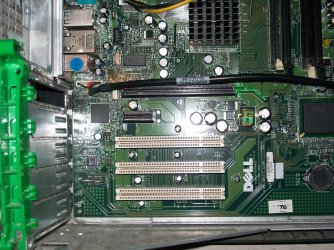
Hey Erick, I tried to run the system with just the minimum required to function, and yes, the Windows Start and also the BIOS screens look fine, no color or graphic distortion, everything seems to going fine till I get to the actual Windows system and all is recolored with purple tint, there are no changes, everything looks messed up from the start. I tried Safe Mode, Enable low-resolution video (640x480) and Last known good configuration (advanced), but is still the same. Oddly enough, when I tried to take a capture on safe mode, the picture just scrambled (the first one I include). I include also, a couple of pics of the mobo, so you can see I run it without video card and just one RAM stick.
 

Attachments

  • WER6.jpg
    WER6.jpg
    59.6 KB · Views: 4
  • 100_1839.JPG
    100_1839.JPG
    331.9 KB · Views: 5
  • 100_1841.JPG
    100_1841.JPG
    319.6 KB · Views: 4

My Computer My Computer

Computer type
PC/Desktop
Computer Manufacturer/Model Number
Custom Build
OS
Windows 7 Ultimate 64bit
CPU
AMD Phenom X4 9850
Motherboard
Gigabyte Technology GA-MA74GM-S2 (Socket M2)
Memory
4.00GB Crucial Dual-Channel DDR2 @ 401MHz (5-5-5-18)
Graphics Card(s)
ATI Radeon 2100 (Gigabyte)
Sound Card
Realtek High Definition Audio
Monitor(s) Displays
LM742 on ATI Radeon 2100
Screen Resolution
1280x1024 pixels
Hard Drives
WDC WD15EARS-00Z5B1 ATA Device, 1.5 TB, 2 partitions: - 500 GB (aprox.) Where Windows 7 resides, - 1 TB (aprox.) Storage
PSU
Ultra X4 ATX 600W
Case
ST ATX Mid-Tower Case
Cooling
Ultra Carbon X3
Keyboard
Logitech K360
Mouse
Logitech MX10
Internet Speed
802.11n USB Wireless LAN Card
Antivirus
AVG Internet Security 2014
Browser
Firefox Mozilla
Other Info
I use a graphic tablet, a XBOX360 Wired Controller, a external CD/DVD Driver, and my entire system is connected to a 6 slots Protected Power-surge
Have you tried booting it with a live DVD,like a Linux build just to rule out hardware? You have tried multiple GPU's, monitors,. And the boot looks OK until windows tries to start? Do you have a copy of say Vista that you can try to install? If it is hardware , I would have to say the PSU or MOBO.
 

My Computer My Computer

Computer type
PC/Desktop
Computer Manufacturer/Model Number
Custom Build
OS
Win 10 Pro 64
CPU
Intel Core i7 960 @3.20 GHz
Motherboard
MSI MS7522
Memory
24.0 GB DDR3
Graphics Card(s)
EVGA GTX 750Ti
Monitor(s) Displays
LG E2341 23 Inch
Screen Resolution
1920x1080
Hard Drives
1TB Western Dgital 1002FAEX-00Y9A0
1TB Hitachi HDS721010CLA322
PSU
700 Watt
Case
Haf 912
Cooling
Fans
Keyboard
Logitech MK710
Mouse
Logitech M705
Internet Speed
Cable
Antivirus
AIS 2015 .10.0.2225
Browser
Firefox 49
Other Info
MalwareBytes Anti-Rootkit utility
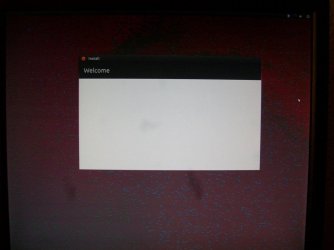
I just downloaded the newest version of Ubuntu, 12.10 and used and USB drive to boot from there, and like Windows, it looks fine from the boot, and the Ubuntu start screen, but when I got to the setup (again, just like windows), some graphics and text looked fine but the desktop wallpaper was all messed up (UB.jpg). By pure coincidence, I still have a spare ATX PSU, and I put in the mobo, but the graphics are still there. Is there any possibility that the HDD with the OS could be the problem?, maybe it's going to break any moment?, or is definitely the mobo?
 

Attachments

  • UB.JPG
    UB.JPG
    90 KB · Views: 5

My Computer My Computer

Computer type
PC/Desktop
Computer Manufacturer/Model Number
Custom Build
OS
Windows 7 Ultimate 64bit
CPU
AMD Phenom X4 9850
Motherboard
Gigabyte Technology GA-MA74GM-S2 (Socket M2)
Memory
4.00GB Crucial Dual-Channel DDR2 @ 401MHz (5-5-5-18)
Graphics Card(s)
ATI Radeon 2100 (Gigabyte)
Sound Card
Realtek High Definition Audio
Monitor(s) Displays
LM742 on ATI Radeon 2100
Screen Resolution
1280x1024 pixels
Hard Drives
WDC WD15EARS-00Z5B1 ATA Device, 1.5 TB, 2 partitions: - 500 GB (aprox.) Where Windows 7 resides, - 1 TB (aprox.) Storage
PSU
Ultra X4 ATX 600W
Case
ST ATX Mid-Tower Case
Cooling
Ultra Carbon X3
Keyboard
Logitech K360
Mouse
Logitech MX10
Internet Speed
802.11n USB Wireless LAN Card
Antivirus
AVG Internet Security 2014
Browser
Firefox Mozilla
Other Info
I use a graphic tablet, a XBOX360 Wired Controller, a external CD/DVD Driver, and my entire system is connected to a 6 slots Protected Power-surge
No.. what you see is ultimately projected from the Video processors. Unless you can try another HDD and attempt to install the OS into another hard drive just as extra troubleshooting.

But I'm starting to think it could be your motherboard indeed.
 

My Computer My Computer

Computer type
PC/Desktop
OS
Windows 7 professional X64
CPU
AMD A10-5800K OC@ 4.4Ghz.
Motherboard
Gigabyte F2A85X-UP4
Memory
8GB Kingston HyperX Blu 1333mhz
Graphics Card(s)
XFX HD7870 2GB Core Edition
Monitor(s) Displays
Acer AL2216W
Screen Resolution
1680x1050
Hard Drives
Seagate Barracuda 500gb 7200rpm
Seagate Barracuda 1.5TB 7200rpm
PSU
Cooler Master Silent Pro M 850W
Case
Thermaltake Commander MS-I
Cooling
Cooler Master N520
Mouse
Logitech M504
Internet Speed
10Mbps
That's a shame, It's not even 1 year old, and I bought it from ebay as a spare because the original one endured almost 3 to 4 years. Tonight I will try to install the OS on another HDD.
 

My Computer My Computer

Computer type
PC/Desktop
Computer Manufacturer/Model Number
Custom Build
OS
Windows 7 Ultimate 64bit
CPU
AMD Phenom X4 9850
Motherboard
Gigabyte Technology GA-MA74GM-S2 (Socket M2)
Memory
4.00GB Crucial Dual-Channel DDR2 @ 401MHz (5-5-5-18)
Graphics Card(s)
ATI Radeon 2100 (Gigabyte)
Sound Card
Realtek High Definition Audio
Monitor(s) Displays
LM742 on ATI Radeon 2100
Screen Resolution
1280x1024 pixels
Hard Drives
WDC WD15EARS-00Z5B1 ATA Device, 1.5 TB, 2 partitions: - 500 GB (aprox.) Where Windows 7 resides, - 1 TB (aprox.) Storage
PSU
Ultra X4 ATX 600W
Case
ST ATX Mid-Tower Case
Cooling
Ultra Carbon X3
Keyboard
Logitech K360
Mouse
Logitech MX10
Internet Speed
802.11n USB Wireless LAN Card
Antivirus
AVG Internet Security 2014
Browser
Firefox Mozilla
Other Info
I use a graphic tablet, a XBOX360 Wired Controller, a external CD/DVD Driver, and my entire system is connected to a 6 slots Protected Power-surge
Well, it is a pretty aged motherboard to put it respectfully. I believe the motherboard has an AGP slot instead of PCI-E for the graphics card. I'm saying this while eyeballing my compaq 5106CL sitting on a corner collecting dust.


I'm sure that for 300 or 400 dollars you could get a nice system that will last you longer.
Let us know and we will be more than happy to help you putting one together!
 

My Computer My Computer

Computer type
PC/Desktop
OS
Windows 7 professional X64
CPU
AMD A10-5800K OC@ 4.4Ghz.
Motherboard
Gigabyte F2A85X-UP4
Memory
8GB Kingston HyperX Blu 1333mhz
Graphics Card(s)
XFX HD7870 2GB Core Edition
Monitor(s) Displays
Acer AL2216W
Screen Resolution
1680x1050
Hard Drives
Seagate Barracuda 500gb 7200rpm
Seagate Barracuda 1.5TB 7200rpm
PSU
Cooler Master Silent Pro M 850W
Case
Thermaltake Commander MS-I
Cooling
Cooler Master N520
Mouse
Logitech M504
Internet Speed
10Mbps
Ohh, maybe you got it wrong, I was saying that the old mobo that came with this system had endured 3 or 4 years (it's from 2009 but I'm not sure when was buyed), I bought the mobo that has right now less than a year. and is a new spare part. I would be more than happy to arm another rig, in fact I'm using one I built from a barebone kit, but this one PC is kinda special, but I thank again your help :D
 

My Computer My Computer

Computer type
PC/Desktop
Computer Manufacturer/Model Number
Custom Build
OS
Windows 7 Ultimate 64bit
CPU
AMD Phenom X4 9850
Motherboard
Gigabyte Technology GA-MA74GM-S2 (Socket M2)
Memory
4.00GB Crucial Dual-Channel DDR2 @ 401MHz (5-5-5-18)
Graphics Card(s)
ATI Radeon 2100 (Gigabyte)
Sound Card
Realtek High Definition Audio
Monitor(s) Displays
LM742 on ATI Radeon 2100
Screen Resolution
1280x1024 pixels
Hard Drives
WDC WD15EARS-00Z5B1 ATA Device, 1.5 TB, 2 partitions: - 500 GB (aprox.) Where Windows 7 resides, - 1 TB (aprox.) Storage
PSU
Ultra X4 ATX 600W
Case
ST ATX Mid-Tower Case
Cooling
Ultra Carbon X3
Keyboard
Logitech K360
Mouse
Logitech MX10
Internet Speed
802.11n USB Wireless LAN Card
Antivirus
AVG Internet Security 2014
Browser
Firefox Mozilla
Other Info
I use a graphic tablet, a XBOX360 Wired Controller, a external CD/DVD Driver, and my entire system is connected to a 6 slots Protected Power-surge
Just for the files, or if anyone finds this post, installing the OS in another HDD didn't help, so I only hope that replacing the mobo also repairs this issue, fortunately, these mobos are cheaper now, but thanks again for your answers.
 

My Computer My Computer

Computer type
PC/Desktop
Computer Manufacturer/Model Number
Custom Build
OS
Windows 7 Ultimate 64bit
CPU
AMD Phenom X4 9850
Motherboard
Gigabyte Technology GA-MA74GM-S2 (Socket M2)
Memory
4.00GB Crucial Dual-Channel DDR2 @ 401MHz (5-5-5-18)
Graphics Card(s)
ATI Radeon 2100 (Gigabyte)
Sound Card
Realtek High Definition Audio
Monitor(s) Displays
LM742 on ATI Radeon 2100
Screen Resolution
1280x1024 pixels
Hard Drives
WDC WD15EARS-00Z5B1 ATA Device, 1.5 TB, 2 partitions: - 500 GB (aprox.) Where Windows 7 resides, - 1 TB (aprox.) Storage
PSU
Ultra X4 ATX 600W
Case
ST ATX Mid-Tower Case
Cooling
Ultra Carbon X3
Keyboard
Logitech K360
Mouse
Logitech MX10
Internet Speed
802.11n USB Wireless LAN Card
Antivirus
AVG Internet Security 2014
Browser
Firefox Mozilla
Other Info
I use a graphic tablet, a XBOX360 Wired Controller, a external CD/DVD Driver, and my entire system is connected to a 6 slots Protected Power-surge
Back
Top