
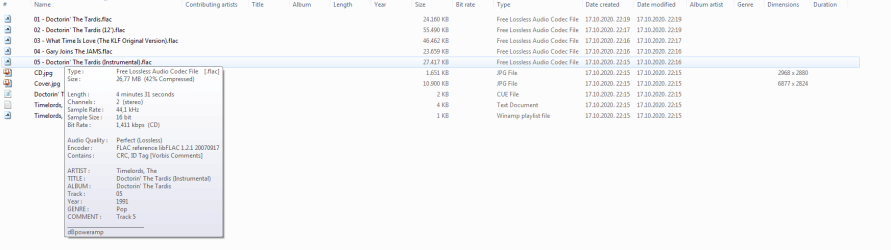
Hi... see the pic, empty columns. The data: Artist, title, abum, length... not showing anymore in the columns. It was showing before I have performed the drive error check on C and other drives. Just to be clear, it is empty now not only in this folder (which is not C) but in every other folder with audio on this drive and on every other drive. Video files are not affected, just the audio files. What can I try now to fix it back?
EDIT: dBpoweramp new version 17.2 was the issue, reverting to older version 17.1 fixed it.
EDIT: dBpoweramp new version 17.2 was the issue, reverting to older version 17.1 fixed it.
Attachments
Last edited:
My Computer
At a glance
Windows 7 Ultimate x64Intel Core i7-7700KCrucial Ballistix DDR4 3600 MHz 64GBGeForce GTX 1050
- Computer type
- PC/Desktop
- OS
- Windows 7 Ultimate x64
- CPU
- Intel Core i7-7700K
- Motherboard
- Gigabyte GA-Z170X-Gaming 7 (rev. 1.0)
- Memory
- Crucial Ballistix DDR4 3600 MHz 64GB
- Graphics Card(s)
- GeForce GTX 1050
- Sound Card
- Asus Xonar Essence STXII
- Monitor(s) Displays
- Asus VC279H
- Screen Resolution
- 1920x1080

