Command and Conquer generals...

Diabolical

New member
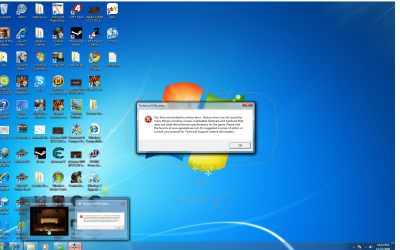
Hmm, am having doubt that command and conquer generals really works on window 7, ive tried to install it, and a error message saying u encounter a serious error, it may do off overheating etc.. it also says please mae sure that your system meets the minimum requirment, ive contacted ea but they didnt help me, they say they would send me an email but i know its a lie cuz they never do, i think command and conquer is only compatible with professional and ultimate, but not home premium.. and i got window 7 family pack home premium, and suggestion? people told me that window 7 can change to 32 bit but i dont think its true
 

My Computer

OS
Window 7 Home premium 64 bit
Memory
1.15 Terabyte
Graphics Card(s)
Dual Ati radeon 5970
Screen Resolution
1920X1200
Cooling
Liquid cooling / Fans
Im running W7 Professional.

Im currently installing the game to see if i get the same error as you. Ill post back soon.

BTW i dont know of anything to do with Home that would stop things working on it but work on all the other versions.
 

My Computer

OS
Windows 7 Professional x64
CPU
Intel Q6600
Motherboard
TPower i45
Memory
4gb (2x2gb) Corsair
Graphics Card(s)
ATI Radeon HD4870
well through being stupid and having bad discs, i cant actually get the game to run without whining about the CD not being there. Cant even find a working crack (legally, as i own the game) to get it working to test. :(
 

My Computer

OS
Windows 7 Professional x64
CPU
Intel Q6600
Motherboard
TPower i45
Memory
4gb (2x2gb) Corsair
Graphics Card(s)
ATI Radeon HD4870
I didn’t have any problems when installing command and conquer generals and zero hour on my windows 7. But occasionally I do get that massage its mostly when playing things like comp stomp and AOD
 

My Computer

OS
Windows 7 Home Premium 64-bit
Right-clack executable, Xhosa the Compabiliyy Tab and change the opwrrating system to Windows Vista,.
 

My Computer

Computer Manufacturer/Model Number
Cheap $399.00 E-Machine
OS
Windows 7 Pro & Vista Home Premium
CPU
Athlon 64 3800+ (Orleans) 2.40GHz
Motherboard
Winfast
Memory
2GB DDR2 RAM DIMM
Graphics Card(s)
NVIDIA GeForce 8500 GT 512 MB memory HDMI out
Sound Card
creative X-Fi Exteme 7..1 channel
Monitor(s) Displays
Acer V223W 22" widescreen DVI
Screen Resolution
1680x1050
Hard Drives
WDC WD5 500GB
WDC WD25 250GB
PSU
OCZ 550 watt
Case
Gateway
Cooling
2 fans
Keyboard
Dell
Mouse
Sony Vaio
Internet Speed
18MB/s down - .72MB /s up
Thanks

when i try to start it, it says "sorry you encounter a serious error" on command and conquers generals. i got window 7 home premium family pack, and am a little frighten is not gonna work becuase it doesnt has "run many window xp productivity appilcations in window xp mode" like professional and ultimate, btw i really appreciate you guys tryng to help me and replying on my thread thanks alot
 

My Computer

OS
Window 7 Home premium 64 bit
Memory
1.15 Terabyte
Graphics Card(s)
Dual Ati radeon 5970
Screen Resolution
1920X1200
Cooling
Liquid cooling / Fans
hi

Right-clack executable, Xhosa the Compabiliyy Tab and change the opwrrating system to Windows Vista,.
where is excutable, what is Xhosa the Compability tab?
 

My Computer

OS
Window 7 Home premium 64 bit
Memory
1.15 Terabyte
Graphics Card(s)
Dual Ati radeon 5970
Screen Resolution
1920X1200
Cooling
Liquid cooling / Fans
The executable is the .exe to run the program.

right-click on the shortcut for the application you want to open, right-click on the shortcut and choose open file location.

There you'll find the .exe. Right-click on that,choose Compatibility Mode and run it as Vista or XP. You might also want to make some other changes under Settings
 

My Computer

Computer Manufacturer/Model Number
Cheap $399.00 E-Machine
OS
Windows 7 Pro & Vista Home Premium
CPU
Athlon 64 3800+ (Orleans) 2.40GHz
Motherboard
Winfast
Memory
2GB DDR2 RAM DIMM
Graphics Card(s)
NVIDIA GeForce 8500 GT 512 MB memory HDMI out
Sound Card
creative X-Fi Exteme 7..1 channel
Monitor(s) Displays
Acer V223W 22" widescreen DVI
Screen Resolution
1680x1050
Hard Drives
WDC WD5 500GB
WDC WD25 250GB
PSU
OCZ 550 watt
Case
Gateway
Cooling
2 fans
Keyboard
Dell
Mouse
Sony Vaio
Internet Speed
18MB/s down - .72MB /s up
Hi, all I am new here.

I try to run C&C Generals on my windows 7 professional 64 bit and i get these error:

Can someone help me ?
 

Attachments

  • generals.jpg
    generals.jpg
    309.2 KB · Views: 12,016

My Computer

OS
Windows 7 Professional 64 bit
CPU
Intel Core 2 Quad Q8300
Motherboard
GIGABYTE P43-ES3G
Memory
Patriot Gaming 2 x 2 GB
Graphics Card(s)
ASUS ENGTX285
Sound Card
Realtek ALC888
Monitor(s) Displays
iiyama ProLite E2473HDS
Screen Resolution
1920 x 1080
Hard Drives
WDC WD6400AAKS
WDC WD6400AAKS
PSU
Corsair TX650V2
Case
CoolerMaster CM690 Advanced Dominator II
Cooling
Standard Colling
Keyboard
Trust eLight illumunated keyboard
Mouse
Labtec Laser Mouse
Internet Speed
Download 2.30 MB/s Upload 0.31 MB/s
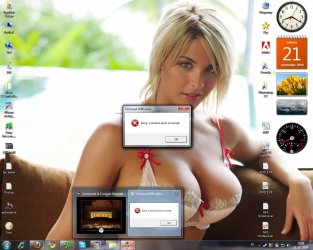
First off, why is my girlfriend your desktop background?? :P (joke)

Nah seriously, have you patched the game to the latest version? 1.7 or 1.8 is the latest i think? And is all your graphics drivers upto date also?

Have you installed directx 9c too? i know that windows 7 comes with DX11 but some elements of DX9c were not included i think (please correct me if im wrong).

Just check all that and post back please. :)
 

My Computer

OS
Windows 7 Professional x64
CPU
Intel Q6600
Motherboard
TPower i45
Memory
4gb (2x2gb) Corsair
Graphics Card(s)
ATI Radeon HD4870
o.o

after i put it under compatibility mode, and installed all the updates, and made sure my driver was updated, my error message updated itself, becuase b4 it i was getting the error message that GIGN1987 was getting now another one. ( i posted it, please check it out) any other suggestion? :sarc:
 

Attachments

  • Command and conquer error.png
    Command and conquer error.png
    1.9 MB · Views: 2,130

My Computer

OS
Window 7 Home premium 64 bit
Memory
1.15 Terabyte
Graphics Card(s)
Dual Ati radeon 5970
Screen Resolution
1920X1200
Cooling
Liquid cooling / Fans
I update the graphic driver to the latest version, update of directx end with message that a newer version instaled. I have this patch:

Code:
http://rapidshare.com/files/310477334/Generals-108-english.exe.html
I copy it to the instalation folder, set a compatibility mode to the patch file with "run as administrator" and i aplly the patch.


I copy only exe file and game run :D thanks everyone.
 

My Computer

OS
Windows 7 Professional 64 bit
CPU
Intel Core 2 Quad Q8300
Motherboard
GIGABYTE P43-ES3G
Memory
Patriot Gaming 2 x 2 GB
Graphics Card(s)
ASUS ENGTX285
Sound Card
Realtek ALC888
Monitor(s) Displays
iiyama ProLite E2473HDS
Screen Resolution
1920 x 1080
Hard Drives
WDC WD6400AAKS
WDC WD6400AAKS
PSU
Corsair TX650V2
Case
CoolerMaster CM690 Advanced Dominator II
Cooling
Standard Colling
Keyboard
Trust eLight illumunated keyboard
Mouse
Labtec Laser Mouse
Internet Speed
Download 2.30 MB/s Upload 0.31 MB/s

My Computer

Computer Manufacturer/Model Number
Cheap $399.00 E-Machine
OS
Windows 7 Pro & Vista Home Premium
CPU
Athlon 64 3800+ (Orleans) 2.40GHz
Motherboard
Winfast
Memory
2GB DDR2 RAM DIMM
Graphics Card(s)
NVIDIA GeForce 8500 GT 512 MB memory HDMI out
Sound Card
creative X-Fi Exteme 7..1 channel
Monitor(s) Displays
Acer V223W 22" widescreen DVI
Screen Resolution
1680x1050
Hard Drives
WDC WD5 500GB
WDC WD25 250GB
PSU
OCZ 550 watt
Case
Gateway
Cooling
2 fans
Keyboard
Dell
Mouse
Sony Vaio
Internet Speed
18MB/s down - .72MB /s up
after i put it under compatibility mode, and installed all the updates, and made sure my driver was updated, my error message updated itself, becuase b4 it i was getting the error message that GIGN1987 was getting now another one. ( i posted it, please check it out) any other suggestion? :sarc:

you use a xp mode or compatibility mode to the win xp 3. I patch the game, overwrite the exe file and set comaptibility mode to xp sp 3
 

My Computer

OS
Windows 7 Professional 64 bit
CPU
Intel Core 2 Quad Q8300
Motherboard
GIGABYTE P43-ES3G
Memory
Patriot Gaming 2 x 2 GB
Graphics Card(s)
ASUS ENGTX285
Sound Card
Realtek ALC888
Monitor(s) Displays
iiyama ProLite E2473HDS
Screen Resolution
1920 x 1080
Hard Drives
WDC WD6400AAKS
WDC WD6400AAKS
PSU
Corsair TX650V2
Case
CoolerMaster CM690 Advanced Dominator II
Cooling
Standard Colling
Keyboard
Trust eLight illumunated keyboard
Mouse
Labtec Laser Mouse
Internet Speed
Download 2.30 MB/s Upload 0.31 MB/s
what? can u make the steps easier?
 

My Computer

OS
Window 7 Home premium 64 bit
Memory
1.15 Terabyte
Graphics Card(s)
Dual Ati radeon 5970
Screen Resolution
1920X1200
Cooling
Liquid cooling / Fans
  1. Unistall the game and delete all folders about it. Clean registry with some registry cleaner. Restart comupter.
  2. Install the game normaly running setup program.
  3. Copy the patch into game instalation directory.
  4. Use the patch v1.08 with next compatibity settings: Run in compatible mode with xp3. Run as administrator.
  5. After the patch is succesfuly apllied, copy only exe file and owerwrite it.
  6. The game should run. :)
 

My Computer

OS
Windows 7 Professional 64 bit
CPU
Intel Core 2 Quad Q8300
Motherboard
GIGABYTE P43-ES3G
Memory
Patriot Gaming 2 x 2 GB
Graphics Card(s)
ASUS ENGTX285
Sound Card
Realtek ALC888
Monitor(s) Displays
iiyama ProLite E2473HDS
Screen Resolution
1920 x 1080
Hard Drives
WDC WD6400AAKS
WDC WD6400AAKS
PSU
Corsair TX650V2
Case
CoolerMaster CM690 Advanced Dominator II
Cooling
Standard Colling
Keyboard
Trust eLight illumunated keyboard
Mouse
Labtec Laser Mouse
Internet Speed
Download 2.30 MB/s Upload 0.31 MB/s
Well Im uninstalling to try it the way posted above, but has anyone tried zero hour? Im going to try and follow the steps above for it but I would like to know if there is any additional steps required.
 

My Computer

OS
Windows 7 Home Premium/Windows Vista Ultimate
CPU
Intel Quad 2.66 Ghz
Motherboard
EVGA nForce 780i SLI
Memory
4 GB
Graphics Card(s)
(2x) XFX 8800 GTX
Monitor(s) Displays
24" Samsung & 19" Samsung
Hard Drives
(1) 1 T
PSU
Ultra X3 1000 Watt
Case
Thermaltake

My Computer

Computer Manufacturer/Model Number
Cheap $399.00 E-Machine
OS
Windows 7 Pro & Vista Home Premium
CPU
Athlon 64 3800+ (Orleans) 2.40GHz
Motherboard
Winfast
Memory
2GB DDR2 RAM DIMM
Graphics Card(s)
NVIDIA GeForce 8500 GT 512 MB memory HDMI out
Sound Card
creative X-Fi Exteme 7..1 channel
Monitor(s) Displays
Acer V223W 22" widescreen DVI
Screen Resolution
1680x1050
Hard Drives
WDC WD5 500GB
WDC WD25 250GB
PSU
OCZ 550 watt
Case
Gateway
Cooling
2 fans
Keyboard
Dell
Mouse
Sony Vaio
Internet Speed
18MB/s down - .72MB /s up
Um Reghakr I think you missunderstood me. Zero Hour is the name of the expansion pack to the game in question. Not sime uninstallation nethod.

However I have tried the steps listed by GIGN1987 with no luck! Also I would like to ask what is the point of overwriting the exe with itself?
 

My Computer

OS
Windows 7 Home Premium/Windows Vista Ultimate
CPU
Intel Quad 2.66 Ghz
Motherboard
EVGA nForce 780i SLI
Memory
4 GB
Graphics Card(s)
(2x) XFX 8800 GTX
Monitor(s) Displays
24" Samsung & 19" Samsung
Hard Drives
(1) 1 T
PSU
Ultra X3 1000 Watt
Case
Thermaltake
I was just saying to use RevoUinstaller when this was posted
  1. Unistall the game and delete all folders about it. Clean registry with some registry cleaner. Restart comupter.
  2. Install the game normaly running setup program.
  3. Copy the patch into game instalation directory.
  4. Use the patch v1.08 with next compatibity settings: Run in compatible mode with xp3. Run as administrator.
  5. After the patch is succesfuly apllied, copy only exe file and owerwrite it.
  6. The game should run. :)
 

My Computer

Computer Manufacturer/Model Number
Cheap $399.00 E-Machine
OS
Windows 7 Pro & Vista Home Premium
CPU
Athlon 64 3800+ (Orleans) 2.40GHz
Motherboard
Winfast
Memory
2GB DDR2 RAM DIMM
Graphics Card(s)
NVIDIA GeForce 8500 GT 512 MB memory HDMI out
Sound Card
creative X-Fi Exteme 7..1 channel
Monitor(s) Displays
Acer V223W 22" widescreen DVI
Screen Resolution
1680x1050
Hard Drives
WDC WD5 500GB
WDC WD25 250GB
PSU
OCZ 550 watt
Case
Gateway
Cooling
2 fans
Keyboard
Dell
Mouse
Sony Vaio
Internet Speed
18MB/s down - .72MB /s up
Back
Top