Completely remove OS Choice menu

ggildas

New member
Local time
6:57 AM
Messages
5
Hello all and thanks in advance,

I've just done a fresh install on a single partition HD. When I start the PC the OS choices menu appears (I've lowered the display time to 3 sec in msconfig and used EasyBCD set to "Don't show"). It gives 2 options Windows 7 and Recovery Console.
Can I completely hide the choices menu manually somehow?
If not can I remove the Recovery Console element?

ggildas
 

My Computer

Computer type
PC/Desktop
OS
Dudley

My Computer

Computer type
PC/Desktop
Computer Manufacturer/Model Number
Self built custom
OS
64-bit Windows 11 Pro for Workstations
CPU
Intel i7-8700K OC'd to 5 GHz
Motherboard
ASUS ROG Maximus XI Formula Z390
Memory
64 GB (4x16GB) G.SKILL TridentZ RGB DDR4 3600 MHz
Graphics Card(s)
ASUS ROG-STRIX-GTX1080TI-O11G-GAMING
Sound Card
Integrated
Monitor(s) Displays
2 x Samsung Odyssey G7 27"
Screen Resolution
2560x1440
Hard Drives
1TB Samsung 990 PRO M.2,
4TB Samsung 990 PRO PRO M.2,
TerraMaster F8 SSD Plus NAS
PSU
Seasonic Prime Titanium 850W
Case
Thermaltake Core P3
Cooling
Corsair Hydro H115i
Keyboard
Logitech wireless K800
Mouse
Logitech MX Master 4
Internet Speed
2 Gb/s Download and 100 Mb/s Upload
Antivirus
Malwarebyte Anti-Malware Premium
Browser
Google Chrome
Other Info
Logitech Z625 speaker system,
Logitech BRIO 4K Pro webcam,
HP Color LaserJet Pro MFP M477fdn,
APC SMART-UPS RT 1000 XL - SURT1000XLI,
Galaxy S23 Plus phone
Hi Brink,
I assume you are referring to EasyBCD. I have done what you suggested but it still shows.
ggildas
 

My Computer

Computer type
PC/Desktop
OS
Dudley
Hi Brink,
Sorry I missed the link. I'll try and let you know
ggildas
 

My Computer

Computer type
PC/Desktop
OS
Dudley
Hi Brink,
Thanks that worked a bit. It still flashes the choices menu for a split second. Any ideas why with a single installation and user account it would show anyway?
ggildas
 

My Computer

Computer type
PC/Desktop
OS
Dudley
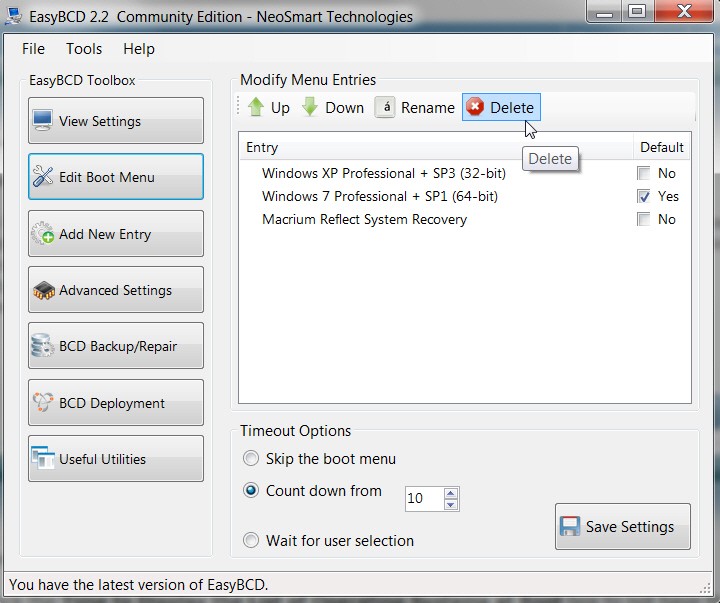
You're getting a Boot Menu presented because you have at least TWO items on the menu. I guess even reducing the "show list time, before automatically choosing the default" to 0 doesn't present the 2-item list from being shown ever so briefly.

If you have no interest in "Recovery Console", why don't you just DELETE it with EasyBCD using "edit"??

42hp.jpg


Of course, if "Recovery Console" is useful and intended for disaster recovery then why would you NOT want to at least have the option to select it from the presented Boot Manager menu? Why would you want it deleted or suppressed?

I suppose you could delete it, which would reduce your boot choices to 1 and then you would not see the boot menu presented as the default would simply be taken immediately. And then is you really did need recovery you could just always boot to the Windows DVD, or in my case to the Macrium Reflect standalone boot CD (note that there is also a Boot Manager option for Macrium Reflect, for "normal disaster recovery" when the hard drive and Boot Manager is still usable).
 

My Computer

Computer type
PC/Desktop
Computer Manufacturer/Model Number
Home-built, two systems (1) and (2)
OS
Windows 7 Pro x64 (1), Win7 Pro X64 (2)
CPU
i5-3350p 3.1Ghz/6MB-cache (1); E8400 3.0Ghz/6MB-cache (2)
Motherboard
ASUS P8Z77-V Pro (1); ASUS P5Q3 (2)
Memory
8GB PC3-12800 DDR3 (1); 4GB PC3-10600 DDR3 (2)
Graphics Card(s)
ATI HD7750 (1), (see TV cards); ATI R7 250 (2)
Sound Card
Realtek ALC892 HD Audio (1); Realtek ALC1200 HD Audio (2)
Monitor(s) Displays
Eizo HD2441W LCD, Eizo S2433W (1); Eizo 24" S2433W (2)
Screen Resolution
1920x1200, 1920x1200 (1); 1920x1200 (2)
Hard Drives
(1) 1TB SATA-II (7200RPM), 2x2TB SATA-III (7200RPM), 250GB SATA-III (10000RPM) for OS; 2x2TB external USB 3.0

(2) 320GB SATA-II (7200RPM), 750GB SATA-II (7200RPM), 150GB SATA-II (10000RPM) for OS; 2TB external USB 3.0
PSU
Nesteq ECS-6001 600W (1); Nesteq ECS-5001 500W (2)
Case
Acousti-Case 360 (1) and (2)
Cooling
Noctua NH-U12P SE2 for CPU, 2x120mm case fans (1) and (2)
Keyboard
IBM PS/2 (1) and (2)
Mouse
Logitech MX Revolution wireless (1); Microsoft wired (2)
Internet Speed
100mbps down / 10mbps up
Antivirus
Microsoft Security Essentials; Malwarebyte Anti-Malware Pro
Browser
Firefox
Other Info
Ceton InfiniTV 4-tuner cablecard-enabled TV card as well as Hauppauge HVR-2250 OTA/ATSC 2-tuner TV card in (1), running under Win7 WMC
Hi Dsperber,
EasyBCD does not show Recovery Console in it's list. As to why I want to remove the option is 2 fold.
1. I have young children in the house, fingers get everywhere. If they get into Rev Cons they could wreak havoc occidentally
2. It should not be showing on the OS choices screen but in the options.

ggildas.
 

My Computer

Computer type
PC/Desktop
OS
Dudley
Back
Top