Computer Connection/Locations problems

andresinatra

New member
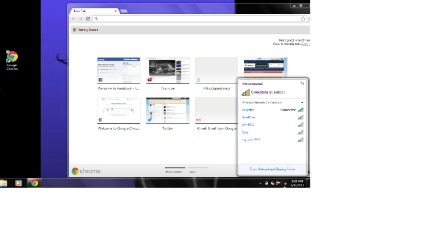
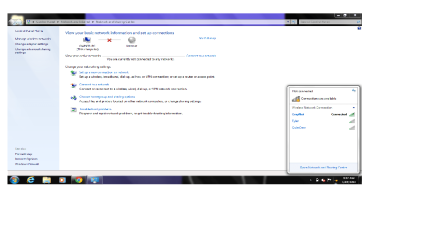
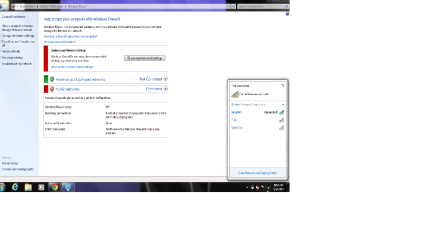
So i just bought this computer on craigslist, and everytime i connect to my internet at home it says im not connected but the internet thingy says i am and im able to surf the web and all. and also it says im in a public network in which im not im at home and it never ask to if i m a home public or work connect it ont even let me change it because it says im not connected to the internet i need help on how to fix that. i need to change it to home network and also make it so it shows that im connected.. any ideas ?? i need help!! ive een searching everywhere.

ive provided pics on what im talking about
 

Attachments

  • in.png
    in.png
    163 KB · Views: 1
  • inn.png
    inn.png
    107.9 KB · Views: 2
  • innnnnnn.png
    innnnnnn.png
    104 KB · Views: 2

My Computer

Computer type
PC/Desktop
Computer Manufacturer/Model Number
DELL
OS
Windows 7 Ultimate x64
This is a fairly rare problem which comes up sometimes, apparently there is a registry key that had it's permissions changed, not sure how but probably a virus. At any rate the solution seems to be changing the permissions of a certain registry key back to default. No guarantee's here but this is all I could find. :)

Ugumba said,...
I found a solution for (my version of) this problem. My tray icon never showed the red X, but if I clicked on the icon, the popup showed a bigger icon with a red X, and said "Not connected". As in your case, Internet worked, but I'm unable to setup a VPN connection because it insists on using a non-existent modem, obviously because I'm "not connected" (which I am).

I monitored the processes running the NlaSvc and Netprofm services (using ProcMon), and noticed that both were denied read/write access to subkeys within the HKLM\SOFTWARE\Microsoft\Windows NT\CurrentVersion\NetworkList hierarchy.

The processes were running as NetworkService and LocalService, respectively, so I tried adding full access for these service accounts to the entire subkey mentioned above. Notice that permissions are not automatically inherited in the registry, so you may need to explicitly "replace all child object permissions with inheritable permissions from this object".

Within seconds, Network and Sharing Center tells me I'm connected to my domain. Yay!
A reboot was required to fix the tray icon and its popup.

Directions to change this registry key:
Ok I had the same problem and used the following to make it work following Ugumbas post

Click Start
Type Run
Type Regedit
Expand HKEY_LOCAL_MACHINE
Expand Software
Expand Microsoft
Expand Windows NT
Expand Current Version
Right Click Network List
Right Click Permissions
For all users except CREATOR OWNER ensure that you have Full Control and Read ticked for all other accounts.
Reboot your machine

Which comes from TechNet thread about 11 posts down the page,> This solution worked for many people going down the page: http://social.technet.microsoft.com...g/thread/DF17C593-E78F-4878-97B0-7569307934C5
 

My Computer

Computer type
PC/Desktop
Computer Manufacturer/Model Number
Home built
OS
Windows 7 Ult, Windows 8.1 Pro,
CPU
Q9650-4.275GHz, E8600 4.5GHz, E6750-3.8GHz
Motherboard
Evga 780i FTW
Memory
G.Skill PC2 9600 1200Mhz 5 5 5 15 2T
Graphics Card(s)
GTX480
Sound Card
Asus Xonar D2
Monitor(s) Displays
HannsG
Screen Resolution
1680X1050
Hard Drives
GSkill Phoenix Pro 120GB SSD
PSU
ThermalTake Toughpower 1000Watt modular
Case
ThermalTake XaserV
Cooling
Xigmatek S1283
Keyboard
Logitech G15
Mouse
Logitech G9
Internet Speed
T1
This is a fairly rare problem which comes up sometimes, apparently there is a registry key that had it's permissions changed, not sure how but probably a virus. At any rate the solution seems to be changing the permissions of a certain registry key back to default. No guarantee's here but this is all I could find. :)

Ugumba said,...
I found a solution for (my version of) this problem. My tray icon never showed the red X, but if I clicked on the icon, the popup showed a bigger icon with a red X, and said "Not connected". As in your case, Internet worked, but I'm unable to setup a VPN connection because it insists on using a non-existent modem, obviously because I'm "not connected" (which I am).

I monitored the processes running the NlaSvc and Netprofm services (using ProcMon), and noticed that both were denied read/write access to subkeys within the HKLM\SOFTWARE\Microsoft\Windows NT\CurrentVersion\NetworkList hierarchy.

The processes were running as NetworkService and LocalService, respectively, so I tried adding full access for these service accounts to the entire subkey mentioned above. Notice that permissions are not automatically inherited in the registry, so you may need to explicitly "replace all child object permissions with inheritable permissions from this object".

Within seconds, Network and Sharing Center tells me I'm connected to my domain. Yay!
A reboot was required to fix the tray icon and its popup.

Directions to change this registry key:
Ok I had the same problem and used the following to make it work following Ugumbas post

Click Start
Type Run
Type Regedit
Expand HKEY_LOCAL_MACHINE
Expand Software
Expand Microsoft
Expand Windows NT
Expand Current Version
Right Click Network List
Right Click Permissions
For all users except CREATOR OWNER ensure that you have Full Control and Read ticked for all other accounts.
Reboot your machine

Which comes from TechNet thread about 11 posts down the page,> This solution worked for many people going down the page: Windows 7 states I'm not connected to any networks when in fact I am connected to my wireless network??


that didnt work or maybe i did something wrong. would you be able to teamview me or omething to make sure its right and/or fix some things
 

My Computer

Computer type
PC/Desktop
Computer Manufacturer/Model Number
DELL
OS
Windows 7 Ultimate x64
This is a fairly rare problem which comes up sometimes, apparently there is a registry key that had it's permissions changed, not sure how but probably a virus. At any rate the solution seems to be changing the permissions of a certain registry key back to default. No guarantee's here but this is all I could find. :)

Ugumba said,...
I found a solution for (my version of) this problem. My tray icon never showed the red X, but if I clicked on the icon, the popup showed a bigger icon with a red X, and said "Not connected". As in your case, Internet worked, but I'm unable to setup a VPN connection because it insists on using a non-existent modem, obviously because I'm "not connected" (which I am).

I monitored the processes running the NlaSvc and Netprofm services (using ProcMon), and noticed that both were denied read/write access to subkeys within the HKLM\SOFTWARE\Microsoft\Windows NT\CurrentVersion\NetworkList hierarchy.

The processes were running as NetworkService and LocalService, respectively, so I tried adding full access for these service accounts to the entire subkey mentioned above. Notice that permissions are not automatically inherited in the registry, so you may need to explicitly "replace all child object permissions with inheritable permissions from this object".

Within seconds, Network and Sharing Center tells me I'm connected to my domain. Yay!
A reboot was required to fix the tray icon and its popup.

Directions to change this registry key:
Ok I had the same problem and used the following to make it work following Ugumbas post

Click Start
Type Run
Type Regedit
Expand HKEY_LOCAL_MACHINE
Expand Software
Expand Microsoft
Expand Windows NT
Expand Current Version
Right Click Network List
Right Click Permissions
For all users except CREATOR OWNER ensure that you have Full Control and Read ticked for all other accounts.
Reboot your machine

Which comes from TechNet thread about 11 posts down the page,> This solution worked for many people going down the page: Windows 7 states I'm not connected to any networks when in fact I am connected to my wireless network??


that didnt work or maybe i did something wrong. would you be able to teamview me or omething to make sure its right and/or fix some things

Yes editing the registry isn't for everyone although those directions worked for many people in that thread, if you aren't sure what you are doing then you should back up the registry before hand.

To get to the registry type regedit into the run box. Navigate to the key stated in the thread and make the adjustments per the second paragraph where it says "Directions to change this registry key".

You might want to think about using system restore to take the system back to a point in time before this problem occurred.
http://www.sevenforums.com/tutorials/700-system-restore.html

If this system was in use by someone else then you really should clean reinstall the Op system, there is no telling what might be wrong with this Op system.

I would hesitate to mess with the registry on someone else's machine through team viewer. :geek:
 

My Computer

Computer type
PC/Desktop
Computer Manufacturer/Model Number
Home built
OS
Windows 7 Ult, Windows 8.1 Pro,
CPU
Q9650-4.275GHz, E8600 4.5GHz, E6750-3.8GHz
Motherboard
Evga 780i FTW
Memory
G.Skill PC2 9600 1200Mhz 5 5 5 15 2T
Graphics Card(s)
GTX480
Sound Card
Asus Xonar D2
Monitor(s) Displays
HannsG
Screen Resolution
1680X1050
Hard Drives
GSkill Phoenix Pro 120GB SSD
PSU
ThermalTake Toughpower 1000Watt modular
Case
ThermalTake XaserV
Cooling
Xigmatek S1283
Keyboard
Logitech G15
Mouse
Logitech G9
Internet Speed
T1
This is a fairly rare problem which comes up sometimes, apparently there is a registry key that had it's permissions changed, not sure how but probably a virus. At any rate the solution seems to be changing the permissions of a certain registry key back to default. No guarantee's here but this is all I could find. :)

Ugumba said,...
I found a solution for (my version of) this problem. My tray icon never showed the red X, but if I clicked on the icon, the popup showed a bigger icon with a red X, and said "Not connected". As in your case, Internet worked, but I'm unable to setup a VPN connection because it insists on using a non-existent modem, obviously because I'm "not connected" (which I am).

I monitored the processes running the NlaSvc and Netprofm services (using ProcMon), and noticed that both were denied read/write access to subkeys within the HKLM\SOFTWARE\Microsoft\Windows NT\CurrentVersion\NetworkList hierarchy.

The processes were running as NetworkService and LocalService, respectively, so I tried adding full access for these service accounts to the entire subkey mentioned above. Notice that permissions are not automatically inherited in the registry, so you may need to explicitly "replace all child object permissions with inheritable permissions from this object".

Within seconds, Network and Sharing Center tells me I'm connected to my domain. Yay!
A reboot was required to fix the tray icon and its popup.

Directions to change this registry key:
Ok I had the same problem and used the following to make it work following Ugumbas post

Click Start
Type Run
Type Regedit
Expand HKEY_LOCAL_MACHINE
Expand Software
Expand Microsoft
Expand Windows NT
Expand Current Version
Right Click Network List
Right Click Permissions
For all users except CREATOR OWNER ensure that you have Full Control and Read ticked for all other accounts.
Reboot your machine

Which comes from TechNet thread about 11 posts down the page,> This solution worked for many people going down the page: Windows 7 states I'm not connected to any networks when in fact I am connected to my wireless network??


that didnt work or maybe i did something wrong. would you be able to teamview me or omething to make sure its right and/or fix some things

Yes editing the registry isn't for everyone although those directions worked for many people in that thread, if you aren't sure what you are doing then you should back up the registry before hand.

To get to the registry type regedit into the run box. Navigate to the key stated in the thread and make the adjustments per the second paragraph where it says "Directions to change this registry key".

I would hesitate to mess with the registry on someone else's machine through team viewer. :geek:


no i changed the permissions correctly and everything . it just didnt work.
 

My Computer

Computer type
PC/Desktop
Computer Manufacturer/Model Number
DELL
OS
Windows 7 Ultimate x64
any other ideas ? i saw somewhere they said reinstall windows or it might be a virus ?
 

My Computer

Computer type
PC/Desktop
Computer Manufacturer/Model Number
DELL
OS
Windows 7 Ultimate x64
any other ideas ? i saw somewhere they said reinstall windows or it might be a virus ?

If this machine came from someone else then I would reinstall the Op system, it helps to have a copy of Windows 7 for this, I would think that the Windows key would be located on the machine some place.

A virus probably caused this problem but running virus scan's may not fix this type of problem.

System restore may help, the link for this is a couple of posts up.
 

My Computer

Computer type
PC/Desktop
Computer Manufacturer/Model Number
Home built
OS
Windows 7 Ult, Windows 8.1 Pro,
CPU
Q9650-4.275GHz, E8600 4.5GHz, E6750-3.8GHz
Motherboard
Evga 780i FTW
Memory
G.Skill PC2 9600 1200Mhz 5 5 5 15 2T
Graphics Card(s)
GTX480
Sound Card
Asus Xonar D2
Monitor(s) Displays
HannsG
Screen Resolution
1680X1050
Hard Drives
GSkill Phoenix Pro 120GB SSD
PSU
ThermalTake Toughpower 1000Watt modular
Case
ThermalTake XaserV
Cooling
Xigmatek S1283
Keyboard
Logitech G15
Mouse
Logitech G9
Internet Speed
T1
What if i dont have a windows cd , or one of those blank cds where u can put windows on it how else can i wipe aand then put windows on it ?
 

My Computer

Computer type
PC/Desktop
Computer Manufacturer/Model Number
DELL
OS
Windows 7 Ultimate x64
also i have tried system restore it always fails for some reason.
 

My Computer

Computer type
PC/Desktop
Computer Manufacturer/Model Number
DELL
OS
Windows 7 Ultimate x64
and i also have prduct key ready
 

My Computer

Computer type
PC/Desktop
Computer Manufacturer/Model Number
DELL
OS
Windows 7 Ultimate x64
and i also have prduct key ready

You can obtain the download for Windows 7 at various places on the internet although I'm not allowed to tell you where, basically you can torrent it by searching around for it. The Windows key means you can legally install it on your machine but the key is only good for the version that you are currently running.

System restore never works right once a system has been compromised.

You might try running the sfc/scannow command, I'm sure it will have problems as well.
 

My Computer

Computer type
PC/Desktop
Computer Manufacturer/Model Number
Home built
OS
Windows 7 Ult, Windows 8.1 Pro,
CPU
Q9650-4.275GHz, E8600 4.5GHz, E6750-3.8GHz
Motherboard
Evga 780i FTW
Memory
G.Skill PC2 9600 1200Mhz 5 5 5 15 2T
Graphics Card(s)
GTX480
Sound Card
Asus Xonar D2
Monitor(s) Displays
HannsG
Screen Resolution
1680X1050
Hard Drives
GSkill Phoenix Pro 120GB SSD
PSU
ThermalTake Toughpower 1000Watt modular
Case
ThermalTake XaserV
Cooling
Xigmatek S1283
Keyboard
Logitech G15
Mouse
Logitech G9
Internet Speed
T1
i understand that part now thhanks . and also what do i do to like wipe the computer? and would i put the windows 7 on a usb drive or something ?
 

My Computer

Computer type
PC/Desktop
Computer Manufacturer/Model Number
DELL
OS
Windows 7 Ultimate x64
or would i download the windows 7 thing and just run it
 

My Computer

Computer type
PC/Desktop
Computer Manufacturer/Model Number
DELL
OS
Windows 7 Ultimate x64
i understand that part now thhanks . and also what do i do to like wipe the computer? and would i put the windows 7 on a usb drive or something ?

Typically you would download the torrent as an .iso then use a DVD burning software like imgburn to burn the .iso to a DVD. You would then insert the DVD into the drive and restart Windows, hit enter to boot to the DVD, though you may need to go into bios in order to set the machine to boot to the DVD. At that point the installation is fairly straight forward.

We also have an entire section of the forum dedicated to installing Windows. :)
http://www.sevenforums.com/installation-setup/
 

My Computer

Computer type
PC/Desktop
Computer Manufacturer/Model Number
Home built
OS
Windows 7 Ult, Windows 8.1 Pro,
CPU
Q9650-4.275GHz, E8600 4.5GHz, E6750-3.8GHz
Motherboard
Evga 780i FTW
Memory
G.Skill PC2 9600 1200Mhz 5 5 5 15 2T
Graphics Card(s)
GTX480
Sound Card
Asus Xonar D2
Monitor(s) Displays
HannsG
Screen Resolution
1680X1050
Hard Drives
GSkill Phoenix Pro 120GB SSD
PSU
ThermalTake Toughpower 1000Watt modular
Case
ThermalTake XaserV
Cooling
Xigmatek S1283
Keyboard
Logitech G15
Mouse
Logitech G9
Internet Speed
T1
thank you very much is there any way i can show my support to you ?
 

My Computer

Computer type
PC/Desktop
Computer Manufacturer/Model Number
DELL
OS
Windows 7 Ultimate x64
Back
Top