Computer doesn't stay in sleep mode

stebobibo

New member
Local time
12:32 PM
Messages
22
My computer doesn't stay in sleep mode when I put it there. After a variable amount of time (usually less than 2 hours), it wakes up without any stimulus. It will also immediately wake up if I turn off (off only, not on) a peripheral device such as the moniter or speakers. I would like to have both problems fixed, but most important is the first example (wakes up without anything done). It does this even attached to different peripherals (changed keyboard, mouse, speakers).

To be clear, I put the computer to sleep by myself. The settings don't allow the computer to do so by itself.
Thanks for your help!
 

My Computer

Computer type
PC/Desktop
Computer Manufacturer/Model Number
N/A
OS
Windows 7
CPU
Intel Core i5-3570
Motherboard
Asus P8277-V
Memory
8Gb (2x4GB)
Graphics Card(s)
Nvidia GeForce GTX 660 Ti
Hard Drives
1 TB
Antivirus
N/A
Browser
Internet Explorer
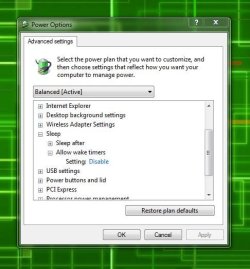
Make sure this is set to disable.

Also, check your bios for anything that will allow it to wake from sleep and disable it.
 

Attachments

  • Capture.JPG
    Capture.JPG
    53.7 KB · Views: 25

My Computer

Computer type
PC/Desktop
Computer Manufacturer/Model Number
Skylake Special #666
OS
Windows 10 Pro x64
CPU
Intel Core i7 6700K
Motherboard
Asus Sabertooth Z170 Mark 1
Memory
GSkill TridentZ RGB 16GB 3600 16-16-16-36
Graphics Card(s)
EVGA GTX 980 Ti SC x2
Sound Card
Realtek High Definition
Monitor(s) Displays
AOC G2460PG
Screen Resolution
1920 x 1080 144Hz
Hard Drives
Samsung 860 Pro 256GB, Seagate Barracuda 4TB x2
PSU
EVGA 1000 P2, EVGA White Custom Braided Cables
Case
Corsair Vengeance C70 Gunmetal Black
Cooling
Corsair H100i v2, Corsair ML120 x2, Thermal Grizzly Kryonaut
Keyboard
Logitech G910 Orion Spectrum
Mouse
Logitech G700s
Internet Speed
Verizon Fios Quantum Gateway 75/75
Antivirus
Windows Defender, Malwarebytes Free 3.8.3
Browser
Chrome
Other Info
Corsair SP120 x4, LG Blu-ray Drive, Durabrand HT-395 100 Watt Dolby Digital Amp, Corsair H2100 Wireless 7.1 Headset

My Computer

Computer type
PC/Desktop
Computer Manufacturer/Model Number
Self built custom
OS
64-bit Windows 11 Pro for Workstations
CPU
Intel i7-8700K OC'd to 5 GHz
Motherboard
ASUS ROG Maximus XI Formula Z390
Memory
64 GB (4x16GB) G.SKILL TridentZ RGB DDR4 3600 MHz
Graphics Card(s)
ASUS ROG-STRIX-GTX1080TI-O11G-GAMING
Sound Card
Integrated
Monitor(s) Displays
2 x Samsung Odyssey G7 27"
Screen Resolution
2560x1440
Hard Drives
1TB Samsung 990 PRO M.2,
4TB Samsung 990 PRO PRO M.2,
TerraMaster F8 SSD Plus NAS
PSU
Seasonic Prime Titanium 850W
Case
Thermaltake Core P3
Cooling
Corsair Hydro H115i
Keyboard
Logitech wireless K800
Mouse
Logitech MX Master 4
Internet Speed
2 Gb/s Download and 100 Mb/s Upload
Antivirus
Malwarebyte Anti-Malware Premium
Browser
Google Chrome
Other Info
Logitech Z625 speaker system,
Logitech BRIO 4K Pro webcam,
HP Color LaserJet Pro MFP M477fdn,
APC SMART-UPS RT 1000 XL - SURT1000XLI,
Galaxy S23 Plus phone

My Computer

Computer type
PC/Desktop
Computer Manufacturer/Model Number
Mellon Labs (custom build)
OS
Win 7 Pro x64/Win 10 Pro x64 dual boot
CPU
AMD FX 8350 Vishera @ 4200
Motherboard
ASUS M5A97 R2.0
Memory
16 GB Mushkin Blackline DDR3-2400 @ 1866 (9-10-10-10-31)
Graphics Card(s)
XFX Radeon R9 280 Double D Black Edition
Sound Card
Realtek HD Audio on MB. Sounds great.
Monitor(s) Displays
Acer 24", Acer 22"
Screen Resolution
3840 x 1080
Hard Drives
1 x Mushkin Chronos 120 GB SSD (Win 10)
1 x Samsung 850 EVO 250 GB SSD (Win 7)
1 x WD 1TB SATA Blue
1 x WD 1TB SATA Green
PSU
Corsair TX-750
Case
CoolerMaster HAF 912+
Cooling
Coolermaster Seidon 240M Liquid AIO. 6 case fans
Keyboard
Logitech G710+
Mouse
Logitech G500s
Internet Speed
Much better since I got fiber, but still way overpriced.
Antivirus
MSE, Malware Bytes for scanning
Browser
Firefox
Other Info
Corsair VOID USB headphones.

A Mellon Labs X-1 - LCD Smartie driven system status display.

Brought to you by the letter E
Make sure this is set to disable.

Also, check your bios for anything that will allow it to wake from sleep and disable it.

Thanks! I did the first step. How do I do check the bios?
 

My Computer

Computer type
PC/Desktop
Computer Manufacturer/Model Number
N/A
OS
Windows 7
CPU
Intel Core i5-3570
Motherboard
Asus P8277-V
Memory
8Gb (2x4GB)
Graphics Card(s)
Nvidia GeForce GTX 660 Ti
Hard Drives
1 TB
Antivirus
N/A
Browser
Internet Explorer
What did your wake log show?
 

My Computer

Computer type
PC/Desktop
Computer Manufacturer/Model Number
Self built custom
OS
64-bit Windows 11 Pro for Workstations
CPU
Intel i7-8700K OC'd to 5 GHz
Motherboard
ASUS ROG Maximus XI Formula Z390
Memory
64 GB (4x16GB) G.SKILL TridentZ RGB DDR4 3600 MHz
Graphics Card(s)
ASUS ROG-STRIX-GTX1080TI-O11G-GAMING
Sound Card
Integrated
Monitor(s) Displays
2 x Samsung Odyssey G7 27"
Screen Resolution
2560x1440
Hard Drives
1TB Samsung 990 PRO M.2,
4TB Samsung 990 PRO PRO M.2,
TerraMaster F8 SSD Plus NAS
PSU
Seasonic Prime Titanium 850W
Case
Thermaltake Core P3
Cooling
Corsair Hydro H115i
Keyboard
Logitech wireless K800
Mouse
Logitech MX Master 4
Internet Speed
2 Gb/s Download and 100 Mb/s Upload
Antivirus
Malwarebyte Anti-Malware Premium
Browser
Google Chrome
Other Info
Logitech Z625 speaker system,
Logitech BRIO 4K Pro webcam,
HP Color LaserJet Pro MFP M477fdn,
APC SMART-UPS RT 1000 XL - SURT1000XLI,
Galaxy S23 Plus phone
Hello Stebobibo,

In addition, you can read your wake source log to see if it may reveal what is waking the PC. See the related tutorials links at the bottom of the tutorial for more helpful information as well. :)

http://www.sevenforums.com/tutorials/179257-wake-source-read-event-viewer-log.html

Thanks a lot, Brink.
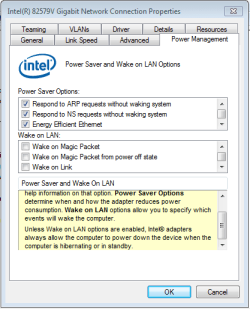
I ran the tutorial. There are 3 different wake sources out of 12 events. One is "unknown", which occurs in the oldest 10/12. The other 2 are:
1. Intel(R) 82579V Gigabit Network Connection
2. USB Root Hub
The average amount of time it remains in sleep is 1hour.

I don't know what to make of this information. Do you?
 

My Computer

Computer type
PC/Desktop
Computer Manufacturer/Model Number
N/A
OS
Windows 7
CPU
Intel Core i5-3570
Motherboard
Asus P8277-V
Memory
8Gb (2x4GB)
Graphics Card(s)
Nvidia GeForce GTX 660 Ti
Hard Drives
1 TB
Antivirus
N/A
Browser
Internet Explorer

Attachments

  • Network connection properties.PNG
    Network connection properties.PNG
    27.6 KB · Views: 22

My Computer

Computer type
PC/Desktop
Computer Manufacturer/Model Number
N/A
OS
Windows 7
CPU
Intel Core i5-3570
Motherboard
Asus P8277-V
Memory
8Gb (2x4GB)
Graphics Card(s)
Nvidia GeForce GTX 660 Ti
Hard Drives
1 TB
Antivirus
N/A
Browser
Internet Explorer

My Computer

Computer type
PC/Desktop
Computer Manufacturer/Model Number
Self built custom
OS
64-bit Windows 11 Pro for Workstations
CPU
Intel i7-8700K OC'd to 5 GHz
Motherboard
ASUS ROG Maximus XI Formula Z390
Memory
64 GB (4x16GB) G.SKILL TridentZ RGB DDR4 3600 MHz
Graphics Card(s)
ASUS ROG-STRIX-GTX1080TI-O11G-GAMING
Sound Card
Integrated
Monitor(s) Displays
2 x Samsung Odyssey G7 27"
Screen Resolution
2560x1440
Hard Drives
1TB Samsung 990 PRO M.2,
4TB Samsung 990 PRO PRO M.2,
TerraMaster F8 SSD Plus NAS
PSU
Seasonic Prime Titanium 850W
Case
Thermaltake Core P3
Cooling
Corsair Hydro H115i
Keyboard
Logitech wireless K800
Mouse
Logitech MX Master 4
Internet Speed
2 Gb/s Download and 100 Mb/s Upload
Antivirus
Malwarebyte Anti-Malware Premium
Browser
Google Chrome
Other Info
Logitech Z625 speaker system,
Logitech BRIO 4K Pro webcam,
HP Color LaserJet Pro MFP M477fdn,
APC SMART-UPS RT 1000 XL - SURT1000XLI,
Galaxy S23 Plus phone
Stebobibo,

Have you already done OPTION TWO below to disable the devices listed in the wake log to no longer be able to wake the PC?

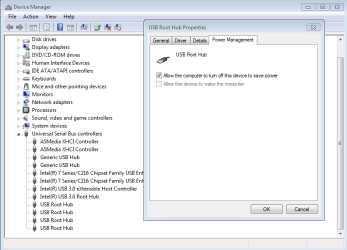
I used OPTION ONE. As you see in the previous post, I don't see an option to disable the Intel(R) 82579V Gigabit Network Connection from waking. I did check the USB Root Hub. There were four devices, and all four of them didn't have the box checked (see screenshot). Should I try OPTION 2 on the Intel Network Connection?
 

Attachments

  • USB Root hub power.PNG
    USB Root hub power.PNG
    50.7 KB · Views: 1

My Computer

Computer type
PC/Desktop
Computer Manufacturer/Model Number
N/A
OS
Windows 7
CPU
Intel Core i5-3570
Motherboard
Asus P8277-V
Memory
8Gb (2x4GB)
Graphics Card(s)
Nvidia GeForce GTX 660 Ti
Hard Drives
1 TB
Antivirus
N/A
Browser
Internet Explorer
Yep, try disabling them using OPTION TWO.
 

My Computer

Computer type
PC/Desktop
Computer Manufacturer/Model Number
Self built custom
OS
64-bit Windows 11 Pro for Workstations
CPU
Intel i7-8700K OC'd to 5 GHz
Motherboard
ASUS ROG Maximus XI Formula Z390
Memory
64 GB (4x16GB) G.SKILL TridentZ RGB DDR4 3600 MHz
Graphics Card(s)
ASUS ROG-STRIX-GTX1080TI-O11G-GAMING
Sound Card
Integrated
Monitor(s) Displays
2 x Samsung Odyssey G7 27"
Screen Resolution
2560x1440
Hard Drives
1TB Samsung 990 PRO M.2,
4TB Samsung 990 PRO PRO M.2,
TerraMaster F8 SSD Plus NAS
PSU
Seasonic Prime Titanium 850W
Case
Thermaltake Core P3
Cooling
Corsair Hydro H115i
Keyboard
Logitech wireless K800
Mouse
Logitech MX Master 4
Internet Speed
2 Gb/s Download and 100 Mb/s Upload
Antivirus
Malwarebyte Anti-Malware Premium
Browser
Google Chrome
Other Info
Logitech Z625 speaker system,
Logitech BRIO 4K Pro webcam,
HP Color LaserJet Pro MFP M477fdn,
APC SMART-UPS RT 1000 XL - SURT1000XLI,
Galaxy S23 Plus phone
Yep, try disabling them using OPTION TWO.
Sorry for taking a long time to get back to you. I tried option 2. The USB hub was no longer listed (I think it's because I stopped using a wireless receiver for internet). But the Intel Gigabit Network Connection was listed. I executed the commands, but it did not work. I received a message saying, "You do not have permission to enable or disable device wake"
What do I do now? My computer is still waking automatically. Thanks for your help!
 

My Computer

Computer type
PC/Desktop
Computer Manufacturer/Model Number
N/A
OS
Windows 7
CPU
Intel Core i5-3570
Motherboard
Asus P8277-V
Memory
8Gb (2x4GB)
Graphics Card(s)
Nvidia GeForce GTX 660 Ti
Hard Drives
1 TB
Antivirus
N/A
Browser
Internet Explorer
Back
Top