Computer Hangs while selecting some files/folders

tanvsb

New member
Local time
10:49 PM
Messages
4
Location
Dhaka
Hello all,

I'm a new member here. I'm using Windows 7 ultimate 32 bit in my Intel duel core 3 Ghz with Intel g41 express chipset, 2 GB DDR2 RAM, 1 TB Hitachi internal HD.

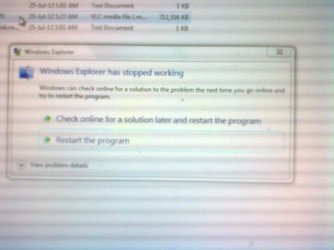
There are some movie files with different extensions or folders containing those files on selection of those files or folders or while trying to play those files my computer hangs instantaneously and there remain no options except to restart my computer. Someone may say that I've virus in my computer but I can say that I've checked those files on other computer where it doesnt create any problem. I'm giving a snap shot of the message gives while my computer hangs.
photo.php


Please help me...
 

Attachments

  • Image0362.jpg
    Image0362.jpg
    145 KB · Views: 13

My Computer

OS
Windows 7 Ultimate 32 bit

My Computer

Computer type
PC/Desktop
Computer Manufacturer/Model Number
Self assembled
OS
Windows 10 Home 64Bit
CPU
Intel Core i5 10400 @ 2.90GHz
Motherboard
Intel Corporation DG41WV (PROCESSOR)
Memory
8.00GB Single-Channel Unknown @ 1329MHz (16-20-20-38)
Sound Card
Realtek High Definition Audio
Monitor(s) Displays
DELL E170S
Screen Resolution
1280x1024 pixels
Hard Drives
931GB TOSHIBA DT01ACA100 (SATA)
238GB TEAM TM8PS7256G (SATA SSD)
Case
Nothing Fancy
Cooling
Fans
Keyboard
A4 Tech Co LTD
Mouse
A4 Tech Co Ltd/Logitech
Internet Speed
25 Mbps
Welcome to the forum tanvsb

Do you have any Codec packs installed?

Yes, I've installed k-lite kodec pack 760 full. And i've also installed DivX player.

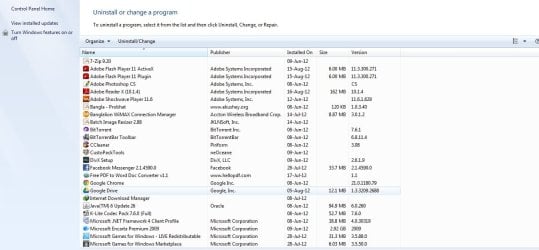
I've attached the pics you wanted.

Thanks for your quick reply....
 

Attachments

  • sc1.jpg
    sc1.jpg
    210.4 KB · Views: 8
  • sc2.jpg
    sc2.jpg
    193.7 KB · Views: 8

My Computer

OS
Windows 7 Ultimate 32 bit
Yes, I've installed k-lite kodec pack 760 full. And i've also installed DivX player.

I've attached the pics you wanted.

Thanks for your quick reply....

Hello to the friend from Bangladesh. Thanks for the pictures.

Did you do the steps mentioned in this tutorial http://www.sevenforums.com/tutorials/1538-sfc-scannow-command-system-file-checker.html ? Restart when it says violations are found.

I see you have Custo Packs installed. Please uninstall it and reboot also.

By the way what antivirus are you using?

Also uninstall the K-lite codec pack for now, I will give you a link to another codec pack once you've done the above.

Keep us posted.
 

My Computer

Computer type
PC/Desktop
Computer Manufacturer/Model Number
Self assembled
OS
Windows 10 Home 64Bit
CPU
Intel Core i5 10400 @ 2.90GHz
Motherboard
Intel Corporation DG41WV (PROCESSOR)
Memory
8.00GB Single-Channel Unknown @ 1329MHz (16-20-20-38)
Sound Card
Realtek High Definition Audio
Monitor(s) Displays
DELL E170S
Screen Resolution
1280x1024 pixels
Hard Drives
931GB TOSHIBA DT01ACA100 (SATA)
238GB TEAM TM8PS7256G (SATA SSD)
Case
Nothing Fancy
Cooling
Fans
Keyboard
A4 Tech Co LTD
Mouse
A4 Tech Co Ltd/Logitech
Internet Speed
25 Mbps
Yes, I've installed k-lite kodec pack 760 full. And i've also installed DivX player.

I've attached the pics you wanted.

Thanks for your quick reply....

Hello to the friend from Bangladesh. Thanks for the pictures.

Did you do the steps mentioned in this tutorial http://www.sevenforums.com/tutorials/1538-sfc-scannow-command-system-file-checker.html ? Restart when it says violations are found.

I see you have Custo Packs installed. Please uninstall it and reboot also.

By the way what antivirus are you using?

Also uninstall the K-lite codec pack for now, I will give you a link to another one once you've done the above.

Keep us posted.

I've done the sfc scan and it says resource protection found corrupt and repaired. But I'vent rebooted the system yet.

Yes, I've installed custo packs. I'm uninstalling it; but my problem happens from the very beginning of installing any program like custo packs or codecs after a fresh installation.

I'm following your instructions.

Thanks
 

My Computer

OS
Windows 7 Ultimate 32 bit
I've done the sfc scan and it says resource protection found corrupt and repaired. But I'vent rebooted the system yet.

Yes, I've installed custo packs. I'm uninstalling it; but my problem happens from the very beginning of installing any program like custo packs or codecs after a fresh installation.

I'm following your instructions.

Thanks

You've missed one question: What antivirus are you using?
Recommend MSE which you can download from here Download Security Essentials 4.0.1526 Vista - FileHippo.com

Next: Fill in your system specs: :ar:
http://www.sevenforums.com/tutorials/180324-system-info-see-your-system-specs.html

If you find that too complicated then just download Speccy - System Information - Free Download or click on the start :orb: and type system information on the search field. Hit enter and your specs should be there. Fill them up in this link User Specs and hit save once you're done.

Next: Download and install Sharks codecs from here Download Windows 7 Codecs 3.7.5 - FileHippo.com. It will run some settings on first installation, do not cancel or interrupt it. You'll see a box like the image attached.

Just select the option Shark007 SUGGESTED Settings.

Now see if you still have those errors while watching the videos.

Let us know how it goes. :)
 
Last edited:

My Computer

Computer type
PC/Desktop
Computer Manufacturer/Model Number
Self assembled
OS
Windows 10 Home 64Bit
CPU
Intel Core i5 10400 @ 2.90GHz
Motherboard
Intel Corporation DG41WV (PROCESSOR)
Memory
8.00GB Single-Channel Unknown @ 1329MHz (16-20-20-38)
Sound Card
Realtek High Definition Audio
Monitor(s) Displays
DELL E170S
Screen Resolution
1280x1024 pixels
Hard Drives
931GB TOSHIBA DT01ACA100 (SATA)
238GB TEAM TM8PS7256G (SATA SSD)
Case
Nothing Fancy
Cooling
Fans
Keyboard
A4 Tech Co LTD
Mouse
A4 Tech Co Ltd/Logitech
Internet Speed
25 Mbps
Back
Top