
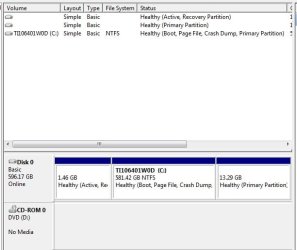
Computer Management. Can I delete one or both of these other drives?

anectine17

New member
Local time
1:32 AM
Messages
2
I'm new here so forgive me if I posted in the wrong category. I am preparing my (relatively) new Toshiba Satellite C855 Laptop with Windows 7 for a dual boot with Linux Mint. I started by deleting the "Click-To-Run" items that were found on Drive "Q". I did so using a tutorial from Microsoft. It seems to have worked, since all the "Click-To-Run" items are gone, as is Drive "Q" (or so it seems since it is no longer seen next to Drive C when accessing "(My) Computer"). My question now is this: What are these other 2 drives on either side of my C Drive? I know one of them is a "Recovery" drive, but I'm not sure what the other one is. Is the "Recovery" drive necessary? Can I delete it and/or the other drive. I've attached a screen shot so you can see what I'm looking at and better advise me on how to proceed. Thanks!!
 

Attachments
  • Drives.jpg
    Drives.jpg
    28.3 KB · Views: 12

My Computer My Computer

At a glance

Windows 7 Home Premium 64 bit SP1Pentium B970 @ 2.30 Ghz4 GB DDR3Intel HD Graphics
Computer type
Laptop
Computer Manufacturer/Model Number
Toshiba Satellite C855
OS
Windows 7 Home Premium 64 bit SP1
CPU
Pentium B970 @ 2.30 Ghz
Motherboard
Toshiba
Memory
4 GB DDR3
Graphics Card(s)
Intel HD Graphics
Hard Drives
Toshiba TI106401W0D 640 GB
Antivirus
Kaspersky Internet Security 2013
Browser
Firefox 19.0.2
It appears both are Recovery partitions since the first one marked Active (as some OEM's do to make the partition bootable) is not large enough to hold the Recovery files while the second one is.

If you haven't made your Recovery disks yet I'd do so in case Recovery is needed to run and it wont' from boot. Toshiba HDD Recovery Utility

Since your C partition is so large you might as well shrink it to make another partition for your Dual Boot and keep the other partitions. You can have four Primary Partitions or three Primary and as many Logical as you want. So if you want more than another partition, I'd make the next one Logical using Partition Wizard Create Partition Video Help so that you can add as many others later as you want as long as they are adjoining.

Keep in mind that the factory preinstalled Win7 is an inferior install and that most tech enthusiasts will Clean Reinstall - Factory OEM Windows 7 in which case you don't really need the Recovery partitions and can delete all of them when you do the reinstall. I'd still make my Recovery disks first so you have a path back to factory condition if you'd ever want one to sell the machine or recover a preinstalled program you really need.
 
Thanks for the reply. I think I'll just do a clean install and partition for Windows, Page File, Linux Mint and Linux Swap.
 

My Computer My Computer

At a glance

Windows 7 Home Premium 64 bit SP1Pentium B970 @ 2.30 Ghz4 GB DDR3Intel HD Graphics
Computer type
Laptop
Computer Manufacturer/Model Number
Toshiba Satellite C855
OS
Windows 7 Home Premium 64 bit SP1
CPU
Pentium B970 @ 2.30 Ghz
Motherboard
Toshiba
Memory
4 GB DDR3
Graphics Card(s)
Intel HD Graphics
Hard Drives
Toshiba TI106401W0D 640 GB
Antivirus
Kaspersky Internet Security 2013
Browser
Firefox 19.0.2
Back
Top