Computer takes about 20 min to start up normal. Fast on safe mode.

Johnson Q

New member
Local time
11:50 AM
Messages
5
Hello,

I have a HP Laptop Pavilion dv6. It has Windows 7 Home Premium x64 on it. When I hit the power button and let it turn on normally, it gets to the Windows 7 boot splash screen and gets stuck there for about 20 minutes. Sometimes it turns on completely, sometimes it will restart at that point then I am stuck waiting again after that.

I can boot into safe mode, and I am in pretty quickly. I have done a hard disk defrag to see if that helped anything and it didnt. I did a hard drive test through the bios and it said the drive was fine. I also did a memory test and that was all good. I tried the startup repair tools, and it came back with no errors found. Im stuck now.

Any ideas?

Thank you!

Johnson.
 

My Computer My Computer

At a glance

Windows 7 Home Premium x64
Computer type
Laptop
Computer Manufacturer/Model Number
HP Pavilion dv6
OS
Windows 7 Home Premium x64

My Computer My Computer

At a glance

Windows 7 Ultimate x64, Windows 8.1 Pro x64 (...AMD - A6-3670 Accelerated Processing unit W/R...8.00GBAMD Radeon HD 6530D (APU)
Computer type
PC/Desktop
Computer Manufacturer/Model Number
Desktop - Zoostorm, Laptop - HP
OS
Windows 7 Ultimate x64, Windows 8.1 Pro x64 (on laptop)
CPU
AMD - A6-3670 Accelerated Processing unit W/Radeon HD6530D
Motherboard
MSI
Memory
8.00GB
Graphics Card(s)
AMD Radeon HD 6530D (APU)
Sound Card
Realtek HD
Monitor(s) Displays
single/one
Screen Resolution
1440x900
Hard Drives
1x2tb internal
1x1tb external
PSU
300W
Case
Zoostorm
Cooling
1 rear fan (12cm) 1 GPU cooler fan(8CM) 2 side fans (12cm)
Keyboard
Saitek C.Y.B.O.R.G V5
Mouse
Saitek R.A.T V3
Internet Speed
Download - 17-20 mbps. Upload - 07-1.3 mbps
Antivirus
Eset Smart Security 7.0.302.26
Browser
Google chrome, IE11, Firefox
Other Info
The laptop is a HP Pavillion G6 (AMD A10 APU @ 2.3 (turbo to 3.2) ghz)

My Computer My Computer

At a glance

Windows 7 Ultimate x64, Windows 8.1 Pro x64 (...AMD - A6-3670 Accelerated Processing unit W/R...8.00GBAMD Radeon HD 6530D (APU)
Computer type
PC/Desktop
Computer Manufacturer/Model Number
Desktop - Zoostorm, Laptop - HP
OS
Windows 7 Ultimate x64, Windows 8.1 Pro x64 (on laptop)
CPU
AMD - A6-3670 Accelerated Processing unit W/Radeon HD6530D
Motherboard
MSI
Memory
8.00GB
Graphics Card(s)
AMD Radeon HD 6530D (APU)
Sound Card
Realtek HD
Monitor(s) Displays
single/one
Screen Resolution
1440x900
Hard Drives
1x2tb internal
1x1tb external
PSU
300W
Case
Zoostorm
Cooling
1 rear fan (12cm) 1 GPU cooler fan(8CM) 2 side fans (12cm)
Keyboard
Saitek C.Y.B.O.R.G V5
Mouse
Saitek R.A.T V3
Internet Speed
Download - 17-20 mbps. Upload - 07-1.3 mbps
Antivirus
Eset Smart Security 7.0.302.26
Browser
Google chrome, IE11, Firefox
Other Info
The laptop is a HP Pavillion G6 (AMD A10 APU @ 2.3 (turbo to 3.2) ghz)
Last edited by a moderator:

My Computer My Computer

At a glance

Vista, Windows7, Mint Mate, Zorin, Windows 8from 1.6GHz Duo to i7
Computer Manufacturer/Model Number
HP, Dell, Gateway, Toshiba - 4 laptops and 2 desktops
OS
Vista, Windows7, Mint Mate, Zorin, Windows 8
CPU
from 1.6GHz Duo to i7
Monitor(s) Displays
2x HP w2207
Hard Drives
5x HDD, 7x SSD, 12x Externals
Keyboard
with trackball - no mices
Mouse
Trackball mice
Internet Speed
DSL 6000
cryptoncore: I did a scan with AVG free one of the times I got it to turn on normally. There were no viruses found. I havent tried Malwarebyes tho. And yes, once the computer is up and running, it is at normal speed. Its just the startup that takes forever. what other information could I provide to make it easier?

Regarding the link you sent me:

#8: I have done the memtest that is in the BIOS but I havent tried the one that they said to use yet. I could try that

#10: All the cabling, as far as I know, is connected. Its a laptop. Without taking it completely apart it would be hard to diagonose that. Theres nothing extra plugged into it.

#11: I do not believe the computer is overheating because it starts up in safe mode no problem. I did however use some compressed air to dust it out a little bit. It didnt seem to help with the startup tho

#12: I checked the Device Manager for errors. There were two errors that came up.

1. Under "Other Devices" the PCI Simple Communications Controller says "The drivers for this device are not installed (Code 28). I have never been able to find the drivers for this for this specific computer, so I have always left it uninstalled. It hasent posed as a problem in the past, but perhaps it is now?

2. After viewing the hidden drivers, under "Non-Plug and Play Drivers" the Security Processor Loaded Driver says "This device is not present, is not working properly, or does not have all its drivers installed (code 24)" Could this be a problem?

whs: Did that, no changes.

What other info should I provide to help?
 

My Computer My Computer

At a glance

Windows 7 Home Premium x64
Computer type
Laptop
Computer Manufacturer/Model Number
HP Pavilion dv6
OS
Windows 7 Home Premium x64
Try this - run the schtasks command in Command Prompt and have a look whether there is any scheduled task that might hold up progress.
 

My Computer My Computer

At a glance

Vista, Windows7, Mint Mate, Zorin, Windows 8from 1.6GHz Duo to i7
Computer Manufacturer/Model Number
HP, Dell, Gateway, Toshiba - 4 laptops and 2 desktops
OS
Vista, Windows7, Mint Mate, Zorin, Windows 8
CPU
from 1.6GHz Duo to i7
Monitor(s) Displays
2x HP w2207
Hard Drives
5x HDD, 7x SSD, 12x Externals
Keyboard
with trackball - no mices
Mouse
Trackball mice
Internet Speed
DSL 6000
scheduled tasks are disabled in safe mode, I am trying to get into the computer normally right now. I did a quick search on how to enable scheduled tasks from within safe mode, but it didnt come up with anything.

I at first thought that maybe an update was preventing it from starting, and so I went and removed the updates that had installed last. And it didnt help anything either. Could it be that removing the updates did something to slow it down? It started to startup slow shortly after getting windows updates.

I just remembered I had done that. I first overlooked it thinking that wasnt the problem, but perhaps it might be?
 
Last edited:

My Computer My Computer

At a glance

Windows 7 Home Premium x64
Computer type
Laptop
Computer Manufacturer/Model Number
HP Pavilion dv6
OS
Windows 7 Home Premium x64
You have to look into Scheduled Tasks in normal mode - not in safe mode.
 

My Computer My Computer

At a glance

Vista, Windows7, Mint Mate, Zorin, Windows 8from 1.6GHz Duo to i7
Computer Manufacturer/Model Number
HP, Dell, Gateway, Toshiba - 4 laptops and 2 desktops
OS
Vista, Windows7, Mint Mate, Zorin, Windows 8
CPU
from 1.6GHz Duo to i7
Monitor(s) Displays
2x HP w2207
Hard Drives
5x HDD, 7x SSD, 12x Externals
Keyboard
with trackball - no mices
Mouse
Trackball mice
Internet Speed
DSL 6000
After getting it to start in normal mode. I did the schtasks in the cmd prompt. It doesnt appear that anything is trying to be done on startup? This time when I did turn the computer on after the starting windows screen went away, it said something along the lines of the updates not being installed correctly and then it said something about removing uninstalled or unconfigured updates. Could an update be causing this problem? If they are not completely uninstalled or installed or something happened when it was trying to update?

Here is the output from the schtasks (ran as administrator):

Code:
Microsoft Windows [Version 6.1.7601]
Copyright (c) 2009 Microsoft Corporation.  All rights reserved.

C:\Windows\system32>schtasks

Folder: \
TaskName                                 Next Run Time          Status
======================================== ====================== ===============
GoogleUpdateTaskUserS-1-5-21-2832589673- 5/3/2013 9:23:00 PM    Ready
GoogleUpdateTaskUserS-1-5-21-2832589673- 5/3/2013 2:23:00 PM    Ready

Folder: \Apple
TaskName                                 Next Run Time          Status
======================================== ====================== ===============
AppleSoftwareUpdate                      5/7/2013 8:05:00 AM    Ready

Folder: \Microsoft
TaskName                                 Next Run Time          Status
======================================== ====================== ===============
INFO: There are no scheduled tasks presently available at your access level.

Folder: \Microsoft\Windows
TaskName                                 Next Run Time          Status
======================================== ====================== ===============
INFO: There are no scheduled tasks presently available at your access level.

Folder: \Microsoft\Windows\Active Directory Rights Management Services Client
TaskName                                 Next Run Time          Status
======================================== ====================== ===============
AD RMS Rights Policy Template Management Disabled
AD RMS Rights Policy Template Management N/A                    Ready

Folder: \Microsoft\Windows\AppID
TaskName                                 Next Run Time          Status
======================================== ====================== ===============
PolicyConverter                          Disabled
VerifiedPublisherCertStoreCheck          Disabled

Folder: \Microsoft\Windows\Application Experience
TaskName                                 Next Run Time          Status
======================================== ====================== ===============
AitAgent                                 5/4/2013 2:30:00 AM    Unknown
ProgramDataUpdater                       5/4/2013 12:30:00 AM   Unknown

Folder: \Microsoft\Windows\Autochk
TaskName                                 Next Run Time          Status
======================================== ====================== ===============
Proxy                                    N/A                    Ready

Folder: \Microsoft\Windows\Bluetooth
TaskName                                 Next Run Time          Status
======================================== ====================== ===============
UninstallDeviceTask                      N/A                    Ready

Folder: \Microsoft\Windows\CertificateServicesClient
TaskName                                 Next Run Time          Status
======================================== ====================== ===============
SystemTask                               N/A                    Ready
UserTask                                 N/A                    Ready
UserTask-Roam                            Disabled

Folder: \Microsoft\Windows\Customer Experience Improvement Program
TaskName                                 Next Run Time          Status
======================================== ====================== ===============
Consolidator                             5/3/2013 5:00:00 PM    Could not start
KernelCeipTask                           5/9/2013 3:30:00 AM    Unknown
UsbCeip                                  5/5/2013 1:30:00 AM    Ready

Folder: \Microsoft\Windows\Defrag
TaskName                                 Next Run Time          Status
======================================== ====================== ===============
ScheduledDefrag                          5/8/2013 2:57:46 AM    Unknown

Folder: \Microsoft\Windows\Diagnosis
TaskName                                 Next Run Time          Status
======================================== ====================== ===============
Scheduled                                5/5/2013 1:00:00 AM    Ready

Folder: \Microsoft\Windows\DiskDiagnostic
TaskName                                 Next Run Time          Status
======================================== ====================== ===============
Microsoft-Windows-DiskDiagnosticDataColl Disabled
Microsoft-Windows-DiskDiagnosticResolver Disabled

Folder: \Microsoft\Windows\Location
TaskName                                 Next Run Time          Status
======================================== ====================== ===============
Notifications                            N/A                    Ready

Folder: \Microsoft\Windows\Maintenance
TaskName                                 Next Run Time          Status
======================================== ====================== ===============
WinSAT                                   5/5/2013 1:00:00 AM    Ready

Folder: \Microsoft\Windows\Media Center
TaskName                                 Next Run Time          Status
======================================== ====================== ===============
ActivateWindowsSearch                    N/A                    Ready
ConfigureInternetTimeService             N/A                    Ready
DispatchRecoveryTasks                    N/A                    Ready
ehDRMInit                                N/A                    Ready
InstallPlayReady                         N/A                    Ready
mcupdate                                 N/A                    Ready
MediaCenterRecoveryTask                  N/A                    Ready
ObjectStoreRecoveryTask                  N/A                    Ready
OCURActivate                             N/A                    Ready
OCURDiscovery                            N/A                    Ready
PBDADiscovery                            N/A                    Ready
PBDADiscoveryW1                          N/A                    Ready
PBDADiscoveryW2                          N/A                    Ready
PeriodicScanRetry                        Disabled
PvrRecoveryTask                          N/A                    Ready
PvrScheduleTask                          N/A                    Ready
RecordingRestart                         Disabled
RegisterSearch                           N/A                    Ready
ReindexSearchRoot                        N/A                    Ready
SqlLiteRecoveryTask                      N/A                    Ready
UpdateRecordPath                         N/A                    Ready

Folder: \Microsoft\Windows\MemoryDiagnostic
TaskName                                 Next Run Time          Status
======================================== ====================== ===============
CorruptionDetector                       N/A                    Ready
DecompressionFailureDetector             N/A                    Ready

Folder: \Microsoft\Windows\MobilePC
TaskName                                 Next Run Time          Status
======================================== ====================== ===============
HotStart                                 N/A                    Ready

Folder: \Microsoft\Windows\MUI
TaskName                                 Next Run Time          Status
======================================== ====================== ===============
LPRemove                                 N/A                    Ready

Folder: \Microsoft\Windows\Multimedia
TaskName                                 Next Run Time          Status
======================================== ====================== ===============
SystemSoundsService                      N/A                    Running

Folder: \Microsoft\Windows\NetTrace
TaskName                                 Next Run Time          Status
======================================== ====================== ===============
GatherNetworkInfo                        N/A                    Ready

Folder: \Microsoft\Windows\PerfTrack
TaskName                                 Next Run Time          Status
======================================== ====================== ===============
BackgroundConfigSurveyor                 Disabled

Folder: \Microsoft\Windows\PLA
TaskName                                 Next Run Time          Status
======================================== ====================== ===============
INFO: There are no scheduled tasks presently available at your access level.

Folder: \Microsoft\Windows\Power Efficiency Diagnostics
TaskName                                 Next Run Time          Status
======================================== ====================== ===============
AnalyzeSystem                            5/14/2013 7:41:05 AM   Unknown

Folder: \Microsoft\Windows\RAC
TaskName                                 Next Run Time          Status
======================================== ====================== ===============
RacTask                                  5/3/2013 2:10:31 PM    Ready

Folder: \Microsoft\Windows\Ras
TaskName                                 Next Run Time          Status
======================================== ====================== ===============
MobilityManager                          N/A                    Ready

Folder: \Microsoft\Windows\Registry
TaskName                                 Next Run Time          Status
======================================== ====================== ===============
RegIdleBackup                            5/4/2013 12:35:35 AM   Unknown

Folder: \Microsoft\Windows\RemoteAssistance
TaskName                                 Next Run Time          Status
======================================== ====================== ===============
RemoteAssistanceTask                     N/A                    Ready

Folder: \Microsoft\Windows\Shell
TaskName                                 Next Run Time          Status
======================================== ====================== ===============
WindowsParentalControls                  Disabled
WindowsParentalControlsMigration         Disabled

Folder: \Microsoft\Windows\SideShow
TaskName                                 Next Run Time          Status
======================================== ====================== ===============
AutoWake                                 Disabled
GadgetManager                            N/A                    Ready
SessionAgent                             Disabled               Could not start
SystemDataProviders                      Disabled               Could not start

Folder: \Microsoft\Windows\SoftwareProtectionPlatform
TaskName                                 Next Run Time          Status
======================================== ====================== ===============
SvcRestartTask                           Disabled

Folder: \Microsoft\Windows\SystemRestore
TaskName                                 Next Run Time          Status
======================================== ====================== ===============
SR                                       5/4/2013 12:00:00 AM   Unknown

Folder: \Microsoft\Windows\Task Manager
TaskName                                 Next Run Time          Status
======================================== ====================== ===============
Interactive                              N/A                    Ready

Folder: \Microsoft\Windows\Tcpip
TaskName                                 Next Run Time          Status
======================================== ====================== ===============
IpAddressConflict1                       N/A                    Ready
IpAddressConflict2                       N/A                    Ready

Folder: \Microsoft\Windows\TextServicesFramework
TaskName                                 Next Run Time          Status
======================================== ====================== ===============
MsCtfMonitor                             N/A                    Running

Folder: \Microsoft\Windows\Time Synchronization
TaskName                                 Next Run Time          Status
======================================== ====================== ===============
SynchronizeTime                          5/5/2013 1:00:00 AM    Ready

Folder: \Microsoft\Windows\UPnP
TaskName                                 Next Run Time          Status
======================================== ====================== ===============
UPnPHostConfig                           N/A                    Ready

Folder: \Microsoft\Windows\User Profile Service
TaskName                                 Next Run Time          Status
======================================== ====================== ===============
HiveUploadTask                           Disabled

Folder: \Microsoft\Windows\WDI
TaskName                                 Next Run Time          Status
======================================== ====================== ===============
ResolutionHost                           N/A                    Ready

Folder: \Microsoft\Windows\Windows Activation Technologies
TaskName                                 Next Run Time          Status
======================================== ====================== ===============
ValidationTask                           7/24/2013 7:48:19 PM   Ready
ValidationTaskDeadline                   8/3/2013 7:48:19 PM    Ready

Folder: \Microsoft\Windows\Windows Error Reporting
TaskName                                 Next Run Time          Status
======================================== ====================== ===============
QueueReporting                           N/A                    Ready

Folder: \Microsoft\Windows\Windows Filtering Platform
TaskName                                 Next Run Time          Status
======================================== ====================== ===============
BfeOnServiceStartTypeChange              N/A                    Ready

Folder: \Microsoft\Windows\Windows Media Sharing
TaskName                                 Next Run Time          Status
======================================== ====================== ===============
UpdateLibrary                            N/A                    Ready

Folder: \Microsoft\Windows\WindowsBackup
TaskName                                 Next Run Time          Status
======================================== ====================== ===============
ConfigNotification                       5/4/2013 10:00:00 AM   Ready

Folder: \Microsoft\Windows\WindowsColorSystem
TaskName                                 Next Run Time          Status
======================================== ====================== ===============
Calibration Loader                       Disabled

Folder: \Microsoft\Windows\Wininet
TaskName                                 Next Run Time          Status
======================================== ====================== ===============
CacheTask                                N/A                    Running

Folder: \Microsoft\Windows Live
TaskName                                 Next Run Time          Status
======================================== ====================== ===============
INFO: There are no scheduled tasks presently available at your access level.

Folder: \Microsoft\Windows Live\SOXE
TaskName                                 Next Run Time          Status
======================================== ====================== ===============
Extractor Definitions Update Task        5/8/2013 8:51:04 AM    Unknown

Folder: \WPD
TaskName                                 Next Run Time          Status
======================================== ====================== ===============
SqmUpload_S-1-5-21-2832589673-640674785- 5/4/2013 12:14:59 PM   Ready

C:\Windows\system32>
 

My Computer My Computer

At a glance

Windows 7 Home Premium x64
Computer type
Laptop
Computer Manufacturer/Model Number
HP Pavilion dv6
OS
Windows 7 Home Premium x64

My Computer My Computer

At a glance

Vista, Windows7, Mint Mate, Zorin, Windows 8from 1.6GHz Duo to i7
Computer Manufacturer/Model Number
HP, Dell, Gateway, Toshiba - 4 laptops and 2 desktops
OS
Vista, Windows7, Mint Mate, Zorin, Windows 8
CPU
from 1.6GHz Duo to i7
Monitor(s) Displays
2x HP w2207
Hard Drives
5x HDD, 7x SSD, 12x Externals
Keyboard
with trackball - no mices
Mouse
Trackball mice
Internet Speed
DSL 6000
Are you still running the HP preinstall which is the worst possible install you can have with the worst load of bloatware in the industry? Most tech enthusiasts will not run such a corrupt install that smothers Win7, but instead Clean Reinstall - Factory OEM Windows 7. The issue will most certainly be solved.

At the least I'd Clean Up Factory Bloatware.

If you insist on keeping the corrupt HP factory preinstall then Establish a Clean Boot as shown, check for Malware and Spyware, check the logs for clues, utilize the System Resources from the Troubleshooting Steps for Windows 7.

If these fail try Gathering a Startup, Shutdown, Sleep, Hibernate, or Reboot Trace - Windows 7 Forums
 
Last edited:
VEW is an event viewer with a little more detail. It might give us an idea about what is causing the computer to 'hang'.

Download VEW by Vino Rosso http://images.malwareremoval.com/vino/VEW.exe
and save it to your desktop
Double click it to start it Note: If running Windows Vista or Windows 7 you will need to right click the file and select Run as administrator and click Continue or Allow at the User Account Control Prompt.

Click the check boxes next to Application and System located under Select log to query on the upper left

Under Select type to list on the right click the boxes next to Error and Warning Note: If running Windows Vista or Windows 7 also click the box next to Critical (not XP).

Under Number or date of events select Number of events and type 20 in the box next to 1 to 20 and click Run. It will appear to be doing nothing at all ..... give it time!! ;)

Once it finishes it will display a log file in notepad
Please copy and paste its entire contents into your next reply
 

My Computer My Computer

At a glance

Windows 7 Ultimate 32bit SP1Intel(R) Core(TM)2 Quad CPU @ 2.40GHz, 2400 MHz4 GBATI Radeon HD 2600 Pro
Computer type
PC/Desktop
Computer Manufacturer/Model Number
Bruce ... somewhere in his 40's
OS
Windows 7 Ultimate 32bit SP1
CPU
Intel(R) Core(TM)2 Quad CPU @ 2.40GHz, 2400 MHz
Motherboard
INTEL/D975XBX2
Memory
4 GB
Graphics Card(s)
ATI Radeon HD 2600 Pro
Monitor(s) Displays
Samsung SyncMaster 914v
Screen Resolution
1280 x 1024
Hard Drives
2/500GB each ... ST3500630AS ATA Device.
One is not connected
PSU
Rocketfish 700 W
Case
G.Skill Gigabyte Chassis
Keyboard
Standard PS/2 Keyboard
Mouse
Microsoft PS/2 Mouse
Internet Speed
DSL
Antivirus
Avira Internet Security
Browser
IE 11
Other Info
ATI HDMI Audio
gregrocker: re-installing a non HP preinstall of Windows 7 was one of the first things that I did. I could not stand all the bloatware that came with it! I removed that right away. I will also have to check out that link you posted and see if it works.

Jacee: I ran the program you suggested. Here is the output of it. (output is attached)

I had at first thought that uninstalling the updates that were most recently installed fixed the problem, but it didnt seem to make a difference. It turned on normally fast once and when it did it said it had to reconfigure the updates and after looking at it again, all it did was re-install those updates. I have a small hunch that it is the updates (Security Update #'s: KB2817183, KB2809289, KB27987052, KB2792100) that might be causing the problems but I am unsure on how to go about removing them and keeping them away.
 

Attachments

My Computer My Computer

At a glance

Windows 7 Home Premium x64
Computer type
Laptop
Computer Manufacturer/Model Number
HP Pavilion dv6
OS
Windows 7 Home Premium x64
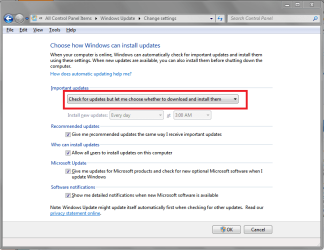
You can change the Windows Update Settings so updates are not automatically installed.
Then uninstall the updates in question and see if it the slow bootup issue is "fixed".
You could then install updates one at a time to see which update(s) are causing the issue, or wait for Jacee to look at the VEW file and post back.

WUDSP01.PNG
 

My Computer My Computer

At a glance

Multi-Boot W7_Pro_x64 W8.1_Pro_x64 W10_Pro_x6...AMD Athlon II x4 6206GB GSkill DDR2 800AMD 4670 GPU + AMD 4200 IGP
Computer type
PC/Desktop
Computer Manufacturer/Model Number
home built
OS
Multi-Boot W7_Pro_x64 W8.1_Pro_x64 W10_Pro_x64 +Linux_VMs +Chromium_VM
CPU
AMD Athlon II x4 620
Motherboard
Gigabyte GA-MA785G-UD3H
Memory
6GB GSkill DDR2 800
Graphics Card(s)
AMD 4670 GPU + AMD 4200 IGP
Sound Card
on board Realtek ALC889A
Monitor(s) Displays
RCA 40" LCD TV, Insignia 32" LCD TV, HP 15" LCD monitor
Screen Resolution
1680 x 1050
Hard Drives
OCZ Vertex 3 120GB,
Samsung F3 1TB (3),
Several others - WD, Seagate, Hitachi, ...
PSU
Corsair 500 W
Case
Rosewill mid tower
Cooling
CM 90mm rifle
Keyboard
Gyration wireless, Logitech wireless, Dell USB wired
Mouse
Gyration wireless, Logitech wireless, V7 USB wired
Internet Speed
Spectrum - 100Mbps D / 10Mbps U
Antivirus
Avast, MBAM3, EMET, WinPatrol
Browser
Pale Moon, Firefox, IE
Other Info
2 multi-boot PC's
Mainly HTPC/Office/Gen purpose (no gaming).
Trendnet USB KVM.
LG DVD burner/Blue Ray Player.
Tray system for removable SATA backup drives.

Not currently OCd, under-volted.
I use Hybrid sleep, rarely re-boot or shutdown.

Hauppauge HD-PVR, Avermedia PCIe TV Tuner, Hauppauge PCI TV Tuner.
hi, me and my classmates all have the same problem with the same model of laptop, the only way we could solve this problem is to have a change of harddisk. i think that HP has created a batch of defective laptops with harddisk that will spoil within a year of usage, all my classmates who used the same model of hp laptop as mine all have this harddisk issue. It even appeared in dv4 models! do you still have warranty left? if you have, call up hp support, they will ask u to do a disk check, just tell them that there's an error, they will ask u for an error code, google for it and give it to them, and they will help u replace the harddisk. They won't admit that it's their fault, but it's too much a coincidence that all of our laptops have the same problem within a year of purchase. you might have a hard time with the hp support hotline because they outsourced it to the people in India, and it's not that i'm a racist or whatever, but I can't really comprehend their English.
 

My Computer My Computer

At a glance

Windows 7 Ultimate x64QuadCore AMD Phenom II X4 Black Edition 955, ...Kingston RamATI Radeon HD 4870
OS
Windows 7 Ultimate x64
CPU
QuadCore AMD Phenom II X4 Black Edition 955, 3200 MHz
Motherboard
DFI LANParty DK 790FXB-M2RS(H)
Memory
Kingston Ram
Graphics Card(s)
ATI Radeon HD 4870
Monitor(s) Displays
Philips 234EL
Screen Resolution
1920 x 1080
Hard Drives
Western Digital Caviar Blue
Seagate Barracuda 7200.10 320620
Hitachi Deskstar 7K160
PSU
Antec True Power New 750W
Case
NZXT Guardian 921RB
Cooling
Coolermaster
Keyboard
Logitech
Mouse
Logitech
I think you have to consider and research lala1990's claim just above. Consult HP support if you can't find anything about the alleged bad HD's searching google. If you are still under warranty they should replace the drive if it is known defective.

To know you have the cleanest possible install without leaving any boot code from previous installs I would first wipe the HD with Diskpart Clean Command before doing a perfect Clean Reinstall - Factory OEM Windows 7 sticking with the steps given exactly.
 
See this for the first Event 10 Event ID 10 is logged in the Application log after you install Service Pack 1 for Windows 7 or Windows Server 2008 R2

Event: 100 Source: Bonjour Service ---> Apple - Support - Bonjour

Type: Critical Category: 63
Event: 41 Source: Microsoft-Windows-Kernel-Power
The system has rebooted without cleanly shutting down first. See:
http://support.microsoft.com/kb/2028504

Event: 9 Source: iaStor
The device, \Device\Ide\iaStor0, did not respond within the timeout period. [SOLVED] \Device\Ide\iaStor0 did not respond within the timeout period - Tech Support Forum
 

My Computer My Computer

At a glance

Windows 7 Ultimate 32bit SP1Intel(R) Core(TM)2 Quad CPU @ 2.40GHz, 2400 MHz4 GBATI Radeon HD 2600 Pro
Computer type
PC/Desktop
Computer Manufacturer/Model Number
Bruce ... somewhere in his 40's
OS
Windows 7 Ultimate 32bit SP1
CPU
Intel(R) Core(TM)2 Quad CPU @ 2.40GHz, 2400 MHz
Motherboard
INTEL/D975XBX2
Memory
4 GB
Graphics Card(s)
ATI Radeon HD 2600 Pro
Monitor(s) Displays
Samsung SyncMaster 914v
Screen Resolution
1280 x 1024
Hard Drives
2/500GB each ... ST3500630AS ATA Device.
One is not connected
PSU
Rocketfish 700 W
Case
G.Skill Gigabyte Chassis
Keyboard
Standard PS/2 Keyboard
Mouse
Microsoft PS/2 Mouse
Internet Speed
DSL
Antivirus
Avira Internet Security
Browser
IE 11
Other Info
ATI HDMI Audio
Johnson Q

when your window is in safe mode try to follow these instructions
Limiting programs that run at startup might help you to fix your computer performance problem
-Click on the Start button
-Type msconfig into the text box then press Enter to locate msconfig. You will be prompted system configuration page
-Switch to Startup tab and Remove the check from the box programs that you do not want to start up with the operating system
-press Apply and OK button.
-Or uninstall these programs that you don't want to need.

it may be useful for you......
 

My Computer My Computer

At a glance

microsoft window7 Ultimate x64
Computer type
PC/Desktop
OS
microsoft window7 Ultimate x64
Back
Top