Computers with CPUs that don't support SSE2 and Windows 7

If you have a UEFI system, you might have to disable Secure Boot in the BIOS before you try to run the Linux CD.
 

My Computer My Computer

At a glance

Windows 7 Pro SP1 64 bit8 GB
Computer type
Laptop
Computer Manufacturer/Model Number
Dell M6500 Precision Work Station
OS
Windows 7 Pro SP1 64 bit
Memory
8 GB
Screen Resolution
1920x
Internet Speed
30 Mbps
Antivirus
Norton Security
Browser
IE 11
wither 2

I think the talking horse is referring to an older low powered system running 32 bit win7.
 

My Computers My Computers

  • At a glance

    7 X64i5 84002x8gb 3200mhz
    Computer type
    PC/Desktop
    OS
    7 X64
    CPU
    i5 8400
    Motherboard
    gigabyte b365m ds3h
    Memory
    2x8gb 3200mhz
    Hard Drives
    various
    PSU
    pure power 11 400w cm
    Case
    Coolermaster
    Cooling
    cryorig m9i
  • At a glance

    7x64g54008gb ddr4 2400
    Computer type
    PC/Desktop
    OS
    7x64
    CPU
    g5400
    Motherboard
    ga b365m ds3h
    Memory
    8gb ddr4 2400
    PSU
    xfx pro 450w
UEFI? Secure Boot? Not on a 20 year old computer.

Well I made progress.

I never realized this computer could boot from a flash drive. I found out if I made the first boot device USB-HDD it would boot from the flash drive.

I had tried Backupper 2.0.2, 6.2. 6.92. No difference. My mistake was in selecting Linux boot. This was true whether booting from a CD or flash drive. I didn't think this old computer would boot using Windows PE but I tried anyways. To my surprise the computer booted with Windows PE on a flash drive.

I feel better now that I will be able to restore the boot drive if Windows become unbootable again.

--------------------------------------------------------------------------------------
Current Configuration:
MBD: ASUS A7N8X-E Deluxe
CPU: AMD Athlon XP 2800+
RAM: Corsair CMC2GX1M2A400C3 2GB (2x1GB)
GPU: PNY Verto GeForce FX5900 (128MB)
HDD: Maxtor 80GB (IDE)
HDD: WDC 40GB (IDE)
O/S: Windows 7 Home Premium

I agree, the computer is considered low power now but not when it was built 20 years ago. The CPU was the fastest AMD had at the time. BTW, the AMD XP 2800+ cost $400 US.

People may think that a computer this old and with only 2GB RAM would be really slow. Well a single core CPU is a liability. It is a lot slower than all my other computers except the laptop I bought in 2004. The GPU on this desktop makes a big difference. Windows 7 other than being slow is quite usable.

BTW, my old 2004 laptop does have one big advantage. Its CPU does support SSE2. That means it has a lot fewer problems with Windows updates. It also has the latest versions of Firefox and Edge.

I want to emphasize that this computer had been running fine with Windows 7 until two or three years ago when Microsoft and software developers started to assume the computer's CPU supported SSE2. There would be no workaround or fallback. The update or software would just install and if the CPU did not support SSE2 that was too bad. The possible results were:
  1. The software checked for SSE2 and would refuse to install
  2. The software installed but crashed when run
  3. The computer would crash but would boot again
  4. The computer would crash but would not boot again
If the computer would not boot and if I was lucky a System Restore would get the computer booting again. If not then a complete reinstall of Windows 7 was required.
 

My Computers My Computers

  • At a glance

    Windows 7 Home Premium 64-bitsAMD FX-8350GSKILL Ripjaw-X PC3 12800 8GB (2x4GB)ASUS ROG STRIX GTX 1060 6GB
    Computer type
    PC/Desktop
    Computer Manufacturer/Model Number
    Custom build
    OS
    Windows 7 Home Premium 64-bits
    CPU
    AMD FX-8350
    Motherboard
    Gigabyte GA-990FXA-UD3 (AM3+)
    Memory
    GSKILL Ripjaw-X PC3 12800 8GB (2x4GB)
    Graphics Card(s)
    ASUS ROG STRIX GTX 1060 6GB
    Sound Card
    Integrated
    Monitor(s) Displays
    Asus VE228H (21.5-in)
    Screen Resolution
    1920x1080 60Hz
    Hard Drives
    SAMSUNG 870 EVO 2.5 Inch SATA SSD (1TB)
    SAMSUNG 870 EVO 2.5 Inch SATA SSD (1TB)
    SAMSUNG 870 EVO 2.5 Inch SATA SSD (1TB)
    PSU
    Corsair RM750x (750 watts)
    Case
    Corsair Carbide Series 200R
    Cooling
    Corsair Hydro Series H60 (CWCH60)
    Keyboard
    Logitech Elite
    Mouse
    Logitech M510 Wireless Mouse
    Internet Speed
    Comcast Gigabit Extra (1200Mbps down / 35Mbps up)
    Antivirus
    Malwarebytes
    Browser
    Firefox, Edge, Chrome
    Other Info
    ASUS DRW-24B1ST DVD-RW (24X) optical drive
    Seagate Expansion Desk (5TB) external SATA/USB HDD
    Comcast XB8 Internet Gateway
  • At a glance

    Windows 7 Pro (64-bit)AMD Phenom II 960T X4Corsair XMS2 DDR2-800 8GB (4x2GB)ASUS ENGTX560 DCII OC/2DI/1GD5 1GB
    Computer type
    PC/Desktop
    System Manufacturer/Model Number
    Custom
    OS
    Windows 7 Pro (64-bit)
    CPU
    AMD Phenom II 960T X4
    Motherboard
    ASUS M4N82 Deluxe
    Memory
    Corsair XMS2 DDR2-800 8GB (4x2GB)
    Graphics Card(s)
    ASUS ENGTX560 DCII OC/2DI/1GD5 1GB
    Monitor(s) Displays
    Samsung 930B 19-inch LCD
    Screen Resolution
    1280x1024
    Hard Drives
    Samsung SSD 870 EVO 1000 GB (Windows 10)
    Seagate ST1000DM003 1000 GB (Windows 7)
    PSU
    Antec TruePower (new) TP-650
    Case
    Antec Three Hundred
    Cooling
    AMD stock cooler from FX8350
    Mouse
    Logitech M100
    Internet Speed
    Xfinity Gigabit Extra 1200/35 Mbps
I had to reinstall Windows 7 for other reasons. Yesterday I worked through the expected updates crashing because of CPU not supporting SSE2. Windows said it had 41 updates but because of the potential for crashing I decided to install them one at a time. I only had to do 2 or 3 System Restores. It turned out I had to install fewer update than expected because once an update crashed some of the other updates were no longer offered.The final list had 4 updates but I hid them because they had already caused the computer to crash. I will continue to only try to install one update at a time so I know what to hide.

I have attached a Windows Update log showing the updates that were attempted yesterday. Some updates are shown more than once because sometimes I didn't realize that a particular update had already been tried. Note Internet Explorer 11 installed but I had to uninstall it. That is because it would not run. Later I found out that was because it required SSE2.
 

Attachments

My Computers My Computers

  • At a glance

    Windows 7 Home Premium 64-bitsAMD FX-8350GSKILL Ripjaw-X PC3 12800 8GB (2x4GB)ASUS ROG STRIX GTX 1060 6GB
    Computer type
    PC/Desktop
    Computer Manufacturer/Model Number
    Custom build
    OS
    Windows 7 Home Premium 64-bits
    CPU
    AMD FX-8350
    Motherboard
    Gigabyte GA-990FXA-UD3 (AM3+)
    Memory
    GSKILL Ripjaw-X PC3 12800 8GB (2x4GB)
    Graphics Card(s)
    ASUS ROG STRIX GTX 1060 6GB
    Sound Card
    Integrated
    Monitor(s) Displays
    Asus VE228H (21.5-in)
    Screen Resolution
    1920x1080 60Hz
    Hard Drives
    SAMSUNG 870 EVO 2.5 Inch SATA SSD (1TB)
    SAMSUNG 870 EVO 2.5 Inch SATA SSD (1TB)
    SAMSUNG 870 EVO 2.5 Inch SATA SSD (1TB)
    PSU
    Corsair RM750x (750 watts)
    Case
    Corsair Carbide Series 200R
    Cooling
    Corsair Hydro Series H60 (CWCH60)
    Keyboard
    Logitech Elite
    Mouse
    Logitech M510 Wireless Mouse
    Internet Speed
    Comcast Gigabit Extra (1200Mbps down / 35Mbps up)
    Antivirus
    Malwarebytes
    Browser
    Firefox, Edge, Chrome
    Other Info
    ASUS DRW-24B1ST DVD-RW (24X) optical drive
    Seagate Expansion Desk (5TB) external SATA/USB HDD
    Comcast XB8 Internet Gateway
  • At a glance

    Windows 7 Pro (64-bit)AMD Phenom II 960T X4Corsair XMS2 DDR2-800 8GB (4x2GB)ASUS ENGTX560 DCII OC/2DI/1GD5 1GB
    Computer type
    PC/Desktop
    System Manufacturer/Model Number
    Custom
    OS
    Windows 7 Pro (64-bit)
    CPU
    AMD Phenom II 960T X4
    Motherboard
    ASUS M4N82 Deluxe
    Memory
    Corsair XMS2 DDR2-800 8GB (4x2GB)
    Graphics Card(s)
    ASUS ENGTX560 DCII OC/2DI/1GD5 1GB
    Monitor(s) Displays
    Samsung 930B 19-inch LCD
    Screen Resolution
    1280x1024
    Hard Drives
    Samsung SSD 870 EVO 1000 GB (Windows 10)
    Seagate ST1000DM003 1000 GB (Windows 7)
    PSU
    Antec TruePower (new) TP-650
    Case
    Antec Three Hundred
    Cooling
    AMD stock cooler from FX8350
    Mouse
    Logitech M100
    Internet Speed
    Xfinity Gigabit Extra 1200/35 Mbps
I had to reinstall Windows 7 for other reasons. Yesterday I worked through the expected updates crashing because of CPU not supporting SSE2. Windows said it had 41 updates but because of the potential for crashing I decided to install them one at a time. I only had to do 2 or 3 System Restores. It turned out I had to install fewer update than expected because once an update crashed some of the other updates were no longer offered.The final list had 4 updates but I hid them because they had already caused the computer to crash. I will continue to only try to install one update at a time so I know what to hide.

I have attached a Windows Update log showing the updates that were attempted yesterday. Some updates are shown more than once because sometimes I didn't realize that a particular update had already been tried. Note Internet Explorer 11 installed but I had to uninstall it. That is because it would not run. Later I found out that was because it required SSE2.

All the information shared by MisterEd in this thread was super helpful, as I was going thru the same issues.

My system is pretty much similar:
MBD: ASUS A7V8X-X
CPU: AMD Athlon XP 2400+
RAM: 1.5GB
GPU: GeForce FX5200 (128MB)
HDD: 120GB (IDE)
OS: Windows 7 Pro SP1

I wanted to update it as I had a fresh SP1 install, but sadly I found out that without SSE2 some patches would totally break the system.

My first idea was to update with Legacy Update , but that didn't work and my PC wouldn't boot. I was lucky to restore it using my installation media and booting the Win7 installer. (then select the recovery options and pick the restore point before the legacy update failure)

Then before trying more stuff I found this thread, and was surprised to see that I could follow this to avoid guessing which updates would work or not.

So what I did:
Install the "sp2 rollup" as mentioned in Redirecting

Then instead of the Simplix 2017 link, I just went with the regular windows update. It showed about 50 updates available. I was selected updates with dates up to 2017. Anything above like 2018, 2019, 2020+, I just skipped. If I had doubts, I used the .PDF from MisterEd. If it was marked as "Failed" I'd just avoid it.

Everything went well and I could update my Win7 pretty much until 2018, before the SSE2 requirement went into effect.

On a side note, I manually updated to IE9 , as it seems both IE11 and IE10 already required SSE2. I'm not using IE anyways, but just in case I tried to update the browser to the latest available.

Btw, for regular browsing I found this project "Pale Moon" based on Firefox, and some community devs make builds without SSE2 so it can run on Athlon XP processors. This firefox-based browser can render newer sites pretty well, even if everything might be slow for today's standards.

 

My Computers My Computers

  • At a glance

    Windows 7 Professional 32bitAMD Athlon XP 2400+1.5GBGeForce FX5200
    Computer type
    PC/Desktop
    OS
    Windows 7 Professional 32bit
    CPU
    AMD Athlon XP 2400+
    Motherboard
    Asus A7V8X-X
    Memory
    1.5GB
    Graphics Card(s)
    GeForce FX5200
    Sound Card
    SoundMAX Integrated Audio
    Monitor(s) Displays
    Samsung
    Screen Resolution
    1920x1080
  • Computer type
    PC/Desktop
That is a good strategy to avoid updates that are dated 2018 or newer. 2018 is when people with CPUs without SSE2 started having problems.

Computer #1 is the one I was talking about when I started this thread. It was running Windows 7 but it now has Windows XP because of the problems I was having. Your response has encouraged me to rethink this and try Windows 7 again. This time I will try to make sure that updates 2018 and newer are not installed.

Computer #2 is another matter. I probably need at least 1GB RAM to install Windows 7. I need to look around to see if I have any that will work with that motherboard.

These two computers are OK as is but would be a lot more useful if I put Windows 7 on them. At least I could browse the Internet more safely.

Computer #1:
MBD: ASUS A7N8X-E Deluxe (Socket A)
CHP: NVIDIA NForce2 Ultra 400/Nforce2 MCP-T
CPU: AMD Athlon XP 2800+ (2.25GHz)
RAM: Corsair XMS DDR 400 2GB (2x1GB)
GPU: PNY Verto GeForce FX5900 (AGP)

Computer #2:
MBD: ASUS A7V400-MX (Socket A)
CHP: VIA KM400A/VT8235 CE
CPU: Athlon XP2400+ (2.0GHz)
RAM: Super Talent DDR 333 500MB
GPU: NVIDIA GeForce4 ti4600 (AGP)
 

My Computers My Computers

  • At a glance

    Windows 7 Home Premium 64-bitsAMD FX-8350GSKILL Ripjaw-X PC3 12800 8GB (2x4GB)ASUS ROG STRIX GTX 1060 6GB
    Computer type
    PC/Desktop
    Computer Manufacturer/Model Number
    Custom build
    OS
    Windows 7 Home Premium 64-bits
    CPU
    AMD FX-8350
    Motherboard
    Gigabyte GA-990FXA-UD3 (AM3+)
    Memory
    GSKILL Ripjaw-X PC3 12800 8GB (2x4GB)
    Graphics Card(s)
    ASUS ROG STRIX GTX 1060 6GB
    Sound Card
    Integrated
    Monitor(s) Displays
    Asus VE228H (21.5-in)
    Screen Resolution
    1920x1080 60Hz
    Hard Drives
    SAMSUNG 870 EVO 2.5 Inch SATA SSD (1TB)
    SAMSUNG 870 EVO 2.5 Inch SATA SSD (1TB)
    SAMSUNG 870 EVO 2.5 Inch SATA SSD (1TB)
    PSU
    Corsair RM750x (750 watts)
    Case
    Corsair Carbide Series 200R
    Cooling
    Corsair Hydro Series H60 (CWCH60)
    Keyboard
    Logitech Elite
    Mouse
    Logitech M510 Wireless Mouse
    Internet Speed
    Comcast Gigabit Extra (1200Mbps down / 35Mbps up)
    Antivirus
    Malwarebytes
    Browser
    Firefox, Edge, Chrome
    Other Info
    ASUS DRW-24B1ST DVD-RW (24X) optical drive
    Seagate Expansion Desk (5TB) external SATA/USB HDD
    Comcast XB8 Internet Gateway
  • At a glance

    Windows 7 Pro (64-bit)AMD Phenom II 960T X4Corsair XMS2 DDR2-800 8GB (4x2GB)ASUS ENGTX560 DCII OC/2DI/1GD5 1GB
    Computer type
    PC/Desktop
    System Manufacturer/Model Number
    Custom
    OS
    Windows 7 Pro (64-bit)
    CPU
    AMD Phenom II 960T X4
    Motherboard
    ASUS M4N82 Deluxe
    Memory
    Corsair XMS2 DDR2-800 8GB (4x2GB)
    Graphics Card(s)
    ASUS ENGTX560 DCII OC/2DI/1GD5 1GB
    Monitor(s) Displays
    Samsung 930B 19-inch LCD
    Screen Resolution
    1280x1024
    Hard Drives
    Samsung SSD 870 EVO 1000 GB (Windows 10)
    Seagate ST1000DM003 1000 GB (Windows 7)
    PSU
    Antec TruePower (new) TP-650
    Case
    Antec Three Hundred
    Cooling
    AMD stock cooler from FX8350
    Mouse
    Logitech M100
    Internet Speed
    Xfinity Gigabit Extra 1200/35 Mbps
Yes, I had this old PC lying around (with 512Mb Ram), but with WinXP it felt almost useless. So I added 1GB RAM, and then with 1.5GB Ram I decided to try the Win7 road.

I was positively surprised of the results, I'm very happy and it feels like it can handle a good amount of tasks, like:
- Win7 with Aero
- running Office 2007
- FTP client (filezilla 3.67.1)
- video playback (VLC 2.2.8)
- web browsing (Firefox 48 / New Moon 28)
- SMB sharing
- NFS file server (HaneWin NFS server)

I bought a cheap used PCI-SATA card, and added a 18TB hard drive, and now this PC runs as a file server on my local network. The SMB share for any Windows computer, and the NFS server for Mac and Linux computers. I might try using the integrated FTP server from Win7 if I also want to run a local ftp server, but right now SMB and NFS seems enough, and with good speeds (up to 100 Mbits, max for the Rhine II ethernet card from the Asus motherboard)

I think that your PC #1 should even run better than mine, so I'd totally try Win7 again. For the GeForce 5200 I had to use the vista driver, but runs great and I can get 1920x1080 via DVI-HDMI cable on my Samsung monitor.

Regarding web browsing with no SSE2, you can check these options (I tried all except SeaMonkey, and I kept Firefox 48 and New Moon 28 SSE1):
Chromium v34.0.1847.0 (SSE1)
Firefox 45.9.13esr (SSE1)
Firefox 48.0.2 (SSE1)
New Moon 27 (SSE1 and noSSE)
Opera 20.0.1387.91 (SSE1)
SeaMonkey (2.9.1 for SSE1 and 2.8 for noSSE)

Btw, once I completed all the 2017 patches, I just disabled Windows update and Windows defender, as nothing can be updated further and I don't want the risk of some silent update/download crashing my computer.
 
Last edited:

My Computers My Computers

  • At a glance

    Windows 7 Professional 32bitAMD Athlon XP 2400+1.5GBGeForce FX5200
    Computer type
    PC/Desktop
    OS
    Windows 7 Professional 32bit
    CPU
    AMD Athlon XP 2400+
    Motherboard
    Asus A7V8X-X
    Memory
    1.5GB
    Graphics Card(s)
    GeForce FX5200
    Sound Card
    SoundMAX Integrated Audio
    Monitor(s) Displays
    Samsung
    Screen Resolution
    1920x1080
  • Computer type
    PC/Desktop
I am already doing file sharing with these old computers with my other computers that have Windows 7, 10 and 11. Network setup on Windows XP is kind of flaky but Windows 7 should be better.

I am using the Pale Moon browser on these computers. Note Pale Moon is derived from the New Moon browser for Windows XP. I will probably switch to Firefox on Windows 7.

I have one copy of Office Pro 2007 and one of Office Std 2007. I may put these on these computers if I upgrade them to Windows 7.

I forgot to mention that both computers used to have IDE HDDs. Last year I replaced these drives with SATA HDDs. Computer #1 had 2 x built-in SATA 1.0 ports. Computer #2 didn't but I added an old PCI card that had 2 x SATA 1.0 ports on it. Since these computers are over 20 years old their BIOSs didn't natively support SATA. When I installed Windows XP I had to have SATA drivers on floppy disks. During setup at the appropriate time I had to press F6 to load the SATA drivers. I am sure I will have to do the same thing if I install Windows 7. Even though the SATA controllers are only SATA 1.0 the SATA drives were noticeably faster than the previous IDE ones.

On another forum someone tried to tell me the drivers on the floppy were not necessary. That may be true for motherboards from maybe 2005 and newer but not ones as old as mine.

Computer #1 has 2 SATA 1.0 ports. These are not supported in the BIOS.

SATA ports.jpg

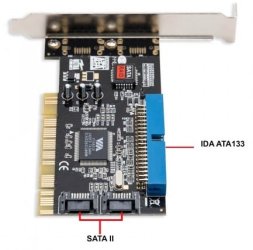
Computer #2 has no SATA ports. The PCI cards adds 2 x SATA 1.0 ports.

SATA card.jpg
 

My Computers My Computers

  • At a glance

    Windows 7 Home Premium 64-bitsAMD FX-8350GSKILL Ripjaw-X PC3 12800 8GB (2x4GB)ASUS ROG STRIX GTX 1060 6GB
    Computer type
    PC/Desktop
    Computer Manufacturer/Model Number
    Custom build
    OS
    Windows 7 Home Premium 64-bits
    CPU
    AMD FX-8350
    Motherboard
    Gigabyte GA-990FXA-UD3 (AM3+)
    Memory
    GSKILL Ripjaw-X PC3 12800 8GB (2x4GB)
    Graphics Card(s)
    ASUS ROG STRIX GTX 1060 6GB
    Sound Card
    Integrated
    Monitor(s) Displays
    Asus VE228H (21.5-in)
    Screen Resolution
    1920x1080 60Hz
    Hard Drives
    SAMSUNG 870 EVO 2.5 Inch SATA SSD (1TB)
    SAMSUNG 870 EVO 2.5 Inch SATA SSD (1TB)
    SAMSUNG 870 EVO 2.5 Inch SATA SSD (1TB)
    PSU
    Corsair RM750x (750 watts)
    Case
    Corsair Carbide Series 200R
    Cooling
    Corsair Hydro Series H60 (CWCH60)
    Keyboard
    Logitech Elite
    Mouse
    Logitech M510 Wireless Mouse
    Internet Speed
    Comcast Gigabit Extra (1200Mbps down / 35Mbps up)
    Antivirus
    Malwarebytes
    Browser
    Firefox, Edge, Chrome
    Other Info
    ASUS DRW-24B1ST DVD-RW (24X) optical drive
    Seagate Expansion Desk (5TB) external SATA/USB HDD
    Comcast XB8 Internet Gateway
  • At a glance

    Windows 7 Pro (64-bit)AMD Phenom II 960T X4Corsair XMS2 DDR2-800 8GB (4x2GB)ASUS ENGTX560 DCII OC/2DI/1GD5 1GB
    Computer type
    PC/Desktop
    System Manufacturer/Model Number
    Custom
    OS
    Windows 7 Pro (64-bit)
    CPU
    AMD Phenom II 960T X4
    Motherboard
    ASUS M4N82 Deluxe
    Memory
    Corsair XMS2 DDR2-800 8GB (4x2GB)
    Graphics Card(s)
    ASUS ENGTX560 DCII OC/2DI/1GD5 1GB
    Monitor(s) Displays
    Samsung 930B 19-inch LCD
    Screen Resolution
    1280x1024
    Hard Drives
    Samsung SSD 870 EVO 1000 GB (Windows 10)
    Seagate ST1000DM003 1000 GB (Windows 7)
    PSU
    Antec TruePower (new) TP-650
    Case
    Antec Three Hundred
    Cooling
    AMD stock cooler from FX8350
    Mouse
    Logitech M100
    Internet Speed
    Xfinity Gigabit Extra 1200/35 Mbps
Oh, nice, I had no idea that some ASUS motherboards from that time had SATA ports. I'm still using my old IDE drive as the system drive for booting. The additional SATA disk I use it only for data storage, formatted as exFAT in case I need to take it out and connect it to any other system like Mac. (NTFS can be tricky if you're not using windows)

The PCI board I've got has 4 SATA 1 ports, and it has a Silicon Image Sil3114 chipset:
https://www.startech.com/en-us/cards-adapters/pcisata4r1

(I'm not using the RAID features from the PCI card because RAID is limited to 2TB drives. But with that card in theory I could connect up to 4 drives with any size. Currently only using one SATA 18TB disk)

Talking about Win7 browsers, I was searching around, and found some references that IE10 "Windows 7 Preview" actually worked fine on Athlon XP processors, so I guess originally it didn't had SSE2 as requirement, yet the final IE10 release did require SSE2.
I was able to download the old IE10 Preview installer from archive.org (but haven't tested on my system yet):
Download IE10 Platform Preview

On a side note, I found this web site with a list of windows apps and versions compatible with the "no-SSE2" requirement:
Last versions of Windows applications that do not require SSE2 - Matej Horvat
 

My Computers My Computers

  • At a glance

    Windows 7 Professional 32bitAMD Athlon XP 2400+1.5GBGeForce FX5200
    Computer type
    PC/Desktop
    OS
    Windows 7 Professional 32bit
    CPU
    AMD Athlon XP 2400+
    Motherboard
    Asus A7V8X-X
    Memory
    1.5GB
    Graphics Card(s)
    GeForce FX5200
    Sound Card
    SoundMAX Integrated Audio
    Monitor(s) Displays
    Samsung
    Screen Resolution
    1920x1080
  • Computer type
    PC/Desktop
I need to further mention that the ASUS A7N8X-E Deluxe motherboard came out in about 2003. I bought it on Ebay to replace the ASUS A7N8X- Deluxe that failed. The biggest difference was the A7N8X-E Deluxe board had gigabit Ethernet controller. I bought the A7N8X-E Deluxe board in November 2002.

The ASUS A7N8X Deluxe board was ahead of its time with SATA support and a dual-channel memory controller. Note in 2002 you couldn't even buy SATA HDDs. They eventually came out with SATA HDDs in 2003 but they were very expensive. I remember some people were using SATA to IDE adapters so they could plug their old IDE drives into the SATA ports. I read that some HDD manufacturers converted existing IDE drives to SATA by adding SATA to IDE bridges adapters internally.

When the ASUS A7N8X Deluxe board came out dual-channel memory support didn't exist. Early buyers were caught off guard because there was no guidance on what memory to buy that was compatible. I was one of these people. I bought very expensive RAM because it was said to work by a reviewer that evaluated the board before release. I find it hard to believe that I paid $378 US for the following 2x512MB sticks of Corsair XMS CMX512-2700C2 DDR PC2700 (333MHz) RAM.

BTW, there were so many people having problems with finding suitable RAM that some sellers started testing RAM to find sticks that worked together reliability. They so sold them as being guaranteed to run with this motherboard. Note back then kits of RAM for dual-channel didn't exist.

Even though both the motherboard for Computer #1 and the SATA controller board for Computer #2 supported RAID I had no interest in it. I find it amusing now because they really emphasized RAID and barely talked about just using the controllers for just single drive SATA. I think it was just marketing. They were probably did this by comparing the performance of a single IDE drives with 2 SATA drives running RAID 0.
 

My Computers My Computers

  • At a glance

    Windows 7 Home Premium 64-bitsAMD FX-8350GSKILL Ripjaw-X PC3 12800 8GB (2x4GB)ASUS ROG STRIX GTX 1060 6GB
    Computer type
    PC/Desktop
    Computer Manufacturer/Model Number
    Custom build
    OS
    Windows 7 Home Premium 64-bits
    CPU
    AMD FX-8350
    Motherboard
    Gigabyte GA-990FXA-UD3 (AM3+)
    Memory
    GSKILL Ripjaw-X PC3 12800 8GB (2x4GB)
    Graphics Card(s)
    ASUS ROG STRIX GTX 1060 6GB
    Sound Card
    Integrated
    Monitor(s) Displays
    Asus VE228H (21.5-in)
    Screen Resolution
    1920x1080 60Hz
    Hard Drives
    SAMSUNG 870 EVO 2.5 Inch SATA SSD (1TB)
    SAMSUNG 870 EVO 2.5 Inch SATA SSD (1TB)
    SAMSUNG 870 EVO 2.5 Inch SATA SSD (1TB)
    PSU
    Corsair RM750x (750 watts)
    Case
    Corsair Carbide Series 200R
    Cooling
    Corsair Hydro Series H60 (CWCH60)
    Keyboard
    Logitech Elite
    Mouse
    Logitech M510 Wireless Mouse
    Internet Speed
    Comcast Gigabit Extra (1200Mbps down / 35Mbps up)
    Antivirus
    Malwarebytes
    Browser
    Firefox, Edge, Chrome
    Other Info
    ASUS DRW-24B1ST DVD-RW (24X) optical drive
    Seagate Expansion Desk (5TB) external SATA/USB HDD
    Comcast XB8 Internet Gateway
  • At a glance

    Windows 7 Pro (64-bit)AMD Phenom II 960T X4Corsair XMS2 DDR2-800 8GB (4x2GB)ASUS ENGTX560 DCII OC/2DI/1GD5 1GB
    Computer type
    PC/Desktop
    System Manufacturer/Model Number
    Custom
    OS
    Windows 7 Pro (64-bit)
    CPU
    AMD Phenom II 960T X4
    Motherboard
    ASUS M4N82 Deluxe
    Memory
    Corsair XMS2 DDR2-800 8GB (4x2GB)
    Graphics Card(s)
    ASUS ENGTX560 DCII OC/2DI/1GD5 1GB
    Monitor(s) Displays
    Samsung 930B 19-inch LCD
    Screen Resolution
    1280x1024
    Hard Drives
    Samsung SSD 870 EVO 1000 GB (Windows 10)
    Seagate ST1000DM003 1000 GB (Windows 7)
    PSU
    Antec TruePower (new) TP-650
    Case
    Antec Three Hundred
    Cooling
    AMD stock cooler from FX8350
    Mouse
    Logitech M100
    Internet Speed
    Xfinity Gigabit Extra 1200/35 Mbps
Just a small quick note, I recently tried installing one update from 2018 that improved/fixed some Remote desktop issue, and my Win7 setup totally crashed after the reboot.

I had to boot from my install DVD, and used the restore point recovery option. It looked like it was doing the recovery, but failed at the end with an unknown error. Yet after that semi-failed restore, my Win7 system booted fine, so I guess it fixed the broken SSE2 files.
I'm a bit worried that I couldn't really fully restore the system and right now everything works, but I don't know if some problem will show up in the future due to this incomplete/failed update. I don't want to reinstall everything from scratch as it will take time. Too bad I didn't made a disk image with Norton Ghost before trying risky 2018+ updates, that way it would be piece of cake to try newer updates and restore to a safe point when needed.

Long story short, the only safe path is avoiding all 2018+ updates if you have a non-SSE2 processor and have Win7 installed.
 

My Computers My Computers

  • At a glance

    Windows 7 Professional 32bitAMD Athlon XP 2400+1.5GBGeForce FX5200
    Computer type
    PC/Desktop
    OS
    Windows 7 Professional 32bit
    CPU
    AMD Athlon XP 2400+
    Motherboard
    Asus A7V8X-X
    Memory
    1.5GB
    Graphics Card(s)
    GeForce FX5200
    Sound Card
    SoundMAX Integrated Audio
    Monitor(s) Displays
    Samsung
    Screen Resolution
    1920x1080
  • Computer type
    PC/Desktop
Just a small quick note, I recently tried installing one update from 2018 that improved/fixed some Remote desktop issue, and my Win7 setup totally crashed after the reboot.

I had to boot from my install DVD, and used the restore point recovery option. It looked like it was doing the recovery, but failed at the end with an unknown error. Yet after that semi-failed restore, my Win7 system booted fine, so I guess it fixed the broken SSE2 files.
I'm a bit worried that I couldn't really fully restore the system and right now everything works, but I don't know if some problem will show up in the future due to this incomplete/failed update. I don't want to reinstall everything from scratch as it will take time. Too bad I didn't made a disk image with Norton Ghost before trying risky 2018+ updates, that way it would be piece of cake to try newer updates and restore to a safe point when needed.

Long story short, the only safe path is avoiding all 2018+ updates if you have a non-SSE2 processor and have Win7 installed.
You don't what agony I went through because I didn't know what the problem was. I had maybe 50 updates and didn't know what update was causing the problem. Every time the system crashed I had to do a system restore. I ended up only doing a few updates at a time and if that crashed I narrowed it down to one of those. I lost track of how many system restores I did. I ended up reinstalling Windows XP on that computer. Someday I may try to install Windows 7 again if I get bored and have a lot of free time.
 

My Computers My Computers

  • At a glance

    Windows 7 Home Premium 64-bitsAMD FX-8350GSKILL Ripjaw-X PC3 12800 8GB (2x4GB)ASUS ROG STRIX GTX 1060 6GB
    Computer type
    PC/Desktop
    Computer Manufacturer/Model Number
    Custom build
    OS
    Windows 7 Home Premium 64-bits
    CPU
    AMD FX-8350
    Motherboard
    Gigabyte GA-990FXA-UD3 (AM3+)
    Memory
    GSKILL Ripjaw-X PC3 12800 8GB (2x4GB)
    Graphics Card(s)
    ASUS ROG STRIX GTX 1060 6GB
    Sound Card
    Integrated
    Monitor(s) Displays
    Asus VE228H (21.5-in)
    Screen Resolution
    1920x1080 60Hz
    Hard Drives
    SAMSUNG 870 EVO 2.5 Inch SATA SSD (1TB)
    SAMSUNG 870 EVO 2.5 Inch SATA SSD (1TB)
    SAMSUNG 870 EVO 2.5 Inch SATA SSD (1TB)
    PSU
    Corsair RM750x (750 watts)
    Case
    Corsair Carbide Series 200R
    Cooling
    Corsair Hydro Series H60 (CWCH60)
    Keyboard
    Logitech Elite
    Mouse
    Logitech M510 Wireless Mouse
    Internet Speed
    Comcast Gigabit Extra (1200Mbps down / 35Mbps up)
    Antivirus
    Malwarebytes
    Browser
    Firefox, Edge, Chrome
    Other Info
    ASUS DRW-24B1ST DVD-RW (24X) optical drive
    Seagate Expansion Desk (5TB) external SATA/USB HDD
    Comcast XB8 Internet Gateway
  • At a glance

    Windows 7 Pro (64-bit)AMD Phenom II 960T X4Corsair XMS2 DDR2-800 8GB (4x2GB)ASUS ENGTX560 DCII OC/2DI/1GD5 1GB
    Computer type
    PC/Desktop
    System Manufacturer/Model Number
    Custom
    OS
    Windows 7 Pro (64-bit)
    CPU
    AMD Phenom II 960T X4
    Motherboard
    ASUS M4N82 Deluxe
    Memory
    Corsair XMS2 DDR2-800 8GB (4x2GB)
    Graphics Card(s)
    ASUS ENGTX560 DCII OC/2DI/1GD5 1GB
    Monitor(s) Displays
    Samsung 930B 19-inch LCD
    Screen Resolution
    1280x1024
    Hard Drives
    Samsung SSD 870 EVO 1000 GB (Windows 10)
    Seagate ST1000DM003 1000 GB (Windows 7)
    PSU
    Antec TruePower (new) TP-650
    Case
    Antec Three Hundred
    Cooling
    AMD stock cooler from FX8350
    Mouse
    Logitech M100
    Internet Speed
    Xfinity Gigabit Extra 1200/35 Mbps
Back
Top