Connecting wirelessly to an xp computer.

Martin Dendev

Software Lover
Power User
Local time
12:30 AM
Messages
170
Location
Oostkamp
Hi there,

I got an XP laptop running and wirelessly conected to our router.

Somehow my laptop is not able to connect with that router, even with the correct password. (before I was just running on the cable but I wanted to go in my room upstairs)

Now is there a way to connect to that XP laptop and get the internet from the XP laptop? I know VirtualRouter but that's only for Windows7. The XP laptop must stay wirelessly connected to the router since my mom does not want to go on cable either. And we don't want to buy a new router...

Any solutions?

Thx!
Martin
 

My Computer

Computer type
Laptop
Computer Manufacturer/Model Number
HP Probook 4710s
OS
Windows 7 Home Premium 32 bit
Hard Drives
Fujitsu
Mouse
Touchpad

My Computer

Computer Manufacturer/Model Number
HP Pavilion Elite 495UK
OS
Windows 7 Ultimate SP1 64-Bit
CPU
Intel Core i7 870 @ 2.93GHz
Motherboard
MSI 2A9C (CPU1)
Memory
8Gb Dual-Channel DDR3 @ 664MHz
Graphics Card(s)
nVidia GeForce GTX 460 1024MB dedicated RAM
Sound Card
Realtek HD Audio
Monitor(s) Displays
HP2310i
Screen Resolution
1920 x 1080
Hard Drives
1x1954GB Hitachi HDS22020ALA 330 (RAID), 1x1954GB Hitachi External for backup and storage
PSU
460W
Case
HP Elite
Cooling
Air cooled
Keyboard
Logitech K750 solar-powered keyboard
Mouse
Logitech Wireless M180 mouse
Internet Speed
2Mb
Other Info
Pure Avanti Flow Internet Radio with iPod Dock, 64Gb iPod, HP USB Speakers, Sony MDR-V500 Headphones, Sony Vaio F-Series Laptop
So let me make sure that I have this right:

You have a router that doesn't support wireless capabilities
You have an XP laptop with a wireless card
The XP laptop is connected via wire to your router
You have a Windows 7 computer also with a wireless card
You are trying to connect to the internet wirelessly, by connecting to your XP laptop (which is sharing its wireless card) with your Windows 7 computer?

Am I right?
 

My Computer

Computer Manufacturer/Model Number
ASUS G60JX Republic of Gamers
OS
Windows 7 Professional 64-bit
CPU
Intel i5 430m
Memory
4 GB DDR3
Graphics Card(s)
nvidia Geforce GTS 360M Cuda 1GB
Sound Card
EAX Advanced HD 4.0
Screen Resolution
1366 x 768
Hard Drives
460 GB 7200 RPM built in
Internet Speed
Too slow :-( 160kbs
Hi there, both of you! Thanks for your quick replies.

My own laptop is not able to connect to the router (I don't know why)
The XP Computer is connected wirelessly to the router;
I want to connect via the XP computer to the network.

@seavixen32: If i set up another network on the XP laptop, my wireless connection to the router goes away :)
 

My Computer

Computer type
Laptop
Computer Manufacturer/Model Number
HP Probook 4710s
OS
Windows 7 Home Premium 32 bit
Hard Drives
Fujitsu
Mouse
Touchpad
Have you tried sharing the XP's wireless card, then connecting to that? That should give you network access and internet access.
 

My Computer

Computer Manufacturer/Model Number
ASUS G60JX Republic of Gamers
OS
Windows 7 Professional 64-bit
CPU
Intel i5 430m
Memory
4 GB DDR3
Graphics Card(s)
nvidia Geforce GTS 360M Cuda 1GB
Sound Card
EAX Advanced HD 4.0
Screen Resolution
1366 x 768
Hard Drives
460 GB 7200 RPM built in
Internet Speed
Too slow :-( 160kbs
It would be great if you can tell me how :)
 

My Computer

Computer type
Laptop
Computer Manufacturer/Model Number
HP Probook 4710s
OS
Windows 7 Home Premium 32 bit
Hard Drives
Fujitsu
Mouse
Touchpad
Sorry, I was just making sure that I had the right idea.

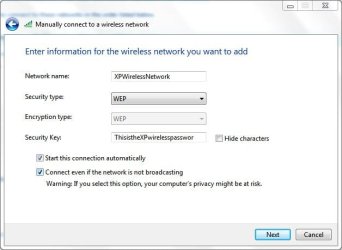
Follow this link up until step 9. From then on, follow these steps:

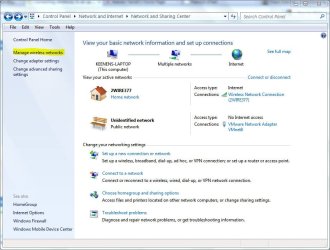
Go to start any type "Network and Sharing Center"

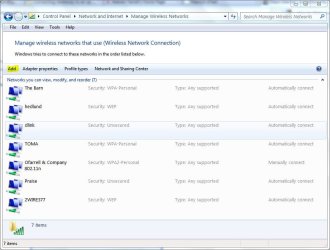
Click on Network and Sharing Center, and a window like this should come up. Then click on Manage Wireless Networks on the right hand side.

Click next, and that should do it!

Hope this helps,
The Unofficial
 

Attachments

  • Capture.JPG
    Capture.JPG
    92.1 KB · Views: 3
  • Capture1.JPG
    Capture1.JPG
    45.2 KB · Views: 1
  • ManageWireless.JPG
    ManageWireless.JPG
    102.2 KB · Views: 1

My Computer

Computer Manufacturer/Model Number
ASUS G60JX Republic of Gamers
OS
Windows 7 Professional 64-bit
CPU
Intel i5 430m
Memory
4 GB DDR3
Graphics Card(s)
nvidia Geforce GTS 360M Cuda 1GB
Sound Card
EAX Advanced HD 4.0
Screen Resolution
1366 x 768
Hard Drives
460 GB 7200 RPM built in
Internet Speed
Too slow :-( 160kbs
Well that ^^^^^ certainly didn't work...
 

My Computer

Computer Manufacturer/Model Number
ASUS G60JX Republic of Gamers
OS
Windows 7 Professional 64-bit
CPU
Intel i5 430m
Memory
4 GB DDR3
Graphics Card(s)
nvidia Geforce GTS 360M Cuda 1GB
Sound Card
EAX Advanced HD 4.0
Screen Resolution
1366 x 768
Hard Drives
460 GB 7200 RPM built in
Internet Speed
Too slow :-( 160kbs
You say XP is connected to the wireless router without cable.
Your Windows 7 is not connecting to the wireless router.

Like XP has connected, your Window 7 also should connect to wireless router easily. It is not efficient way of connecting through XP using "Internet Connection Sharing".

Open the XP's wireless connection and notedown the following.

Type of wireless connection, it is "b", "g" "b/g" or "n".
What is the encryption mode, it is either "WEP" or "WAP2" with AES or TKIP.
Check the wireless channel number (ex: 6, 11 etc.)

Make same settings on the Win 7 laptop wireless adapter. Select "connect automatically to this network when in range"
and " Connect to this network even if it is not broadcasting".

Hopefully you should connect to the wireless router wirelessly.

If it is not connected, try the repair option on the Wireless adapter. In the TCP/IP settings make sure the "Obtain the IP addresses and DNS server Addresses automatically" is set.
 

My Computer

Computer Manufacturer/Model Number
Toshiba Satellite P775-S7232
OS
MS Windows 7 Ultimate 64-bit SP1
CPU
i5-2410M 2.3GHz (2.9GHz Turbo-Boost) Sandy Bridge 32nm
Motherboard
Toshiba PHRAA ver. PSBY1U-00F003
Memory
4GB+4GB Samsung DDR3 PC3-10700 (1333 MHz)
Graphics Card(s)
Video Intel(R) HD Graphics Family, 1696MB available memory
Sound Card
Realtek High Definition Audio version=6.0.1.6323
Monitor(s) Displays
17.3 " Trubrite TFT LCD, LED Backlit
Screen Resolution
1600x900 32 bit, Native support for 720P content
Hard Drives
TOSHIBA MK6476GSXN
580.614 [GB] partitioned C: 80GB and D: 500GB with hidden recovery partitons.

Spare bay for 2nd HDD but no SATA connector :-(
PSU
Toshiba AC/DC Adapter
Case
Notebook
Cooling
Built-in Fan
Keyboard
Premium Raised Tile keyboard
Mouse
Logitech M215 wireless mouse
Internet Speed
Not fast enough
Other Info
Built-in Harman Kardon speakers with Dolby Advanced Audio, Waves MaxxAudio® 3. HDMI, 1xUSB3+3xUSB2 ports, WebCam, Battery life 4hrs 11mins, 4GB Readyboost SDHC card, WD My Book Essential Ext HDDs 2 TB, 2x1TB, My Passport SE 1TB and WDTV 1st Gen for Multimedia playing on a Sony Wega 32" LCD.
Recent addition to my toys are Asus Transformer Pad TF300T with 32GB onboard sd card + 32GB microsd card.
Back
Top