
You are using an out of date browser. It may not display this or other websites correctly.
You should upgrade or use an alternative browser.
You should upgrade or use an alternative browser.
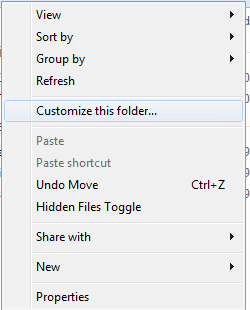
Context Menu -> Customize this folder...
- Thread starter selflysis
- Start date

reghakr
Expelled
Are you talking about the Customize tab when you choose properties of a folder
or is it on the right click menu.
I don't have one on my right-click menu.
What does that have to do with taking s screen shot?
or is it on the right click menu.
I don't have one on my right-click menu.
What does that have to do with taking s screen shot?
My Computer
- Computer Manufacturer/Model Number
- Cheap $399.00 E-Machine
- OS
- Windows 7 Pro & Vista Home Premium
- CPU
- Athlon 64 3800+ (Orleans) 2.40GHz
- Motherboard
- Winfast
- Memory
- 2GB DDR2 RAM DIMM
- Graphics Card(s)
- NVIDIA GeForce 8500 GT 512 MB memory HDMI out
- Sound Card
- creative X-Fi Exteme 7..1 channel
- Monitor(s) Displays
- Acer V223W 22" widescreen DVI
- Screen Resolution
- 1680x1050
- Hard Drives
- WDC WD5 500GB
WDC WD25 250GB
- PSU
- OCZ 550 watt
- Case
- Gateway
- Cooling
- 2 fans
- Keyboard
- Dell
- Mouse
- Sony Vaio
- Internet Speed
- 18MB/s down - .72MB /s up

Dark Nova Gamer
Resident OS X Expert
Are you talking about the Customize tab when you choose properties of a folder
or is it on the right click menu.
I don't have oner on my right-click menu.
Whatt does that have yo do with tasking s screen shot?
I think he/she meant that, if you didn't know what he/she was talking about, then he/she would gladly give a screenshot/screencapture showing what he/she was talking about.

My Computer
- Computer Manufacturer/Model Number
- Custom | Whitebox
- OS
- Windows 7 Ultimate, OS X 10.7, Ubuntu 11.04
- CPU
- Intel E6750 @ 3.80GHz
- Motherboard
- Gigabyte GA-EP45-UD3L (Revision 1.1)
- Memory
- 2x2GB & 2x1GB (6GB) OCZ Reaper 1066MHz @ 1080MHz
- Graphics Card(s)
- EVGA nVidia GTX 260 896mb (216 Core) FTW Edition
- Sound Card
- Realtek ALC888
- Monitor(s) Displays
- 21" VIZIO TV
- Screen Resolution
- 1680x1050 @ 60Hz
- Hard Drives
- Western Digital WD6401AALS - 640GB
Hitachi HDP725016GLA380 - 160GB
- PSU
- Corsair 750W
- Case
- NZXT Nemesis Elite
- Cooling
- Thermaltake SpinQ
- Keyboard
- Logitech Wireless S520
- Mouse
- Logitech Wireless S520 - Microsoft Wireless Arc Mouse
- Internet Speed
- Download: 20mbps, Upload: 3mbps
reghakr
Expelled
uuummm,.
wer'll wait and see.
wer'll wait and see.
My Computer
- Computer Manufacturer/Model Number
- Cheap $399.00 E-Machine
- OS
- Windows 7 Pro & Vista Home Premium
- CPU
- Athlon 64 3800+ (Orleans) 2.40GHz
- Motherboard
- Winfast
- Memory
- 2GB DDR2 RAM DIMM
- Graphics Card(s)
- NVIDIA GeForce 8500 GT 512 MB memory HDMI out
- Sound Card
- creative X-Fi Exteme 7..1 channel
- Monitor(s) Displays
- Acer V223W 22" widescreen DVI
- Screen Resolution
- 1680x1050
- Hard Drives
- WDC WD5 500GB
WDC WD25 250GB
- PSU
- OCZ 550 watt
- Case
- Gateway
- Cooling
- 2 fans
- Keyboard
- Dell
- Mouse
- Sony Vaio
- Internet Speed
- 18MB/s down - .72MB /s up
Dark Nova Gamer
Resident OS X Expert
uuummm,.
wer'll wait and see.
Told ya

It's in my context menu...
I do not have that. Is it any particular folder or does it show that with all?
My Computer
- Computer Manufacturer/Model Number
- Custom | Whitebox
- OS
- Windows 7 Ultimate, OS X 10.7, Ubuntu 11.04
- CPU
- Intel E6750 @ 3.80GHz
- Motherboard
- Gigabyte GA-EP45-UD3L (Revision 1.1)
- Memory
- 2x2GB & 2x1GB (6GB) OCZ Reaper 1066MHz @ 1080MHz
- Graphics Card(s)
- EVGA nVidia GTX 260 896mb (216 Core) FTW Edition
- Sound Card
- Realtek ALC888
- Monitor(s) Displays
- 21" VIZIO TV
- Screen Resolution
- 1680x1050 @ 60Hz
- Hard Drives
- Western Digital WD6401AALS - 640GB
Hitachi HDP725016GLA380 - 160GB
- PSU
- Corsair 750W
- Case
- NZXT Nemesis Elite
- Cooling
- Thermaltake SpinQ
- Keyboard
- Logitech Wireless S520
- Mouse
- Logitech Wireless S520 - Microsoft Wireless Arc Mouse
- Internet Speed
- Download: 20mbps, Upload: 3mbps
reghakr
Expelled
On a folder or in a folder.
Anyway, why would you click in empy space?
Anyway, why would you click in empy space?
My Computer
- Computer Manufacturer/Model Number
- Cheap $399.00 E-Machine
- OS
- Windows 7 Pro & Vista Home Premium
- CPU
- Athlon 64 3800+ (Orleans) 2.40GHz
- Motherboard
- Winfast
- Memory
- 2GB DDR2 RAM DIMM
- Graphics Card(s)
- NVIDIA GeForce 8500 GT 512 MB memory HDMI out
- Sound Card
- creative X-Fi Exteme 7..1 channel
- Monitor(s) Displays
- Acer V223W 22" widescreen DVI
- Screen Resolution
- 1680x1050
- Hard Drives
- WDC WD5 500GB
WDC WD25 250GB
- PSU
- OCZ 550 watt
- Case
- Gateway
- Cooling
- 2 fans
- Keyboard
- Dell
- Mouse
- Sony Vaio
- Internet Speed
- 18MB/s down - .72MB /s up
In a folder (all folders), right click to create a new folder maybe? why the irrelevant question... Reg?
(I think) this happened when I was trying to remove HomeGroup from the navigation pane. I came across something like "regsvr /i (i dont remember).dll." I tried googling in reverse, pretending as if I wanted to add the option but I couldn't find it. It was a mistake and I don't really wanna format to get rid of it.
(I think) this happened when I was trying to remove HomeGroup from the navigation pane. I came across something like "regsvr /i (i dont remember).dll." I tried googling in reverse, pretending as if I wanted to add the option but I couldn't find it. It was a mistake and I don't really wanna format to get rid of it.
Last edited:
My Computer
- OS
- Windows 7 Ultimate
- CPU
- P4E Prescott
- Motherboard
- Intel D915PBL
- Memory
- 3 GB
- Graphics Card(s)
- Radeon X800XL
reghakr
Expelled
Where did you type regsvr /i
What is the problem with your computer after doing this?
What is the problem with your computer after doing this?
My Computer
- Computer Manufacturer/Model Number
- Cheap $399.00 E-Machine
- OS
- Windows 7 Pro & Vista Home Premium
- CPU
- Athlon 64 3800+ (Orleans) 2.40GHz
- Motherboard
- Winfast
- Memory
- 2GB DDR2 RAM DIMM
- Graphics Card(s)
- NVIDIA GeForce 8500 GT 512 MB memory HDMI out
- Sound Card
- creative X-Fi Exteme 7..1 channel
- Monitor(s) Displays
- Acer V223W 22" widescreen DVI
- Screen Resolution
- 1680x1050
- Hard Drives
- WDC WD5 500GB
WDC WD25 250GB
- PSU
- OCZ 550 watt
- Case
- Gateway
- Cooling
- 2 fans
- Keyboard
- Dell
- Mouse
- Sony Vaio
- Internet Speed
- 18MB/s down - .72MB /s up
Where did you type regsvr /i
What is the problem with your computer after doing this?
The only place you can possibly type it and have it do anything;
the run command prompt.
My problem is that I don't like this context menu... isn't that evident?
My Computer
- OS
- Windows 7 Ultimate
- CPU
- P4E Prescott
- Motherboard
- Intel D915PBL
- Memory
- 3 GB
- Graphics Card(s)
- Radeon X800XL
reghakr
Expelled
I came across something like "regsvr /i (i dont remember).dll." I tried googling in reverse, pretending as if I wanted to add the option but I couldn't find it. It was a mistake and I don't really wanna format to get rid of it
What exactly does that mean. There is no regsrvg /i command,. so you didn't do anything,.
And what entries do you want to remove t from the context menu
Could you try to be more specific with your questions.
My Computer
- Computer Manufacturer/Model Number
- Cheap $399.00 E-Machine
- OS
- Windows 7 Pro & Vista Home Premium
- CPU
- Athlon 64 3800+ (Orleans) 2.40GHz
- Motherboard
- Winfast
- Memory
- 2GB DDR2 RAM DIMM
- Graphics Card(s)
- NVIDIA GeForce 8500 GT 512 MB memory HDMI out
- Sound Card
- creative X-Fi Exteme 7..1 channel
- Monitor(s) Displays
- Acer V223W 22" widescreen DVI
- Screen Resolution
- 1680x1050
- Hard Drives
- WDC WD5 500GB
WDC WD25 250GB
- PSU
- OCZ 550 watt
- Case
- Gateway
- Cooling
- 2 fans
- Keyboard
- Dell
- Mouse
- Sony Vaio
- Internet Speed
- 18MB/s down - .72MB /s up
(I think) this happened when I was trying to remove HomeGroup from the navigation pane.
Are sure it wasn't always there? This menu item even is in the win2000 context menu.
It doesn't show show up in C:\Windows or C:\ (and probably a few others), maybe that's why you thought it wasn't there before?
(FYI I also checked in a pretty freshly installed win7 without any registry tweakes/hacks or anything like that, and it's there too)
My Computer
- OS
- w7-64, w2k
reghakr
Expelled
Do you want to remove Customize this folder from the Context Menu?
My Computer
- Computer Manufacturer/Model Number
- Cheap $399.00 E-Machine
- OS
- Windows 7 Pro & Vista Home Premium
- CPU
- Athlon 64 3800+ (Orleans) 2.40GHz
- Motherboard
- Winfast
- Memory
- 2GB DDR2 RAM DIMM
- Graphics Card(s)
- NVIDIA GeForce 8500 GT 512 MB memory HDMI out
- Sound Card
- creative X-Fi Exteme 7..1 channel
- Monitor(s) Displays
- Acer V223W 22" widescreen DVI
- Screen Resolution
- 1680x1050
- Hard Drives
- WDC WD5 500GB
WDC WD25 250GB
- PSU
- OCZ 550 watt
- Case
- Gateway
- Cooling
- 2 fans
- Keyboard
- Dell
- Mouse
- Sony Vaio
- Internet Speed
- 18MB/s down - .72MB /s up
(I think) this happened when I was trying to remove HomeGroup from the navigation pane.
Are sure it wasn't always there? This menu item even is in the win2000 context menu.
It doesn't show show up in C:\Windows or C:\ (and probably a few others), maybe that's why you thought it wasn't there before?
(FYI I also checked in a pretty freshly installed win7 without any registry tweakes/hacks or anything like that, and it's there too)
Oh, well that solves the problem that I didn't do it to my copy. It is a default context menu entry, but I still want to get rid of it. Any ideas?
Reg, I thought I was pretty clear in my question during my initial post. I even showed a screen shot in the following post to show exactly what was bothering me. I do not want the "Customize this folder..." that appears when you right click the white space inside any folder besides the C: drive. And yes there is a /i
My Computer
- OS
- Windows 7 Ultimate
- CPU
- P4E Prescott
- Motherboard
- Intel D915PBL
- Memory
- 3 GB
- Graphics Card(s)
- Radeon X800XL
reghakr
Expelled
Yea, you're right, your first post dud describe it.
Bur when you started talking about regsvr .i . I had no clue what you were talking about.
I used Sysinternals Autoruns and didn't find any reference to Customize this folder. I searched the registry and came up with nothing either.
I don't have it on my computer
Did you install some kind of 3rd party utility that may have added that entry?
What is Hidden Filed Toggle?
Did you perform a "clean" install or an upgrade?
Bur when you started talking about regsvr .i . I had no clue what you were talking about.
I used Sysinternals Autoruns and didn't find any reference to Customize this folder. I searched the registry and came up with nothing either.
I don't have it on my computer
Did you install some kind of 3rd party utility that may have added that entry?
What is Hidden Filed Toggle?
Did you perform a "clean" install or an upgrade?
My Computer
- Computer Manufacturer/Model Number
- Cheap $399.00 E-Machine
- OS
- Windows 7 Pro & Vista Home Premium
- CPU
- Athlon 64 3800+ (Orleans) 2.40GHz
- Motherboard
- Winfast
- Memory
- 2GB DDR2 RAM DIMM
- Graphics Card(s)
- NVIDIA GeForce 8500 GT 512 MB memory HDMI out
- Sound Card
- creative X-Fi Exteme 7..1 channel
- Monitor(s) Displays
- Acer V223W 22" widescreen DVI
- Screen Resolution
- 1680x1050
- Hard Drives
- WDC WD5 500GB
WDC WD25 250GB
- PSU
- OCZ 550 watt
- Case
- Gateway
- Cooling
- 2 fans
- Keyboard
- Dell
- Mouse
- Sony Vaio
- Internet Speed
- 18MB/s down - .72MB /s up
regsvr /i forces dll to install into memory, or force into use.
Apparently it must be a default function, as tweaker said... I don't know if it a default, I never noticed it before but it doesn't mean it was not there. I did perform a clean install, always. I've never done an upgrade before, ever.
As for installed programs, yes I installed that program you see it is called Hidden File Toggle and it does just that. You can right click and select it, see the hidden files and right click and disable hidden files. It is really convenient, if it sounds interesting let me know. I can upload it.
As for my issue, are you sure it isn't in your context? He said he did a clean install also and it has it. Right click any area inside a folder that isn't your system directory(C: ), let me know. I don't think it would be inside autorun or anything, it must be a registry entry or dll, it doesn't bother me that much - I'm just an OCD clean freak.
Apparently it must be a default function, as tweaker said... I don't know if it a default, I never noticed it before but it doesn't mean it was not there. I did perform a clean install, always. I've never done an upgrade before, ever.
As for installed programs, yes I installed that program you see it is called Hidden File Toggle and it does just that. You can right click and select it, see the hidden files and right click and disable hidden files. It is really convenient, if it sounds interesting let me know. I can upload it.
As for my issue, are you sure it isn't in your context? He said he did a clean install also and it has it. Right click any area inside a folder that isn't your system directory(C: ), let me know. I don't think it would be inside autorun or anything, it must be a registry entry or dll, it doesn't bother me that much - I'm just an OCD clean freak.
My Computer
- OS
- Windows 7 Ultimate
- CPU
- P4E Prescott
- Motherboard
- Intel D915PBL
- Memory
- 3 GB
- Graphics Card(s)
- Radeon X800XL
He said he did a clean install also and it has it.
just to add a little more info, I did the clean install in Virtual Box just a couple of days ago, it's not a windows install I use normally, so it's totally clean. The only options I touched were a few standard folder settings (show hidden files and thos kinds of things), but none that would affect that.
but like I mentioned, even win2k has it, and I never really noticed it for the past 8+ years, until I checked after reading your post. So there's a good chance you just never noticed like me
My Computer
- OS
- w7-64, w2k
reghakr
Expelled
Sorry , like I said it's not om my compeer anywhere,
Sorry, I can't help you any furtherer
Sorry, I can't help you any furtherer
My Computer
- Computer Manufacturer/Model Number
- Cheap $399.00 E-Machine
- OS
- Windows 7 Pro & Vista Home Premium
- CPU
- Athlon 64 3800+ (Orleans) 2.40GHz
- Motherboard
- Winfast
- Memory
- 2GB DDR2 RAM DIMM
- Graphics Card(s)
- NVIDIA GeForce 8500 GT 512 MB memory HDMI out
- Sound Card
- creative X-Fi Exteme 7..1 channel
- Monitor(s) Displays
- Acer V223W 22" widescreen DVI
- Screen Resolution
- 1680x1050
- Hard Drives
- WDC WD5 500GB
WDC WD25 250GB
- PSU
- OCZ 550 watt
- Case
- Gateway
- Cooling
- 2 fans
- Keyboard
- Dell
- Mouse
- Sony Vaio
- Internet Speed
- 18MB/s down - .72MB /s up

Mark
AKA Mr GRiM
It's on mine as well but only in certain folders, mainly folders I have made, reghakr make a new folder and right click in the folder in the left pane and you will see it.
My Computer
- Computer Manufacturer/Model Number
- Home Brew
- OS
- Windows 7 Ultimate Vista Ultimate x64
- CPU
- Core 2 Duo E8500 3.16Ghz @ 3.8Ghz
- Motherboard
- eVGA 750i FTW
- Memory
- 2x2Gigs Patriot PC2-6400 LL
- Graphics Card(s)
- Inno3D GeForce GTX260 216 SP
- Monitor(s) Displays
- ASUS VW222U 22" 2ms Response time
- Screen Resolution
- 1680x1050
- Hard Drives
- SATA 150GB
SATA II 250GB
USB IDE 750GB Ext.
- PSU
- HYTEC 600W & Thermaltake 650W Toughpower Power Exp
- Case
- Thermaltake Armor LCS (Liquid Cooling System)
- Cooling
- Liquid Cooling System
- Keyboard
- Logitech G15 Gaming Keyboard
- Mouse
- Logitech G9 Gaming Mouse
reghakr
Expelled
No, not on mine, but u know how much I like to tweak.
My Computer
- Computer Manufacturer/Model Number
- Cheap $399.00 E-Machine
- OS
- Windows 7 Pro & Vista Home Premium
- CPU
- Athlon 64 3800+ (Orleans) 2.40GHz
- Motherboard
- Winfast
- Memory
- 2GB DDR2 RAM DIMM
- Graphics Card(s)
- NVIDIA GeForce 8500 GT 512 MB memory HDMI out
- Sound Card
- creative X-Fi Exteme 7..1 channel
- Monitor(s) Displays
- Acer V223W 22" widescreen DVI
- Screen Resolution
- 1680x1050
- Hard Drives
- WDC WD5 500GB
WDC WD25 250GB
- PSU
- OCZ 550 watt
- Case
- Gateway
- Cooling
- 2 fans
- Keyboard
- Dell
- Mouse
- Sony Vaio
- Internet Speed
- 18MB/s down - .72MB /s up