Continuous Identifying of network

laungst

New member
I was playing Borderlands 2 with my friend a week or so ago (wirelessly), when everything suddenly disconnected mid game. No internet whatsoever, just endlessly "identifying" my internet connection. Ever since then I've just been using a ridiculously long ethernet cable to suit my needs.

I've tried googling to no avail, I've completely reinstalled my wireless software, reset my router and modem (although I don't think that's the issue considering all other devices can connect just fine, and because my computer can't connect to ANY wireless networks), and I've played around with the settings.

My next step would just be to reinstall Windows but before I do that I'd rather see if there's any obvious solution that I'm missing here.

Any help would be greatly appreciated.
 

Attachments
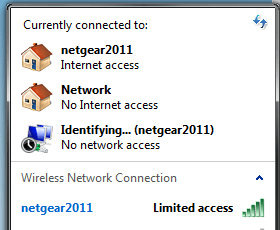
  • internet.png
    internet.png
    18.4 KB · Views: 22

My Computer

Computer type
PC/Desktop
Computer Manufacturer/Model Number
ASUS G74SX-BBK11
OS
Windows 7 Home Premium 64bit
CPU
Intel Core i7 2720QM @ 2.20GHz
Motherboard
ASUSTeK Computer Inc. G74Sx (CPU 1)
Memory
8 GB
Graphics Card(s)
NVIDIA GeForce GTX 560M
Screen Resolution
1920x1080
Hard Drives
977GB Seagate ST1000LM024 HN-M101MBB (SATA)
128 GB SSD
Internet Speed
~20 Mbps
Hi.

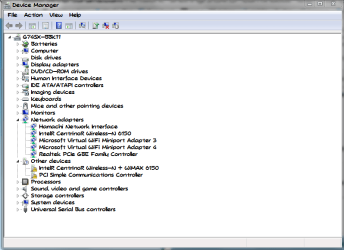
Have you checked on the device manager, under Network Adapters? Can you notice if there's any network adapter with an exlamation yellow mark? Or below on Other devices if there's any "unknown device"?
 

My Computer

Computer type
PC/Desktop
Computer Manufacturer/Model Number
Custom Build
OS
Windows 7 Ultimate SP1 64 Bits
CPU
AMD A6-3650 APU 2.60
Motherboard
Asrock A75M-HVS
Memory
4 Gb
Graphics Card(s)
Radeon HD
Sound Card
Built-In
Monitor(s) Displays
Hp w1907
Screen Resolution
1440 x 900
Hard Drives
1
PSU
Conventional
Case
Conventional
Cooling
Conventional
Keyboard
Genius
Mouse
Benq
Internet Speed
1 mb
Antivirus
AVG
Browser
Firefox
Like this?

Yes, I do believe I have little yellow exclamation marks. . . What exactly does this mean?
 

Attachments

  • device manager.PNG
    device manager.PNG
    80.6 KB · Views: 11

My Computer

Computer type
PC/Desktop
Computer Manufacturer/Model Number
ASUS G74SX-BBK11
OS
Windows 7 Home Premium 64bit
CPU
Intel Core i7 2720QM @ 2.20GHz
Motherboard
ASUSTeK Computer Inc. G74Sx (CPU 1)
Memory
8 GB
Graphics Card(s)
NVIDIA GeForce GTX 560M
Screen Resolution
1920x1080
Hard Drives
977GB Seagate ST1000LM024 HN-M101MBB (SATA)
128 GB SSD
Internet Speed
~20 Mbps

My Computer

Computer Manufacturer/Model Number
Lenovo Desktop/Samsung Laptop
OS
Win7 & Win8 64bit
CPU
Intel i5
Internet Speed
Charter-20 Mbps
Antivirus
Avast
Browser
FF, IE9 and Chrome
Yes, I do believe I have little yellow exclamation marks. . . What exactly does this mean?

It could mean a hardware problem or a faulty driver or software configuration. Have you tried a System Restore?
If that keeps appearing after a clean installation of windows as you planned to do, it could mean a hardware issue.
 

My Computer

Computer type
PC/Desktop
Computer Manufacturer/Model Number
Custom Build
OS
Windows 7 Ultimate SP1 64 Bits
CPU
AMD A6-3650 APU 2.60
Motherboard
Asrock A75M-HVS
Memory
4 Gb
Graphics Card(s)
Radeon HD
Sound Card
Built-In
Monitor(s) Displays
Hp w1907
Screen Resolution
1440 x 900
Hard Drives
1
PSU
Conventional
Case
Conventional
Cooling
Conventional
Keyboard
Genius
Mouse
Benq
Internet Speed
1 mb
Antivirus
AVG
Browser
Firefox
Back
Top