Control panel problem

rodrikes

New member
Local time
4:09 PM
Messages
3
Hey guys,

Since a pretty long while my control panel does not show all the icons it has to show.
I already found some info about regedit.exe but it sais it can't delete the files in the don't load folder.
Is it possible to get the icons back without re-installing windows?

PC specs:
Windows 7 64 bit
i5 processor
8 gigs RAM

Antivirus solution:
Bitdefender 2013

~rodrikes
 

My Computer

OS
Nederland
Hey guys,

Since a pretty long while my control panel does not show all the icons it has to show.
I already found some info about regedit.exe but it sais it can't delete the files in the don't load folder.
Is it possible to get the icons back without re-installing windows?

PC specs:
Windows 7 64 bit
i5 processor
8 gigs RAM

Antivirus solution:
Bitdefender 2013

~rodrikes

Could you give us some specifics on what is missing from the Control Panel?
 

My Computer

Computer type
PC/Desktop
Computer Manufacturer/Model Number
Custom Build
OS
Windows 7 Home Premium 32-Bit - Build 7600 SP1
CPU
Intel Core i3-2120 3.30Ghz
Motherboard
Asus P8Z68-V LX Intel Z68 Socket H2 ATX
Memory
Kingston 4 GB DDR3 1333 mhz
Graphics Card(s)
AMD Radeon HD6670
Sound Card
Sound Blaster Audigy SE 24-Bit
Monitor(s) Displays
Asus VE228
Screen Resolution
1440 X 900
Hard Drives
OCZ Vertex 3 120 GB Sata 3 SSD ==
Kingston SH103/S3 120 G Hyper X 120 GB SSD ==
Western Digital 500 GB Caviar Green 7200 RPM ==
PSU
Corsair CX600M == 600 Watt
Case
NZXT Apollo - Silver with Clear Side Panel
Cooling
Three 120 mm Fans
Keyboard
Microsoft Natural 4000
Mouse
Microsoft Custom Optical 3000
Internet Speed
AT&T Fiber Optic Wireless Network
Antivirus
Microsoft Security Essentials
Browser
Chrome
Other Info
120 mm Blue LED Fan -- Three Blue LED Lazer Light Sticks
i only have these options now:
(my pc is dutch language so i'll translate as good as i can)
1. system and security
2. network and internet
4. hardware and sound
5. programms
6. useraccounts and parent controll
7. design and personal settings
8. clock, language, and area
 
Last edited:

My Computer

OS
Nederland
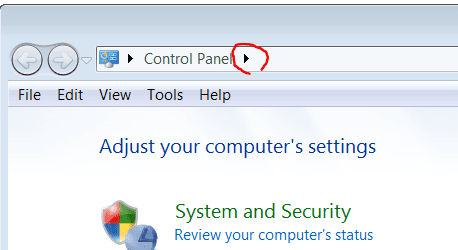
In your control panel click on the little arrow head riged on this screenshot and choose "All Control Panel Items"
Capture5.PNG
 

My Computer

Computer type
PC/Desktop
OS
Microsoft Windows 7 Home Premium 64-bit 7601 Multiprocessor Free Service Pack 1
CPU
Intel(R) Core(TM) i7-3770 CPU @ 3.40GHz
Motherboard
ASUSTeK COMPUTER INC. P8H77-M
Memory
8.00 GB
Graphics Card(s)
Intel(R) HD Graphics 4000
Sound Card
On Board
Monitor(s) Displays
Dell 24"
Screen Resolution
1920 x 1080
Hard Drives
(1) INTEL SSDSC2CT180A3 ATA Device (2) ST500DM002-1BD142 ATA Device (3) WDC WD3200AAKS-75L9A0 ATA Device (4) Generic- Compact Flash USB Device (5) Generic- MS/MS-Pro USB Device (6) Generic- SD/MMC USB Device (7) Generic- SM/xD-Picture USB
PSU
500w Corsair
Case
Cooler Master
Cooling
3 Fans
Keyboard
Logitech MK300
Mouse
Logitech WOM
Internet Speed
75Mb
Antivirus
Norton 360
Browser
Firefox, Opera, IE
wow thanks! i really did not know that arrow was clickable!
the problem is now solved!
mitchell65 and bigmck thanks for your time to help/reply!

~rodrikes
 

My Computer

OS
Nederland
Back
Top