
copy/paste multiple files get really slow

fros

New member
Local time
4:31 PM
Messages
7
Hi guys,
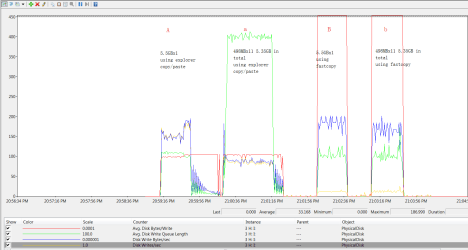
Recently,I noticed a significant drop in speed when copy/paste more than one files,as in the chart below.Then I tried fastcopy,and it seems my hard drives work fine.
So what is wrong with explorer.exe ?
Thanks!
Untitled.png
 

My Computer My Computer

At a glance

Windows 7 Ultimate x64
Computer type
PC/Desktop
OS
Windows 7 Ultimate x64

My Computer My Computer

At a glance

Windows 10 Pro
Computer type
Laptop
Computer Manufacturer/Model Number
Lenovo E450
OS
Windows 10 Pro
Hmmm...I'm not sure what's fastcopy, but when you say copy/paste multiple files, you are pasting into an external source I presume? If it's within the system itself, I suggest you do a check on your hard disk.

http://www.sevenforums.com/tutorials/139810-sfc-scannow-run-command-prompt-boot.html

I copied those files from an internal SSD to an internal HDD,both are in perfect shape.
I also tried the same under windows PE 2003,the speed is normal.
Fastcopy is a file copy tool which is faster than windows explorer
fastcopy.png
 

My Computer My Computer

At a glance

Windows 7 Ultimate x64
Computer type
PC/Desktop
OS
Windows 7 Ultimate x64
Well then. I dont see theres a problem with explorer since youre using a third party software to copy files faster.

Its like an athlete on steroids and allows him to run faster, or in tech terms, a normal computer using readyboost to speed it up more. ;)


Just for some advise. Since you have SSD and HDD both internally I suggest that you can actually reformat your computer and make it such a way that your windows 7 is on SSD and your data files on HDD. That way your OS will boot up faster since its on SSD and wont have hard disk problems on the long run.
 

My Computer My Computer

At a glance

Windows 10 Pro
Computer type
Laptop
Computer Manufacturer/Model Number
Lenovo E450
OS
Windows 10 Pro
Well then. I dont see theres a problem with explorer since youre using a third party software to copy files faster.

Its like an athlete on steroids and allows him to run faster, or in tech terms, a normal computer using readyboost to speed it up more. ;)


Just for some advise. Since you have SSD and HDD both internally I suggest that you can actually reformat your computer and make it such a way that your windows 7 is on SSD and your data files on HDD. That way your OS will boot up faster since its on SSD and wont have hard disk problems on the long run.
I think you've missed the point.I use Fastcopy only to show that my hdd can reach full write speed under these circumstances.If every windows user will be able to boost their file copying performance by 100% and all they have to pay is a few more clicks,this software would be much more famous.

And would you please try to copy/paste a single larger file and then several smaller files(at least100mb each) ,the write speed should be almost the same(even within the same partition),at least it won't cut in half.

My windows is installed on SSD.

Thanks.
 

My Computer My Computer

At a glance

Windows 7 Ultimate x64
Computer type
PC/Desktop
OS
Windows 7 Ultimate x64
Back
Top