Solved Copy Video URL Not Working In IE 11 or Firefox

poolmon

New member
Power User
VIP
Local time
10:04 PM
Messages
172
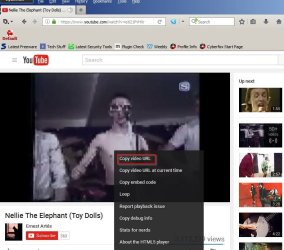
My 3 browsers (IE11, FireFox47, and Chrome) all used to support right clicking on a playing video ( such as in YouTube) and copying the video URL to the clipboard for pasting elsewhere (like in email). Now that Flash Player has been phased out and HTML5 phased in at various video sites, the copy and paste URL function only works with Chrome, Anyone know how to get it to work it in FireFox and IE11?
 

My Computer My Computer

At a glance

win 7
OS
win 7
Hi,
Have you tried to use the url address bar in all of the browsers :)
 

My Computer My Computer

At a glance

Win-7-Pro64bit 7-H-Prem-64biti7-5930K 2nd i9-9940x both water blocked VRM'...Trident-z 3200C14 2nd Trident-z 3600C16EVGA 1080ti ftw3 2nd Titan Xp both water blocked
Computer type
PC/Desktop
Computer Manufacturer/Model Number
Custom assembled by me :}
OS
Win-7-Pro64bit 7-H-Prem-64bit
CPU
i7-5930K 2nd i9-9940x both water blocked VRM's too
Motherboard
ASUS SABERTOOTH X99 2nd ASUS x299 Apex
Memory
Trident-z 3200C14 2nd Trident-z 3600C16
Graphics Card(s)
EVGA 1080ti ftw3 2nd Titan Xp both water blocked
Sound Card
Built-in Realtek
Monitor(s) Displays
1-AOC G2460PG 24"G-Sync 144Hz/ 2nd 1-ASUS VG248QE 24" 144Hz
Screen Resolution
1920 x 1080 144Hz
Hard Drives
2-Samsung M.2 Evo & Evo Plus
2-Samsung 850 EVO 500GB SSD's/ 3-2.5 W.D. Black 1tb-&3-1tb/3-3.5 WD Black 1tb hdd's
PSU
EVGA SuperNOVA 1000-P2 2nd 1200-P2
Case
2-Corsair Obsidian Series 450D Black ATX Mid Tower
Cooling
Custom water loops
Keyboard
Logitech G710+/ 2nd Logitech G910
Mouse
2-RedDragon M901 Perdition 16400 dpi Gaming mouse = wired
Internet Speed
Comcast Ping 19ms 89.31mbps download speed 6.12mbps upload
Antivirus
Malwarebytes Pro/ Superantispyware Pro
Browser
FireFox & Pale moon
Other Info
2nd ASUS X299 Apex/Intel i9-9940x with Custom water loop/7H-Prem-x64/Corsair 450D case/Ram Trident-z 3600C16 4x8gb / Samsung970Evo plus 500gb SSD/Dual ssd EZ swap evo/PSU EVGA SuperNova 1200w-P2 80+Platinum/GPU Titan Xp /8-ML-140 on push-pull on 2-280GTX rads
Works for me with HTML5 playback. Can't say why it doesn't work for you.

[INDENTYouTube.jpgINDENT]
 

My Computer My Computer

At a glance

Microsoft Windows 7 Home Premium 64-bit 7601 ...AMD C-60 APU with Radeon(tm) HD Graphics4.00 GBAMD Radeon HD 6290 Graphics
Computer type
Laptop
Computer Manufacturer/Model Number
ASUS
OS
Microsoft Windows 7 Home Premium 64-bit 7601 Multiprocessor Free Service Pack 1
CPU
AMD C-60 APU with Radeon(tm) HD Graphics
Motherboard
ASUSTeK COMPUTER INC. X501U
Memory
4.00 GB
Graphics Card(s)
AMD Radeon HD 6290 Graphics
Sound Card
(1) AMD High Definition Audio Device (2) Realtek High Defi
Screen Resolution
1366 x 768 x 32 bits (4294967296 colors) @ 60 Hz
Hard Drives
Hitachi HTS545050A7E380 SATA Disk Device
Antivirus
Comodo CIS & FW, SecureAplus App Whitelisting, Threatfire
Browser
Cyberfox 64bit, Opera 64bit, Airfox
Other Info
Spy-The-Spy, HitmanPro.Alert, Norton Connect Safe, MJRegWatcher, BitDefender TrafficLight, Voodoo Shield, Zemana AntiMalware
When I press the "Copy URL" then go to paste it, the paste function is greyed out as if nothing was copied to the clipboard. Copy and paste works fine in other apps.
 

My Computer My Computer

At a glance

win 7
OS
win 7
Hi,
Have you tried to use the url address bar in all of the browsers :)
Will have to try that, but curious why the right click copy function does not seem to work
 

My Computer My Computer

At a glance

win 7
OS
win 7
Copy and Paste to notepad (or anything else) works for me. Did you try pasting via "Ctrl+V" ?

Anyway I've tested on Firefox new and older versions and there's no problem.

If you suspect (as I do) that it's a problem with your current FF installation try downloading and running the portable version of Cyberfox (uses it's own profile so does not share FF profile)

See it it works. If it doesn't work then it's not a FF issue.

Don't know your system specs so make your choice:

Intel or AMD optimized version (portable) 32bit or 64bit:

https://cyberfox.8pecxstudios.com/

Or get directly from here:

https://sourceforge.net/projects/cyberfoxportabl/files/?source=navbar

Hover over links to see versions.
 

My Computer My Computer

At a glance

Microsoft Windows 7 Home Premium 64-bit 7601 ...AMD C-60 APU with Radeon(tm) HD Graphics4.00 GBAMD Radeon HD 6290 Graphics
Computer type
Laptop
Computer Manufacturer/Model Number
ASUS
OS
Microsoft Windows 7 Home Premium 64-bit 7601 Multiprocessor Free Service Pack 1
CPU
AMD C-60 APU with Radeon(tm) HD Graphics
Motherboard
ASUSTeK COMPUTER INC. X501U
Memory
4.00 GB
Graphics Card(s)
AMD Radeon HD 6290 Graphics
Sound Card
(1) AMD High Definition Audio Device (2) Realtek High Defi
Screen Resolution
1366 x 768 x 32 bits (4294967296 colors) @ 60 Hz
Hard Drives
Hitachi HTS545050A7E380 SATA Disk Device
Antivirus
Comodo CIS & FW, SecureAplus App Whitelisting, Threatfire
Browser
Cyberfox 64bit, Opera 64bit, Airfox
Other Info
Spy-The-Spy, HitmanPro.Alert, Norton Connect Safe, MJRegWatcher, BitDefender TrafficLight, Voodoo Shield, Zemana AntiMalware
OK Guys. Thanks for the info.

I finally got it working in all browsers. I updated FF browser, installed the most recent WIN updates and on IE11 checked the warning block that came up upon right click that said "do you want this webpage to access your clipboard. If you do it can read its content". Now the right click function works again.

Thanks again for your input
 

My Computer My Computer

At a glance

win 7
OS
win 7
Back
Top