
CPU 100%, Help Me!!

th3me

New member
Hi, I have a PC problem, always when you open an application or when watching a film facebook online, I raise the CPU 100% and pc not working, any Broshwer When Opened as the same problem, If I you can help me.
I Have Antivirus Nod 32 Antivirus 5.
If you can post all the programs I have on PC
Who help me??
 

My Computer

OS
Microsoft Windows 7 Home Premium 64-bit 7600 Multiprocessor Free
CPU
AMD Sempron(tm) M100
Motherboard
Quanta 363F
Memory
2.00 GB
Graphics Card(s)
AMD M880G with ATI Mobility Radeon HD 4200
Sound Card
(1) IDT High Definition Audio CODEC (2) ATI High Definitio
Fill computer specs, and post a screenshot of process explorer so the geeks can take a look on whats hogging your resources.
 

My Computer

Computer type
PC/Desktop
OS
Microsoft Windows 10 Professional / Windows 7 Professional
CPU
Intel i5-3570
Motherboard
Lenovo Mahobay
Memory
16GB DDR3
Graphics Card(s)
AMD Radeon HD 7850 2GB
Sound Card
(1) Realtek HD Audio (2) AMD HD Audio
Monitor(s) Displays
LG LS192WS
Screen Resolution
1440 x 900 @ 32bit color
Hard Drives
(1) SUV300S37A/120G (2) ST3500413AS SATA Disk Device AHCI mode enabled.
PSU
Corsair HX620
Case
Thermaltake V4 Black Edition
Cooling
Cooler Master Hyper 212 + Artic Silver 5 on CPU/GPU
Keyboard
Dell SK-8115
Mouse
Razer Copperhead with MAPED mat (awesome!)
Internet Speed
100 Mbps up/down
Browser
Chrome

My Computer

Computer type
PC/Desktop
Computer Manufacturer/Model Number
Custom Build
OS
Windows 10 Pro x64
CPU
Intel Core i5 4440 @Stock
Motherboard
Gigabyte Z97 D3H
Memory
4 x 4GB HyperX Fury DDR3
Graphics Card(s)
Gigabyte GTX 1050Ti O4G
Sound Card
Integrated
Monitor(s) Displays
Dell P2417H
Screen Resolution
1920 x 1080
Hard Drives
Samsung EVO 850 120GB / Toshiba DT01ACA050 1TB 7200prm 32MB
PSU
Riotoro Onyx 750W
Case
NZXT H500 Black-Red
Cooling
Stock CPU + NZXT 120mm + 2x120mm red fans
Keyboard
Modecom Volcano Lanparty
Mouse
Asus ROG Gladius / DeepCool E-Pad Plus
Internet Speed
DOCSIS 50/3 Mbit
Browser
Google Chrome
Other Info
Asus K55VJ(i5 3210M, GT635M / 2GB, 8GB DDR3, 500GB HDD)
Th3me, First off welcome to Sevenforums. Hopefully we can figure this out in short order.

How old is your pc? If you can, Fill out your system specs (this tool may help you out a great deal).

Is the problem recent or has it always had it? If it is recent, can you think of what may have caused it (or what events led up to the problems)?

Do you have all windows 7 updates installed? Are your drivers installed? http://windows.microsoft.com/en-US/...mmended-drivers-and-updates-for-your-hardware

*Edit - Stalker beat me to the punch on this one.

But yes, you will want to post a screenshot of your Processes list in task manager, and Stalker showed you how
 
Last edited:

My Computer

Computer type
PC/Desktop
Computer Manufacturer/Model Number
Custom Asus Build
OS
Microsoft Windows 8.1 Pro 64-bit
CPU
Intel(R) Core(TM) i3-4130 CPU @ 3.40GHz
Motherboard
B85M-E
Memory
8.00 GB
Graphics Card(s)
None
Sound Card
Realtek High Definition Audio
Monitor(s) Displays
Asus 23.6" Monitor
Screen Resolution
1920 x 1080 x 32 bits (4294967296 colors) @ 60 Hz
Hard Drives
INTEL SSDSC2BW180A4
Samsung SSD 840 PRO Series
PSU
Seasonic S12II-380Bronze
Case
Lian Li
Cooling
Fan, Passive
Keyboard
Logitech K120
Mouse
Microsoft Touch Mouse
Internet Speed
4ms Ping, 19.0 Mbps Download, 19.0 Mbps Upload
Antivirus
Eset Endpoint
Browser
Internet Explorer, Chrome
@stalker: Pictures For You.
@DustSailor: My Pc 2009 .I had no problems so far, this problem after I reinstalled I Observed of the new windows 7, about a month, then I noticed that my PC's hard work. I tried to scan, but I have no virus.
I'll try to do an update to the drivers, then come back with a post.
 

Attachments

  • Untitled.png
    Untitled.png
    266 KB · Views: 61
  • Task.png
    Task.png
    220.3 KB · Views: 74

My Computer

OS
Microsoft Windows 7 Home Premium 64-bit 7600 Multiprocessor Free
CPU
AMD Sempron(tm) M100
Motherboard
Quanta 363F
Memory
2.00 GB
Graphics Card(s)
AMD M880G with ATI Mobility Radeon HD 4200
Sound Card
(1) IDT High Definition Audio CODEC (2) ATI High Definitio
Th3me,

looks like Chrome is causing a lot of the trouble, it says it has a high CPU rate, doesn't it? You might try reinstalling it or (if that doesn't help) uninstalling it.

Did you have chrome running when you did that test? Each chrome.exe should represent every Chrome tab open when you did the test, as they run on seperate processes. You can change this.

Chrome Features here: http://www.google.com/chrome/intl/e...gn=en&utm_source=en-ha-na-us-sk&utm_medium=ha

Explaination of Chrome sandboxing (What may be causing you speed trouble, dated 2008): http://blog.chromium.org/2008/10/new-approach-to-browser-security-google.html

Also, Fill out your system specs (this tool may help you out a great deal).
 

My Computer

Computer type
PC/Desktop
Computer Manufacturer/Model Number
Custom Asus Build
OS
Microsoft Windows 8.1 Pro 64-bit
CPU
Intel(R) Core(TM) i3-4130 CPU @ 3.40GHz
Motherboard
B85M-E
Memory
8.00 GB
Graphics Card(s)
None
Sound Card
Realtek High Definition Audio
Monitor(s) Displays
Asus 23.6" Monitor
Screen Resolution
1920 x 1080 x 32 bits (4294967296 colors) @ 60 Hz
Hard Drives
INTEL SSDSC2BW180A4
Samsung SSD 840 PRO Series
PSU
Seasonic S12II-380Bronze
Case
Lian Li
Cooling
Fan, Passive
Keyboard
Logitech K120
Mouse
Microsoft Touch Mouse
Internet Speed
4ms Ping, 19.0 Mbps Download, 19.0 Mbps Upload
Antivirus
Eset Endpoint
Browser
Internet Explorer, Chrome
In addition to dumping Google spyware Chrome, I'd try running a clean boot by unchecking everything in msconfig>Startup except AV, then after reboots do the same in msconfig>Services after Hiding All MS Services. Check back periodically that none have written themselves back in, or else turn them off in Program Preferences or Uninstall.

Watch optional Windows Updates for newer drivers.

Other troubleshooting steps to check over your System thoroughly.
 
Last edited:
Besides dumping Chrome, I'd try running a clean boot by unchecking everything in msconfig>Startup except AV
Th3me,
Greg is right, I probably shouldn't have so carelessly suggested removing Chrome. If you use it, like it, and want it, who is to say Chrome is the big problem anyway? Just because it says Chrome, doesn't mean only Chrome can be causing issues. Follow those steps Greg gave you and see what you find out. Also, Greg gave me an idea. What antivirus do you run? Certain AVs have been known to cause internet problems. Does the same problem exist when you use another browser, such as IE?

:info: Before removing any Antivirus to check if that is the problem (Which I won't suggest until I find out which one you have), there are special tools that need to be downloaded first to remove it, so that bits and pieces aren't left behind. McAfee is an example of one that has caused people problems, as well as AVG. I helped remove McAfee for 3 different people in a month alone, solving all of their problems with browsing the web. Let me know what AV you have!

*Edit: Realized just now that Greg meant "In addition to removing" instead of "rather than removing".
 

My Computer

Computer type
PC/Desktop
Computer Manufacturer/Model Number
Custom Asus Build
OS
Microsoft Windows 8.1 Pro 64-bit
CPU
Intel(R) Core(TM) i3-4130 CPU @ 3.40GHz
Motherboard
B85M-E
Memory
8.00 GB
Graphics Card(s)
None
Sound Card
Realtek High Definition Audio
Monitor(s) Displays
Asus 23.6" Monitor
Screen Resolution
1920 x 1080 x 32 bits (4294967296 colors) @ 60 Hz
Hard Drives
INTEL SSDSC2BW180A4
Samsung SSD 840 PRO Series
PSU
Seasonic S12II-380Bronze
Case
Lian Li
Cooling
Fan, Passive
Keyboard
Logitech K120
Mouse
Microsoft Touch Mouse
Internet Speed
4ms Ping, 19.0 Mbps Download, 19.0 Mbps Upload
Antivirus
Eset Endpoint
Browser
Internet Explorer, Chrome
I would dump Chrome too, and for many reasons including that it is impossible to turn off Google Updater which is spyware developing a profile of you which pastes ads targeting you wherever you go on the web. Creepy. Use Firefox or IE9.

Good idea on AV. Is it bloatware or lean and mean?
 
I update System Info. I have Antivirus 5 Nod32 .
 

My Computer

OS
Microsoft Windows 7 Home Premium 64-bit 7600 Multiprocessor Free
CPU
AMD Sempron(tm) M100
Motherboard
Quanta 363F
Memory
2.00 GB
Graphics Card(s)
AMD M880G with ATI Mobility Radeon HD 4200
Sound Card
(1) IDT High Definition Audio CODEC (2) ATI High Definitio
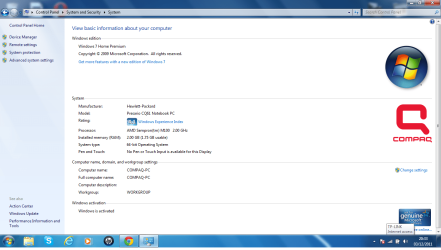
Thats a good AV if you're going to buy one.

Let us know if you have any questions as you work through the troubleshooting steps given.
 
I did everything so far, but I think it's not from Google Chrome, so when I watch a film appears online in chrome, O be it?
 

My Computer

OS
Microsoft Windows 7 Home Premium 64-bit 7600 Multiprocessor Free
CPU
AMD Sempron(tm) M100
Motherboard
Quanta 363F
Memory
2.00 GB
Graphics Card(s)
AMD M880G with ATI Mobility Radeon HD 4200
Sound Card
(1) IDT High Definition Audio CODEC (2) ATI High Definitio
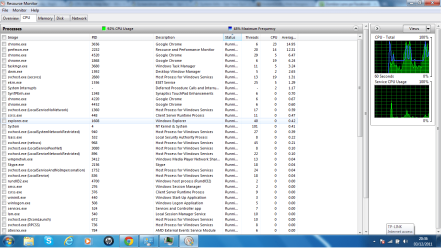
What happens when you watch streaming video in Chrome? It isn't clear from what you said.

Try the same video on Internet Explorer or Firefox to compare. Watch the CPU.
 
this is cpu on firefox. If anyone has time to get to my PC via viwer7 team and look my problem please.
 

Attachments

  • gfgf.png
    gfgf.png
    199.8 KB · Views: 25

My Computer

OS
Microsoft Windows 7 Home Premium 64-bit 7600 Multiprocessor Free
CPU
AMD Sempron(tm) M100
Motherboard
Quanta 363F
Memory
2.00 GB
Graphics Card(s)
AMD M880G with ATI Mobility Radeon HD 4200
Sound Card
(1) IDT High Definition Audio CODEC (2) ATI High Definitio

My Computer

Computer type
PC/Desktop
Computer Manufacturer/Model Number
Custom Build
OS
Windows 10 Pro x64
CPU
Intel Core i5 4440 @Stock
Motherboard
Gigabyte Z97 D3H
Memory
4 x 4GB HyperX Fury DDR3
Graphics Card(s)
Gigabyte GTX 1050Ti O4G
Sound Card
Integrated
Monitor(s) Displays
Dell P2417H
Screen Resolution
1920 x 1080
Hard Drives
Samsung EVO 850 120GB / Toshiba DT01ACA050 1TB 7200prm 32MB
PSU
Riotoro Onyx 750W
Case
NZXT H500 Black-Red
Cooling
Stock CPU + NZXT 120mm + 2x120mm red fans
Keyboard
Modecom Volcano Lanparty
Mouse
Asus ROG Gladius / DeepCool E-Pad Plus
Internet Speed
DOCSIS 50/3 Mbit
Browser
Google Chrome
Other Info
Asus K55VJ(i5 3210M, GT635M / 2GB, 8GB DDR3, 500GB HDD)
Stalker@ I do not think is that a problem even when Google Chrome firexos watch the video or just cpu rises to 100 and PC no longer works or it's a virus or a program or an error from Windows.
If you want to take a look at my pc?
 

My Computer

OS
Microsoft Windows 7 Home Premium 64-bit 7600 Multiprocessor Free
CPU
AMD Sempron(tm) M100
Motherboard
Quanta 363F
Memory
2.00 GB
Graphics Card(s)
AMD M880G with ATI Mobility Radeon HD 4200
Sound Card
(1) IDT High Definition Audio CODEC (2) ATI High Definitio
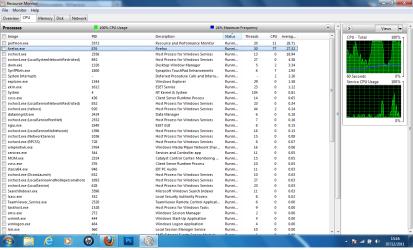
So look, it't normal when watch videos on YouTube CPU Usage to raise. On older cpu's this is more noticeable, on newer not so...

And, for Team Viewer, I can't I'm learning atm.
 

My Computer

Computer type
PC/Desktop
Computer Manufacturer/Model Number
Custom Build
OS
Windows 10 Pro x64
CPU
Intel Core i5 4440 @Stock
Motherboard
Gigabyte Z97 D3H
Memory
4 x 4GB HyperX Fury DDR3
Graphics Card(s)
Gigabyte GTX 1050Ti O4G
Sound Card
Integrated
Monitor(s) Displays
Dell P2417H
Screen Resolution
1920 x 1080
Hard Drives
Samsung EVO 850 120GB / Toshiba DT01ACA050 1TB 7200prm 32MB
PSU
Riotoro Onyx 750W
Case
NZXT H500 Black-Red
Cooling
Stock CPU + NZXT 120mm + 2x120mm red fans
Keyboard
Modecom Volcano Lanparty
Mouse
Asus ROG Gladius / DeepCool E-Pad Plus
Internet Speed
DOCSIS 50/3 Mbit
Browser
Google Chrome
Other Info
Asus K55VJ(i5 3210M, GT635M / 2GB, 8GB DDR3, 500GB HDD)
When i look on youtube cpu is normal , but when i look a online movie cpu is 80-100 procent.(Firefox or Explore).
In connection with the team, at least 5 minutes to look at the CPU.
 

My Computer

OS
Microsoft Windows 7 Home Premium 64-bit 7600 Multiprocessor Free
CPU
AMD Sempron(tm) M100
Motherboard
Quanta 363F
Memory
2.00 GB
Graphics Card(s)
AMD M880G with ATI Mobility Radeon HD 4200
Sound Card
(1) IDT High Definition Audio CODEC (2) ATI High Definitio
Could this have anything to do with whatever video card he has? IOW, doesn't the CPU get involved with video processing to some degree?

When you watch in youtube, is the screen the normal youtube size (about 1/10 or your screen area)? When watching movies, are they FULL screen?
 

My Computer

Computer type
PC/Desktop
Computer Manufacturer/Model Number
Custom
OS
Windows 7
CPU
AMD Phenom II X2 (dual-core)
Motherboard
GA-MA785GM-US2H
Memory
4G
Graphics Card(s)
integrated ATI HD 4200
Sound Card
integrated
Monitor(s) Displays
Samsung 24"
Screen Resolution
1920x1080
Hard Drives
1 SSD - Samsung 840 - 500 GB - OS and DATA partitions
1 SSD - Intel 320 - 120 GB (used for backups) - Misc/BACKUP
1 SATA HD - WD, 500 GB - BACKUP
PSU
Ultra X4 500W
Case
Ultra X-blaster
Keyboard
Microsoft Digital Media Pro
Mouse
Logitech WIRED!
Internet Speed
15 Mbps FIOS
Back
Top