CPU Speed.

SlackerITGuy

New member
So ok... Here's the deal.

I just installed CPU-Z in order to check my memory timings (since I just updated BIOS, just wanted to make sure everything was ok), so in the process I stumble upon my CPU speed, and it reads ~1358 MHz!.

What is going on?

Screen:


(specs under 'My System Specs')
 

My Computer

Computer type
PC/Desktop
Computer Manufacturer/Model Number
Self Built
OS
Windows 8.1 Pro
CPU
Intel Core i5-2500K
Motherboard
ASRock Z77 Extreme4
Memory
8GB Corsair Vengeance DDR3
Graphics Card(s)
Sapphire Radeon HD 7970 GHz Vapor-X Edition
Sound Card
Realtek ALC898
Monitor(s) Displays
BenQ XL2411T
Screen Resolution
1920 x 1080 @ 144Hz
Hard Drives
Plextor M3 Pro 128GB
WD Caviar Blue
PSU
Seasonic G Series 650W
Case
Corsair Obsidian 650D
Cooling
Corsair H60 2013 Edition
Keyboard
Cooler Master Quick Fire Rapid
Mouse
Corsair Raptor M45
Other Info
Headphones: Sennheiser HD-515
So ok... Here's the deal.

I just installed CPU-Z in order to check my memory timings (since I just updated BIOS, just wanted to make sure everything was ok), so in the process I stumble upon my CPU speed, and it reads ~1358 MHz!.

What is going on?

Screen:


(specs under 'My System Specs')


the multiplier changes under load
 

My Computer

Computer Manufacturer/Model Number
HP Pavillion dv-7 1005 Tx
OS
Win 8 Release candidate 8400
CPU
[email protected]
Memory
4 gigs
Graphics Card(s)
Nvidia 9600M
Sound Card
HD built-in
Monitor(s) Displays
17" Wxga
Screen Resolution
1440x900
Cooling
none
Internet Speed
45Mb down 5Mb up
So ok... Here's the deal.

I just installed CPU-Z in order to check my memory timings (since I just updated BIOS, just wanted to make sure everything was ok), so in the process I stumble upon my CPU speed, and it reads ~1358 MHz!.

What is going on?

Screen:


(specs under 'My System Specs')


the multiplier changes under load
So are you saying that I'm getting the whole 2.7 GHz of my processors speed under load?
 

My Computer

Computer type
PC/Desktop
Computer Manufacturer/Model Number
Self Built
OS
Windows 8.1 Pro
CPU
Intel Core i5-2500K
Motherboard
ASRock Z77 Extreme4
Memory
8GB Corsair Vengeance DDR3
Graphics Card(s)
Sapphire Radeon HD 7970 GHz Vapor-X Edition
Sound Card
Realtek ALC898
Monitor(s) Displays
BenQ XL2411T
Screen Resolution
1920 x 1080 @ 144Hz
Hard Drives
Plextor M3 Pro 128GB
WD Caviar Blue
PSU
Seasonic G Series 650W
Case
Corsair Obsidian 650D
Cooling
Corsair H60 2013 Edition
Keyboard
Cooler Master Quick Fire Rapid
Mouse
Corsair Raptor M45
Other Info
Headphones: Sennheiser HD-515
Yes... The idea is there is no reason to run the cpu at full power when there is no need.. the lower the load, the lower the power consumption.. this also saves cpu life...
 

My Computer

Computer type
PC/Desktop
Computer Manufacturer/Model Number
LENOVO K450 @3.0GHZ
OS
64-bit Windows 8.1 Pro
CPU
Core(TM) i5 CPU 4330 Haswell @ 3.20GHz
Motherboard
LENOVO
Memory
12.00 GB
Graphics Card(s)
Intel(R) HD Graphics
Sound Card
Intel HD integtrated
Monitor(s) Displays
HP 25' ISP Monitor
Screen Resolution
1900/1020
Hard Drives
(1) ST1000DM003-1CH162 (2) Generic STORAGE DEVICE USB Device (3) Generic STORAGE DEVICE USB Device
Internet Speed
100mb down/10mb up
Hmmm... Interesting.

So what's behind this CPU underclock when not under load? Windows 7? The Processor itself?...

Because I clearly remember that my CPU read 2.7 GHz (using CPU-Z) under Vista 24/7, but this was also under a different BIOS.
 

My Computer

Computer type
PC/Desktop
Computer Manufacturer/Model Number
Self Built
OS
Windows 8.1 Pro
CPU
Intel Core i5-2500K
Motherboard
ASRock Z77 Extreme4
Memory
8GB Corsair Vengeance DDR3
Graphics Card(s)
Sapphire Radeon HD 7970 GHz Vapor-X Edition
Sound Card
Realtek ALC898
Monitor(s) Displays
BenQ XL2411T
Screen Resolution
1920 x 1080 @ 144Hz
Hard Drives
Plextor M3 Pro 128GB
WD Caviar Blue
PSU
Seasonic G Series 650W
Case
Corsair Obsidian 650D
Cooling
Corsair H60 2013 Edition
Keyboard
Cooler Master Quick Fire Rapid
Mouse
Corsair Raptor M45
Other Info
Headphones: Sennheiser HD-515
Hmmm... Interesting.

So what's behind this CPU under clock when not under load? Windows 7? The Processor itself?...

Because I clearly remember that my CPU read 2.7 GHz (using CPU-Z) under Vista 24/7, but this was also under a different BIOS.

C

there you go. different bios may read it differently, different OS as well

Ken
 

My Computer

Computer Manufacturer/Model Number
HP Pavillion dv-7 1005 Tx
OS
Win 8 Release candidate 8400
CPU
[email protected]
Memory
4 gigs
Graphics Card(s)
Nvidia 9600M
Sound Card
HD built-in
Monitor(s) Displays
17" Wxga
Screen Resolution
1440x900
Cooling
none
Internet Speed
45Mb down 5Mb up
This is usually controlled via bios or some mobo manufacturer software. I think its called Speedstep or EIST. Stress your cpu with some program and see if it bumps it up to the correct speed. If so then what the other poster said is the case. You can usually turn it off in bios if you choose to. Its not a problem to have on, but is sometimes recommended to turn it off if you overclock your cpu.
 

My Computer

OS
Windows 7
CPU
E6850 @ 3.7Ghz
Motherboard
GA-EP45-UD3P
Memory
TWIN2X2048-6400C4
Graphics Card(s)
8800GTS 640Mb
Sound Card
Montego DDL
Monitor(s) Displays
Samsung 226BW / Sharp Aquos LC46D64U
Hard Drives
150Gb WD Raptor
500Gb WD Black
PSU
700W Ultra
Case
Ultra Grid
Thanks for all the help guys.
 

My Computer

Computer type
PC/Desktop
Computer Manufacturer/Model Number
Self Built
OS
Windows 8.1 Pro
CPU
Intel Core i5-2500K
Motherboard
ASRock Z77 Extreme4
Memory
8GB Corsair Vengeance DDR3
Graphics Card(s)
Sapphire Radeon HD 7970 GHz Vapor-X Edition
Sound Card
Realtek ALC898
Monitor(s) Displays
BenQ XL2411T
Screen Resolution
1920 x 1080 @ 144Hz
Hard Drives
Plextor M3 Pro 128GB
WD Caviar Blue
PSU
Seasonic G Series 650W
Case
Corsair Obsidian 650D
Cooling
Corsair H60 2013 Edition
Keyboard
Cooler Master Quick Fire Rapid
Mouse
Corsair Raptor M45
Other Info
Headphones: Sennheiser HD-515
when you flashed the bios to a new version, it probably started at "optimal settings," which in your case, seems to include as a default setting a cpu throttling feature to lower frequencies during non-load (as the others have stated prior to my post). depending on the bios, whenever you flash, you will have to go back into the bios and reset all of your specific settings back to what they were set at before the bios flash. (my bios, for instance, gives me the option when flashing to erase everything or only update specific items while leaving my changed settings intact).
 

My Computer

Computer Manufacturer/Model Number
Rig 1
OS
Windows 7 Ultimate x64
CPU
AMD Phenom II X4 940 Black Edition @ 3.4GHz (AM2+)
Motherboard
Gigabyte GA-MA790X-UD4P (AM2+)
Memory
Corsair CM2X4096-8500C5 (4 X 2GB)
Graphics Card(s)
XFX Radeon HD 5770 / Diamond Radeon HD 5770 CrossFireX
Sound Card
Asus Xonar DS (PCI)
Monitor(s) Displays
Samsung SyncMaster 932bw+ (3)
Screen Resolution
4320x900
Hard Drives
OCZ Vertex 2 80 GB - Windows 7 System --
WD Caviar Black 1TB - Music, Movies, Vids, Pics --
WD Caviar Black 640GB - User Profiles & Games --
WD My Book 320GB external
PSU
Corsair CMPSU-750TX
Case
Cooler Master HAF 932
Cooling
Corsair Hydro Series H50
Keyboard
Logitech Desktop Wave
Mouse
Logitech LX8 Laser
Internet Speed
20 down / 2 up
Other Info
LG GGC-H20L Blu-Ray / HDDVD combo --
Hauppauge HVR-1250 --
Silverstone MFP-51 --
Logitech Webcam C600
when you flashed the bios to a new version, it probably started at "optimal settings," which in your case, seems to include as a default setting a cpu throttling feature to lower frequencies during non-load (as the others have stated prior to my post). depending on the bios, whenever you flash, you will have to go back into the bios and reset all of your specific settings back to what they were set at before the bios flash. (my bios, for instance, gives me the option when flashing to erase everything or only update specific items while leaving my changed settings intact).
Hmmm...

The thing is, I'm a big chicken when it comes to BIOS, I only change basic stuff like... Memory timings, Boot order, etc...

I would never mess up with something like 'CPU throttle'.

I'm even scared of disabling AMD's 'Cool n Quiet' feature lolz.

It has to be something new that ASUS wanted to incorporate into their new BIOSes.

EDIT: Thanks BTW.
 

My Computer

Computer type
PC/Desktop
Computer Manufacturer/Model Number
Self Built
OS
Windows 8.1 Pro
CPU
Intel Core i5-2500K
Motherboard
ASRock Z77 Extreme4
Memory
8GB Corsair Vengeance DDR3
Graphics Card(s)
Sapphire Radeon HD 7970 GHz Vapor-X Edition
Sound Card
Realtek ALC898
Monitor(s) Displays
BenQ XL2411T
Screen Resolution
1920 x 1080 @ 144Hz
Hard Drives
Plextor M3 Pro 128GB
WD Caviar Blue
PSU
Seasonic G Series 650W
Case
Corsair Obsidian 650D
Cooling
Corsair H60 2013 Edition
Keyboard
Cooler Master Quick Fire Rapid
Mouse
Corsair Raptor M45
Other Info
Headphones: Sennheiser HD-515
you speak of cool n' quiet--that is amd's cpu throttling feature (forgot the name of it). if prior to upgrading the bios, your cpu was always showing the full speed, then cool n' quiet was disabled already. so when you upgrade the bios, it set everything to default or optimal, which enabled that feature.

also, in my experience with an asus amd board no less, i have upgraded the bios and had to go into the bios because upon rebooting, i would get an error message stating that the os could not be found--the boot order got messed up from the upgrade. i'm not saying that will happen to you anytime in the future you may upgrade your bios, but it may.
 

My Computer

Computer Manufacturer/Model Number
Rig 1
OS
Windows 7 Ultimate x64
CPU
AMD Phenom II X4 940 Black Edition @ 3.4GHz (AM2+)
Motherboard
Gigabyte GA-MA790X-UD4P (AM2+)
Memory
Corsair CM2X4096-8500C5 (4 X 2GB)
Graphics Card(s)
XFX Radeon HD 5770 / Diamond Radeon HD 5770 CrossFireX
Sound Card
Asus Xonar DS (PCI)
Monitor(s) Displays
Samsung SyncMaster 932bw+ (3)
Screen Resolution
4320x900
Hard Drives
OCZ Vertex 2 80 GB - Windows 7 System --
WD Caviar Black 1TB - Music, Movies, Vids, Pics --
WD Caviar Black 640GB - User Profiles & Games --
WD My Book 320GB external
PSU
Corsair CMPSU-750TX
Case
Cooler Master HAF 932
Cooling
Corsair Hydro Series H50
Keyboard
Logitech Desktop Wave
Mouse
Logitech LX8 Laser
Internet Speed
20 down / 2 up
Other Info
LG GGC-H20L Blu-Ray / HDDVD combo --
Hauppauge HVR-1250 --
Silverstone MFP-51 --
Logitech Webcam C600
you speak of cool n' quiet--that is amd's cpu throttling feature (forgot the name of it). if prior to upgrading the bios, your cpu was always showing the full speed, then cool n' quiet was disabled already. so when you upgrade the bios, it set everything to default or optimal, which enabled that feature.
I've never messed around with Cool'n'Quiet though.

And I'm pretty sure it comes 'enabled' by default on all BIOS revisions (for my board anyway).

Unless they're working under a newer version of Cool'n'Quiet now. Who knows?...
 

My Computer

Computer type
PC/Desktop
Computer Manufacturer/Model Number
Self Built
OS
Windows 8.1 Pro
CPU
Intel Core i5-2500K
Motherboard
ASRock Z77 Extreme4
Memory
8GB Corsair Vengeance DDR3
Graphics Card(s)
Sapphire Radeon HD 7970 GHz Vapor-X Edition
Sound Card
Realtek ALC898
Monitor(s) Displays
BenQ XL2411T
Screen Resolution
1920 x 1080 @ 144Hz
Hard Drives
Plextor M3 Pro 128GB
WD Caviar Blue
PSU
Seasonic G Series 650W
Case
Corsair Obsidian 650D
Cooling
Corsair H60 2013 Edition
Keyboard
Cooler Master Quick Fire Rapid
Mouse
Corsair Raptor M45
Other Info
Headphones: Sennheiser HD-515
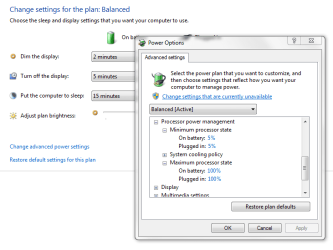
Windows 7 and Windows Vista have the option in Advance Power Options. It is under Processor power management, Minimum * state, Maximum * state. Probably on Vista you had the power plan set to High Performance which sets the Minimum state to 100%.

But my advice, let the CPU throttle down when its full power is not required. This will keep the computer cooler and quieter.
 

Attachments

  • Untitled.png
    Untitled.png
    52.1 KB · Views: 157

My Computer

Computer type
PC/Desktop
Computer Manufacturer/Model Number
Alienware Aurora ALX R4
OS
Windows 10 Pro (x64)
CPU
Intel Core i7-3930K (3.2GHz - 4.5GHz)
Motherboard
Alienware Aurora-R4 x79
Memory
4x Samsung 4GB PC3-12800 DDR3 (16GB 1600MHz)
Graphics Card(s)
Nvidia Geforce GTX 690
Sound Card
SteelSeries Siberia Elite
Monitor(s) Displays
Dell UltraSharp U3011
Screen Resolution
2560x1600
Hard Drives
Samsung 850 Pro 256 GB, Seagate 1TB Desktop Hybrid HDD, 2x Western Digital 4TB Green HDD
PSU
875W Some Dell PSU <.<
Case
Alienware Aurora ALX
Cooling
Custom Liquid Cooling (EK CPU & GPU blocks) dual EK 480RAD
Keyboard
Logitech G710+ Mechanical
Mouse
Logitech G700s
Internet Speed
Verizon Fios (50 mbps average)
Other Info
Server: Intel NUC D54250WYK: i5-4250U, 16GB, 256 GB mSATA, Windows Server 2012 R2
Windows 7 and Windows Vista have the option in Advance Power Options. It is under Processor power management, Minimum * state, Maximum * state. Probably on Vista you had the power plan set to High Performance which sets the Minimum state to 100%.

But my advice, let the CPU throttle down when its full power is not required. This will keep the computer cooler and quieter.
Yup, that's probably it.

Minimum processor state is set to 5%:


Thanks a lot man!.
 

My Computer

Computer type
PC/Desktop
Computer Manufacturer/Model Number
Self Built
OS
Windows 8.1 Pro
CPU
Intel Core i5-2500K
Motherboard
ASRock Z77 Extreme4
Memory
8GB Corsair Vengeance DDR3
Graphics Card(s)
Sapphire Radeon HD 7970 GHz Vapor-X Edition
Sound Card
Realtek ALC898
Monitor(s) Displays
BenQ XL2411T
Screen Resolution
1920 x 1080 @ 144Hz
Hard Drives
Plextor M3 Pro 128GB
WD Caviar Blue
PSU
Seasonic G Series 650W
Case
Corsair Obsidian 650D
Cooling
Corsair H60 2013 Edition
Keyboard
Cooler Master Quick Fire Rapid
Mouse
Corsair Raptor M45
Other Info
Headphones: Sennheiser HD-515
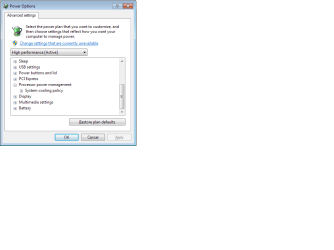
Fujitsu Siemens Amilo A1630 with AMD 3700 runs at only 800MHz, even under load (as confirmed by AMDpwrmon, CPUz, and RMclock). I tried with Balanced and High Performance power plans, with lapyop plugged in to mains power line.

as per screenshot, i only see System Cooling Policy. how do i enable Processor State Settings?

BIOS is latest available from Fujitsu Siemens (1.04c released 2005). There is a 1.05 BIOS available from Uniwill motherboard manufacturer released 2006. I did not try that since Coolnquiet is enabling ok as confirmed by RMclock. CPU would run at 800/2400 in XP.
 

Attachments

  • scrnshot.png
    scrnshot.png
    35.5 KB · Views: 47

My Computer

OS
7
Try disabling Cool&Quiet or (Intel version)
in BIOS
see if that helps.
 

My Computer

Computer Manufacturer/Model Number
Home Built
OS
Windows 7 64 ultimate
CPU
AMD Phenom II x4 550 3.4gHz
Motherboard
ASUS M4A785TD-V EVO AM3
Memory
Kingston HyperX 2GB DDR3 1800 (PC3 14400)
Graphics Card(s)
on board HD 4200
Sound Card
on board
Monitor(s) Displays
Samsung SyncMaster 204b
Screen Resolution
1600 x 1200
Hard Drives
WD 160gb SATA II
PSU
Antec TruePower 650w
Case
Crap
Keyboard
sunbeamtech green illuminated keyboard
Mouse
Razer Diamondback
no option in the 1.04c bios. tried the 1.05 and suddenly it is working at 2.4GHz again!

i would rather have it stuck on 2.4GHz than 800 MHz :)
 

My Computer

OS
7
when you flashed the bios to a new version, it probably started at "optimal settings," which in your case, seems to include as a default setting a cpu throttling feature to lower frequencies during non-load (as the others have stated prior to my post). depending on the bios, whenever you flash, you will have to go back into the bios and reset all of your specific settings back to what they were set at before the bios flash. (my bios, for instance, gives me the option when flashing to erase everything or only update specific items while leaving my changed settings intact).
Hmmm...

The thing is, I'm a big chicken when it comes to BIOS, I only change basic stuff like... Memory timings, Boot order, etc...

I would never mess up with something like 'CPU throttle'.

I'm even scared of disabling AMD's 'Cool n Quiet' feature lolz.

It has to be something new that ASUS wanted to incorporate into their new BIOSes.

EDIT: Thanks BTW.

AMD's Cool and Quiet feature is behind the CPU underclock, Personally I want my CPU running at full 24/7 I guess i just don't like the fact that the multiplier is changed on the fly like that. Disabling that will not do any harm to your system and I disable it on every AMD system I've built or used. I belive power saving in many components today is a joke because you really don't save all that much power if you do the math for DC and AC conversion. I say disable it and let your cpu run at what the manufacturer designed it to run at.
 

My Computer

Computer Manufacturer/Model Number
Custom Built
OS
Windows 7 Ultimate x64
CPU
AMD Phenom II X4 965 Black Edition ~3.4Ghz
Motherboard
ASUS M4A79XTD-EVO
Memory
8GB (4x2GB) Mushkin DDR3-1600 7-7-7-20 @ 1.85V
Graphics Card(s)
HIS Radeon 4890 Turbo+ OC Edition 1GB GDDR5 965/1050
Sound Card
Creative X-Fi Titanium Fatal1ty Pro PCI-E
Monitor(s) Displays
ASUS VK246 24"
Screen Resolution
1920x1080 ~75hz
Hard Drives
WD Raptor 150GB 10K - OS /Programs Drive
2xWD Black 1TB RAID 0 - Storage / Games Drive
PSU
Corsair CMPSU-750TX 750W / 12V+ @60AMP
Case
Coolermaster SGC-2000 Storm Scout
Cooling
Zalman CNPS9900 + Paper-thin layer Zalman compound
Keyboard
Saitek Cyborg
Mouse
Logitech G5
Internet Speed
Cable 20M/5M
Other Info
WEI:
CPU: 7.4
RAM: 7.7
VID1: 7.7
VID2: 7.7
HDD: 7.0
... I belive power saving in many components today is a joke because you really don't save all that much power if you do the math for DC and AC conversion. I say disable it and let your cpu run at what the manufacturer designed it to run at.

You forgot to calculate heat dissipation into the calculation. Hardware components running at a lower clock produce less heat and require less electrictity to run for itself and supporting cooling systems. The CPU is designed to run at a lower clock just as it is deigned to run at a set clock speed.

Having the processor run at 100% all the time when it is not required is just silly.
 

My Computer

Computer type
PC/Desktop
Computer Manufacturer/Model Number
Alienware Aurora ALX R4
OS
Windows 10 Pro (x64)
CPU
Intel Core i7-3930K (3.2GHz - 4.5GHz)
Motherboard
Alienware Aurora-R4 x79
Memory
4x Samsung 4GB PC3-12800 DDR3 (16GB 1600MHz)
Graphics Card(s)
Nvidia Geforce GTX 690
Sound Card
SteelSeries Siberia Elite
Monitor(s) Displays
Dell UltraSharp U3011
Screen Resolution
2560x1600
Hard Drives
Samsung 850 Pro 256 GB, Seagate 1TB Desktop Hybrid HDD, 2x Western Digital 4TB Green HDD
PSU
875W Some Dell PSU <.<
Case
Alienware Aurora ALX
Cooling
Custom Liquid Cooling (EK CPU & GPU blocks) dual EK 480RAD
Keyboard
Logitech G710+ Mechanical
Mouse
Logitech G700s
Internet Speed
Verizon Fios (50 mbps average)
Other Info
Server: Intel NUC D54250WYK: i5-4250U, 16GB, 256 GB mSATA, Windows Server 2012 R2
... I belive power saving in many components today is a joke because you really don't save all that much power if you do the math for DC and AC conversion. I say disable it and let your cpu run at what the manufacturer designed it to run at.

You forgot to calculate heat dissipation into the calculation. Hardware components running at a lower clock produce less heat and require less electrictity to run for itself and supporting cooling systems. The CPU is designed to run at a lower clock just as it is deigned to run at a set clock speed.

Having the processor run at 100% all the time when it is not required is just silly.

I do have to agree with you that heat dissipation is plus with cool and quiet, I just don't think a CPU would have a longer lifespan with the VCORE and the Multiplier constantly changing, and I mean CONSTANTLY. Then keeping a steady multiplier and vcore 24/7 and it only would be stressing underload the same as cool and quiet.
 

My Computer

Computer Manufacturer/Model Number
Custom Built
OS
Windows 7 Ultimate x64
CPU
AMD Phenom II X4 965 Black Edition ~3.4Ghz
Motherboard
ASUS M4A79XTD-EVO
Memory
8GB (4x2GB) Mushkin DDR3-1600 7-7-7-20 @ 1.85V
Graphics Card(s)
HIS Radeon 4890 Turbo+ OC Edition 1GB GDDR5 965/1050
Sound Card
Creative X-Fi Titanium Fatal1ty Pro PCI-E
Monitor(s) Displays
ASUS VK246 24"
Screen Resolution
1920x1080 ~75hz
Hard Drives
WD Raptor 150GB 10K - OS /Programs Drive
2xWD Black 1TB RAID 0 - Storage / Games Drive
PSU
Corsair CMPSU-750TX 750W / 12V+ @60AMP
Case
Coolermaster SGC-2000 Storm Scout
Cooling
Zalman CNPS9900 + Paper-thin layer Zalman compound
Keyboard
Saitek Cyborg
Mouse
Logitech G5
Internet Speed
Cable 20M/5M
Other Info
WEI:
CPU: 7.4
RAM: 7.7
VID1: 7.7
VID2: 7.7
HDD: 7.0
Back
Top