BingoGaming
New member
- Local time
- 10:21 AM
- Messages
- 19
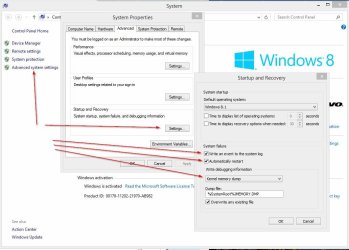
I've been playing CoD:AW recently and, soon after playing a game my computer freezes and I have to restart it.
For context, my shrowd-style stock EVGA 660ti reaches temps of 80C+ on Battlefield 4 and has never shut down. Similarly, my processor (3570k) reaches high 60s and also has never shut down. This leads me to believe it is not an overheating issue.
I play StarCraft II a lot and it also does not cause crashes.
When playing CoD, the crashes experienced are like this:
I checked windows event viewer and the only information I have is "The system has rebooted without cleanly shutting down first. This error could be caused if the system stopped responding, crashed, or lost power unexpectedly".
The error encountered is not a bluescreen
The only thing I believe it may be is the RAM? Not enough? Perhaps it's the hard drive however it is healthy on CrystalDisk
This used to happen with other games as well (most notably Sonic & All Stars Racing Transformed) before I stopped playing them.
It leaves me unable to play the game as the crashing is almost always within the first hour of gaming.
Anyone have any solutions/similar problems?
For context, my shrowd-style stock EVGA 660ti reaches temps of 80C+ on Battlefield 4 and has never shut down. Similarly, my processor (3570k) reaches high 60s and also has never shut down. This leads me to believe it is not an overheating issue.
I play StarCraft II a lot and it also does not cause crashes.
When playing CoD, the crashes experienced are like this:
Screen goes black(sometimes goes through different colours)
Sound still plays however gets stuck on repeat in a matter of seconds (think of "Our base is under attaaaaaaaaaaaaa~~~")
It's at this point I restart the computer and it starts normally. Sometimes, after shutting it down and pressing the power button again it takes a while for it to start up (press button, few seconds and then it starts up)
I checked windows event viewer and the only information I have is "The system has rebooted without cleanly shutting down first. This error could be caused if the system stopped responding, crashed, or lost power unexpectedly".
The error encountered is not a bluescreen
The only thing I believe it may be is the RAM? Not enough? Perhaps it's the hard drive however it is healthy on CrystalDisk
This used to happen with other games as well (most notably Sonic & All Stars Racing Transformed) before I stopped playing them.
It leaves me unable to play the game as the crashing is almost always within the first hour of gaming.
Anyone have any solutions/similar problems?
My Computer
At a glance
Windows Ultimate x64Intel Core i5-3570K 3.4GHzCorsair Vengeance 8GB (2 x 4GB) DDR3-1600EVGA GTX 660Ti 2GB
- Computer type
- PC/Desktop
- Computer Manufacturer/Model Number
- Custom Build
- OS
- Windows Ultimate x64
- CPU
- Intel Core i5-3570K 3.4GHz
- Motherboard
- Gigabyte GA-Z77X-UD3H
- Memory
- Corsair Vengeance 8GB (2 x 4GB) DDR3-1600
- Graphics Card(s)
- EVGA GTX 660Ti 2GB
- Monitor(s) Displays
- HP 2311x
- Screen Resolution
- 1920x1080
- Hard Drives
- Western Digital Caviar Black 1TB 3.5" 7200RPM
- PSU
- NZXT HALE82 750W ATX12V / EPS12V
- Case
- NZXT Phantom 410 (Black) ATX Mid Tower
- Keyboard
- Razer Lycosa Mirror Edition
- Mouse
- Razer Deathadder Re-spawn
- Internet Speed
- 5Mbp/s - 20 Mbp/s
- Antivirus
- Microsoft Security Essentials + Malwarebytes
- Browser
- Google Chrome