Create your own Special Repair disc

SIW2

YTS GEEK
Guru
Gold Member
SF Team
Local time
8:00 AM
Messages
16,790
Finally go it working.

Very simple, just d/l the attached .zip.

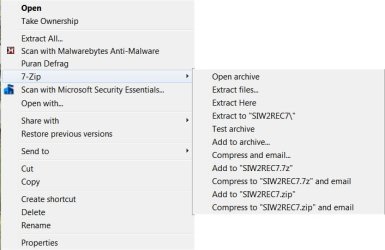
Inside is a .7z file, which you unzip onto your Hard drive.
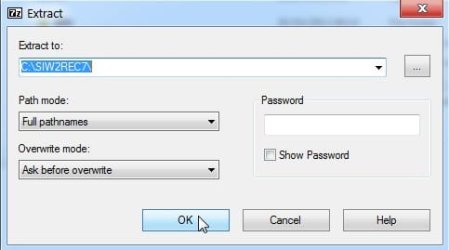
REC7-2.jpg

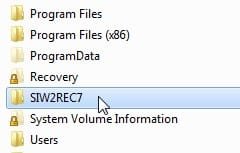
You will have a folder C:\SIW2REC7

REC7-1.jpg

In there , just rt click and run as admin on the runmeasadminx64.cmd, or runmeasadminx86.cmd.
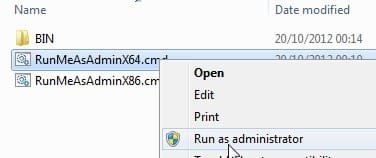
REC7-0.jpg

Should take a couple of mins to make a boot disc for you.

When you boot it up, 64 bit users will get this:
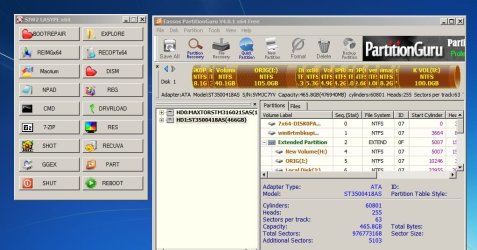
REC7 (4).jpg

All those options will be in there - except macrium and partition guru.

If you want to include Macrium Reflect FREE Edition - Information and download and PartitionGuru Free - Download - you need to install them . Then they will be included automatically.

Partition Guru free is an excellent partition manager ( the only one I have found which is native 64 bit ). The free version works for 512kb mbr style - just like the macrium free version.


32 bit users will need to run runmeasadminx86.cmd instead.

Running the runmeasadminx86.cmd.gives you more options - you can include paragon and partition wizard, for example.

64 bit users can run runmeasadminx86.cmd as well - it will download a small part of WAIK (130MB ) and make the 32 bit pe for you.

64 bit users can run runmeasadminx64.cmd first (don't bother making an iso ), then run
runmeasadminx86.cmd and both will be included on one boot disc with a menu to select.


Updated version:

Updated again to v4 - fixed extraction issue, fixed adding old version of macrium - now only adds new version of macrium if you have it installed:

http://www.sevenforums.com/attachme...ate-your-own-special-repair-disc-siw2r7v4.zip
 
Last edited:

My Computers My Computers

  • At a glance

    7 X64i5 84002x8gb 3200mhz
    Computer type
    PC/Desktop
    OS
    7 X64
    CPU
    i5 8400
    Motherboard
    gigabyte b365m ds3h
    Memory
    2x8gb 3200mhz
    Hard Drives
    various
    PSU
    pure power 11 400w cm
    Case
    Coolermaster
    Cooling
    cryorig m9i
  • At a glance

    7x64g54008gb ddr4 2400
    Computer type
    PC/Desktop
    OS
    7x64
    CPU
    g5400
    Motherboard
    ga b365m ds3h
    Memory
    8gb ddr4 2400
    PSU
    xfx pro 450w
Si,

I understand everything up to
64 bit users can run runmeasadminx86.cmd as well - it will download a small part of WAIK (130MB ) and make the 32 bit pe for you.

64 bit users can run runmeasadminx64.cmd first (don't bother making an iso ), then run
runmeasadminx86.cmd and both will be included on one boot disc with a menu to select.
I already have Macrium Reflect free x64 ver.4.2 build 3775 installed so that will be included when I run your utility.

So when I do run it I do this "64 bit users can run runmeasadminx64.cmd first (don't bother making an iso ), then run
runmeasadminx86.cmd and both will be included on one boot disc with a menu to select".

But then I still have to make an .iso, Correct?
 

My Computer My Computer

At a glance

Originally Win 7 Hm Prem x64 Ver 6.1.7600 Bui...Intel i3 530 2.93GHz, 2933MHz 2 Cores 4 Logic...6GB of 1,333MHz DDR3 SDRAM32MB Intel Graphics Media Accelerator HD IGChip
Computer type
PC/Desktop
Computer Manufacturer/Model Number
Gateway DX4831-01e (Mid-Tower Desktop)
OS
Originally Win 7 Hm Prem x64 Ver 6.1.7600 Build 7601-SP1 | Upgraded to Windows 10 December 14, 2019
CPU
Intel i3 530 2.93GHz, 2933MHz 2 Cores 4 Logical Processors
Motherboard
Gateway H57M01 133 megahertz
Memory
6GB of 1,333MHz DDR3 SDRAM
Graphics Card(s)
32MB Intel Graphics Media Accelerator HD IGChip
Sound Card
Realtek High Definition Audio
Monitor(s) Displays
Gateway HX2000 20inch TFT active matrix TN
Screen Resolution
1600 x 900 x 59 hertz
Hard Drives
WDC WD10EADS-00M2B0 [HDD] (1000.20 GB) -- drive 0,
HL-DT-ST DVDRAM GH41N [CD-ROM dr]
Four card readers, and Four USB 2.0
PSU
300watts.
Case
Mid-Tower Desktop
Cooling
Stock from Gateway
Keyboard
Natural Ergonomic Keyboard 4000, see Other Info
Mouse
Orig. Gateway wore out now using Insignia USB wired optical
Internet Speed
Vz FIOS 10ms png 57.64Mbps down 65.53Mbps up Speedtest.org
Antivirus
Zamana Anti-logger with Anti-malware, MSE, Windows Firewall,
Browser
IE11.0.9600.19399-Upd ver11.0.135, Firefox 68.0.1 x64
Other Info
System Specs by Belarc.

BIOS: American Megatrends Inc. P01-A0 11/17/2009

Replaced the MS 'Natural' Standard PS/2 Enhanced 101-102 Keyboard with a new Natural Ergonomic Keyboard 4000 on August 1st 2014.

Canon Pixma MG3222 Printer.

Updated to IE11 on 12102015 | Fios Quantum Router g1100

Additional AV: SpywareBlaster, manual Mbam, SAS
Yes, if you want both:

Run runmeasadminx64.cmd first - say no when it asks if you want to make an .iso)

The run runmeasadminx86.cmd - say yes when it asks if you want to make an iso.

You will get one iso with both wim's in it.
 

My Computers My Computers

  • At a glance

    7 X64i5 84002x8gb 3200mhz
    Computer type
    PC/Desktop
    OS
    7 X64
    CPU
    i5 8400
    Motherboard
    gigabyte b365m ds3h
    Memory
    2x8gb 3200mhz
    Hard Drives
    various
    PSU
    pure power 11 400w cm
    Case
    Coolermaster
    Cooling
    cryorig m9i
  • At a glance

    7x64g54008gb ddr4 2400
    Computer type
    PC/Desktop
    OS
    7x64
    CPU
    g5400
    Motherboard
    ga b365m ds3h
    Memory
    8gb ddr4 2400
    PSU
    xfx pro 450w
Okay Si thank you, I get as far as this:

Si repair utility1.JPG Si repair utility3.JPG
When it extracts I see the first Window, When I click on runmeasadminx64 the Cmd window flashes then disappears an goes back to runmeasadminx64.

I don't think I'm following the instructions right, I'll try again tomorrow.
 

My Computer My Computer

At a glance

Originally Win 7 Hm Prem x64 Ver 6.1.7600 Bui...Intel i3 530 2.93GHz, 2933MHz 2 Cores 4 Logic...6GB of 1,333MHz DDR3 SDRAM32MB Intel Graphics Media Accelerator HD IGChip
Computer type
PC/Desktop
Computer Manufacturer/Model Number
Gateway DX4831-01e (Mid-Tower Desktop)
OS
Originally Win 7 Hm Prem x64 Ver 6.1.7600 Build 7601-SP1 | Upgraded to Windows 10 December 14, 2019
CPU
Intel i3 530 2.93GHz, 2933MHz 2 Cores 4 Logical Processors
Motherboard
Gateway H57M01 133 megahertz
Memory
6GB of 1,333MHz DDR3 SDRAM
Graphics Card(s)
32MB Intel Graphics Media Accelerator HD IGChip
Sound Card
Realtek High Definition Audio
Monitor(s) Displays
Gateway HX2000 20inch TFT active matrix TN
Screen Resolution
1600 x 900 x 59 hertz
Hard Drives
WDC WD10EADS-00M2B0 [HDD] (1000.20 GB) -- drive 0,
HL-DT-ST DVDRAM GH41N [CD-ROM dr]
Four card readers, and Four USB 2.0
PSU
300watts.
Case
Mid-Tower Desktop
Cooling
Stock from Gateway
Keyboard
Natural Ergonomic Keyboard 4000, see Other Info
Mouse
Orig. Gateway wore out now using Insignia USB wired optical
Internet Speed
Vz FIOS 10ms png 57.64Mbps down 65.53Mbps up Speedtest.org
Antivirus
Zamana Anti-logger with Anti-malware, MSE, Windows Firewall,
Browser
IE11.0.9600.19399-Upd ver11.0.135, Firefox 68.0.1 x64
Other Info
System Specs by Belarc.

BIOS: American Megatrends Inc. P01-A0 11/17/2009

Replaced the MS 'Natural' Standard PS/2 Enhanced 101-102 Keyboard with a new Natural Ergonomic Keyboard 4000 on August 1st 2014.

Canon Pixma MG3222 Printer.

Updated to IE11 on 12102015 | Fios Quantum Router g1100

Additional AV: SpywareBlaster, manual Mbam, SAS
Those com samples aren't needed.

I have uploaded a new version with a couple of other little fixes.

It is attached to first post.
 

My Computers My Computers

  • At a glance

    7 X64i5 84002x8gb 3200mhz
    Computer type
    PC/Desktop
    OS
    7 X64
    CPU
    i5 8400
    Motherboard
    gigabyte b365m ds3h
    Memory
    2x8gb 3200mhz
    Hard Drives
    various
    PSU
    pure power 11 400w cm
    Case
    Coolermaster
    Cooling
    cryorig m9i
  • At a glance

    7x64g54008gb ddr4 2400
    Computer type
    PC/Desktop
    OS
    7x64
    CPU
    g5400
    Motherboard
    ga b365m ds3h
    Memory
    8gb ddr4 2400
    PSU
    xfx pro 450w
I unzip your new version with 7z and get to here:
Si repair utility3.JPG

If I right click "Run as Administrator" the screen blinks several times, stops, and nothing happens.


But when I click on runmeasadminx64.cmd I get this:
Si repair utility 4.JPG

Am I missing a helper to make runmeasadminx64 a valid application?


My OS is fully updated and I've run SFC and CHKDSK, could there be something in the un-zipping process?
I have the SIW2REC7 Folder in C:\


Can you point out what un-zipping process I should use?
Si repair 5.jpg
 

My Computer My Computer

At a glance

Originally Win 7 Hm Prem x64 Ver 6.1.7600 Bui...Intel i3 530 2.93GHz, 2933MHz 2 Cores 4 Logic...6GB of 1,333MHz DDR3 SDRAM32MB Intel Graphics Media Accelerator HD IGChip
Computer type
PC/Desktop
Computer Manufacturer/Model Number
Gateway DX4831-01e (Mid-Tower Desktop)
OS
Originally Win 7 Hm Prem x64 Ver 6.1.7600 Build 7601-SP1 | Upgraded to Windows 10 December 14, 2019
CPU
Intel i3 530 2.93GHz, 2933MHz 2 Cores 4 Logical Processors
Motherboard
Gateway H57M01 133 megahertz
Memory
6GB of 1,333MHz DDR3 SDRAM
Graphics Card(s)
32MB Intel Graphics Media Accelerator HD IGChip
Sound Card
Realtek High Definition Audio
Monitor(s) Displays
Gateway HX2000 20inch TFT active matrix TN
Screen Resolution
1600 x 900 x 59 hertz
Hard Drives
WDC WD10EADS-00M2B0 [HDD] (1000.20 GB) -- drive 0,
HL-DT-ST DVDRAM GH41N [CD-ROM dr]
Four card readers, and Four USB 2.0
PSU
300watts.
Case
Mid-Tower Desktop
Cooling
Stock from Gateway
Keyboard
Natural Ergonomic Keyboard 4000, see Other Info
Mouse
Orig. Gateway wore out now using Insignia USB wired optical
Internet Speed
Vz FIOS 10ms png 57.64Mbps down 65.53Mbps up Speedtest.org
Antivirus
Zamana Anti-logger with Anti-malware, MSE, Windows Firewall,
Browser
IE11.0.9600.19399-Upd ver11.0.135, Firefox 68.0.1 x64
Other Info
System Specs by Belarc.

BIOS: American Megatrends Inc. P01-A0 11/17/2009

Replaced the MS 'Natural' Standard PS/2 Enhanced 101-102 Keyboard with a new Natural Ergonomic Keyboard 4000 on August 1st 2014.

Canon Pixma MG3222 Printer.

Updated to IE11 on 12102015 | Fios Quantum Router g1100

Additional AV: SpywareBlaster, manual Mbam, SAS
No idea what is going there.

It is just a simple batch file. Standard .7z file.

Two slight possibilities:

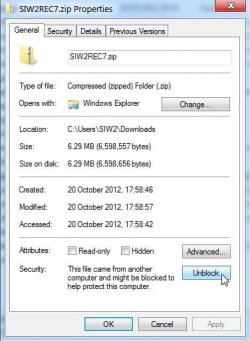
1) After you have downloaded the .zip, you need to rt click >properties >Unblock>Apply>OK.

You need to do that as it has come from another computer (mine).


Unblock.jpg


You must be familiar with that - you need to do it with almost everything you download.

That is the only reason I can think of why it isn't extracting - they shouldn't be 0kb.

2) I am using 7z 929 - maybe there is something different about the compression algorithm ., but I doubt it.
 

My Computers My Computers

  • At a glance

    7 X64i5 84002x8gb 3200mhz
    Computer type
    PC/Desktop
    OS
    7 X64
    CPU
    i5 8400
    Motherboard
    gigabyte b365m ds3h
    Memory
    2x8gb 3200mhz
    Hard Drives
    various
    PSU
    pure power 11 400w cm
    Case
    Coolermaster
    Cooling
    cryorig m9i
  • At a glance

    7x64g54008gb ddr4 2400
    Computer type
    PC/Desktop
    OS
    7x64
    CPU
    g5400
    Motherboard
    ga b365m ds3h
    Memory
    8gb ddr4 2400
    PSU
    xfx pro 450w
I have 7z - 465 only good up to Vista. found it in the readme file.

Si, I'm going sit on this for a while, I'll update 7z and try it then, hope to get back to you by Sunday evening my time EDT.
 

My Computer My Computer

At a glance

Originally Win 7 Hm Prem x64 Ver 6.1.7600 Bui...Intel i3 530 2.93GHz, 2933MHz 2 Cores 4 Logic...6GB of 1,333MHz DDR3 SDRAM32MB Intel Graphics Media Accelerator HD IGChip
Computer type
PC/Desktop
Computer Manufacturer/Model Number
Gateway DX4831-01e (Mid-Tower Desktop)
OS
Originally Win 7 Hm Prem x64 Ver 6.1.7600 Build 7601-SP1 | Upgraded to Windows 10 December 14, 2019
CPU
Intel i3 530 2.93GHz, 2933MHz 2 Cores 4 Logical Processors
Motherboard
Gateway H57M01 133 megahertz
Memory
6GB of 1,333MHz DDR3 SDRAM
Graphics Card(s)
32MB Intel Graphics Media Accelerator HD IGChip
Sound Card
Realtek High Definition Audio
Monitor(s) Displays
Gateway HX2000 20inch TFT active matrix TN
Screen Resolution
1600 x 900 x 59 hertz
Hard Drives
WDC WD10EADS-00M2B0 [HDD] (1000.20 GB) -- drive 0,
HL-DT-ST DVDRAM GH41N [CD-ROM dr]
Four card readers, and Four USB 2.0
PSU
300watts.
Case
Mid-Tower Desktop
Cooling
Stock from Gateway
Keyboard
Natural Ergonomic Keyboard 4000, see Other Info
Mouse
Orig. Gateway wore out now using Insignia USB wired optical
Internet Speed
Vz FIOS 10ms png 57.64Mbps down 65.53Mbps up Speedtest.org
Antivirus
Zamana Anti-logger with Anti-malware, MSE, Windows Firewall,
Browser
IE11.0.9600.19399-Upd ver11.0.135, Firefox 68.0.1 x64
Other Info
System Specs by Belarc.

BIOS: American Megatrends Inc. P01-A0 11/17/2009

Replaced the MS 'Natural' Standard PS/2 Enhanced 101-102 Keyboard with a new Natural Ergonomic Keyboard 4000 on August 1st 2014.

Canon Pixma MG3222 Printer.

Updated to IE11 on 12102015 | Fios Quantum Router g1100

Additional AV: SpywareBlaster, manual Mbam, SAS
Last edited:

My Computers My Computers

  • At a glance

    7 X64i5 84002x8gb 3200mhz
    Computer type
    PC/Desktop
    OS
    7 X64
    CPU
    i5 8400
    Motherboard
    gigabyte b365m ds3h
    Memory
    2x8gb 3200mhz
    Hard Drives
    various
    PSU
    pure power 11 400w cm
    Case
    Coolermaster
    Cooling
    cryorig m9i
  • At a glance

    7x64g54008gb ddr4 2400
    Computer type
    PC/Desktop
    OS
    7x64
    CPU
    g5400
    Motherboard
    ga b365m ds3h
    Memory
    8gb ddr4 2400
    PSU
    xfx pro 450w
BTW - it only works for macrium v5 - macrium v4 installed components will not run properly in pe.

You can d/l the free macrium v5 - it is backwards compatible and will be fine with any images you made with macrium v4.

Thanks for reminding me - I will add a check to make sure we are not trying to include macrium v4.

Alternatively, you can just use the free macrium pe plugin that they issued with v4 ( runs in any 32 bit pe ).

Not sure if it still around as they don't sell v4 anymore - they did post it up on their site for anyone to d/l .

Here is the pe plugin for macrium v4: View attachment Macrium.zip
 

My Computers My Computers

  • At a glance

    7 X64i5 84002x8gb 3200mhz
    Computer type
    PC/Desktop
    OS
    7 X64
    CPU
    i5 8400
    Motherboard
    gigabyte b365m ds3h
    Memory
    2x8gb 3200mhz
    Hard Drives
    various
    PSU
    pure power 11 400w cm
    Case
    Coolermaster
    Cooling
    cryorig m9i
  • At a glance

    7x64g54008gb ddr4 2400
    Computer type
    PC/Desktop
    OS
    7x64
    CPU
    g5400
    Motherboard
    ga b365m ds3h
    Memory
    8gb ddr4 2400
    PSU
    xfx pro 450w
OK -you can either install macrium v5, OR you could do this:

1. extract SIW2R7V3 onto C .

2. Look in BIN\X86\Program Files.

There is already a folder called Macrium.

Open macrium pe file from the post above.

Rename ReflectPE.exe to Reflect.exe.

Put those ( except peexplorer.exe )files in SIW2R7V3\BIN\X86\Program files \Macrium

It already contains a better peexplorer.exe.

3. To stop the .cmd adding in your installed macrium v4 ( which won't work) just replace runmeasadminx86.cmd with this one: ( will post it up in a sec. ).

Can you check your installed macrium v4 does not have a file called PrimoBurner.DLL ?
 
Last edited:

My Computers My Computers

  • At a glance

    7 X64i5 84002x8gb 3200mhz
    Computer type
    PC/Desktop
    OS
    7 X64
    CPU
    i5 8400
    Motherboard
    gigabyte b365m ds3h
    Memory
    2x8gb 3200mhz
    Hard Drives
    various
    PSU
    pure power 11 400w cm
    Case
    Coolermaster
    Cooling
    cryorig m9i
  • At a glance

    7x64g54008gb ddr4 2400
    Computer type
    PC/Desktop
    OS
    7x64
    CPU
    g5400
    Motherboard
    ga b365m ds3h
    Memory
    8gb ddr4 2400
    PSU
    xfx pro 450w
New version - will not include macriumv4 automatically - will include macriumv5 automatically

View attachment 237563
 

My Computers My Computers

  • At a glance

    7 X64i5 84002x8gb 3200mhz
    Computer type
    PC/Desktop
    OS
    7 X64
    CPU
    i5 8400
    Motherboard
    gigabyte b365m ds3h
    Memory
    2x8gb 3200mhz
    Hard Drives
    various
    PSU
    pure power 11 400w cm
    Case
    Coolermaster
    Cooling
    cryorig m9i
  • At a glance

    7x64g54008gb ddr4 2400
    Computer type
    PC/Desktop
    OS
    7x64
    CPU
    g5400
    Motherboard
    ga b365m ds3h
    Memory
    8gb ddr4 2400
    PSU
    xfx pro 450w
Is it possible to get one of these with WinRE, or is it too copyright protected?

If the installer is freely given by MS forums then what would be the objection to WinRE which can only be used to Repair?
 
If you run the same bit version as you have installed - winre is in there already.

64 but user running runmeasadminX64.cmd will get winre included.

32 bit user running runmeasadminX86.cmd will get winre included.

It is only if you are running 64 bit o/s, and you want to create 32 bit wim so you can have partition wizard, paragon, etc in it - then you do not get winre in the 32 bit wim.

That is why if you have 64 bit os - you run runmeasadminX64.cmd first ( you can say NO to making an iso ).

Then you run runmeasadminX86.cmd - say Yes to creating an iso. Then you have both in one iso and can select from the boot menu.

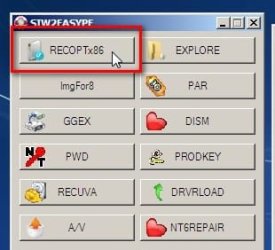
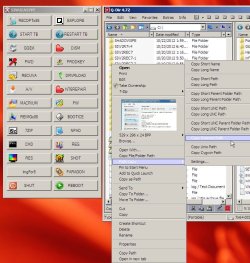
MS repair options e.g. startup repair, system restore etc .. are on the Button that says RECOPT

recopt.jpg
 

My Computers My Computers

  • At a glance

    7 X64i5 84002x8gb 3200mhz
    Computer type
    PC/Desktop
    OS
    7 X64
    CPU
    i5 8400
    Motherboard
    gigabyte b365m ds3h
    Memory
    2x8gb 3200mhz
    Hard Drives
    various
    PSU
    pure power 11 400w cm
    Case
    Coolermaster
    Cooling
    cryorig m9i
  • At a glance

    7x64g54008gb ddr4 2400
    Computer type
    PC/Desktop
    OS
    7x64
    CPU
    g5400
    Motherboard
    ga b365m ds3h
    Memory
    8gb ddr4 2400
    PSU
    xfx pro 450w
Hi SI, I didn't forget about you, It's just this is the first time I've ever done this and all the steps are new to me.

I'm going to try and break this down as to how I had to accomplish this task and I'll answer your questions first. This will undoubtedly be a long post.

Okay!

My timing wasn't right with yours and I upgraded to the 7z929alpha version before I realized you had already created SIW2R7V3 and by the time I had that copacetic you had already pushed out V4.

So for the rest of this telling I am dealing with your SIW2R7v4 and 7z929alpha.

Can you check your installed macrium v4 does not have a file called PrimoBurner.DLL ?
I have checked and neither mac.v4 and mac.v5 contain PrimoBurner.dll.

I was sure you had at least one more question for me, but I can't locate it.

What happened to v2? You seemed to go from SIW2R7 to SIW2R7v3 to SIW2R7v4. No matter, moot point.

----------------------

Even with 929 I kept having the same result where I had 0Kb so I looked at your first attachment in your OP where you show the 7z settings you used to extract the .zip file, I was using the 7z defaults when I made those earlier extractions.
I made changes to make sure that the; extract to (SIW2R7v4), Path mode (Full Path Names), Overwrite mode (Ask Before Overwrite) that you had showing were the same, and the .zip file you attached created SIW2R7v4 in C:\

SIRP6.JPG

But I had one more step. I had to extract that file into that same Folder (SIW2R7v4), and this was the result
Si repair utility2.JPG

From there I ran x64 runme, then said no to the .iso. ran the x86 when asked to run .iso said Y.
This is what the end result looked like on my C:\
SIRP7.JPG

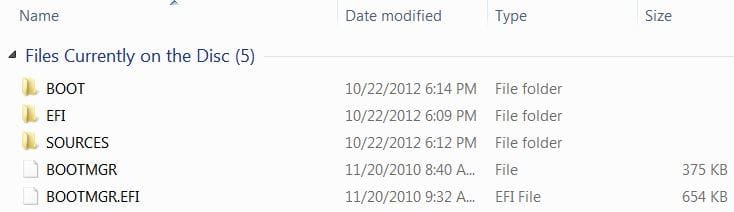
Using ImgBurn I wanted to write the ISO Folder to the disk, but it wouldn't set-up so I used the EASYPE_MULIT.iso file. This is the result after the ImgBurn.
Si RP5.JPG

If everything looks okay to you and if not, I can show more files from that .iso conversion. SI, please correct me if I am wrong, and Greg, you can pitch in here if you want I don't think SI would mind.

From here I need to re-start my machine and enter my bios (F8).
Reset my boot order to DVD-CD as first choice.
Then shut back down.


With the new repair CD-R in my D:\ drive, restart my machine, and.


I should see this:


237444d1350689460t-create-your-own-special-repair-disc-rec7-4-.jpg


From there I should be able to repair my OS (Not that I need to, but this is a handy tool to have) And, I am hoping that I can check to see if there are any incorrect files that reside on our machine and repair or replace them.

By the time you see your note in your email about my post I will in all probability try this to ascertain what will happen when I boot with this disk. I won't be making any changes, I just want to see if it works.

But not right now, it's late here, and I'm tired it's been a long day. :shock:

EDIT:
I meant to put this ImgBurn log in, in case it shows any problems.​
Code:
DVD RW Drive (D:) C:\SIW2R7v4\ISO
 
[LEFT]I 18:47:35 ImgBurn Version 2.5.7.0 started![/LEFT]
 
[LEFT]I 18:47:35 Microsoft Windows 7 Home Premium x64 Edition (6.1, Build 7601 : Service Pack 1)

I 18:47:35 Total Physical Memory: 6,085,728 KB  -  Available: 4,264,964 KB
[LEFT]I 18:47:35 Initialising SPTI...
I 18:47:35 Searching for SCSI / ATAPI devices...
I 18:47:35 -> Drive 1 - Info: HL-DT-ST DVDRAM GH41N MN01 (D:) (ATAPI)
I 18:47:35 Found 1 DVD±RW/RAM!
I 18:54:10 Operation Started!
I 18:54:10 Source File: C:\SIW2R7v4\EASYPE_MULTI.iso
I 18:54:10 Source File Sectors: 221,777 (MODE1/2048)
I 18:54:10 Source File Size: 454,199,296 bytes
I 18:54:10 Source File Volume Identifier: C:\SIW2R7v4\ISO
I 18:54:10 Source File Application Identifier: MKISOFS ISO 9660/HFS FILESYSTEM BUILDER & CDRECORD CD-R/DVD CREATOR (C) 1993 E.YOUNGDALE (C) 1997 J.PEARSON/J.SCHILLING
I 18:54:10 Source File File System(s): ISO9660 (Bootable)
I 18:54:10 Destination Device: [0:1:0] HL-DT-ST DVDRAM GH41N MN01 (D:) (ATAPI)
I 18:54:10 Destination Media Type: CD-R (Disc ID: 97m26s66f, CMC Magnetics Corp.)
I 18:54:10 Destination Media Supported Write Speeds: 4x, 8x, 16x, 24x, 32x, 40x
I 18:54:10 Destination Media Sectors: 359,844
I 18:54:10 Write Mode: CD
I 18:54:10 Write Type: SAO
I 18:54:10 Write Speed: MAX
I 18:54:10 Lock Volume: Yes
I 18:54:10 Test Mode: No
I 18:54:10 OPC: No
I 18:54:10 BURN-Proof: Enabled
W 18:54:10 Write Speed Miscompare! - MODE SENSE: 7,057 KB/s (40x), GET PERFORMANCE: 9,402 KB/s (53.3x)
I 18:54:10 Write Speed Successfully Set! - Effective: 7,057 KB/s (40x)
I 18:54:10 Filling Buffer... (80 MB)
I 18:54:13 Writing LeadIn...
I 18:54:29 Writing Session 1 of 1... (1 Track, LBA: 0 - 221776)
I 18:54:29 Writing Track 1 of 1... (MODE1/2048, LBA: 0 - 221776)
I 18:56:06 Synchronising Cache...
I 18:56:09 Exporting Graph Data...
I 18:56:09 Graph Data File: C:\Users\Amln0\AppData\Roaming\ImgBurn\Graph Data Files\HL-DT-ST_DVDRAM_GH41N_MN01_MONDAY-OCTOBER-22-2012_6-54_PM_97m26s66f_MAX.ibg
I 18:56:09 Export Successfully Completed!
I 18:56:09 Operation Successfully Completed! - Duration: 00:01:59
I 18:56:09 Average Write Rate: 4,572 KB/s (30.5x) - Maximum Write Rate: 6,096 KB/s (40.6x)
I 18:56:09 Cycling Tray before Verify...
W 18:56:19 Waiting for device to become ready...
I 18:56:27 Device Ready!
I 18:56:27 Operation Started!
I 18:56:27 Source Device: [0:1:0] HL-DT-ST DVDRAM GH41N MN01 (D:) (ATAPI)
I 18:56:27 Source Media Type: CD-R (Disc ID: 97m26s66f, CMC Magnetics Corp.)
I 18:56:27 Source Media Supported Read Speeds: 10x, 16x, 24x, 32x, 40x
I 18:56:27 Source Media Supported Write Speeds: 4x, 8x, 16x, 24x, 32x, 40x
I 18:56:27 Image File: C:\SIW2R7v4\EASYPE_MULTI.iso
I 18:56:27 Image File Sectors: 221,777 (MODE1/2048)
I 18:56:27 Image File Size: 454,199,296 bytes
I 18:56:27 Image File Volume Identifier: C:\SIW2R7v4\ISO
I 18:56:27 Image File Application Identifier: MKISOFS ISO 9660/HFS FILESYSTEM BUILDER & CDRECORD CD-R/DVD CREATOR (C) 1993 E.YOUNGDALE (C) 1997 J.PEARSON/J.SCHILLING
I 18:56:27 Image File File System(s): ISO9660 (Bootable)
I 18:56:27 Read Speed (Data/Audio): MAX / MAX
I 18:56:28 Verifying Session 1 of 1... (1 Track, LBA: 0 - 221776)
I 18:56:28 Verifying Track 1 of 1... (MODE1/2048, LBA: 0 - 221776)
I 18:58:29 Exporting Graph Data...
I 18:58:29 Graph Data File: C:\Users\Amln0\AppData\Roaming\ImgBurn\Graph Data Files\HL-DT-ST_DVDRAM_GH41N_MN01_MONDAY-OCTOBER-22-2012_6-54_PM_97m26s66f_MAX.ibg
I 18:58:29 Export Successfully Completed!
I 18:58:29 Operation Successfully Completed! - Duration: 00:02:01
I 18:58:29 Average Verify Rate: 3,727 KB/s (24.8x) - Maximum Verify Rate: 5,088 KB/s (33.9x)[/LEFT]
[/LEFT]
 
Last edited:

My Computer My Computer

At a glance

Originally Win 7 Hm Prem x64 Ver 6.1.7600 Bui...Intel i3 530 2.93GHz, 2933MHz 2 Cores 4 Logic...6GB of 1,333MHz DDR3 SDRAM32MB Intel Graphics Media Accelerator HD IGChip
Computer type
PC/Desktop
Computer Manufacturer/Model Number
Gateway DX4831-01e (Mid-Tower Desktop)
OS
Originally Win 7 Hm Prem x64 Ver 6.1.7600 Build 7601-SP1 | Upgraded to Windows 10 December 14, 2019
CPU
Intel i3 530 2.93GHz, 2933MHz 2 Cores 4 Logical Processors
Motherboard
Gateway H57M01 133 megahertz
Memory
6GB of 1,333MHz DDR3 SDRAM
Graphics Card(s)
32MB Intel Graphics Media Accelerator HD IGChip
Sound Card
Realtek High Definition Audio
Monitor(s) Displays
Gateway HX2000 20inch TFT active matrix TN
Screen Resolution
1600 x 900 x 59 hertz
Hard Drives
WDC WD10EADS-00M2B0 [HDD] (1000.20 GB) -- drive 0,
HL-DT-ST DVDRAM GH41N [CD-ROM dr]
Four card readers, and Four USB 2.0
PSU
300watts.
Case
Mid-Tower Desktop
Cooling
Stock from Gateway
Keyboard
Natural Ergonomic Keyboard 4000, see Other Info
Mouse
Orig. Gateway wore out now using Insignia USB wired optical
Internet Speed
Vz FIOS 10ms png 57.64Mbps down 65.53Mbps up Speedtest.org
Antivirus
Zamana Anti-logger with Anti-malware, MSE, Windows Firewall,
Browser
IE11.0.9600.19399-Upd ver11.0.135, Firefox 68.0.1 x64
Other Info
System Specs by Belarc.

BIOS: American Megatrends Inc. P01-A0 11/17/2009

Replaced the MS 'Natural' Standard PS/2 Enhanced 101-102 Keyboard with a new Natural Ergonomic Keyboard 4000 on August 1st 2014.

Canon Pixma MG3222 Printer.

Updated to IE11 on 12102015 | Fios Quantum Router g1100

Additional AV: SpywareBlaster, manual Mbam, SAS
Looks ok from your screenshots.

Yes, just boot the iso and hopefully should be fine.

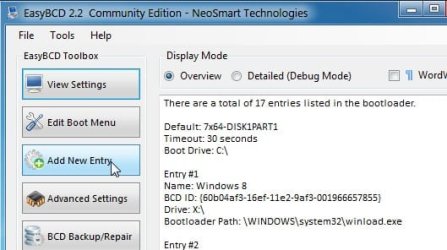
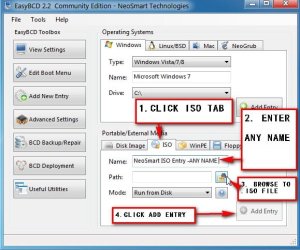
FYI - if you just want to test any pe discs you make - you can boot them off the HD before you decide to burn an iso.

Add the .iso to your boot menu with easybcd - it will defrag it first - only takes a few secs.

ADDISO-1.jpg

ADDISO-2.jpg
 

My Computers My Computers

  • At a glance

    7 X64i5 84002x8gb 3200mhz
    Computer type
    PC/Desktop
    OS
    7 X64
    CPU
    i5 8400
    Motherboard
    gigabyte b365m ds3h
    Memory
    2x8gb 3200mhz
    Hard Drives
    various
    PSU
    pure power 11 400w cm
    Case
    Coolermaster
    Cooling
    cryorig m9i
  • At a glance

    7x64g54008gb ddr4 2400
    Computer type
    PC/Desktop
    OS
    7x64
    CPU
    g5400
    Motherboard
    ga b365m ds3h
    Memory
    8gb ddr4 2400
    PSU
    xfx pro 450w
Anak,

I have just seen from your screenshots that I made a mistake with the x86 in v4.

If you boot the cd you have made, the 64 bit should work perfectly. But the 32 bit won't work.

To fix that, replace your existing runmeasadminx86.cmd with this one. Then run runmeasadminx86-ANAKONLY.cmd it will rename your existing existing .iso and make a new one.

It's just a regular .zip View attachment RunMeAsAdminX86-ANAKONLY.zip


That should be fine then .

I will update to v5 soon - might include a couple of other options in the x86 when I do that.
 

My Computers My Computers

  • At a glance

    7 X64i5 84002x8gb 3200mhz
    Computer type
    PC/Desktop
    OS
    7 X64
    CPU
    i5 8400
    Motherboard
    gigabyte b365m ds3h
    Memory
    2x8gb 3200mhz
    Hard Drives
    various
    PSU
    pure power 11 400w cm
    Case
    Coolermaster
    Cooling
    cryorig m9i
  • At a glance

    7x64g54008gb ddr4 2400
    Computer type
    PC/Desktop
    OS
    7x64
    CPU
    g5400
    Motherboard
    ga b365m ds3h
    Memory
    8gb ddr4 2400
    PSU
    xfx pro 450w
I'm glad I waited I haven't run mine yet to try it out. Will the x86 just refuse to run?

Okay SI, RunMeAsAdminX86-ANAKONLY is in the SIW2R7v4 folder.

Now, because it is there, when I click on it to run and it reaches the point where I say Y to making the .iso. Will it also include the x64 version?

That's my take on you saying:
it will rename your existing existing .iso and make a new one.


Should I wait for v5, will it be that different? Aww, what the heck I can use the practice to see If I can get this running. :p
 

My Computer My Computer

At a glance

Originally Win 7 Hm Prem x64 Ver 6.1.7600 Bui...Intel i3 530 2.93GHz, 2933MHz 2 Cores 4 Logic...6GB of 1,333MHz DDR3 SDRAM32MB Intel Graphics Media Accelerator HD IGChip
Computer type
PC/Desktop
Computer Manufacturer/Model Number
Gateway DX4831-01e (Mid-Tower Desktop)
OS
Originally Win 7 Hm Prem x64 Ver 6.1.7600 Build 7601-SP1 | Upgraded to Windows 10 December 14, 2019
CPU
Intel i3 530 2.93GHz, 2933MHz 2 Cores 4 Logical Processors
Motherboard
Gateway H57M01 133 megahertz
Memory
6GB of 1,333MHz DDR3 SDRAM
Graphics Card(s)
32MB Intel Graphics Media Accelerator HD IGChip
Sound Card
Realtek High Definition Audio
Monitor(s) Displays
Gateway HX2000 20inch TFT active matrix TN
Screen Resolution
1600 x 900 x 59 hertz
Hard Drives
WDC WD10EADS-00M2B0 [HDD] (1000.20 GB) -- drive 0,
HL-DT-ST DVDRAM GH41N [CD-ROM dr]
Four card readers, and Four USB 2.0
PSU
300watts.
Case
Mid-Tower Desktop
Cooling
Stock from Gateway
Keyboard
Natural Ergonomic Keyboard 4000, see Other Info
Mouse
Orig. Gateway wore out now using Insignia USB wired optical
Internet Speed
Vz FIOS 10ms png 57.64Mbps down 65.53Mbps up Speedtest.org
Antivirus
Zamana Anti-logger with Anti-malware, MSE, Windows Firewall,
Browser
IE11.0.9600.19399-Upd ver11.0.135, Firefox 68.0.1 x64
Other Info
System Specs by Belarc.

BIOS: American Megatrends Inc. P01-A0 11/17/2009

Replaced the MS 'Natural' Standard PS/2 Enhanced 101-102 Keyboard with a new Natural Ergonomic Keyboard 4000 on August 1st 2014.

Canon Pixma MG3222 Printer.

Updated to IE11 on 12102015 | Fios Quantum Router g1100

Additional AV: SpywareBlaster, manual Mbam, SAS
when I click on it to run and it reaches the point where I say Y to making the .iso. Will it also include the x64 version?

Yes, because you ran runmeasadminx64.cmd previously.

That should all work now, I hope. It works for me.

If you take a peek in the folder called ISO\sources, you should see BOOT.WIM and BOOTX86.WIM.

The boot menu will have been adjusted to let you select either one when you boot the _MULTI.iso
 

My Computers My Computers

  • At a glance

    7 X64i5 84002x8gb 3200mhz
    Computer type
    PC/Desktop
    OS
    7 X64
    CPU
    i5 8400
    Motherboard
    gigabyte b365m ds3h
    Memory
    2x8gb 3200mhz
    Hard Drives
    various
    PSU
    pure power 11 400w cm
    Case
    Coolermaster
    Cooling
    cryorig m9i
  • At a glance

    7x64g54008gb ddr4 2400
    Computer type
    PC/Desktop
    OS
    7x64
    CPU
    g5400
    Motherboard
    ga b365m ds3h
    Memory
    8gb ddr4 2400
    PSU
    xfx pro 450w
New version may include the option to add in TODO backup - it is a very good program , but fell out of favour slightly when they stopped including winpe maker with the free one.

On a different note:

I have made a somewhat similar one for Vista users.

Surprised I managed to get all of these things to work.


VISTAPE1.jpg


The only fly in the ointment is I haven't got infdefaultinstall to work yet - meaning you can't load drivers on the fly into your running Vista pe ( unless you included TODO - that includes it's own driver install function. )

Maybe I should see if I can get advpack.dll to do it.
 

My Computers My Computers

  • At a glance

    7 X64i5 84002x8gb 3200mhz
    Computer type
    PC/Desktop
    OS
    7 X64
    CPU
    i5 8400
    Motherboard
    gigabyte b365m ds3h
    Memory
    2x8gb 3200mhz
    Hard Drives
    various
    PSU
    pure power 11 400w cm
    Case
    Coolermaster
    Cooling
    cryorig m9i
  • At a glance

    7x64g54008gb ddr4 2400
    Computer type
    PC/Desktop
    OS
    7x64
    CPU
    g5400
    Motherboard
    ga b365m ds3h
    Memory
    8gb ddr4 2400
    PSU
    xfx pro 450w
Back
Top