Ctrl+Alt+Del and Start Menu - Add or Remove Switch User

How to Add or Remove "Switch User" from CTRL+ALT+DEL Screen and Start Menu

   Information
This will show you how to add or remove the Switch User option in the Windows 7 CTRL+ALT+DELETE screen, Lock Computer screen, and Start Menu arrow menu for all users on the computer.
   Note
Fast User Switching or Switch User is a feature only included in the Windows 7 Professional, Ultimate, and Enterprise editions.

The Windows 7 Starter, Home Basic, and Home Premium editions do not have this feature included since they do not have the C:\Windows\System32\tsdiscon.exe file. It is a part of Terminal Services.

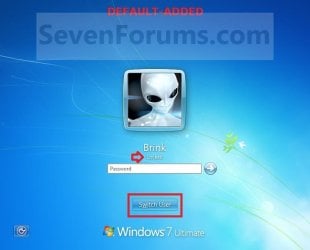
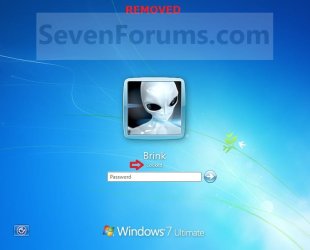
EXAMPLE: CTRL+ALT+DEL screen
NOTE: This is when you press CTRL+ALT+DEL with Switch User added by default (left screenshot below) and removed (right screenshot below).
Switch_User_Added1.jpg

Switch_User_Removed1.jpg
EXAMPLE: Lock Computer screen
NOTE: This is when you press Windows Key+L, or Lock in Start Menu,with the Switch User button added by default (left screenshot below) and removed (right screenshot below).
Switch_User_Added2.jpg

Switch_User_Removed2.jpg
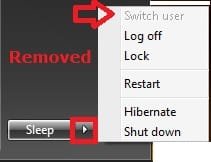
EXAMPLE: Start Menu arrow menu
NOTE: This is the Start Menu arrow menu with Switch User added by default (left screenshot below) and removed (right screenshot below)
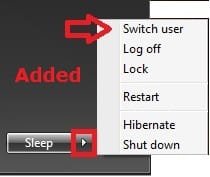
Switch_User_Added3.jpgSwitch_User_Removed3.jpg


OPTION ONE

Using a REG File Download


1. To Add Switch User to CTRL+ALT+DEL Screen
A) Click on the Download button below to download the file below.
Add_Switch_User_CTRL+ALT+DEL.reg

Download


B) Go to step 3.
2. To Remove Switch User from CTRL+ALT+DEL Screen
A) Click on the Download button below to download the file below.
Remove_Switch_User_CTRL+ALT+DEL.reg

Download


3. Save the .reg file to the desktop.

4. Right click on the downloaded .reg file and click on Merge.

5. Click on Run, Yes (UAC), Yes, and OK when prompted.

6. When done, you can delete the downloaded .reg file if you like.

7. Restart the computer to fully apply.


OPTION TWO

Through the Local Group Policy Editor


1. Open the Local Group Policy Editor.

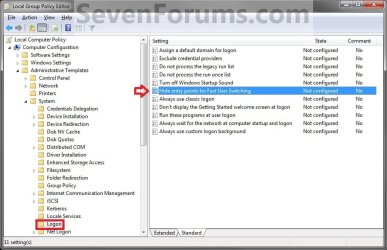
2. In the left pane, click on to expand Computer Configuration, Administrative Templates, System, and Logon. (See screenshot below)
Switch_User_Group_Policy.jpg
3. In the right pane, right click on Hide entry points for Fast User Switching and click on Edit. (See screenshot above)

4. To Add Switch User to CTRL+ALT+DEL Screen
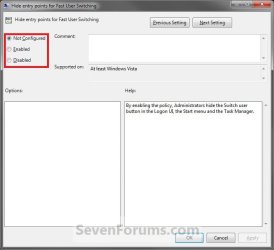
A) Select (dot) either Not Configured or Disabled. (See screenshot below step 6)

B) Go to step 6.
5. To Remove Switch User from CTRL+ALT+DEL Screen
A) Select (dot) Enabled. (See screenshot below step 6)
6. Click on OK. (See screenshot below)
Switch_User_Edit.jpg
7. Close the Local Group Policy Editor window.

8. Restart the computer to fully apply.
That's it,
Shawn


Attachments

Last edited:
Thanks for the Tutorial
Good Job Shawn ...!!
 

My Computer

Computer Manufacturer/Model Number
Samsung NP550P5C-S02IN
OS
Windows 7 Ultimate - 64-bit | Windows 8 Pro - 64-bit
CPU
Intel® Core™ i7 Processor 3,610QM (2.30Hz, 6MB L3 Cach
Memory
8 GB
Graphics Card(s)
NVIDIA® GeForce® GT 650M 2GB Graphics, Optimus™ techno
Sound Card
SoundAlive™ JBL 3 Speakers (With sub-Woofer)
Monitor(s) Displays
39.62cm (15.6) SuperBright 300nit HD+ LED Display
Screen Resolution
1,600 x 900, Anti-Reflective
Hard Drives
1TB S-ATA II Hard Drive (5,400RPM)
You're most welcome Shyam. :)
 

My Computer

Computer type
PC/Desktop
Computer Manufacturer/Model Number
Self built custom
OS
64-bit Windows 11 Pro for Workstations
CPU
Intel i7-8700K OC'd to 5 GHz
Motherboard
ASUS ROG Maximus XI Formula Z390
Memory
64 GB (4x16GB) G.SKILL TridentZ RGB DDR4 3600 MHz
Graphics Card(s)
ASUS ROG-STRIX-GTX1080TI-O11G-GAMING
Sound Card
Integrated
Monitor(s) Displays
2 x Samsung Odyssey G7 27"
Screen Resolution
2560x1440
Hard Drives
1TB Samsung 990 PRO M.2,
4TB Samsung 990 PRO PRO M.2,
TerraMaster F8 SSD Plus NAS
PSU
Seasonic Prime Titanium 850W
Case
Thermaltake Core P3
Cooling
Corsair Hydro H115i
Keyboard
Logitech wireless K800
Mouse
Logitech MX Master 4
Internet Speed
2 Gb/s Download and 100 Mb/s Upload
Antivirus
Malwarebyte Anti-Malware Premium
Browser
Google Chrome
Other Info
Logitech Z625 speaker system,
Logitech BRIO 4K Pro webcam,
HP Color LaserJet Pro MFP M477fdn,
APC SMART-UPS RT 1000 XL - SURT1000XLI,
Galaxy S23 Plus phone
cool just what i was looking for. i could do this through gpedit. now i only have logoff on the screen. thanks
 

My Computer

OS
Windows 7 Ultimate
CPU
Core2Duo E8400
Motherboard
Asus Rampage Formula Rev. 1
Memory
5 Gigs
Graphics Card(s)
Asus Nvidia 9500 Gt
Sound Card
Creative X-Fi Extreme Audio
Monitor(s) Displays
18 Inch LCD
Screen Resolution
1366x768
Hard Drives
c: wd 300 gig velociaptor, wd 1tb, wd 500 gig, wd 320 gig, and 2 wd 40 gig ide drives
PSU
600 watts
You're most welcome DalekOverSeer. :)
 

My Computer

Computer type
PC/Desktop
Computer Manufacturer/Model Number
Self built custom
OS
64-bit Windows 11 Pro for Workstations
CPU
Intel i7-8700K OC'd to 5 GHz
Motherboard
ASUS ROG Maximus XI Formula Z390
Memory
64 GB (4x16GB) G.SKILL TridentZ RGB DDR4 3600 MHz
Graphics Card(s)
ASUS ROG-STRIX-GTX1080TI-O11G-GAMING
Sound Card
Integrated
Monitor(s) Displays
2 x Samsung Odyssey G7 27"
Screen Resolution
2560x1440
Hard Drives
1TB Samsung 990 PRO M.2,
4TB Samsung 990 PRO PRO M.2,
TerraMaster F8 SSD Plus NAS
PSU
Seasonic Prime Titanium 850W
Case
Thermaltake Core P3
Cooling
Corsair Hydro H115i
Keyboard
Logitech wireless K800
Mouse
Logitech MX Master 4
Internet Speed
2 Gb/s Download and 100 Mb/s Upload
Antivirus
Malwarebyte Anti-Malware Premium
Browser
Google Chrome
Other Info
Logitech Z625 speaker system,
Logitech BRIO 4K Pro webcam,
HP Color LaserJet Pro MFP M477fdn,
APC SMART-UPS RT 1000 XL - SURT1000XLI,
Galaxy S23 Plus phone
How to remove switch user in windows 7

Shawn,

I have followed your instructions in downloading the "remove switch user" that is posted in this thread and when I click "Merge" another little windows pups up and gives me the option of "Run or Cancel" When I click "Run" another windows opens up with the following writing: Windows Registry Editor Version 5.00

[HKEY_LOCAL_MACHINE\SOFTWARE\Microsoft\Windows\CurrentVersion\Policies\System]
"HideFastUserSwitching"=dword:00000001

But it does not give an option to run it. It only tells me the content of it. Can you help me? Thanks in advance.

Verdepro
 
Last edited:

My Computer

OS
Windows 7, Home premium x64
Hello Verdepro, and welcome to Seven Forums.

It sounds like you may have .reg files being opened by Notepad by mistake. Check in Default Programs to set the reg file extension to have it's Current Default program set as Registry Editor (C:\Windows\regedit.exe). Afterwards, try merging the REG file again.

Hope this helps,
Shawn
 

My Computer

Computer type
PC/Desktop
Computer Manufacturer/Model Number
Self built custom
OS
64-bit Windows 11 Pro for Workstations
CPU
Intel i7-8700K OC'd to 5 GHz
Motherboard
ASUS ROG Maximus XI Formula Z390
Memory
64 GB (4x16GB) G.SKILL TridentZ RGB DDR4 3600 MHz
Graphics Card(s)
ASUS ROG-STRIX-GTX1080TI-O11G-GAMING
Sound Card
Integrated
Monitor(s) Displays
2 x Samsung Odyssey G7 27"
Screen Resolution
2560x1440
Hard Drives
1TB Samsung 990 PRO M.2,
4TB Samsung 990 PRO PRO M.2,
TerraMaster F8 SSD Plus NAS
PSU
Seasonic Prime Titanium 850W
Case
Thermaltake Core P3
Cooling
Corsair Hydro H115i
Keyboard
Logitech wireless K800
Mouse
Logitech MX Master 4
Internet Speed
2 Gb/s Download and 100 Mb/s Upload
Antivirus
Malwarebyte Anti-Malware Premium
Browser
Google Chrome
Other Info
Logitech Z625 speaker system,
Logitech BRIO 4K Pro webcam,
HP Color LaserJet Pro MFP M477fdn,
APC SMART-UPS RT 1000 XL - SURT1000XLI,
Galaxy S23 Plus phone
Hi Shawn:

I'm sorry but I can't change Notepad to stop opening. Forgive my ignorance but how do I "Check in Default Programs to set the reg file extension to have it's Current Default program set as Registry Editor (C:\Windows\regedit.exe). Afterwards, try merging the REG file again."

I went to Control Panel, Default programs and then I get stuck since I do not know what I'm doing.

I have download "exefix_cu.reg with the same results: Notepad opens up.
 
Last edited by a moderator:

My Computer

OS
Windows 7, Home premium x64
Verdepro,

You can use OPTION TWO after clicking on the link in my post to help show you how to step by step. :)
 

My Computer

Computer type
PC/Desktop
Computer Manufacturer/Model Number
Self built custom
OS
64-bit Windows 11 Pro for Workstations
CPU
Intel i7-8700K OC'd to 5 GHz
Motherboard
ASUS ROG Maximus XI Formula Z390
Memory
64 GB (4x16GB) G.SKILL TridentZ RGB DDR4 3600 MHz
Graphics Card(s)
ASUS ROG-STRIX-GTX1080TI-O11G-GAMING
Sound Card
Integrated
Monitor(s) Displays
2 x Samsung Odyssey G7 27"
Screen Resolution
2560x1440
Hard Drives
1TB Samsung 990 PRO M.2,
4TB Samsung 990 PRO PRO M.2,
TerraMaster F8 SSD Plus NAS
PSU
Seasonic Prime Titanium 850W
Case
Thermaltake Core P3
Cooling
Corsair Hydro H115i
Keyboard
Logitech wireless K800
Mouse
Logitech MX Master 4
Internet Speed
2 Gb/s Download and 100 Mb/s Upload
Antivirus
Malwarebyte Anti-Malware Premium
Browser
Google Chrome
Other Info
Logitech Z625 speaker system,
Logitech BRIO 4K Pro webcam,
HP Color LaserJet Pro MFP M477fdn,
APC SMART-UPS RT 1000 XL - SURT1000XLI,
Galaxy S23 Plus phone
You added "How to Add or Remove Lock Computer from the CTRL+ALT+DEL Screen" twice to the related tutorials.
 

My Computer

Computer type
PC/Desktop
Computer Manufacturer/Model Number
Novatech iRush Pro
OS
Windows 7 Ultimate SP1 - 64 Bit
CPU
Intel Core i5 2500k
Motherboard
Foxconn H67M-S/H67M-V/H67
Memory
2x4GB DDR3 1333Hz
Graphics Card(s)
Ati Radeon 6770
Sound Card
None
Monitor(s) Displays
Samsung S22B150
Screen Resolution
1920x1080
Hard Drives
2x500GB
PSU
500W
Cooling
Fan
Keyboard
HP KU0316
Mouse
Wireless Logitech M185
Internet Speed
20MB/s
Antivirus
Avast Free
Browser
Google Chrome
Other Info
Logitech M185 Mouse
KU-M316 Keyboard
Oops. Thank you Infinite. Corrected. :)
 

My Computer

Computer type
PC/Desktop
Computer Manufacturer/Model Number
Self built custom
OS
64-bit Windows 11 Pro for Workstations
CPU
Intel i7-8700K OC'd to 5 GHz
Motherboard
ASUS ROG Maximus XI Formula Z390
Memory
64 GB (4x16GB) G.SKILL TridentZ RGB DDR4 3600 MHz
Graphics Card(s)
ASUS ROG-STRIX-GTX1080TI-O11G-GAMING
Sound Card
Integrated
Monitor(s) Displays
2 x Samsung Odyssey G7 27"
Screen Resolution
2560x1440
Hard Drives
1TB Samsung 990 PRO M.2,
4TB Samsung 990 PRO PRO M.2,
TerraMaster F8 SSD Plus NAS
PSU
Seasonic Prime Titanium 850W
Case
Thermaltake Core P3
Cooling
Corsair Hydro H115i
Keyboard
Logitech wireless K800
Mouse
Logitech MX Master 4
Internet Speed
2 Gb/s Download and 100 Mb/s Upload
Antivirus
Malwarebyte Anti-Malware Premium
Browser
Google Chrome
Other Info
Logitech Z625 speaker system,
Logitech BRIO 4K Pro webcam,
HP Color LaserJet Pro MFP M477fdn,
APC SMART-UPS RT 1000 XL - SURT1000XLI,
Galaxy S23 Plus phone
No registry string

Hi,
First of all thanks for this topic.
On the previous comp it worked like a charm (HP Probook 4520s,Win 7 Ent SP1 64 bit).
Here on new laptop with the same OS Win 7 Ent SP1 64 bit, i found and enabled this option but still "Switch Users" appears.Also there is no registry key in HKLM and HKLU.
Anyone encountered this problem?
 

My Computer

OS
Windows 7 Ent SP1 64 bit
Hello G3cko, and welcome to Seven Forums. :)

Strange. Did you restart the computer afterwars? Are you part of a domain?

When using step 2 in OPTION ONE, do you not get the HideFastUserSwitching DWORD value added in the right pane of the System key at the registry location below? How does using OPTION TWO for Group Policy work for you?

Code:
[HKEY_LOCAL_MACHINE\SOFTWARE\Microsoft\Windows\CurrentVersion\Policies\System]
"HideFastUserSwitching"=dword:00000001
 
[HKEY_CURRENT_USER\Software\Microsoft\Windows\CurrentVersion\Policies\System]
"HideFastUserSwitching"=-
 

My Computer

Computer type
PC/Desktop
Computer Manufacturer/Model Number
Self built custom
OS
64-bit Windows 11 Pro for Workstations
CPU
Intel i7-8700K OC'd to 5 GHz
Motherboard
ASUS ROG Maximus XI Formula Z390
Memory
64 GB (4x16GB) G.SKILL TridentZ RGB DDR4 3600 MHz
Graphics Card(s)
ASUS ROG-STRIX-GTX1080TI-O11G-GAMING
Sound Card
Integrated
Monitor(s) Displays
2 x Samsung Odyssey G7 27"
Screen Resolution
2560x1440
Hard Drives
1TB Samsung 990 PRO M.2,
4TB Samsung 990 PRO PRO M.2,
TerraMaster F8 SSD Plus NAS
PSU
Seasonic Prime Titanium 850W
Case
Thermaltake Core P3
Cooling
Corsair Hydro H115i
Keyboard
Logitech wireless K800
Mouse
Logitech MX Master 4
Internet Speed
2 Gb/s Download and 100 Mb/s Upload
Antivirus
Malwarebyte Anti-Malware Premium
Browser
Google Chrome
Other Info
Logitech Z625 speaker system,
Logitech BRIO 4K Pro webcam,
HP Color LaserJet Pro MFP M477fdn,
APC SMART-UPS RT 1000 XL - SURT1000XLI,
Galaxy S23 Plus phone
Hello Brink,
Thanks for your respond.Yes , I restarted the comp and yes it belongs to domain.The previous comp was in a domain too.
Looks like I solved it by adding DWORD(32bit)HideFastUserSwitching with value (1) to HKLM manually.
Anyway, thanks.Great forum.
 

My Computer

OS
Windows 7 Ent SP1 64 bit
That's great news G3cko. I'm happy to hear that you got it sorted. :)
 

My Computer

Computer type
PC/Desktop
Computer Manufacturer/Model Number
Self built custom
OS
64-bit Windows 11 Pro for Workstations
CPU
Intel i7-8700K OC'd to 5 GHz
Motherboard
ASUS ROG Maximus XI Formula Z390
Memory
64 GB (4x16GB) G.SKILL TridentZ RGB DDR4 3600 MHz
Graphics Card(s)
ASUS ROG-STRIX-GTX1080TI-O11G-GAMING
Sound Card
Integrated
Monitor(s) Displays
2 x Samsung Odyssey G7 27"
Screen Resolution
2560x1440
Hard Drives
1TB Samsung 990 PRO M.2,
4TB Samsung 990 PRO PRO M.2,
TerraMaster F8 SSD Plus NAS
PSU
Seasonic Prime Titanium 850W
Case
Thermaltake Core P3
Cooling
Corsair Hydro H115i
Keyboard
Logitech wireless K800
Mouse
Logitech MX Master 4
Internet Speed
2 Gb/s Download and 100 Mb/s Upload
Antivirus
Malwarebyte Anti-Malware Premium
Browser
Google Chrome
Other Info
Logitech Z625 speaker system,
Logitech BRIO 4K Pro webcam,
HP Color LaserJet Pro MFP M477fdn,
APC SMART-UPS RT 1000 XL - SURT1000XLI,
Galaxy S23 Plus phone
Thanks. I added it to my CTRL-ALT-DEL screen and it also now appears in my srart menu power button.

Richie
 

My Computer

Computer Manufacturer/Model Number
Dell Inspiron 1720
OS
Windows 7 Home Premium 32 bit SP1
CPU
Intel T5250
Motherboard
Dell OUK437
Memory
4gb
Graphics Card(s)
Nvdia GeForce 8400M GS
Sound Card
Sigma Tel High Definition Audio CODEC
Hard Drives
2 3tb Seagate GoFlex Desktops
1 1tb Seagate Free Agent
Mouse
Logitech M305
Internet Speed
Free Wi-Fi provided to residents of building, too slow!
You're most welcome Richie. :)
 

My Computer

Computer type
PC/Desktop
Computer Manufacturer/Model Number
Self built custom
OS
64-bit Windows 11 Pro for Workstations
CPU
Intel i7-8700K OC'd to 5 GHz
Motherboard
ASUS ROG Maximus XI Formula Z390
Memory
64 GB (4x16GB) G.SKILL TridentZ RGB DDR4 3600 MHz
Graphics Card(s)
ASUS ROG-STRIX-GTX1080TI-O11G-GAMING
Sound Card
Integrated
Monitor(s) Displays
2 x Samsung Odyssey G7 27"
Screen Resolution
2560x1440
Hard Drives
1TB Samsung 990 PRO M.2,
4TB Samsung 990 PRO PRO M.2,
TerraMaster F8 SSD Plus NAS
PSU
Seasonic Prime Titanium 850W
Case
Thermaltake Core P3
Cooling
Corsair Hydro H115i
Keyboard
Logitech wireless K800
Mouse
Logitech MX Master 4
Internet Speed
2 Gb/s Download and 100 Mb/s Upload
Antivirus
Malwarebyte Anti-Malware Premium
Browser
Google Chrome
Other Info
Logitech Z625 speaker system,
Logitech BRIO 4K Pro webcam,
HP Color LaserJet Pro MFP M477fdn,
APC SMART-UPS RT 1000 XL - SURT1000XLI,
Galaxy S23 Plus phone
RESOLVED
 

My Computer

Computer Manufacturer/Model Number
Dell Inspiron 1720
OS
Windows 7 Home Premium 32 bit SP1
CPU
Intel T5250
Motherboard
Dell OUK437
Memory
4gb
Graphics Card(s)
Nvdia GeForce 8400M GS
Sound Card
Sigma Tel High Definition Audio CODEC
Hard Drives
2 3tb Seagate GoFlex Desktops
1 1tb Seagate Free Agent
Mouse
Logitech M305
Internet Speed
Free Wi-Fi provided to residents of building, too slow!
Switch users

hi, your advice does not work on my machine. I run win 7 enterprise. I had this function there but now has suddenly disappeared. I tried everything I found in the web nothing works. any ideas? By the way, display last user name it is what it really means. the name of the last user to be displayed on the screen,...

anyway. I need the move between profiles and now i find it a nuiscance login on and off all the time...
many thanks
Joe
 

My Computer

OS
win 7 64 enterprise

My Computer

Computer type
PC/Desktop
Computer Manufacturer/Model Number
Self built custom
OS
64-bit Windows 11 Pro for Workstations
CPU
Intel i7-8700K OC'd to 5 GHz
Motherboard
ASUS ROG Maximus XI Formula Z390
Memory
64 GB (4x16GB) G.SKILL TridentZ RGB DDR4 3600 MHz
Graphics Card(s)
ASUS ROG-STRIX-GTX1080TI-O11G-GAMING
Sound Card
Integrated
Monitor(s) Displays
2 x Samsung Odyssey G7 27"
Screen Resolution
2560x1440
Hard Drives
1TB Samsung 990 PRO M.2,
4TB Samsung 990 PRO PRO M.2,
TerraMaster F8 SSD Plus NAS
PSU
Seasonic Prime Titanium 850W
Case
Thermaltake Core P3
Cooling
Corsair Hydro H115i
Keyboard
Logitech wireless K800
Mouse
Logitech MX Master 4
Internet Speed
2 Gb/s Download and 100 Mb/s Upload
Antivirus
Malwarebyte Anti-Malware Premium
Browser
Google Chrome
Other Info
Logitech Z625 speaker system,
Logitech BRIO 4K Pro webcam,
HP Color LaserJet Pro MFP M477fdn,
APC SMART-UPS RT 1000 XL - SURT1000XLI,
Galaxy S23 Plus phone
Back
Top