Custom loadup on windows

k33k00

New member
Im trying to make Laptop Running windows 7 Home Premium say welcome [Username] when you log in.

The only way i can do it is by running an MP3 at startup BUT obviously that opens my audio player.

Is there any way of when you log on you can get windows to say "Welcome [Username]

Also hi everyone im new :p
 

My Computer

Computer Manufacturer/Model Number
Advent Roma 1000
OS
Windows 7 Home premium 32bit
CPU
Intel Celeron CPU 900 2.20GHz
Memory
3.00GB
Graphics Card(s)
Mobile Intel 4 Series Express Chipset Family
Sound Card
Intel HD Audio; Realtek HD Audio
Monitor(s) Displays
Generic PnP Monitor
Screen Resolution
1366 x 768 on laptop screen, 1920 x 1080 0n TV
Hard Drives
Toshiba MK1655GSX
ST950032 5AS USB Device
Keyboard
Standard PS/2 Keyboard
Mouse
Synaptics PS/2 Port Pointing Device
Internet Speed
50 meg Virgin Media
Hi, k33k00! Welcome to THE Seven Forums!

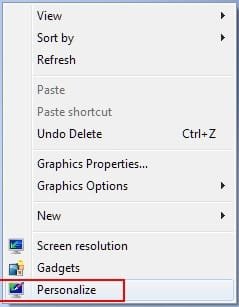
To change your greeting all you need to do is right click on your desktop and select "Personalize":
ScreenShot00037.jpg

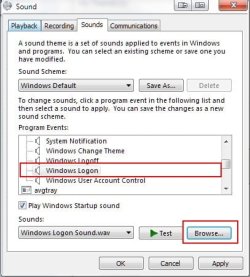
Then click on the "Sounds" selection at the bottom of the Personalize window:
ScreenShot00038.jpg

Scroll through the list of "Program Events" until you find "Windows Logon" then go to the "Browse" button and locate your greeting:
ScreenShot00039.jpg

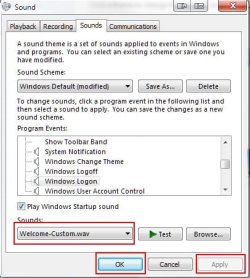
Once you have chosen your custom greeting, click the "Apply" button then "OK," or just click the "OK" button to close the dialog:
ScreenShot00040.jpg

Note: Your custom greeting must be in *.WAV format. Different greetings will be saved separately under different User Names as long as you change the default greeting on each account separately.
 
Last edited:

My Computer

Computer Manufacturer/Model Number
Toshiba L355D
OS
Windows 7 Ultimate x64 SP1
CPU
Core2 Duo
Motherboard
Intel
Memory
4 GB
Graphics Card(s)
GM965 on-board
Sound Card
RealTek on-board
Monitor(s) Displays
19"+17"(laptop)
Screen Resolution
1440x900 (x 2)
Hard Drives
500GB Ext. 200GB Internal
PSU
N/A
Case
N/A
Cooling
N/A

My Computer

Computer Manufacturer/Model Number
Hewlett packard/p6512uk
OS
Microsoft Windows 7 Home Premium 64-bit 7600
CPU
IIx4 amd athelon 635 processor
Motherboard
FOXCONN 2AA9
Memory
2x2gb
Graphics Card(s)
ati radeon HD 5450
Sound Card
(1) Realtek High Definition Audio (2) AMD High Definition
Monitor(s) Displays
samsung lcd tv 32"
Screen Resolution
1360x 768
Hard Drives
(1) WDC WD10 01FAES-60Z2A0 SATA Disk Device (2) Maxtor OneTouch USB Device (3) ST310003 33AS USB Device (4) WD My Book 1111 USB Device
PSU
?
Cooling
air!
Keyboard
wireless hp
Mouse
wireless Hp,optical
Internet Speed
1.10mb/s
Antivirus
MSE
Browser
Firefox
Nice one, boohbah! It works splendidly. I haven't tested it for separate user distinction yet...brb...yep, each user can have a separate greeting, just as was possible in the method I presented above.
 

My Computer

Computer Manufacturer/Model Number
Toshiba L355D
OS
Windows 7 Ultimate x64 SP1
CPU
Core2 Duo
Motherboard
Intel
Memory
4 GB
Graphics Card(s)
GM965 on-board
Sound Card
RealTek on-board
Monitor(s) Displays
19"+17"(laptop)
Screen Resolution
1440x900 (x 2)
Hard Drives
500GB Ext. 200GB Internal
PSU
N/A
Case
N/A
Cooling
N/A
Cheers works perfectly. :)
 

My Computer

Computer Manufacturer/Model Number
Advent Roma 1000
OS
Windows 7 Home premium 32bit
CPU
Intel Celeron CPU 900 2.20GHz
Memory
3.00GB
Graphics Card(s)
Mobile Intel 4 Series Express Chipset Family
Sound Card
Intel HD Audio; Realtek HD Audio
Monitor(s) Displays
Generic PnP Monitor
Screen Resolution
1366 x 768 on laptop screen, 1920 x 1080 0n TV
Hard Drives
Toshiba MK1655GSX
ST950032 5AS USB Device
Keyboard
Standard PS/2 Keyboard
Mouse
Synaptics PS/2 Port Pointing Device
Internet Speed
50 meg Virgin Media
Back
Top