Solved Customizing folder columns (and getting them to stay that way)

zanthal

New member
Local time
7:12 AM
Messages
7
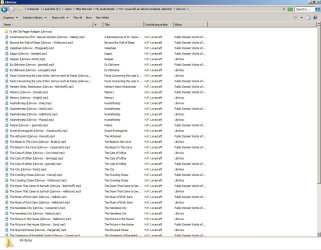
Attached is a screenshot of a folder full of MP3 files (in this case, audiobooks)

Windows 7 does recognize conveniently that this folder is a 'music' type folder, and changes the available Columns to represent that.

Columns like Track number, and Album artist, etc.

I have a large collection of audio, music and audiobooks and more, and I usually like to have Columns that display the Length (in minutes, etc) of the file, and the data size of the file too.

I'm relatively new to using Windows 7 (like most people), and I'm having trouble finding how to customize a standard "Music" folder, with columns how I like them, and get that to be the default. (I'm fairly certain the options for this in Windows XP were in the Control Panel > Folder Options section, but it appears to have been simplified in 7)

As it sits now, I have to edit the columns for every single audio folder I have as I need to see them, and then they revert to the same (lousy) column configurations that you see in the screenshot after I've closed the window.

:mad2:


Thanks in advance for the help :thumbsup:
 

Attachments

  • folderchanges1.jpg
    folderchanges1.jpg
    140.2 KB · Views: 74

My Computer My Computer

At a glance

Windows 7 Home Premium 64 bit SP1AMD Athlon II X3 450 Rana 45nm Technology8.0GB Dual-Channel DDR3 @ 801MHzNVIDIA GeForce GTX 460
Computer Manufacturer/Model Number
Build by me
OS
Windows 7 Home Premium 64 bit SP1
CPU
AMD Athlon II X3 450 Rana 45nm Technology
Motherboard
ASRock 770 Extreme3 (CPUSocket)
Memory
8.0GB Dual-Channel DDR3 @ 801MHz
Graphics Card(s)
NVIDIA GeForce GTX 460
Sound Card
Realtek High Definition Audio
Monitor(s) Displays
HP 1755 17" LCD
Hard Drives
313GB SAMSUNG SAMSUNG HD322GJ ATA Device (SATA)
244GB Seagate ST3250620A ATA Device (PATA)
PSU
Antec TruePower New TP-650 650W Continuous Power ATX12V V2.3
Case
Rosewill DESTROYER Black Gaming ATX Mid Tower
Cooling
COOLER MASTER Hyper 212 Plus RR-B10-212P-G1 Heatpipe Direct
Hello there.

First if you haven't already, you should set the current folder to optimize for Music (the Music Template):
Right Click Folder -> Properties -> Customize -> Choose "Music" from the dropdown list

Now set the settings in the folder: view options

Next apply those settings to all folders that use the Music Template:
Organize -> Folder & Search Options -> View -> Apply to All Folders

Next in a music folder you just need to go to Properties -> Customize -> Music in order to get it to display the way you like.

If you need more details:
folder-template-change
folder-view-apply-all-folders
 

My Computer My Computer

At a glance

Windows 7 Ultimate x64Intel C2D E8400@4Ghz OC4x2GB Kingston HyperX 8500@1066MhzNvidia GTS450 OC
Computer Manufacturer/Model Number
Custom/DIY
OS
Windows 7 Ultimate x64
CPU
Intel C2D E8400@4Ghz OC
Motherboard
ASUS P5Q-E, bios 2101
Memory
4x2GB Kingston HyperX 8500@1066Mhz
Graphics Card(s)
Nvidia GTS450 OC
Sound Card
Onboard SoundMax
Monitor(s) Displays
Samsung Syncmaster 17"
Screen Resolution
1280x1024
Hard Drives
WD6402AAEX-640GB(system), WD10EALX-1TB(storage), other external disks & docking stations
PSU
Corsair TX-750 V2
Case
Custom Tower
Cooling
Air: Arctic Cooling 2xF8 & F12; Akasa AK-968, 2xAK-HD-BL
Mouse
Gigabyte M6900
Internet Speed
10M/1M
Thank you sir

I'm not sure why I had that much trouble with that ... the Apply to All Folders button was greyed out for me before, and I just tuned it out :shock:

Again many thanks
 

My Computer My Computer

At a glance

Windows 7 Home Premium 64 bit SP1AMD Athlon II X3 450 Rana 45nm Technology8.0GB Dual-Channel DDR3 @ 801MHzNVIDIA GeForce GTX 460
Computer Manufacturer/Model Number
Build by me
OS
Windows 7 Home Premium 64 bit SP1
CPU
AMD Athlon II X3 450 Rana 45nm Technology
Motherboard
ASRock 770 Extreme3 (CPUSocket)
Memory
8.0GB Dual-Channel DDR3 @ 801MHz
Graphics Card(s)
NVIDIA GeForce GTX 460
Sound Card
Realtek High Definition Audio
Monitor(s) Displays
HP 1755 17" LCD
Hard Drives
313GB SAMSUNG SAMSUNG HD322GJ ATA Device (SATA)
244GB Seagate ST3250620A ATA Device (PATA)
PSU
Antec TruePower New TP-650 650W Continuous Power ATX12V V2.3
Case
Rosewill DESTROYER Black Gaming ATX Mid Tower
Cooling
COOLER MASTER Hyper 212 Plus RR-B10-212P-G1 Heatpipe Direct
No problem, glad I could help you out. Please mark the thread as solved.
 

My Computer My Computer

At a glance

Windows 7 Ultimate x64Intel C2D E8400@4Ghz OC4x2GB Kingston HyperX 8500@1066MhzNvidia GTS450 OC
Computer Manufacturer/Model Number
Custom/DIY
OS
Windows 7 Ultimate x64
CPU
Intel C2D E8400@4Ghz OC
Motherboard
ASUS P5Q-E, bios 2101
Memory
4x2GB Kingston HyperX 8500@1066Mhz
Graphics Card(s)
Nvidia GTS450 OC
Sound Card
Onboard SoundMax
Monitor(s) Displays
Samsung Syncmaster 17"
Screen Resolution
1280x1024
Hard Drives
WD6402AAEX-640GB(system), WD10EALX-1TB(storage), other external disks & docking stations
PSU
Corsair TX-750 V2
Case
Custom Tower
Cooling
Air: Arctic Cooling 2xF8 & F12; Akasa AK-968, 2xAK-HD-BL
Mouse
Gigabyte M6900
Internet Speed
10M/1M
Solved
 

My Computer My Computer

At a glance

Windows 7 Home Premium 64 bit SP1AMD Athlon II X3 450 Rana 45nm Technology8.0GB Dual-Channel DDR3 @ 801MHzNVIDIA GeForce GTX 460
Computer Manufacturer/Model Number
Build by me
OS
Windows 7 Home Premium 64 bit SP1
CPU
AMD Athlon II X3 450 Rana 45nm Technology
Motherboard
ASRock 770 Extreme3 (CPUSocket)
Memory
8.0GB Dual-Channel DDR3 @ 801MHz
Graphics Card(s)
NVIDIA GeForce GTX 460
Sound Card
Realtek High Definition Audio
Monitor(s) Displays
HP 1755 17" LCD
Hard Drives
313GB SAMSUNG SAMSUNG HD322GJ ATA Device (SATA)
244GB Seagate ST3250620A ATA Device (PATA)
PSU
Antec TruePower New TP-650 650W Continuous Power ATX12V V2.3
Case
Rosewill DESTROYER Black Gaming ATX Mid Tower
Cooling
COOLER MASTER Hyper 212 Plus RR-B10-212P-G1 Heatpipe Direct
To mark the thread as solved, use the icon at the top right:


Type "solved" & send; a moderator will mark it.
 
Last edited by a moderator:

My Computer My Computer

At a glance

Windows 7 Ultimate x64Intel C2D E8400@4Ghz OC4x2GB Kingston HyperX 8500@1066MhzNvidia GTS450 OC
Computer Manufacturer/Model Number
Custom/DIY
OS
Windows 7 Ultimate x64
CPU
Intel C2D E8400@4Ghz OC
Motherboard
ASUS P5Q-E, bios 2101
Memory
4x2GB Kingston HyperX 8500@1066Mhz
Graphics Card(s)
Nvidia GTS450 OC
Sound Card
Onboard SoundMax
Monitor(s) Displays
Samsung Syncmaster 17"
Screen Resolution
1280x1024
Hard Drives
WD6402AAEX-640GB(system), WD10EALX-1TB(storage), other external disks & docking stations
PSU
Corsair TX-750 V2
Case
Custom Tower
Cooling
Air: Arctic Cooling 2xF8 & F12; Akasa AK-968, 2xAK-HD-BL
Mouse
Gigabyte M6900
Internet Speed
10M/1M
I'm afraid this didn't work for me. I have many, many folders of 'music' but the files are sound files and the columns 'artist', 'album' etc. are meaningless. I set one folder with the columns I want, date created etc., and then went through what you said to set all similar folders the same. The column choices are all as they were though, with 'album' and so on..

All the folders are customised as 'music'. Anyone able to help further?

Thanks,

Martin
 

My Computer My Computer

At a glance

Windows 7 Home Premium SP1 64-bitIntel Core i7-4790K CPU @ 4.5GHz16GB KINGSTON HYPER-X FURY DUAL-DDR3 1600MHz8GB NVIDIA GEFORCE GTX 1070
Computer type
PC/Desktop
Computer Manufacturer/Model Number
Custom Build
OS
Windows 7 Home Premium SP1 64-bit
CPU
Intel Core i7-4790K CPU @ 4.5GHz
Motherboard
Asus H97I-PLUS
Memory
16GB KINGSTON HYPER-X FURY DUAL-DDR3 1600MHz
Graphics Card(s)
8GB NVIDIA GEFORCE GTX 1070
Monitor(s) Displays
HannsG 28" & Dell 24"
Screen Resolution
1920x1200
Hard Drives
1 x 2TB Samsung Evo 860 SSD
2 x 500GB Samsung Evo 850 SSD
PSU
CORSAIR 650W CS SERIES
Case
Thermaltake Core V1 Mini ITX Cube
Cooling
NOCTUA NH-L12
Browser
Firefox
Other Info
Custom PC used for X-Plane 11
Ok, as you were. It does work. You have to have the folders set to 'details' view before applying the setting.

M. :o
 

My Computer My Computer

At a glance

Windows 7 Home Premium SP1 64-bitIntel Core i7-4790K CPU @ 4.5GHz16GB KINGSTON HYPER-X FURY DUAL-DDR3 1600MHz8GB NVIDIA GEFORCE GTX 1070
Computer type
PC/Desktop
Computer Manufacturer/Model Number
Custom Build
OS
Windows 7 Home Premium SP1 64-bit
CPU
Intel Core i7-4790K CPU @ 4.5GHz
Motherboard
Asus H97I-PLUS
Memory
16GB KINGSTON HYPER-X FURY DUAL-DDR3 1600MHz
Graphics Card(s)
8GB NVIDIA GEFORCE GTX 1070
Monitor(s) Displays
HannsG 28" & Dell 24"
Screen Resolution
1920x1200
Hard Drives
1 x 2TB Samsung Evo 860 SSD
2 x 500GB Samsung Evo 850 SSD
PSU
CORSAIR 650W CS SERIES
Case
Thermaltake Core V1 Mini ITX Cube
Cooling
NOCTUA NH-L12
Browser
Firefox
Other Info
Custom PC used for X-Plane 11
Back
Top