JavaScript is disabled. For a better experience, please enable JavaScript in your browser before proceeding.
You are using an out of date browser. It may not display this or other websites correctly.
You should upgrade or use an
alternative browser .
Customizing the left Folder Panel and Folder Background. How?
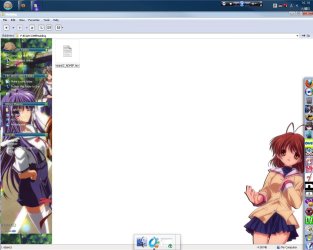
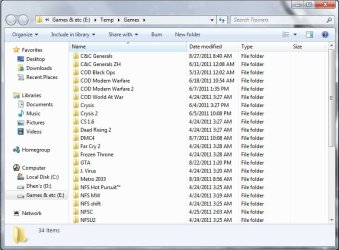
I have been interested to change the backgrounds of folders and some panels.
1.jpg
100.6 KB
· Views: 201
2.jpg
70.6 KB
· Views: 79
Windows 7 Ultimate 64bit 4GB Nvidia GeForce 9500 Windows 7 Ultimate 64bit ASRock G31M-S 4GB Nvidia GeForce 9500 1440x900 C/ Genius
For folder background, you are to edit
Explorer & Shell > Explorer > Items View > Items View > Fillcolor
For left (navigation) pane, edit
Explorer & Shell > Explorer > Proper Tree > <2> - fillcolorhint:color
Everything is to be done with
Ave's Windows7 Style Builder .
Microsoft Windows 10 Pro Insider Preview 64-bit Intel(R) Core(TM) i3-4130 CPU @ 3.40GHz Corsair Vengence 4GB x2 (8.00GB Dual-Channel ... 2047MB GeForce GTS 450 (ZOTAC International) PC/Desktop Self Assembled Microsoft Windows 10 Pro Insider Preview 64-bit Intel(R) Core(TM) i3-4130 CPU @ 3.40GHz Gigabyte Technology Co., Ltd. B85M-D3H Corsair Vengence 4GB x2 (8.00GB Dual-Channel DDR3 @ 798MHz) 2047MB GeForce GTS 450 (ZOTAC International) Onboard (Realtek High Definition Audio) LG Flatron E2040T 1600x900 Western Digital 1 TB Corsair VS550 Cooler Master K380 Cooler Master Seidon 120V Plus Logitech MK260r Logitech MK260r PMPL Broadband Windows Defender + MBAM Firefox Dell Studio 15" Laptop
New member
Member
Thread Starter
Would there be a way for I to customize it without buying any software?
Windows 7 Ultimate 64bit 4GB Nvidia GeForce 9500 Windows 7 Ultimate 64bit ASRock G31M-S 4GB Nvidia GeForce 9500 1440x900 C/ Genius
Microsoft Windows 10 Pro Insider Preview 64-bit Intel(R) Core(TM) i3-4130 CPU @ 3.40GHz Corsair Vengence 4GB x2 (8.00GB Dual-Channel ... 2047MB GeForce GTS 450 (ZOTAC International) PC/Desktop Self Assembled Microsoft Windows 10 Pro Insider Preview 64-bit Intel(R) Core(TM) i3-4130 CPU @ 3.40GHz Gigabyte Technology Co., Ltd. B85M-D3H Corsair Vengence 4GB x2 (8.00GB Dual-Channel DDR3 @ 798MHz) 2047MB GeForce GTS 450 (ZOTAC International) Onboard (Realtek High Definition Audio) LG Flatron E2040T 1600x900 Western Digital 1 TB Corsair VS550 Cooler Master K380 Cooler Master Seidon 120V Plus Logitech MK260r Logitech MK260r PMPL Broadband Windows Defender + MBAM Firefox Dell Studio 15" Laptop
Young Pensioner
Guru
Gold Member
VIP
Windows 7 Home Premium 64bit Intel(R) Core(TM) i3-2120 CPU @ 3.30GHz 3.00 GB (1) Intel(R) HD Graphics (2) VNC Mirror Driver PC/Desktop Packard Bell Windows 7 Home Premium 64bit Intel(R) Core(TM) i3-2120 CPU @ 3.30GHz Packard Bell IPISB-AG 3.00 GB (1) Intel(R) HD Graphics (2) VNC Mirror Driver Realtek High Definition Audio AIO LCD 1920 x 1080 WDC WD10EADX-22TDHB0 ATA Device Wireless Wireless Microsoft Security Essentials IE; Firefox Also:
New member
Member
Thread Starter
There is a freeware to change explorer background :
Windows 7 Folder Background Changer : Change Any Folder .
But I dont know about a free tool that changes the navigation pane background :sarc: If it is there, somebody will find it for you .
You and Irene have pointed me to a program that I have come across already.. Thanks.
Since I felt I had no more options. I have bought the Ave's Windows7 Style Builder.
I have no idea how to utilize the tool.. If possible.. Please give me pointers on how to achieve what I wish to accomplish.
~Very sorry for the trouble I am causing~
Windows 7 Ultimate 64bit 4GB Nvidia GeForce 9500 Windows 7 Ultimate 64bit ASRock G31M-S 4GB Nvidia GeForce 9500 1440x900 C/ Genius
Contact
Bongo if anything troubles you
He is an esteemed thememaker, and he has supreme knowledge on theme making .
Microsoft Windows 10 Pro Insider Preview 64-bit Intel(R) Core(TM) i3-4130 CPU @ 3.40GHz Corsair Vengence 4GB x2 (8.00GB Dual-Channel ... 2047MB GeForce GTS 450 (ZOTAC International) PC/Desktop Self Assembled Microsoft Windows 10 Pro Insider Preview 64-bit Intel(R) Core(TM) i3-4130 CPU @ 3.40GHz Gigabyte Technology Co., Ltd. B85M-D3H Corsair Vengence 4GB x2 (8.00GB Dual-Channel DDR3 @ 798MHz) 2047MB GeForce GTS 450 (ZOTAC International) Onboard (Realtek High Definition Audio) LG Flatron E2040T 1600x900 Western Digital 1 TB Corsair VS550 Cooler Master K380 Cooler Master Seidon 120V Plus Logitech MK260r Logitech MK260r PMPL Broadband Windows Defender + MBAM Firefox Dell Studio 15" Laptop
Jerry ☮ 1956-2019 R.I.P.
VIP
SF Team
I would like to help but I have never put images in the navigation pane and do not know how to do it.
Win 7 Pro x64 / Win 10 Pro Intel(R) Core(TM) i7-3630QM CPU @ 2.40GHz 12 GB (1) Intel(R) HD Graphics 4000 (2) NVIDIA GeFo... Laptop Sager NP9170 Win 7 Pro x64 / Win 10 Pro Intel(R) Core(TM) i7-3630QM CPU @ 2.40GHz CLEVO P170EM 12 GB (1) Intel(R) HD Graphics 4000 (2) NVIDIA GeForce GTX 675M (1) Realtek High Definition Audio (2) Intel(R) Display Aud 17.3 1920x1080 (1) Samsung 860 EVO 500GB(OS) (1) Samsung 860 EVO 500GB(Data) Backlite MSE, Malwarebytes Pro Firefox DESKTOP: Custom-built.
New member
Member
Thread Starter
I would like to help but I have never put images in the navigation pane and do not know how to do it.
Thanks Jerry. I very much appreciate you, Arc and Irene for trying to help me out.
More thanks to you guys. I will add rep to you guys.
Windows 7 Ultimate 64bit 4GB Nvidia GeForce 9500 Windows 7 Ultimate 64bit ASRock G31M-S 4GB Nvidia GeForce 9500 1440x900 C/ Genius
Jerry ☮ 1956-2019 R.I.P.
VIP
SF Team
Thanks Jerry. I very much appreciate you, Arc and Irene for trying to help me out.
I'm sorry I could not be of more help.
Where did you get that first screenshot is it from Windows 7 or another OS?
Jerry
Win 7 Pro x64 / Win 10 Pro Intel(R) Core(TM) i7-3630QM CPU @ 2.40GHz 12 GB (1) Intel(R) HD Graphics 4000 (2) NVIDIA GeFo... Laptop Sager NP9170 Win 7 Pro x64 / Win 10 Pro Intel(R) Core(TM) i7-3630QM CPU @ 2.40GHz CLEVO P170EM 12 GB (1) Intel(R) HD Graphics 4000 (2) NVIDIA GeForce GTX 675M (1) Realtek High Definition Audio (2) Intel(R) Display Aud 17.3 1920x1080 (1) Samsung 860 EVO 500GB(OS) (1) Samsung 860 EVO 500GB(Data) Backlite MSE, Malwarebytes Pro Firefox DESKTOP: Custom-built.
New member
Member
Thread Starter
Thanks Jerry. I very much appreciate you, Arc and Irene for trying to help me out.
I'm sorry I could not be of more help.
Where did you get that first screenshot is it from Windows 7 or another OS?
Jerry
I am not really sure.. I caught that screenshot from a modding forum of a game. Thanks for helping anyway. Atleast I learned new things. Very much appreciated. I'll try to find the answer on my own for the time being and still hope someone would answer this question of mine.
Windows 7 Ultimate 64bit 4GB Nvidia GeForce 9500 Windows 7 Ultimate 64bit ASRock G31M-S 4GB Nvidia GeForce 9500 1440x900 C/ Genius
Well ... a closer looks says that the first screenshot is from XP .
Microsoft Windows 10 Pro Insider Preview 64-bit Intel(R) Core(TM) i3-4130 CPU @ 3.40GHz Corsair Vengence 4GB x2 (8.00GB Dual-Channel ... 2047MB GeForce GTS 450 (ZOTAC International) PC/Desktop Self Assembled Microsoft Windows 10 Pro Insider Preview 64-bit Intel(R) Core(TM) i3-4130 CPU @ 3.40GHz Gigabyte Technology Co., Ltd. B85M-D3H Corsair Vengence 4GB x2 (8.00GB Dual-Channel DDR3 @ 798MHz) 2047MB GeForce GTS 450 (ZOTAC International) Onboard (Realtek High Definition Audio) LG Flatron E2040T 1600x900 Western Digital 1 TB Corsair VS550 Cooler Master K380 Cooler Master Seidon 120V Plus Logitech MK260r Logitech MK260r PMPL Broadband Windows Defender + MBAM Firefox Dell Studio 15" Laptop



 He is an esteemed thememaker, and he has supreme knowledge on theme making .

