D Partition almost full

Bernardus

New member
Member
VIP
Local time
7:12 PM
Messages
282
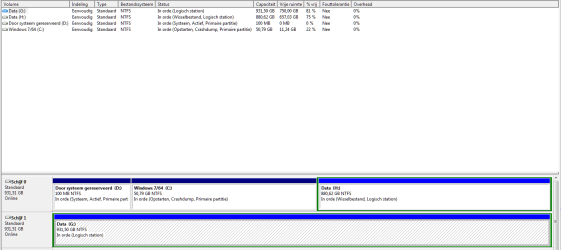
The D partition is almost filled.
Why is windows 7 creating a mysterious partition D and how to expand it?
I can try to shrink C a bit in favour of D. but every new program eats more C drive.
I also have a very large partition E, but filled with a lot of data like backups and personal folders.
With a partition-tool it may be possible, but shifting a lot of data may cause problems.
Or I may backup these partitions and change the original drive partitioning.
Than copy these backups into the new partitions.
What size should D have? What's it's purpose?
 

My Computer

Computer type
PC/Desktop
OS
Microsoft Windows 7 Ultimate 64-bits 7601 Multiprocessor Free Service Pack 1
CPU
Intel(R) Core(TM)2 Duo CPU E8400 @ 3.00GHz
Motherboard
ASRock G41MH/USB3.
Memory
8,00 GB
Graphics Card(s)
(1) Intel(R) G41 Express Chipset (2) Intel(R) G41 Express
Sound Card
(1) VIA High Definition Audio (2) Intel(R) High Definition
Monitor(s) Displays
S24B350 Samsung
Screen Resolution
1920 x 1080 x 32 bits (4294967296 colors) @ 60 Hz
Hard Drives
(1) ST31000528AS ATA Device (2) Generic- Compact Flash USB Device (3) Generic- MS/MS-Pro USB Device (4) Generic- SD/MMC USB Device (5) Generic- SM/xD-Picture USB Device
Antivirus
ZoneAlarm Free Antivirus + Firewall version: 12.0.104.000 Vs

My Computer

Computer type
PC/Desktop
Computer Manufacturer/Model Number
Home made Desktop
OS
Windows 10 Pro. 64/ version 1709 Windows 7 Pro/64
CPU
Intel i7-6800K @ 4.3
Motherboard
ASUS X-99 Deluxe II
Memory
Corsair Platinum 16 gig @2400
Graphics Card(s)
EVGA GTX 1070 OC
Monitor(s) Displays
Asus 27" LED LCD/VE278Q
Screen Resolution
1920-1080 or 1280-720 HDMI
Hard Drives
INTEL SSD 730-240 Gb Sata 3.0/
PSU
EVGA Platium 1200W
Case
Phanteks Luxe Tempered Glass 8 fans/ one radiator
Cooling
XSPC/ Water Cooled CPU
Keyboard
Das 4 Professional
Mouse
Logitech M705/MX Anywhere 2-S
Internet Speed
100 mbits
Antivirus
Microsoft Security Essentials/ Malwarebytes Premium 3.0/ SAS
Browser
I.E. 11 default/Firefox/ ISP Time Warner Cable/Spectrum
Other Info
LG BluRay Burner/
Sound system-KLipsch-THX/
Icy Dock ssd Hot Swap bays.
You mean something like this?

260xv9s.jpg


2agt5dv.jpg
 

My Computer

Computer type
PC/Desktop
OS
Microsoft Windows 7 Ultimate 64-bits 7601 Multiprocessor Free Service Pack 1
CPU
Intel(R) Core(TM)2 Duo CPU E8400 @ 3.00GHz
Motherboard
ASRock G41MH/USB3.
Memory
8,00 GB
Graphics Card(s)
(1) Intel(R) G41 Express Chipset (2) Intel(R) G41 Express
Sound Card
(1) VIA High Definition Audio (2) Intel(R) High Definition
Monitor(s) Displays
S24B350 Samsung
Screen Resolution
1920 x 1080 x 32 bits (4294967296 colors) @ 60 Hz
Hard Drives
(1) ST31000528AS ATA Device (2) Generic- Compact Flash USB Device (3) Generic- MS/MS-Pro USB Device (4) Generic- SD/MMC USB Device (5) Generic- SM/xD-Picture USB Device
Antivirus
ZoneAlarm Free Antivirus + Firewall version: 12.0.104.000 Vs
Please complete the tutorial I posted (#2) exactly as the tutorial instructs you to.
 

My Computer

Computer type
PC/Desktop
Computer Manufacturer/Model Number
Home made Desktop
OS
Windows 10 Pro. 64/ version 1709 Windows 7 Pro/64
CPU
Intel i7-6800K @ 4.3
Motherboard
ASUS X-99 Deluxe II
Memory
Corsair Platinum 16 gig @2400
Graphics Card(s)
EVGA GTX 1070 OC
Monitor(s) Displays
Asus 27" LED LCD/VE278Q
Screen Resolution
1920-1080 or 1280-720 HDMI
Hard Drives
INTEL SSD 730-240 Gb Sata 3.0/
PSU
EVGA Platium 1200W
Case
Phanteks Luxe Tempered Glass 8 fans/ one radiator
Cooling
XSPC/ Water Cooled CPU
Keyboard
Das 4 Professional
Mouse
Logitech M705/MX Anywhere 2-S
Internet Speed
100 mbits
Antivirus
Microsoft Security Essentials/ Malwarebytes Premium 3.0/ SAS
Browser
I.E. 11 default/Firefox/ ISP Time Warner Cable/Spectrum
Other Info
LG BluRay Burner/
Sound system-KLipsch-THX/
Icy Dock ssd Hot Swap bays.
Don't understand the fuss, but here is another one of the same stuff.
 

Attachments

  • Knipsel.PNG
    Knipsel.PNG
    15.2 KB · Views: 7

My Computer

Computer type
PC/Desktop
OS
Microsoft Windows 7 Ultimate 64-bits 7601 Multiprocessor Free Service Pack 1
CPU
Intel(R) Core(TM)2 Duo CPU E8400 @ 3.00GHz
Motherboard
ASRock G41MH/USB3.
Memory
8,00 GB
Graphics Card(s)
(1) Intel(R) G41 Express Chipset (2) Intel(R) G41 Express
Sound Card
(1) VIA High Definition Audio (2) Intel(R) High Definition
Monitor(s) Displays
S24B350 Samsung
Screen Resolution
1920 x 1080 x 32 bits (4294967296 colors) @ 60 Hz
Hard Drives
(1) ST31000528AS ATA Device (2) Generic- Compact Flash USB Device (3) Generic- MS/MS-Pro USB Device (4) Generic- SD/MMC USB Device (5) Generic- SM/xD-Picture USB Device
Antivirus
ZoneAlarm Free Antivirus + Firewall version: 12.0.104.000 Vs
I'm not fussing I just want to see all the information.
We use the forums tutorial for a reason. It makes it easier for those trying to help.

I don't read your language but from what I can tell your Reserve has a Drive letter and it shouldn't.

Here are a couple of things that will help you understand a Reserve partition.

http://www.sevenforums.com/tutorials/119151-system-reserved-create-using-disk-management.html

What is the System Reserved Partition and Can You Delete It?


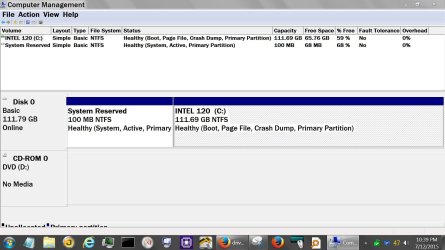
Example from my system.

Disc Management.JPG
 

My Computer

Computer type
PC/Desktop
Computer Manufacturer/Model Number
Home made Desktop
OS
Windows 10 Pro. 64/ version 1709 Windows 7 Pro/64
CPU
Intel i7-6800K @ 4.3
Motherboard
ASUS X-99 Deluxe II
Memory
Corsair Platinum 16 gig @2400
Graphics Card(s)
EVGA GTX 1070 OC
Monitor(s) Displays
Asus 27" LED LCD/VE278Q
Screen Resolution
1920-1080 or 1280-720 HDMI
Hard Drives
INTEL SSD 730-240 Gb Sata 3.0/
PSU
EVGA Platium 1200W
Case
Phanteks Luxe Tempered Glass 8 fans/ one radiator
Cooling
XSPC/ Water Cooled CPU
Keyboard
Das 4 Professional
Mouse
Logitech M705/MX Anywhere 2-S
Internet Speed
100 mbits
Antivirus
Microsoft Security Essentials/ Malwarebytes Premium 3.0/ SAS
Browser
I.E. 11 default/Firefox/ ISP Time Warner Cable/Spectrum
Other Info
LG BluRay Burner/
Sound system-KLipsch-THX/
Icy Dock ssd Hot Swap bays.
System Reserved contains the boot files on your PC.

You could copy your boot files to C and then delete the System Reserved if you wanted to, but that's not necessary.

As Bear mentioned, it should NOT have a drive letter.

Nor should it be full or almost full. Usually, it is larger than 100 mb. More often, it is 200 or 300 mb in size.

The space used by System Reserved would not normally change over time. It's made when Windows is installed and usually is static after that is done.

I'm not sure that it being full is necessarily a problem. It might be.

Usually, you'd like to just leave it alone and not change it at all.

I'm guessing you deliberately gave it a drive letter? It doesn't want or need one.

I'd remove the drive letter and see if it being full causes any problems. If not, leave it alone. If being full causes problems, then worry about that when it happens.

Your C partition is also starting to get crowded at 22% free. I'd leave it alone for now, but if it got down to say 12% or 15% free, I might try to enlarge it.

I see that you are using logical partitions for G and H. Nothing wrong with that, but it can make it more difficult to manipulate partitions if it comes to that. I'd just leave it as is for now.
 

My Computer

Computer type
PC/Desktop
Computer Manufacturer/Model Number
Ignatz Special; 4 speed manual gearbox; factory air conditioning; one of one
OS
Windows 7 Home Premium SP1, 64-bit
CPU
Intel Skylake i5-6600K, not overclocked
Motherboard
AsRock Z170M Extreme 4, micro ATX
Memory
8 GB HyperX DDR4-2666 (2 x 4 GB)
Graphics Card(s)
none; graphics are integrated on CPU
Sound Card
onboard: Realtek ALC1150; external: USB Behringer UF0-202
Monitor(s) Displays
Dell S2340M 23 inch IPS
Screen Resolution
1600 x 900
Hard Drives
System: Crucial MX100 series SSD, 128 GB;
Data: Samsung Spinpoint 103SJ, 1 TB;
Backup: WD Caviar Green WD30EZRX-00D8PB0, 3 TB
PSU
Rosewill SilentNight 500 watt fanless, semi-modular
Case
Antec Solo II
Cooling
Noctua NH-U12S; Noctua F12 intake, Noctua S12A exhaust
Keyboard
Microsoft 200 6JH-00001 USB
Mouse
Dell or Microsoft optical wired; USB
Antivirus
Microsoft Security Essentials and Malwarebytes Premium
Browser
Pale Moon
Other Info
All fans PWM; speeds at idle: CPU circa 500 rpm; intake circa 600 rpm; exhaust circa 600 rpm; CPU temps 27 idle and 47 C load in a warm room (27 C/81 F) when running Intel Extreme Tuning Utility stress test.
Back
Top