
senselocke
New member
- Local time
- 12:20 AM
- Messages
- 14
Hello.
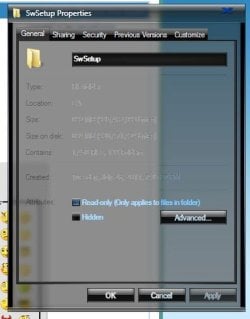
I'm using a dark theme, with fullglass to have transparency on all Explorer windows. Everything looks fine, except Properties pop-up windows--they all have black font colors on dark backgrounds, and are impossible to read.
I found links to the actual fonts themselves:
HKLM\SOFTWARE\Microsoft\Windows NT\CurrentVersion\FontSubstitutes\
MS Shell Dlg
MS Shell Dlg 2
These will let me alter the font type, but not its color.
Oh, I am so very very glad Microsoft, in their infinite wisdom, decided basic color functionality was too much responsibility for us weak-minded peons. I wouldn't even need a 3rd-party theme and hacked files if I could just adjust the Windows Explorer background color to a default of black for all folders.
Does anyone have any idea how to alter this attribute? Attached is a pic of the issue.
I'm using a dark theme, with fullglass to have transparency on all Explorer windows. Everything looks fine, except Properties pop-up windows--they all have black font colors on dark backgrounds, and are impossible to read.
I found links to the actual fonts themselves:
HKLM\SOFTWARE\Microsoft\Windows NT\CurrentVersion\FontSubstitutes\
MS Shell Dlg
MS Shell Dlg 2
These will let me alter the font type, but not its color.
Oh, I am so very very glad Microsoft, in their infinite wisdom, decided basic color functionality was too much responsibility for us weak-minded peons. I wouldn't even need a 3rd-party theme and hacked files if I could just adjust the Windows Explorer background color to a default of black for all folders.
Does anyone have any idea how to alter this attribute? Attached is a pic of the issue.
Attachments
My Computer
At a glance
Windows 7 64-Bit
- OS
- Windows 7 64-Bit

