Solved Date/Time Question

Aviator

New member
Was looking at some forums last week and noticed on one of them that the user's date/time was showing a different color from the default white. His showed a yellow/gold color in the system tray. Just curious if there is a way to change the default white to another color in Win7?
 

My Computer

Computer type
PC/Desktop
Computer Manufacturer/Model Number
Dell XPS600
OS
Win7 Pro x64 SP1
CPU
3.2ghz
Motherboard
Nvidia nForce4 SLI
Memory
8.0 gb Samsung Ram
Graphics Card(s)
Evga GTX260 898mb
Sound Card
Onboard AC97
Monitor(s) Displays
Dell 2407 WFP
Hard Drives
WD 250gb Sata
Antivirus
NIS 2014

My Computer

Computer type
Laptop
Computer Manufacturer/Model Number
Sony Vaio VPCEB47GM Laptop
OS
Win 7 Pro 64-bit
CPU
Intel i5 2.4 Ghz
Memory
8GB DDR3
Graphics Card(s)
Intel HD 3000
Sound Card
IDT High Definition
Monitor(s) Displays
15.6 WGXA Anti-Glare LED
Screen Resolution
1280x800
Hard Drives
640Gb 7200rpm
Antivirus
MSE
Browser
Opera (primary) with IE9 backup
If you are using the default aero theme I can change that for you, using Windows Style Builder and post it here in a zip folder.
If you are using a custom theme you will need to ask the theme maker. It's not cool to change someone else work.
&
This will be a custom theme and you will need to do 1 of these 2 ways of Enabling custom themes for it to work.
http://www.sevenforums.com/tutorials/34579-enabling-custom-themes-windows-7-a.html
Or
http://www.sevenforums.com/tutorials/28377-theme-how-apply-custom-themes.html?filter
I will need the color(RBG would be great) and a name to call the theme.
Let me know.
Jerry
 

My Computer

Computer type
Laptop
Computer Manufacturer/Model Number
Sager NP9170
OS
Win 7 Pro x64 / Win 10 Pro
CPU
Intel(R) Core(TM) i7-3630QM CPU @ 2.40GHz
Motherboard
CLEVO P170EM
Memory
12 GB
Graphics Card(s)
(1) Intel(R) HD Graphics 4000 (2) NVIDIA GeForce GTX 675M
Sound Card
(1) Realtek High Definition Audio (2) Intel(R) Display Aud
Monitor(s) Displays
17.3
Screen Resolution
1920x1080
Hard Drives
(1) Samsung 860 EVO 500GB(OS) (1) Samsung 860 EVO 500GB(Data)
Keyboard
Backlite
Antivirus
MSE, Malwarebytes Pro
Browser
Firefox
Other Info
DESKTOP: Custom-built.
OS: Win 10 Pro x64.
CASE: Rosewill R5.
CPU: Intel I5 4670K CPU @ 3.40GHz.
CPU COOLER: Cool Master Hyper 212 EVO.
MOTHERBOARD: Asus Z87-A.
MEMORY: Kingston HyperX 2x4 GB.
GPU: Nvidia Geforce 650 TI.
PSU: Corsair TX750.
DRIVES: (1) Samsung 840 120 GB SSD (2) Western Digital blue 500 GB 7200 RPM.
Bongo, I really appreciate your assistance. I am not using any custom themes. Just the themes from Win7. I have been usng this theme for the past six months which I like. I think a Yellow/ Gold color theme for the date/time would look great for this theme. I guess a good name for the theme would be "Yellow Time". Thanks again.

large.jpg
 

My Computer

Computer type
PC/Desktop
Computer Manufacturer/Model Number
Dell XPS600
OS
Win7 Pro x64 SP1
CPU
3.2ghz
Motherboard
Nvidia nForce4 SLI
Memory
8.0 gb Samsung Ram
Graphics Card(s)
Evga GTX260 898mb
Sound Card
Onboard AC97
Monitor(s) Displays
Dell 2407 WFP
Hard Drives
WD 250gb Sata
Antivirus
NIS 2014
OK well work on it on monday.
Jerry
 

My Computer

Computer type
Laptop
Computer Manufacturer/Model Number
Sager NP9170
OS
Win 7 Pro x64 / Win 10 Pro
CPU
Intel(R) Core(TM) i7-3630QM CPU @ 2.40GHz
Motherboard
CLEVO P170EM
Memory
12 GB
Graphics Card(s)
(1) Intel(R) HD Graphics 4000 (2) NVIDIA GeForce GTX 675M
Sound Card
(1) Realtek High Definition Audio (2) Intel(R) Display Aud
Monitor(s) Displays
17.3
Screen Resolution
1920x1080
Hard Drives
(1) Samsung 860 EVO 500GB(OS) (1) Samsung 860 EVO 500GB(Data)
Keyboard
Backlite
Antivirus
MSE, Malwarebytes Pro
Browser
Firefox
Other Info
DESKTOP: Custom-built.
OS: Win 10 Pro x64.
CASE: Rosewill R5.
CPU: Intel I5 4670K CPU @ 3.40GHz.
CPU COOLER: Cool Master Hyper 212 EVO.
MOTHERBOARD: Asus Z87-A.
MEMORY: Kingston HyperX 2x4 GB.
GPU: Nvidia Geforce 650 TI.
PSU: Corsair TX750.
DRIVES: (1) Samsung 840 120 GB SSD (2) Western Digital blue 500 GB 7200 RPM.
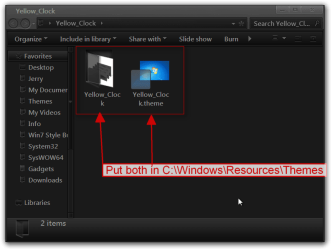
Here you go, I ended up naming it Yellow_Clock if you would prefer Yellow Time I can change it. Download the zip at the bottom of this post and extract it to your desktop then put both 1 Yellow_Clock folder and 1 Yellow_Clock.theme file in C:\Windows\Resources\Themes
Yellow_Clock.png

It will show up in Personalization under Installed Themes as Yellow_Clock
Personalization.png

Let me know how it goes.
Jerry
 

Attachments

My Computer

Computer type
Laptop
Computer Manufacturer/Model Number
Sager NP9170
OS
Win 7 Pro x64 / Win 10 Pro
CPU
Intel(R) Core(TM) i7-3630QM CPU @ 2.40GHz
Motherboard
CLEVO P170EM
Memory
12 GB
Graphics Card(s)
(1) Intel(R) HD Graphics 4000 (2) NVIDIA GeForce GTX 675M
Sound Card
(1) Realtek High Definition Audio (2) Intel(R) Display Aud
Monitor(s) Displays
17.3
Screen Resolution
1920x1080
Hard Drives
(1) Samsung 860 EVO 500GB(OS) (1) Samsung 860 EVO 500GB(Data)
Keyboard
Backlite
Antivirus
MSE, Malwarebytes Pro
Browser
Firefox
Other Info
DESKTOP: Custom-built.
OS: Win 10 Pro x64.
CASE: Rosewill R5.
CPU: Intel I5 4670K CPU @ 3.40GHz.
CPU COOLER: Cool Master Hyper 212 EVO.
MOTHERBOARD: Asus Z87-A.
MEMORY: Kingston HyperX 2x4 GB.
GPU: Nvidia Geforce 650 TI.
PSU: Corsair TX750.
DRIVES: (1) Samsung 840 120 GB SSD (2) Western Digital blue 500 GB 7200 RPM.
Jerry, Yesterday, I put the Yellow_Clock folder and the Yellow_Clock.theme into the Resources\Themes folder as instructed. The new theme showed up under Personalization. I applied the new theme but ran into a problem.
Clicking on the theme brought up the Windows Color and Appearance box which I don't want to change. The date/time color is black. All I get is High Contrast-Win 7 basic color. I could not change the taskbar color (Choclate) as shown in my screenshot. The Window color at the bottom was set to Custom and I could not change it. I am probably doing something wrong but can't figure out what it is.
I did a System Restore prior to applying the new theme and reverted back to my previous theme. I guess I will have to stay with that one. I appreciate your assistance though. Walter
 

My Computer

Computer type
PC/Desktop
Computer Manufacturer/Model Number
Dell XPS600
OS
Win7 Pro x64 SP1
CPU
3.2ghz
Motherboard
Nvidia nForce4 SLI
Memory
8.0 gb Samsung Ram
Graphics Card(s)
Evga GTX260 898mb
Sound Card
Onboard AC97
Monitor(s) Displays
Dell 2407 WFP
Hard Drives
WD 250gb Sata
Antivirus
NIS 2014

My Computer

Computer type
Laptop
Computer Manufacturer/Model Number
Sager NP9170
OS
Win 7 Pro x64 / Win 10 Pro
CPU
Intel(R) Core(TM) i7-3630QM CPU @ 2.40GHz
Motherboard
CLEVO P170EM
Memory
12 GB
Graphics Card(s)
(1) Intel(R) HD Graphics 4000 (2) NVIDIA GeForce GTX 675M
Sound Card
(1) Realtek High Definition Audio (2) Intel(R) Display Aud
Monitor(s) Displays
17.3
Screen Resolution
1920x1080
Hard Drives
(1) Samsung 860 EVO 500GB(OS) (1) Samsung 860 EVO 500GB(Data)
Keyboard
Backlite
Antivirus
MSE, Malwarebytes Pro
Browser
Firefox
Other Info
DESKTOP: Custom-built.
OS: Win 10 Pro x64.
CASE: Rosewill R5.
CPU: Intel I5 4670K CPU @ 3.40GHz.
CPU COOLER: Cool Master Hyper 212 EVO.
MOTHERBOARD: Asus Z87-A.
MEMORY: Kingston HyperX 2x4 GB.
GPU: Nvidia Geforce 650 TI.
PSU: Corsair TX750.
DRIVES: (1) Samsung 840 120 GB SSD (2) Western Digital blue 500 GB 7200 RPM.
Jerry, Neither one.:o I reckon that is why I could not change the custom theme. I d/l the Uxstyle program last night but haven't installed it yet. Will try it out in the next day or two. Don't ever get old. You trend to forget the important stuff.
 

My Computer

Computer type
PC/Desktop
Computer Manufacturer/Model Number
Dell XPS600
OS
Win7 Pro x64 SP1
CPU
3.2ghz
Motherboard
Nvidia nForce4 SLI
Memory
8.0 gb Samsung Ram
Graphics Card(s)
Evga GTX260 898mb
Sound Card
Onboard AC97
Monitor(s) Displays
Dell 2407 WFP
Hard Drives
WD 250gb Sata
Antivirus
NIS 2014
If you need help with installing Uxstyle let me know it's not very hard you just have to follow the procedures in that tutorial. It's too late for me now I am getting old.
Jerry
 

My Computer

Computer type
Laptop
Computer Manufacturer/Model Number
Sager NP9170
OS
Win 7 Pro x64 / Win 10 Pro
CPU
Intel(R) Core(TM) i7-3630QM CPU @ 2.40GHz
Motherboard
CLEVO P170EM
Memory
12 GB
Graphics Card(s)
(1) Intel(R) HD Graphics 4000 (2) NVIDIA GeForce GTX 675M
Sound Card
(1) Realtek High Definition Audio (2) Intel(R) Display Aud
Monitor(s) Displays
17.3
Screen Resolution
1920x1080
Hard Drives
(1) Samsung 860 EVO 500GB(OS) (1) Samsung 860 EVO 500GB(Data)
Keyboard
Backlite
Antivirus
MSE, Malwarebytes Pro
Browser
Firefox
Other Info
DESKTOP: Custom-built.
OS: Win 10 Pro x64.
CASE: Rosewill R5.
CPU: Intel I5 4670K CPU @ 3.40GHz.
CPU COOLER: Cool Master Hyper 212 EVO.
MOTHERBOARD: Asus Z87-A.
MEMORY: Kingston HyperX 2x4 GB.
GPU: Nvidia Geforce 650 TI.
PSU: Corsair TX750.
DRIVES: (1) Samsung 840 120 GB SSD (2) Western Digital blue 500 GB 7200 RPM.
Jerry, The Uxstyle App did the trick. I am now able to use your Clock Theme. The color just about matches the digital clock gadget. Excellent. Thanks again for your help and assistance.

original.jpg
 

My Computer

Computer type
PC/Desktop
Computer Manufacturer/Model Number
Dell XPS600
OS
Win7 Pro x64 SP1
CPU
3.2ghz
Motherboard
Nvidia nForce4 SLI
Memory
8.0 gb Samsung Ram
Graphics Card(s)
Evga GTX260 898mb
Sound Card
Onboard AC97
Monitor(s) Displays
Dell 2407 WFP
Hard Drives
WD 250gb Sata
Antivirus
NIS 2014
You're welcome
 

My Computer

Computer type
Laptop
Computer Manufacturer/Model Number
Sager NP9170
OS
Win 7 Pro x64 / Win 10 Pro
CPU
Intel(R) Core(TM) i7-3630QM CPU @ 2.40GHz
Motherboard
CLEVO P170EM
Memory
12 GB
Graphics Card(s)
(1) Intel(R) HD Graphics 4000 (2) NVIDIA GeForce GTX 675M
Sound Card
(1) Realtek High Definition Audio (2) Intel(R) Display Aud
Monitor(s) Displays
17.3
Screen Resolution
1920x1080
Hard Drives
(1) Samsung 860 EVO 500GB(OS) (1) Samsung 860 EVO 500GB(Data)
Keyboard
Backlite
Antivirus
MSE, Malwarebytes Pro
Browser
Firefox
Other Info
DESKTOP: Custom-built.
OS: Win 10 Pro x64.
CASE: Rosewill R5.
CPU: Intel I5 4670K CPU @ 3.40GHz.
CPU COOLER: Cool Master Hyper 212 EVO.
MOTHERBOARD: Asus Z87-A.
MEMORY: Kingston HyperX 2x4 GB.
GPU: Nvidia Geforce 650 TI.
PSU: Corsair TX750.
DRIVES: (1) Samsung 840 120 GB SSD (2) Western Digital blue 500 GB 7200 RPM.
Back
Top