Default Ethernet cable no longer working?

For a temp test, can you disconnect the router from the cable modem at the cable modem & plug your 50ft cat6 cable into the cable modem & test to see if you can connect that way ?


This isn't possible. Unless you are talking about the other wireless router? Because if i disconnect the ethernet cable that goes from the modem to that router... then are you saying you want me to connect that cable modem ethernet cable directly to my laptop?


Because what you are describing... that isn't possible because the router has those 3 ethernet cables stuck in it and one of them include the other router and you cannot pull it out.
 

My Computer My Computer

At a glance

Windows 10 Pro
Computer type
Laptop
OS
Windows 10 Pro
Cable Modem-------------RouterA-----------RouterB-------3 used ports & 1 open port


Is this how it is set up ?

What is the make & model of the router ? Who is in charge of maintaining the Apt. building equipment setup ?

Cat6 cable is backward compatible with cat5. Cat6 gives better performance & has double bandwith over cat5.
 

My Computer My Computer

At a glance

Win7 Enterprise, Win7 x86 (Ult 7600), Win7 x6...AMD fx8350 4ghz, AMD-32 2400mhz, AMD-64 3200m...2gb, 4gb on the Ult 7600, 4gb on Technet RTM,...Draw my own Graphics, several nVidia cards
Computer type
PC/Desktop
Computer Manufacturer/Model Number
Built them myself, Science Experiments !
OS
Win7 Enterprise, Win7 x86 (Ult 7600), Win7 x64 Ult 7600, TechNet RTM on AMD x64 (2.8Ghz)
CPU
AMD fx8350 4ghz, AMD-32 2400mhz, AMD-64 3200mhz, AMDx64 2.8G
Motherboard
SIS 755, ECS-K8M890M-M (Ult 7600), GigaByte & others
Memory
2gb, 4gb on the Ult 7600, 4gb on Technet RTM, 32gb on FX8350
Graphics Card(s)
Draw my own Graphics, several nVidia cards
Sound Card
on motherboard
Monitor(s) Displays
19" flat scr, 28" I-Inc widescr,22" Emprex Widescr, 23" Acer
Screen Resolution
1280 x 1024, 1440 x 900, 1920 x 1080
Hard Drives
6 pata Ide HD's & 2 Sata HD's
added 80gb external on Ult 7600 computer,
numerous extra 1tb, 2TB, 3Tb SATA HD's
A collection of ext HD Docks w/ HDs
PSU
430w, 550w, 600w, 700, 800, etc
Case
All Generic Full Towers
Cooling
Open Air & a few fans, some w/ colored LEDs
Keyboard
Compaq & Dell recycled from GoodWill
Mouse
Made in China Optical Wired Mouse
Internet Speed
Fast Cable InterNet
Antivirus
AVG Free on 24 different Desktops, NO Problems!
Browser
IE 8 is preferred, but use FireFox sometimes
Other Info
Linksys Routers, switches, & Hubs
Too Many USB Flash Drives to count, Biggest is 64GB !
Eight computers in my home network.
Sixteen computers at my business network.
Linked via TeamViewer !
Lots of old used spare computer parts everywhere!
Cable Modem-------------RouterA-----------RouterB-------3 used ports & 1 open port


Is this how it is set up ?

What is the make & model of the router ? Who is in charge of maintaining the Apt. building equipment setup ?

Cat6 cable is backward compatible with cat5. Cat6 gives better performance & has double bandwith over cat5.


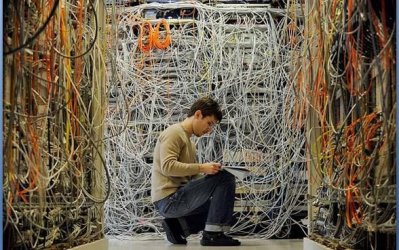
Router A basically is where most of the ethernet cables are attached to.--- Then there are 4 ethernet cables connected to other things.


One is a red ethernet cable to the modem. Another is router b. Another is my ethernet cable which i use to connect to my laptop for wired connection which doesn't work anymore. Another is this blue ethernet cable that goes upwards somewhere.


Does that make sense?


Yes the last port is the one that is available. The other 3 used ports you cannot pull it out. The ethernet that connects to the cable modem however you can.


TP Link router.


The person who does the showing of apartment and renting she usually have someone come over to take a look at things whenever theres a problem.
 

My Computer My Computer

At a glance

Windows 10 Pro
Computer type
Laptop
OS
Windows 10 Pro
Well, I think it should be the Apt. complex that needs to replace the router and the cables. Sounds like a Super Glue prank that is causing NO connections. I have been using Linksys (Cisco) networking products in my systems for 14 years, so that is what I am comfortable with.

Home system >> Cable modem----4 port wire/Wifi Router----100ft cat 5 cable---8 port- Hub/Switch--5 computers
^^-2 wired computers
^^-network printer
^^ WiFi Tivo Box
^^WiFi Laptop
^^Android tablet

Work System >> Cable Modem----4port wired Router---- 16 port wired Hub/switch----3>> 5port wired Hubs
24 wired computers connected to network & a 2x2tb Network Storage device
& 2 network printers.
 

Attachments

  • Network_Nightmare.JPG
    Network_Nightmare.JPG
    78.7 KB · Views: 13

My Computer My Computer

At a glance

Win7 Enterprise, Win7 x86 (Ult 7600), Win7 x6...AMD fx8350 4ghz, AMD-32 2400mhz, AMD-64 3200m...2gb, 4gb on the Ult 7600, 4gb on Technet RTM,...Draw my own Graphics, several nVidia cards
Computer type
PC/Desktop
Computer Manufacturer/Model Number
Built them myself, Science Experiments !
OS
Win7 Enterprise, Win7 x86 (Ult 7600), Win7 x64 Ult 7600, TechNet RTM on AMD x64 (2.8Ghz)
CPU
AMD fx8350 4ghz, AMD-32 2400mhz, AMD-64 3200mhz, AMDx64 2.8G
Motherboard
SIS 755, ECS-K8M890M-M (Ult 7600), GigaByte & others
Memory
2gb, 4gb on the Ult 7600, 4gb on Technet RTM, 32gb on FX8350
Graphics Card(s)
Draw my own Graphics, several nVidia cards
Sound Card
on motherboard
Monitor(s) Displays
19" flat scr, 28" I-Inc widescr,22" Emprex Widescr, 23" Acer
Screen Resolution
1280 x 1024, 1440 x 900, 1920 x 1080
Hard Drives
6 pata Ide HD's & 2 Sata HD's
added 80gb external on Ult 7600 computer,
numerous extra 1tb, 2TB, 3Tb SATA HD's
A collection of ext HD Docks w/ HDs
PSU
430w, 550w, 600w, 700, 800, etc
Case
All Generic Full Towers
Cooling
Open Air & a few fans, some w/ colored LEDs
Keyboard
Compaq & Dell recycled from GoodWill
Mouse
Made in China Optical Wired Mouse
Internet Speed
Fast Cable InterNet
Antivirus
AVG Free on 24 different Desktops, NO Problems!
Browser
IE 8 is preferred, but use FireFox sometimes
Other Info
Linksys Routers, switches, & Hubs
Too Many USB Flash Drives to count, Biggest is 64GB !
Eight computers in my home network.
Sixteen computers at my business network.
Linked via TeamViewer !
Lots of old used spare computer parts everywhere!
1. Inform who ever owns the router of your problem. (Management)
2. Leave other peoples routers alone.
3. Ask management if the tech that checks out the system can install your own router for your use only and at what cost to you.
That should solve your problem.
 

My Computer My Computer

At a glance

Windows 10 Pro. 64/ version 1709 Windows 7 Pr...Intel i7-6800K @ 4.3Corsair Platinum 16 gig @2400EVGA GTX 1070 OC
Computer type
PC/Desktop
Computer Manufacturer/Model Number
Home made Desktop
OS
Windows 10 Pro. 64/ version 1709 Windows 7 Pro/64
CPU
Intel i7-6800K @ 4.3
Motherboard
ASUS X-99 Deluxe II
Memory
Corsair Platinum 16 gig @2400
Graphics Card(s)
EVGA GTX 1070 OC
Monitor(s) Displays
Asus 27" LED LCD/VE278Q
Screen Resolution
1920-1080 or 1280-720 HDMI
Hard Drives
INTEL SSD 730-240 Gb Sata 3.0/
PSU
EVGA Platium 1200W
Case
Phanteks Luxe Tempered Glass 8 fans/ one radiator
Cooling
XSPC/ Water Cooled CPU
Keyboard
Das 4 Professional
Mouse
Logitech M705/MX Anywhere 2-S
Internet Speed
100 mbits
Antivirus
Microsoft Security Essentials/ Malwarebytes Premium 3.0/ SAS
Browser
I.E. 11 default/Firefox/ ISP Time Warner Cable/Spectrum
Other Info
LG BluRay Burner/
Sound system-KLipsch-THX/
Icy Dock ssd Hot Swap bays.
Okay this is very strange. Yesterday i had changed the IP4 properties to

192.168.1.101
255 is that other thing.

It was from youtube video that i found. I did this because i thought this was a way to fix my problem since my 50ft ethernet wire did not work.

So right now i just went there and decide to click on obtain an ip address automatically like it was previously before i input the numbers. Thus just go back to what it was yesterday.

I then put in the short ethernet cable to test it out and yes the wired connection worked as expected.

I then took my 50 ft cat6 ethernet cable and plugged it in... and it worked.

I then went and did this with the router downstairs... my 50 ft ethernet cable worked and i see wired connection.

This doesn't make any sense. Why did it not work yesterday and now it worked today? I didn't do any changes to any settings. All i did was change what i did yesterday that didn't work. So basically me putting in the ethernet cable today is the same as it was yesterday and today right now it worked? I see the wired connection at the moment.

Right now im still unsure because this might work for few day then stop working again. Do you know what kind of strange situation is this? Wired works now but then again im not going to get excited because im not sure few days later suddenly it stop working again.
 

My Computer My Computer

At a glance

Windows 10 Pro
Computer type
Laptop
OS
Windows 10 Pro
Okay this is very strange. Yesterday i had changed the IP4 properties to

192.168.1.101
255 is that other thing.

Then the last 2 lines... i changed it to some other numbers not the ones you wrote down. The last numbers were different.

It was from youtube video.

That did not work. So right now i just went there and decide to click on obtain an ip address automatically like it was previously before i input the own numbers.

I then put in the short ethernet cable to test it out and yes the wired connection worked as expected.

I then took my 50 ft cat6 ethernet cable and plugged it in... and it worked.

I then went and did this with the router downstairs... my 50 ft ethernet cable worked and i see wired connection.

This doesn't make any sense. Why did it not work yesterday and now it worked today? I didn't do any changes to any settings. All i did was change what i did yesterday that didn't work.

Right now im still unsure because this might work for few day then stop working again. Do you know what kind of strange situation is this? Wired works now but then again im not going to get excited because im not sure few days later suddenly it stop working again.
 

My Computer My Computer

At a glance

Windows 10 Pro
Computer type
Laptop
OS
Windows 10 Pro
Well i never did any changes to any settings at all yesterday until i saw the 50ft new ethernet cable didn't work. So i made changes to those settings with those numbers and it didn't work.

Also i forgot to mention but the reason i clicked on obtain ip address automatically was because when i first put the short ethernet cable into router from laptop... it didn't work... had the computer logo with the yellow exclamation point with it. This is the same logo i have when my 50ft ethernet cable didnt work.

So i press obtain ip address autoatmically instead and then wired connection worked for short router. But i figure okay try the 50ft long cable and expected it to not work like yesterday... yet it worked.

I honestly dont know why its working now.

I forgot to mention but yesterday I did download a microsoft fix it file where ppl said it would solve this issue. BUt yesterday when i put ethernet cable after doing that, it still didnt work. However... could it be because i had changed the ip address with the ip4 settings with those numbers and thats why?

The only thing i can think of that is the reason it works today with ethernet cable and not yesterday is b/c i downloaded that microsoft fix it file... but i didn't revert those ip4 numbers back to the original obtain ip address automatically...
 

My Computer My Computer

At a glance

Windows 10 Pro
Computer type
Laptop
OS
Windows 10 Pro
Depending on how many people are connected to the WiFi and how the two routers are set up (both in the way they connect to each other and how their software is set up), and whether the internet is also being shared unknowingly with the public, will depend on the number of IP Addresses that can be assigned.

If you manually changed the IP address your computer has and it didn't work then you could well have tried to use an IP Address that was already taken by somebody else, or alternatively the router has been set up to give you a fixed IP address & what you set up yourself clashed with what the router wanted you to have so you didn't get a connection.

Obtaining an IP Address automatically is the easiest way to get a connection in your situation, because you (presumably) cannot access the configuration page of either Router A or Router B to see what IP Addresses have been assigned to other people.


A little bit more info on IP Addresses: a lot of home routers are only set to give out 150 IP addresses at any one time, with a maximum of 253 IP addresses at any one time (assuming that 192.168.1.0 is the Default Gateway & 192.168.1.255 is always reserved). While I assume that there are not 253 people in your apartment building all using the same Cable Connection (you would need Google Fibre to actually be able to get a half decent connection in that case), it may be possible that people have multiple devices or that the WiFi is not encrypted (i.e. no password required to access it) and as such anyone walking by outside could then use the same internet connection.

 

My Computer My Computer

At a glance

Windows 7 Ultimate x64Intil i7-86016Gb Corsair XMS3 1600MHzMSI N470GTXTwin FrozR II
Computer type
PC/Desktop
Computer Manufacturer/Model Number
Self Built
OS
Windows 7 Ultimate x64
CPU
Intil i7-860
Motherboard
Gigabyte GA-P55a-UD6
Memory
16Gb Corsair XMS3 1600MHz
Graphics Card(s)
MSI N470GTXTwin FrozR II
Monitor(s) Displays
Samsung S23A700D
Hard Drives
1x Samsung 840Pro SSD 256Gb for Windows
2x WD Green 2Tb (for Storage)
1x Western Digital Caviar Black 2 TB 7200 RPM (also for storage)
1x Samsung HD501LJ 500Gb for Ubuntu
PSU
Antec TruePower New Blue Modular 750W
Case
Antec 300
Cooling
Cosair H70
Internet Speed
60Mb/s DL, 3Mb/s UL
Antivirus
Norton Internet Security
Browser
IE, FF, Chrome
Okay but do you know why my ethernet cable when connected to the router works now as oppose to yesterday?

The only different thing i did was the fix it download i installed. Could that been the reason?
 

My Computer My Computer

At a glance

Windows 10 Pro
Computer type
Laptop
OS
Windows 10 Pro
From reading this thread, it seems you have a combination of problems, not the least of which is tampering. You may have an intermittent connection due to the router / switch failing. You also might have someone monkeying where they have no business monkeying.

I'd ask the property owner to have an expert, not an amateur, go in and fix things proper, then put it all behind a locked door. You might be asked to share the cost of doing this, but it's probably worth it to put an end to the frustration.

Just one man's opinion.
 

My Computer My Computer

At a glance

Windows 7 Professional 64 bit4096
Computer Manufacturer/Model Number
Dell Optiplex
OS
Windows 7 Professional 64 bit
Memory
4096
Doc Brown, how do you keep your server room so neat ???
 

My Computer My Computer

At a glance

Windows 7 Professional 64 bit4096
Computer Manufacturer/Model Number
Dell Optiplex
OS
Windows 7 Professional 64 bit
Memory
4096
Okay right now my wired internet doesn't work at all again. I went and took a look and ethernet is plugged into router just like it was yesterday.

Yesterday my wired connection was working perfectly fine.

None of this makes sense now.
 

My Computer My Computer

At a glance

Windows 10 Pro
Computer type
Laptop
OS
Windows 10 Pro
Back
Top