Default Program Icons for Windows Photo Viewer

hhhiii

New member
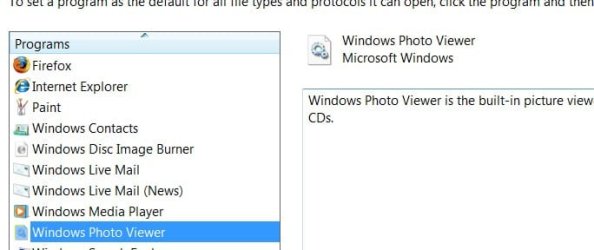
I have noticed in Windows 7 and in Vista that the Icon located in the "set your default programs" window for the Windows Photo Viewer is a Gear and Cog on a piece of paper instead of the normal picture and flower vase. I have tried to fix it through the registry editor, but I don't seem to know where to correct the setting that will produce the correct icon for that application. Does anyone have any suggestions?

screenshot.png
 
Last edited:

My Computer

Computer Manufacturer/Model Number
Dell Precision 380
OS
windows 7 X86
CPU
Pentium D XE 3.2 Ghz
Motherboard
Dell OCF774 A00
Memory
2 Gig of ECC DDR2 800 Mhz
Graphics Card(s)
EVGA Nvidia 9800GT 512 mb DDR3 memory
Sound Card
Sigma Tel onboard sound
Monitor(s) Displays
Dell 1905 FP
Screen Resolution
1280 x 1024
Hard Drives
Two WD 80 GB 10000 rpm Rators
One WD 320 GB 7200 rpm SATA 2
PSU
Dell 400 Watt
Case
Dell
Cooling
Dell, but its really big
Keyboard
Dell
Mouse
Dell
Internet Speed
10 Meg
Other Info
Yea I know the processor isn't that good, but I don't have enough money yet to build my first one which will probably have a Quad Core or something like it
Hi,

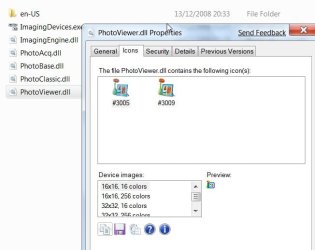
That's the icon for the Photo Viewer.dll, which contains the Flower icon you are talking about.

PHOTOVIEWER2009-02-13_030933.jpg

As long as you get the Flower where it should be, e.g. when you rt click and Open with, I shouldn't worry about it - mine is the same.

PHOTOVIEWER2009-02-13_030742.jpg


Hope it helps

SIW2
 

My Computers

System One System Two

  • Computer type
    PC/Desktop
    OS
    7 X64
    CPU
    i5 8400
    Motherboard
    gigabyte b365m ds3h
    Memory
    2x8gb 3200mhz
    Hard Drives
    various
    PSU
    pure power 11 400w cm
    Case
    Coolermaster
    Cooling
    cryorig m9i
  • Computer type
    PC/Desktop
    OS
    7x64
    CPU
    g5400
    Motherboard
    ga b365m ds3h
    Memory
    8gb ddr4 2400
    PSU
    xfx pro 450w
Yea I know, I found the same thing, I'm just one of those folks that likes everything to work the way it should and wanted to see if I could fix it somehow. My feeling is that the registry entry is pointing at the wrong icon in some way and correcting that value would make it display accurately. But I'm just not sure where that value is at and what is should be for it to work right.
 

My Computer

Computer Manufacturer/Model Number
Dell Precision 380
OS
windows 7 X86
CPU
Pentium D XE 3.2 Ghz
Motherboard
Dell OCF774 A00
Memory
2 Gig of ECC DDR2 800 Mhz
Graphics Card(s)
EVGA Nvidia 9800GT 512 mb DDR3 memory
Sound Card
Sigma Tel onboard sound
Monitor(s) Displays
Dell 1905 FP
Screen Resolution
1280 x 1024
Hard Drives
Two WD 80 GB 10000 rpm Rators
One WD 320 GB 7200 rpm SATA 2
PSU
Dell 400 Watt
Case
Dell
Cooling
Dell, but its really big
Keyboard
Dell
Mouse
Dell
Internet Speed
10 Meg
Other Info
Yea I know the processor isn't that good, but I don't have enough money yet to build my first one which will probably have a Quad Core or something like it
Hi,

No, it is correct - that is the standard icon for .dll files. (See top screenshot of my previous post - the other .dll's have the same icon ).

Photo Viewer is a .dll not an .exe.

There may be a way of changing the icon for all .dll files , tho. I have never tried.

SIW2
 

My Computers

System One System Two

  • Computer type
    PC/Desktop
    OS
    7 X64
    CPU
    i5 8400
    Motherboard
    gigabyte b365m ds3h
    Memory
    2x8gb 3200mhz
    Hard Drives
    various
    PSU
    pure power 11 400w cm
    Case
    Coolermaster
    Cooling
    cryorig m9i
  • Computer type
    PC/Desktop
    OS
    7x64
    CPU
    g5400
    Motherboard
    ga b365m ds3h
    Memory
    8gb ddr4 2400
    PSU
    xfx pro 450w
hello hhhiii and welcome...
it shouldnt be too obtrusive since what its doing is not calling up a program but a dll
thats why you see the image of the cog and wheel, thats the default icon for a dll
if you want to read more on what a dll is and what it does...

Dynamic-link library - Wikipedia, the free encyclopedia

basically the viewer is in this dll...
rundll32.exe runs it and you get the photoviewer...

while you can try to change the icon for the dll files i wouldnt advise it since this is a global change meaning that any dll file is going to have the same icon...
and any extension (like you see) that calls a dll (in the default programs) will have the same icon as this one...
 

My Computer

Computer Manufacturer/Model Number
Tx2500z Tablet Pc/Homemade Server
OS
Windows 7 Ult x64(x2), HomePrem x32(x4), Server 08 (+VM), 08 R2 (VM) , SuSe 11.2 (VM), XP 32 (VM)
CPU
Turion X2 ultra (oh well came with laptop)/P4 @3.2 (yes P4)
Motherboard
IDK HP Motherboard / Intel DG965SS
Memory
OCZ Dual Channel 4GB kit/ 1gb Dual Channel
Graphics Card(s)
HD 3200 graphics /GMA x3100 (yay for intergrated!!)
Sound Card
Realtek HD Audio(mic working, well sort of)/Siig IC-70012
Monitor(s) Displays
built-in Hp 12" laptop screen/ Acer 19"
Screen Resolution
1280x800 /1440x900
Cooling
All Air Cooled
Mouse
Logi MX Rev. /MS Wheel Optical 1.1A /Logitech Optical Mouse
Internet Speed
College baby but its still routed through vpn to 1536k...
Other Info
love my wacom pen and pressure sensitivity...
wished it worked in 7, SUSE for that matter though
Well this is what I have found it in the registry. I notice that it does point towards a .dll file, it might be as you say concerning .dll files vs .exe. that could be why it doesn't display right or maybe the values listed are wrong: "-3069, -3009"? That has been my thought track so far.

reg2.png


reg1.png
 
Last edited by a moderator:

My Computer

Computer Manufacturer/Model Number
Dell Precision 380
OS
windows 7 X86
CPU
Pentium D XE 3.2 Ghz
Motherboard
Dell OCF774 A00
Memory
2 Gig of ECC DDR2 800 Mhz
Graphics Card(s)
EVGA Nvidia 9800GT 512 mb DDR3 memory
Sound Card
Sigma Tel onboard sound
Monitor(s) Displays
Dell 1905 FP
Screen Resolution
1280 x 1024
Hard Drives
Two WD 80 GB 10000 rpm Rators
One WD 320 GB 7200 rpm SATA 2
PSU
Dell 400 Watt
Case
Dell
Cooling
Dell, but its really big
Keyboard
Dell
Mouse
Dell
Internet Speed
10 Meg
Other Info
Yea I know the processor isn't that good, but I don't have enough money yet to build my first one which will probably have a Quad Core or something like it
Actually, the 3069 and 3009 are nothing more than String Resource Identifiers within the referenced DLL. Chances are, if the language or locale of Vista is changed (for whatever reason), then those identifiers will likely be changed also.
 

My Computer

Computer type
PC/Desktop
Computer Manufacturer/Model Number
Virtual Machine
OS
Windows 7 Professional 32-bit SP1
CPU
AMD A4/A6
Motherboard
Intel Corporation 440BX Desktop Reference Platform
Memory
3.00GB EDO
Graphics Card(s)
VMware SVGA 3D
Sound Card
High Definition Audio Device
Monitor(s) Displays
Generic Non-PnP Monitor on VMware SVGA 3D
Screen Resolution
1440x900
Hard Drives
1 x 60GB VMware Virtual SATA Hard Drive ATA Device
Antivirus
Kaspersky Total Security
So where's the...

Windows Photo Viewer (as it's titled in Win7)

.exe file located inside of windows 7

there's no link in the START or ALL PROGRAMS locations,
the search found nothing,
I looked in windows and system 32 folders

I'm tired of looking,

All I wanted to do was assign it to open .gif files from now on...

what a headache windows 7 and Vista can be...
it was so much easier in WinXp to do shortcuts,
find things & get to places,

thanks for the help

seb6000
 

My Computer

OS
Windows 7 Home Premium 64bit
CPU
Intel Core i7-680UM
Memory
4GB DDR3
Graphics Card(s)
Intel HD Graphics
Monitor(s) Displays
32" RCA HDTV
Screen Resolution
1920 x 1080 & 1366 x 768
Hard Drives
500GB
Cooling
Big ASS Fan
Keyboard
Logitech Wave Pro
Mouse
Logitech Wave Pro combo
Internet Speed
mach schnell
Hello Seb,

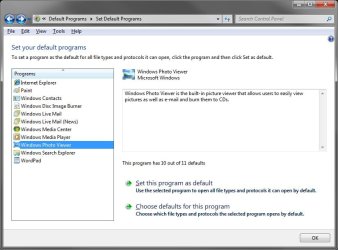
To do this, you would go into Default Programs. Next, select Windows Photo Viewer, Choose defaults for this program (Step 5), and check the .gif box. :)
Default_Programs.jpg
Hope this helps,
Shawn


P.S.
Hhhiii,
It seems that your issue has been fixed in the RTM release.

DF.jpg
 

My Computer

Computer type
PC/Desktop
Computer Manufacturer/Model Number
Self built custom
OS
64-bit Windows 11 Pro for Workstations
CPU
Intel i7-8700K OC'd to 5 GHz
Motherboard
ASUS ROG Maximus XI Formula Z390
Memory
64 GB (4x16GB) G.SKILL TridentZ RGB DDR4 3600 MHz
Graphics Card(s)
ASUS ROG-STRIX-GTX1080TI-O11G-GAMING
Sound Card
Integrated
Monitor(s) Displays
2 x Samsung Odyssey G7 27"
Screen Resolution
2560x1440
Hard Drives
1TB Samsung 990 PRO M.2,
4TB Samsung 990 PRO PRO M.2,
TerraMaster F8 SSD Plus NAS
PSU
Seasonic Prime Titanium 850W
Case
Thermaltake Core P3
Cooling
Corsair Hydro H115i
Keyboard
Logitech wireless K800
Mouse
Logitech MX Master 4
Internet Speed
2 Gb/s Download and 100 Mb/s Upload
Antivirus
Malwarebyte Anti-Malware Premium
Browser
Google Chrome
Other Info
Logitech Z625 speaker system,
Logitech BRIO 4K Pro webcam,
HP Color LaserJet Pro MFP M477fdn,
APC SMART-UPS RT 1000 XL - SURT1000XLI,
Galaxy S23 Plus phone
Brink,
thanks for the help...

Ya I knew about that way, but thought someone might have another trick for win7

I'm pretty familiar with windows and I still cannot understand why MS thinks its so much better to change things that have worked very well since before winXP.

I mean all a person had to do was right click on an image to get to the procedures to assign default options to images. Now when you do that there's no WPV (Windows photo Viewer) option for certain images (like .gif).... why?

(I'm not really sure why these photos are not popping up in your forum, they always have before, but now they're not, so right click on them and open them in a new window, to view)

http://img96.imageshack.us/img96/9628/30429767.jpg


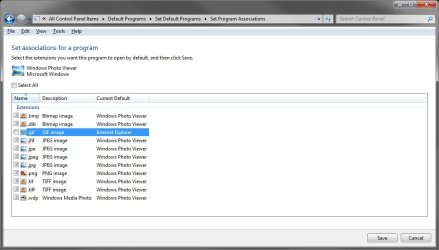
So Ok here's what happens when doing it your way...

I go into START > DEFAULT PROGRAMS > and have 2 options to try

http://img34.imageshack.us/img34/9585/50379359.jpg


So I ran the top/1st option & it never changed the .GIF settings (from Internet explorer opening the .gif image)

So I ran the 2nd option and it would change the association over to WPV (windows photo viewer).

http://img210.imageshack.us/img210/2654/100k.jpg


http://img210.imageshack.us/img210/419/102wc.jpg


So it must be an un-changable bug, at least on this one image type (gif)..

MS could really learn something about programming, if they would just step back and look at themselves.. and what they are doing in win7, stay with things that work and build on them, or leave them alone. Simple is always better.

thanks again
seb60000
 
Last edited:

My Computer

OS
Windows 7 Home Premium 64bit
CPU
Intel Core i7-680UM
Memory
4GB DDR3
Graphics Card(s)
Intel HD Graphics
Monitor(s) Displays
32" RCA HDTV
Screen Resolution
1920 x 1080 & 1366 x 768
Hard Drives
500GB
Cooling
Big ASS Fan
Keyboard
Logitech Wave Pro
Mouse
Logitech Wave Pro combo
Internet Speed
mach schnell
Seb,

In the Open With image above, click on the arrow for "Other Programs" and select Windows Photo Viewer. Make sure that the "Always use......" box is checked. Doing this allow a .gif file to be opened by WPV by default from now on for me.
 

My Computer

Computer type
PC/Desktop
Computer Manufacturer/Model Number
Self built custom
OS
64-bit Windows 11 Pro for Workstations
CPU
Intel i7-8700K OC'd to 5 GHz
Motherboard
ASUS ROG Maximus XI Formula Z390
Memory
64 GB (4x16GB) G.SKILL TridentZ RGB DDR4 3600 MHz
Graphics Card(s)
ASUS ROG-STRIX-GTX1080TI-O11G-GAMING
Sound Card
Integrated
Monitor(s) Displays
2 x Samsung Odyssey G7 27"
Screen Resolution
2560x1440
Hard Drives
1TB Samsung 990 PRO M.2,
4TB Samsung 990 PRO PRO M.2,
TerraMaster F8 SSD Plus NAS
PSU
Seasonic Prime Titanium 850W
Case
Thermaltake Core P3
Cooling
Corsair Hydro H115i
Keyboard
Logitech wireless K800
Mouse
Logitech MX Master 4
Internet Speed
2 Gb/s Download and 100 Mb/s Upload
Antivirus
Malwarebyte Anti-Malware Premium
Browser
Google Chrome
Other Info
Logitech Z625 speaker system,
Logitech BRIO 4K Pro webcam,
HP Color LaserJet Pro MFP M477fdn,
APC SMART-UPS RT 1000 XL - SURT1000XLI,
Galaxy S23 Plus phone
ya I tried that and WPV will not change the .gif file type association,
It is stuck with IE opening it... no matter what I do

I tried both ways in the photo with the arrows

I also searched the web and this is an issue in win7 that many peeps still have.

seb6000
 

My Computer

OS
Windows 7 Home Premium 64bit
CPU
Intel Core i7-680UM
Memory
4GB DDR3
Graphics Card(s)
Intel HD Graphics
Monitor(s) Displays
32" RCA HDTV
Screen Resolution
1920 x 1080 & 1366 x 768
Hard Drives
500GB
Cooling
Big ASS Fan
Keyboard
Logitech Wave Pro
Mouse
Logitech Wave Pro combo
Internet Speed
mach schnell
I did this by checking .gif in Default Programs (for programs) the Windows Photo Gallery and OK'd it, then right clicked on a a .gif file and selecting "Open With" and selected Windows Photo Gallery above. You might try it that way to see if it makes a difference for you.
 

My Computer

Computer type
PC/Desktop
Computer Manufacturer/Model Number
Self built custom
OS
64-bit Windows 11 Pro for Workstations
CPU
Intel i7-8700K OC'd to 5 GHz
Motherboard
ASUS ROG Maximus XI Formula Z390
Memory
64 GB (4x16GB) G.SKILL TridentZ RGB DDR4 3600 MHz
Graphics Card(s)
ASUS ROG-STRIX-GTX1080TI-O11G-GAMING
Sound Card
Integrated
Monitor(s) Displays
2 x Samsung Odyssey G7 27"
Screen Resolution
2560x1440
Hard Drives
1TB Samsung 990 PRO M.2,
4TB Samsung 990 PRO PRO M.2,
TerraMaster F8 SSD Plus NAS
PSU
Seasonic Prime Titanium 850W
Case
Thermaltake Core P3
Cooling
Corsair Hydro H115i
Keyboard
Logitech wireless K800
Mouse
Logitech MX Master 4
Internet Speed
2 Gb/s Download and 100 Mb/s Upload
Antivirus
Malwarebyte Anti-Malware Premium
Browser
Google Chrome
Other Info
Logitech Z625 speaker system,
Logitech BRIO 4K Pro webcam,
HP Color LaserJet Pro MFP M477fdn,
APC SMART-UPS RT 1000 XL - SURT1000XLI,
Galaxy S23 Plus phone
ah...

ok I see how u did it, OTHER PROGRAMS was blank or empty until I double clicked the word OTHER PROGRAMS in the window... that's not good for people who don't know this trick and the overall association process is a big hassle on how MS is making people associate file types... not good MS! (keep it simple)

but again, thanks for your help

sweb6000
 

My Computer

OS
Windows 7 Home Premium 64bit
CPU
Intel Core i7-680UM
Memory
4GB DDR3
Graphics Card(s)
Intel HD Graphics
Monitor(s) Displays
32" RCA HDTV
Screen Resolution
1920 x 1080 & 1366 x 768
Hard Drives
500GB
Cooling
Big ASS Fan
Keyboard
Logitech Wave Pro
Mouse
Logitech Wave Pro combo
Internet Speed
mach schnell
You're welcome Sweb. I believe I'll make a tutorial on this to help others with the same issue tonight. :)
 

My Computer

Computer type
PC/Desktop
Computer Manufacturer/Model Number
Self built custom
OS
64-bit Windows 11 Pro for Workstations
CPU
Intel i7-8700K OC'd to 5 GHz
Motherboard
ASUS ROG Maximus XI Formula Z390
Memory
64 GB (4x16GB) G.SKILL TridentZ RGB DDR4 3600 MHz
Graphics Card(s)
ASUS ROG-STRIX-GTX1080TI-O11G-GAMING
Sound Card
Integrated
Monitor(s) Displays
2 x Samsung Odyssey G7 27"
Screen Resolution
2560x1440
Hard Drives
1TB Samsung 990 PRO M.2,
4TB Samsung 990 PRO PRO M.2,
TerraMaster F8 SSD Plus NAS
PSU
Seasonic Prime Titanium 850W
Case
Thermaltake Core P3
Cooling
Corsair Hydro H115i
Keyboard
Logitech wireless K800
Mouse
Logitech MX Master 4
Internet Speed
2 Gb/s Download and 100 Mb/s Upload
Antivirus
Malwarebyte Anti-Malware Premium
Browser
Google Chrome
Other Info
Logitech Z625 speaker system,
Logitech BRIO 4K Pro webcam,
HP Color LaserJet Pro MFP M477fdn,
APC SMART-UPS RT 1000 XL - SURT1000XLI,
Galaxy S23 Plus phone
Back
Top