Solved Default User AND User\Default and that is not all!

Ojisplayin

New member
Local time
3:17 PM
Messages
6
Okay, I have to first say- THIS forum is AWESOME!! Thanks for all the time you spend helping others, like me. So, here is my questions.........After a succesful Repair in place (TY BRINK!!) Profiles seem, ummmm, strange, sort of! :confused:;)

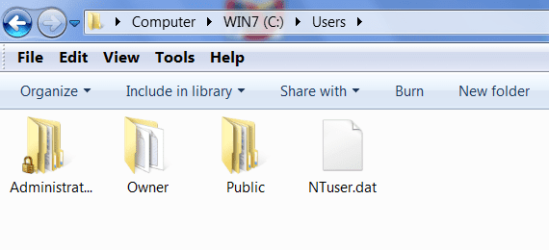
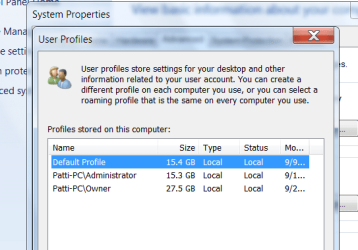
Here are 3 screenshots of what I am seeing with:

1) Hidden & System File Settings SHOW
2) Hidden & System File Settings HIDE
3) System Advanced Settings Profile List

Regarding screenshot 1, is that just a shortcut to the actual Default Profile that can safely be deleted?

Regarding Screenshot 2, is that THE HIDDEN SYSTEM ADMIN profile? If so, why is it showing with HIDE ticked?

Regarding Screenshot 3, I am the Owner with tons of Music/Data etc. so I understand my Profile being huge.
So, but why is the other ADMIN (hidden system admin or not???) & Default there with both over 15 GB in size?

Is this how you're Users folder looks too? Thanks for the INPUT everyone!
xxx Patti
 

Attachments

  • Users 1.png
    Users 1.png
    18.1 KB · Views: 4
  • Users 2.png
    Users 2.png
    14.2 KB · Views: 5
  • Users 3.png
    Users 3.png
    24.4 KB · Views: 7

My Computer My Computer

At a glance

Windows 7 Home Premium x64AMD
Computer Manufacturer/Model Number
ASUS
OS
Windows 7 Home Premium x64
CPU
AMD
Hello Patti,

Screenshot 1
Default Profile with the shortcut arrow on it is not really a folder but a junction point pointing to the Default user profile folder in the same screenshot for backwards compatibility for older programs.
Screenshot 2
The Administrator folder is the built-in Administrator's profile folder. The Owner folder appears to be your user account's profile folder. Both them are not hidden since they are not faded though.
Screenshot 3
I'm not sure why the other user profiles are so large either. You might double check in their user folders to see if something may be saved in them taking up so much space.
Hope this helps some, :)
Shawn


My Computer My Computer

At a glance

64-bit Windows 11 Pro for WorkstationsIntel i7-8700K OC'd to 5 GHz64 GB (4x16GB) G.SKILL TridentZ RGB DDR4 3600...ASUS ROG-STRIX-GTX1080TI-O11G-GAMING
Computer type
PC/Desktop
Computer Manufacturer/Model Number
Self built custom
OS
64-bit Windows 11 Pro for Workstations
CPU
Intel i7-8700K OC'd to 5 GHz
Motherboard
ASUS ROG Maximus XI Formula Z390
Memory
64 GB (4x16GB) G.SKILL TridentZ RGB DDR4 3600 MHz
Graphics Card(s)
ASUS ROG-STRIX-GTX1080TI-O11G-GAMING
Sound Card
Integrated
Monitor(s) Displays
2 x Samsung Odyssey G7 27"
Screen Resolution
2560x1440
Hard Drives
1TB Samsung 990 PRO M.2,
4TB Samsung 990 PRO PRO M.2,
TerraMaster F8 SSD Plus NAS
PSU
Seasonic Prime Titanium 850W
Case
Thermaltake Core P3
Cooling
Corsair Hydro H115i
Keyboard
Logitech wireless K800
Mouse
Logitech MX Master 4
Internet Speed
2 Gb/s Download and 100 Mb/s Upload
Antivirus
Malwarebyte Anti-Malware Premium
Browser
Google Chrome
Other Info
Logitech Z625 speaker system,
Logitech BRIO 4K Pro webcam,
HP Color LaserJet Pro MFP M477fdn,
APC SMART-UPS RT 1000 XL - SURT1000XLI,
Galaxy S23 Plus phone
Shawn, Thank You!!!!! Marking this as Solved right now.

As with most things in life (virtual or other) it is satisfying to have someone validate (or not...) your thoughts. ;)
You helped me hunt down the almost 30 GB that was My (Owner) Music/Pix indeed in both the Profiles.
I remember now SysPrep "Tweak" I did on first install, my bad!
Thought new profiles ought to have my stuff pre-loaded. LMAO now.

Last thoughts for Admin; even though the command-
net user administrator /active:no
is right, and does not offer that User as a Logon option, it still shows in C:\Users. I don't know why? But, instead I changed the attribute on the folder itself to HIDE.
Do you think it may cause future issues by doing that? Should I leave it be, just to be safe?
Thanks again, your opinion is trusted and welcomed! ~Patti
 

My Computer My Computer

At a glance

Windows 7 Home Premium x64AMD
Computer Manufacturer/Model Number
ASUS
OS
Windows 7 Home Premium x64
CPU
AMD
Oops....
By the way Shawn, thank you sooooooo much for the reply, and to each part too.

It was especially nice of you to do so. :):)
 

My Computer My Computer

At a glance

Windows 7 Home Premium x64AMD
Computer Manufacturer/Model Number
ASUS
OS
Windows 7 Home Premium x64
CPU
AMD
You're most welcome Patti.

Once you have enabled the built-in Administrator account and logged on to it the first time, it's C:\Users\Administrator folder will always be there whether you disable/enable the account afterwards.

It will not hurt anything to hide the C:\Users\Administrator folder if you like though.
 

My Computer My Computer

At a glance

64-bit Windows 11 Pro for WorkstationsIntel i7-8700K OC'd to 5 GHz64 GB (4x16GB) G.SKILL TridentZ RGB DDR4 3600...ASUS ROG-STRIX-GTX1080TI-O11G-GAMING
Computer type
PC/Desktop
Computer Manufacturer/Model Number
Self built custom
OS
64-bit Windows 11 Pro for Workstations
CPU
Intel i7-8700K OC'd to 5 GHz
Motherboard
ASUS ROG Maximus XI Formula Z390
Memory
64 GB (4x16GB) G.SKILL TridentZ RGB DDR4 3600 MHz
Graphics Card(s)
ASUS ROG-STRIX-GTX1080TI-O11G-GAMING
Sound Card
Integrated
Monitor(s) Displays
2 x Samsung Odyssey G7 27"
Screen Resolution
2560x1440
Hard Drives
1TB Samsung 990 PRO M.2,
4TB Samsung 990 PRO PRO M.2,
TerraMaster F8 SSD Plus NAS
PSU
Seasonic Prime Titanium 850W
Case
Thermaltake Core P3
Cooling
Corsair Hydro H115i
Keyboard
Logitech wireless K800
Mouse
Logitech MX Master 4
Internet Speed
2 Gb/s Download and 100 Mb/s Upload
Antivirus
Malwarebyte Anti-Malware Premium
Browser
Google Chrome
Other Info
Logitech Z625 speaker system,
Logitech BRIO 4K Pro webcam,
HP Color LaserJet Pro MFP M477fdn,
APC SMART-UPS RT 1000 XL - SURT1000XLI,
Galaxy S23 Plus phone
Once you have enabled the built-in Administrator account and logged on to it the first time, it's C:\Users\Administrator folder will always be there.

Okay, now that makes perfect sense. :o

Thanks for the clarity(again...and again)
Hugs, Patti :)
 

My Computer My Computer

At a glance

Windows 7 Home Premium x64AMD
Computer Manufacturer/Model Number
ASUS
OS
Windows 7 Home Premium x64
CPU
AMD
You're most welcome Patti. :)
 

My Computer My Computer

At a glance

64-bit Windows 11 Pro for WorkstationsIntel i7-8700K OC'd to 5 GHz64 GB (4x16GB) G.SKILL TridentZ RGB DDR4 3600...ASUS ROG-STRIX-GTX1080TI-O11G-GAMING
Computer type
PC/Desktop
Computer Manufacturer/Model Number
Self built custom
OS
64-bit Windows 11 Pro for Workstations
CPU
Intel i7-8700K OC'd to 5 GHz
Motherboard
ASUS ROG Maximus XI Formula Z390
Memory
64 GB (4x16GB) G.SKILL TridentZ RGB DDR4 3600 MHz
Graphics Card(s)
ASUS ROG-STRIX-GTX1080TI-O11G-GAMING
Sound Card
Integrated
Monitor(s) Displays
2 x Samsung Odyssey G7 27"
Screen Resolution
2560x1440
Hard Drives
1TB Samsung 990 PRO M.2,
4TB Samsung 990 PRO PRO M.2,
TerraMaster F8 SSD Plus NAS
PSU
Seasonic Prime Titanium 850W
Case
Thermaltake Core P3
Cooling
Corsair Hydro H115i
Keyboard
Logitech wireless K800
Mouse
Logitech MX Master 4
Internet Speed
2 Gb/s Download and 100 Mb/s Upload
Antivirus
Malwarebyte Anti-Malware Premium
Browser
Google Chrome
Other Info
Logitech Z625 speaker system,
Logitech BRIO 4K Pro webcam,
HP Color LaserJet Pro MFP M477fdn,
APC SMART-UPS RT 1000 XL - SURT1000XLI,
Galaxy S23 Plus phone
Actually you shouldn't see the Administrator account as with Windows 7 it is normally turned off, disabled, and even if enabled it doesn't show up until someone has Logged On to that account. Not sure how is was handled in Vista and whether your Win 7 install was clean, New PC, or an upgrade over Vista.
 

My Computer My Computer

At a glance

7 x64
OS
7 x64
Hello Edwar,

The issue was for the C:\Users\Administrator folder, and not at the log on screen. When the built-in Administrator account is disabled, it will not show up at log on, but the folder will still be there in Windows Explorer. That's all. :)
 

My Computer My Computer

At a glance

64-bit Windows 11 Pro for WorkstationsIntel i7-8700K OC'd to 5 GHz64 GB (4x16GB) G.SKILL TridentZ RGB DDR4 3600...ASUS ROG-STRIX-GTX1080TI-O11G-GAMING
Computer type
PC/Desktop
Computer Manufacturer/Model Number
Self built custom
OS
64-bit Windows 11 Pro for Workstations
CPU
Intel i7-8700K OC'd to 5 GHz
Motherboard
ASUS ROG Maximus XI Formula Z390
Memory
64 GB (4x16GB) G.SKILL TridentZ RGB DDR4 3600 MHz
Graphics Card(s)
ASUS ROG-STRIX-GTX1080TI-O11G-GAMING
Sound Card
Integrated
Monitor(s) Displays
2 x Samsung Odyssey G7 27"
Screen Resolution
2560x1440
Hard Drives
1TB Samsung 990 PRO M.2,
4TB Samsung 990 PRO PRO M.2,
TerraMaster F8 SSD Plus NAS
PSU
Seasonic Prime Titanium 850W
Case
Thermaltake Core P3
Cooling
Corsair Hydro H115i
Keyboard
Logitech wireless K800
Mouse
Logitech MX Master 4
Internet Speed
2 Gb/s Download and 100 Mb/s Upload
Antivirus
Malwarebyte Anti-Malware Premium
Browser
Google Chrome
Other Info
Logitech Z625 speaker system,
Logitech BRIO 4K Pro webcam,
HP Color LaserJet Pro MFP M477fdn,
APC SMART-UPS RT 1000 XL - SURT1000XLI,
Galaxy S23 Plus phone
Not on my systems running Win 7. No Administrator account shows anywhere on my system. But then I've never enabled it on any of them.
 

My Computer My Computer

At a glance

7 x64
OS
7 x64
Ah, that would be why then. Only after you enable and log on to it for the first will the folder be created and remain.
 

My Computer My Computer

At a glance

64-bit Windows 11 Pro for WorkstationsIntel i7-8700K OC'd to 5 GHz64 GB (4x16GB) G.SKILL TridentZ RGB DDR4 3600...ASUS ROG-STRIX-GTX1080TI-O11G-GAMING
Computer type
PC/Desktop
Computer Manufacturer/Model Number
Self built custom
OS
64-bit Windows 11 Pro for Workstations
CPU
Intel i7-8700K OC'd to 5 GHz
Motherboard
ASUS ROG Maximus XI Formula Z390
Memory
64 GB (4x16GB) G.SKILL TridentZ RGB DDR4 3600 MHz
Graphics Card(s)
ASUS ROG-STRIX-GTX1080TI-O11G-GAMING
Sound Card
Integrated
Monitor(s) Displays
2 x Samsung Odyssey G7 27"
Screen Resolution
2560x1440
Hard Drives
1TB Samsung 990 PRO M.2,
4TB Samsung 990 PRO PRO M.2,
TerraMaster F8 SSD Plus NAS
PSU
Seasonic Prime Titanium 850W
Case
Thermaltake Core P3
Cooling
Corsair Hydro H115i
Keyboard
Logitech wireless K800
Mouse
Logitech MX Master 4
Internet Speed
2 Gb/s Download and 100 Mb/s Upload
Antivirus
Malwarebyte Anti-Malware Premium
Browser
Google Chrome
Other Info
Logitech Z625 speaker system,
Logitech BRIO 4K Pro webcam,
HP Color LaserJet Pro MFP M477fdn,
APC SMART-UPS RT 1000 XL - SURT1000XLI,
Galaxy S23 Plus phone
Back
Top