
Deleted Program; now error msg: windows can't find

ataraxiaone

New member
I have an issue with a lenovo idea pad. I didn't like the facial recognition software VeriFace starting up, so I used RevoUninstaller to zap it. Now I get an equally annoying error message saying that windows cannot find VeriFace in the programs file. How do I stop windows from looking for this deleted program? Thanks in advance.
 

My Computer

Computer Manufacturer/Model Number
Custom Build
OS
windows 7 (x64)
CPU
Intel Core i7 950 @ 3.07GHz 38°C Bloomfield 45nm
Motherboard
EVGA X58 SLI FTW3 (Socket 423) 24 °C
Memory
12.0 GB Triple-Channel DDR3 @ 530MHz (6-6-6-19) GSKILL F3
Graphics Card(s)
ASUS VE276; DELL 1704FPT; 1024MB GeForce GTX 465 (EVGA)
Sound Card
Realtek High Definition Audio
Monitor(s) Displays
Dual: Asus & Dell
Screen Resolution
1920x1080 & 1280x1024
Hard Drives
1465GB Western Digital WDC WD15 EARS-22MVWB0 SCSI Disk Device (SATA) 28 °C
125GB C300-CTF DDAC128MAG SCSI Disk Device (SATA)
PSU
CORSAIR|CMPSU-850HX 850W RT
Case
ANTEC|TWELVE HUNDRED V3 RT
Cooling
Thermaltake Frio
Keyboard
Logitech HID-compliant Unifying keyboard
Mouse
Logitech HID-compliant G700 Gaming Mouse
Internet Speed
TWC Road Runner 46ms/19.95Mbps/0.97Mbps
Other Info
Optical Drives
MagicISO Virtual DVD-ROM0000
ATAPI iHAS124 B ATA Device
Hello ataraxianone,

Welcome to Seven Forums.

First place I'd try is type msconfig into the start menu search bar and hit enter. On the startup tab, look for the program. If there, uncheck it and hit OK. If not there, check Start menu/all programs/startup. If there is a shortcut there, delete it. If nothing in either place, we can dig a bit deeper.

Hope this helps.

Gary
 

My Computer

Computer Manufacturer/Model Number
Dell XPS420
OS
Vista Ult 64 bit Seven Ult RTM x64
CPU
Intel Core2 Quad Q6600 2.40 gigahertz
Memory
Crucial Ballistix 4x2GB PC2 6400
Graphics Card(s)
NVIDIA GeForce 8600 GTS 256 MB
Sound Card
Creative SB X-Fi audio
Monitor(s) Displays
HP w2207 + HPvs15
Screen Resolution
1680x1050 + 1024x768
Hard Drives
2-WD5000AAKS-500 GB
WD5000AAV-500 GB external
Keyboard
Microsoft Comfort Curve
Mouse
MX Revolution
Other Info
Wacom Intuos 2 Graphics Tablet
Experience Index=5.5
I couldn't find anything in either place. The only Lenovo items in the msconfig startup file were the SlideNav, Energy management and battery stuff. What'd ya have in mind for digging deeper? Thanks for the help by the way.
 

My Computer

Computer Manufacturer/Model Number
Custom Build
OS
windows 7 (x64)
CPU
Intel Core i7 950 @ 3.07GHz 38°C Bloomfield 45nm
Motherboard
EVGA X58 SLI FTW3 (Socket 423) 24 °C
Memory
12.0 GB Triple-Channel DDR3 @ 530MHz (6-6-6-19) GSKILL F3
Graphics Card(s)
ASUS VE276; DELL 1704FPT; 1024MB GeForce GTX 465 (EVGA)
Sound Card
Realtek High Definition Audio
Monitor(s) Displays
Dual: Asus & Dell
Screen Resolution
1920x1080 & 1280x1024
Hard Drives
1465GB Western Digital WDC WD15 EARS-22MVWB0 SCSI Disk Device (SATA) 28 °C
125GB C300-CTF DDAC128MAG SCSI Disk Device (SATA)
PSU
CORSAIR|CMPSU-850HX 850W RT
Case
ANTEC|TWELVE HUNDRED V3 RT
Cooling
Thermaltake Frio
Keyboard
Logitech HID-compliant Unifying keyboard
Mouse
Logitech HID-compliant G700 Gaming Mouse
Internet Speed
TWC Road Runner 46ms/19.95Mbps/0.97Mbps
Other Info
Optical Drives
MagicISO Virtual DVD-ROM0000
ATAPI iHAS124 B ATA Device
Use this method to identify the process that issues the message that annoys you. Then we'll see from there.
 

My Computer

Computer Manufacturer/Model Number
HP, Dell, Gateway, Toshiba - 4 laptops and 2 desktops
OS
Vista, Windows7, Mint Mate, Zorin, Windows 8
CPU
from 1.6GHz Duo to i7
Monitor(s) Displays
2x HP w2207
Hard Drives
5x HDD, 7x SSD, 12x Externals
Keyboard
with trackball - no mices
Mouse
Trackball mice
Internet Speed
DSL 6000
I don't know how to use process explorer from the welcome screen. This error msg: "Cannot find C:\ProgramFiles(x86)\Lenovo\Veriface\Verify host.exe Make sure you typed the name correctly, then try again." This message comes up only when restarting or when the user is logged off, that is to say, only from the Windows7 Home Premium welcome page.

Any other suggestions?
 

My Computer

Computer Manufacturer/Model Number
Custom Build
OS
windows 7 (x64)
CPU
Intel Core i7 950 @ 3.07GHz 38°C Bloomfield 45nm
Motherboard
EVGA X58 SLI FTW3 (Socket 423) 24 °C
Memory
12.0 GB Triple-Channel DDR3 @ 530MHz (6-6-6-19) GSKILL F3
Graphics Card(s)
ASUS VE276; DELL 1704FPT; 1024MB GeForce GTX 465 (EVGA)
Sound Card
Realtek High Definition Audio
Monitor(s) Displays
Dual: Asus & Dell
Screen Resolution
1920x1080 & 1280x1024
Hard Drives
1465GB Western Digital WDC WD15 EARS-22MVWB0 SCSI Disk Device (SATA) 28 °C
125GB C300-CTF DDAC128MAG SCSI Disk Device (SATA)
PSU
CORSAIR|CMPSU-850HX 850W RT
Case
ANTEC|TWELVE HUNDRED V3 RT
Cooling
Thermaltake Frio
Keyboard
Logitech HID-compliant Unifying keyboard
Mouse
Logitech HID-compliant G700 Gaming Mouse
Internet Speed
TWC Road Runner 46ms/19.95Mbps/0.97Mbps
Other Info
Optical Drives
MagicISO Virtual DVD-ROM0000
ATAPI iHAS124 B ATA Device
Watch the tutorial, it explains how to use PE.
 

My Computer

Computer Manufacturer/Model Number
HP, Dell, Gateway, Toshiba - 4 laptops and 2 desktops
OS
Vista, Windows7, Mint Mate, Zorin, Windows 8
CPU
from 1.6GHz Duo to i7
Monitor(s) Displays
2x HP w2207
Hard Drives
5x HDD, 7x SSD, 12x Externals
Keyboard
with trackball - no mices
Mouse
Trackball mice
Internet Speed
DSL 6000
Maybe I'm missing something, but you need to be logged into windows to run a program correct? This error message pops up before the user logs on--from the welcome screen. I've watched the tutorial several times; downloaded PE and looked around with it. There will be no way to drag the error message to process explorer, unless process explorer is running, which can only happen after logged in. I have looked at the processes that are running after I've logged in, but how would I be able to tell what caused an error message from before process explorer was started.

Sorry if this is causing run around.
 

My Computer

Computer Manufacturer/Model Number
Custom Build
OS
windows 7 (x64)
CPU
Intel Core i7 950 @ 3.07GHz 38°C Bloomfield 45nm
Motherboard
EVGA X58 SLI FTW3 (Socket 423) 24 °C
Memory
12.0 GB Triple-Channel DDR3 @ 530MHz (6-6-6-19) GSKILL F3
Graphics Card(s)
ASUS VE276; DELL 1704FPT; 1024MB GeForce GTX 465 (EVGA)
Sound Card
Realtek High Definition Audio
Monitor(s) Displays
Dual: Asus & Dell
Screen Resolution
1920x1080 & 1280x1024
Hard Drives
1465GB Western Digital WDC WD15 EARS-22MVWB0 SCSI Disk Device (SATA) 28 °C
125GB C300-CTF DDAC128MAG SCSI Disk Device (SATA)
PSU
CORSAIR|CMPSU-850HX 850W RT
Case
ANTEC|TWELVE HUNDRED V3 RT
Cooling
Thermaltake Frio
Keyboard
Logitech HID-compliant Unifying keyboard
Mouse
Logitech HID-compliant G700 Gaming Mouse
Internet Speed
TWC Road Runner 46ms/19.95Mbps/0.97Mbps
Other Info
Optical Drives
MagicISO Virtual DVD-ROM0000
ATAPI iHAS124 B ATA Device
OK, understand. PE will not help when windows is not yet started. That part was not obvious to me from your initial post. Let's try something else:
Go into the Startup programs (e.g. with msconfig) and see whether there is a face recognition program or something that could relate to it listed. If yes, disable it. If you are not sure, post a snip of your startups so we can have a look at it.
In fact, for a test you can disable all the startups. If the problem does not occur then, we know the culprit is nesting in the startups. Else, we'll have to think of something different.
 

My Computer

Computer Manufacturer/Model Number
HP, Dell, Gateway, Toshiba - 4 laptops and 2 desktops
OS
Vista, Windows7, Mint Mate, Zorin, Windows 8
CPU
from 1.6GHz Duo to i7
Monitor(s) Displays
2x HP w2207
Hard Drives
5x HDD, 7x SSD, 12x Externals
Keyboard
with trackball - no mices
Mouse
Trackball mice
Internet Speed
DSL 6000
I disabled all the startups from msconfig, restarted, logged off and yet the problem is still there. Where else did you have in mind for looking? Do you still want pics of the msconfig startup apps?
 

My Computer

Computer Manufacturer/Model Number
Custom Build
OS
windows 7 (x64)
CPU
Intel Core i7 950 @ 3.07GHz 38°C Bloomfield 45nm
Motherboard
EVGA X58 SLI FTW3 (Socket 423) 24 °C
Memory
12.0 GB Triple-Channel DDR3 @ 530MHz (6-6-6-19) GSKILL F3
Graphics Card(s)
ASUS VE276; DELL 1704FPT; 1024MB GeForce GTX 465 (EVGA)
Sound Card
Realtek High Definition Audio
Monitor(s) Displays
Dual: Asus & Dell
Screen Resolution
1920x1080 & 1280x1024
Hard Drives
1465GB Western Digital WDC WD15 EARS-22MVWB0 SCSI Disk Device (SATA) 28 °C
125GB C300-CTF DDAC128MAG SCSI Disk Device (SATA)
PSU
CORSAIR|CMPSU-850HX 850W RT
Case
ANTEC|TWELVE HUNDRED V3 RT
Cooling
Thermaltake Frio
Keyboard
Logitech HID-compliant Unifying keyboard
Mouse
Logitech HID-compliant G700 Gaming Mouse
Internet Speed
TWC Road Runner 46ms/19.95Mbps/0.97Mbps
Other Info
Optical Drives
MagicISO Virtual DVD-ROM0000
ATAPI iHAS124 B ATA Device
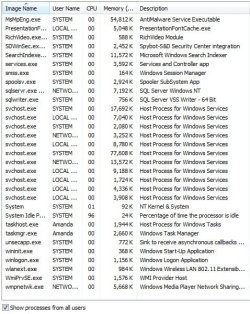
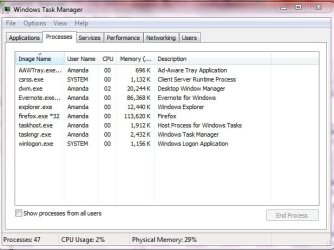
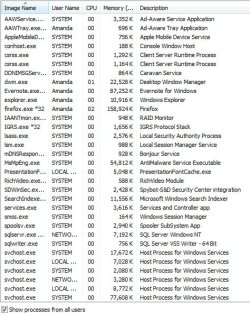
Next step would be to look into the processes. Post a snip of the process tab in task manager (make sure you show "processes from all users" - the button on the bottom of the Task manager window). Maybe we can find a process that looks like the culprit - there is no guarentee though.
 

My Computer

Computer Manufacturer/Model Number
HP, Dell, Gateway, Toshiba - 4 laptops and 2 desktops
OS
Vista, Windows7, Mint Mate, Zorin, Windows 8
CPU
from 1.6GHz Duo to i7
Monitor(s) Displays
2x HP w2207
Hard Drives
5x HDD, 7x SSD, 12x Externals
Keyboard
with trackball - no mices
Mouse
Trackball mice
Internet Speed
DSL 6000
Maybe this winlogon.exe has a settings tab or registry item that can be modified?
 

Attachments

  • task_mgr screen shot.jpg
    task_mgr screen shot.jpg
    90.2 KB · Views: 46
Last edited:

My Computer

Computer Manufacturer/Model Number
Custom Build
OS
windows 7 (x64)
CPU
Intel Core i7 950 @ 3.07GHz 38°C Bloomfield 45nm
Motherboard
EVGA X58 SLI FTW3 (Socket 423) 24 °C
Memory
12.0 GB Triple-Channel DDR3 @ 530MHz (6-6-6-19) GSKILL F3
Graphics Card(s)
ASUS VE276; DELL 1704FPT; 1024MB GeForce GTX 465 (EVGA)
Sound Card
Realtek High Definition Audio
Monitor(s) Displays
Dual: Asus & Dell
Screen Resolution
1920x1080 & 1280x1024
Hard Drives
1465GB Western Digital WDC WD15 EARS-22MVWB0 SCSI Disk Device (SATA) 28 °C
125GB C300-CTF DDAC128MAG SCSI Disk Device (SATA)
PSU
CORSAIR|CMPSU-850HX 850W RT
Case
ANTEC|TWELVE HUNDRED V3 RT
Cooling
Thermaltake Frio
Keyboard
Logitech HID-compliant Unifying keyboard
Mouse
Logitech HID-compliant G700 Gaming Mouse
Internet Speed
TWC Road Runner 46ms/19.95Mbps/0.97Mbps
Other Info
Optical Drives
MagicISO Virtual DVD-ROM0000
ATAPI iHAS124 B ATA Device
sorry, forgot to do all users.
 

Attachments

  • processes01.jpg
    processes01.jpg
    166 KB · Views: 23
  • processes02.jpg
    processes02.jpg
    166.3 KB · Views: 37

My Computer

Computer Manufacturer/Model Number
Custom Build
OS
windows 7 (x64)
CPU
Intel Core i7 950 @ 3.07GHz 38°C Bloomfield 45nm
Motherboard
EVGA X58 SLI FTW3 (Socket 423) 24 °C
Memory
12.0 GB Triple-Channel DDR3 @ 530MHz (6-6-6-19) GSKILL F3
Graphics Card(s)
ASUS VE276; DELL 1704FPT; 1024MB GeForce GTX 465 (EVGA)
Sound Card
Realtek High Definition Audio
Monitor(s) Displays
Dual: Asus & Dell
Screen Resolution
1920x1080 & 1280x1024
Hard Drives
1465GB Western Digital WDC WD15 EARS-22MVWB0 SCSI Disk Device (SATA) 28 °C
125GB C300-CTF DDAC128MAG SCSI Disk Device (SATA)
PSU
CORSAIR|CMPSU-850HX 850W RT
Case
ANTEC|TWELVE HUNDRED V3 RT
Cooling
Thermaltake Frio
Keyboard
Logitech HID-compliant Unifying keyboard
Mouse
Logitech HID-compliant G700 Gaming Mouse
Internet Speed
TWC Road Runner 46ms/19.95Mbps/0.97Mbps
Other Info
Optical Drives
MagicISO Virtual DVD-ROM0000
ATAPI iHAS124 B ATA Device
looking at this winlogon.exe process, it might have something to do with the GINA. There is supposedly a DLL that has settings, but I've never modified registry settings before. Ooh exciting, new waters for me.:geek:
 

My Computer

Computer Manufacturer/Model Number
Custom Build
OS
windows 7 (x64)
CPU
Intel Core i7 950 @ 3.07GHz 38°C Bloomfield 45nm
Motherboard
EVGA X58 SLI FTW3 (Socket 423) 24 °C
Memory
12.0 GB Triple-Channel DDR3 @ 530MHz (6-6-6-19) GSKILL F3
Graphics Card(s)
ASUS VE276; DELL 1704FPT; 1024MB GeForce GTX 465 (EVGA)
Sound Card
Realtek High Definition Audio
Monitor(s) Displays
Dual: Asus & Dell
Screen Resolution
1920x1080 & 1280x1024
Hard Drives
1465GB Western Digital WDC WD15 EARS-22MVWB0 SCSI Disk Device (SATA) 28 °C
125GB C300-CTF DDAC128MAG SCSI Disk Device (SATA)
PSU
CORSAIR|CMPSU-850HX 850W RT
Case
ANTEC|TWELVE HUNDRED V3 RT
Cooling
Thermaltake Frio
Keyboard
Logitech HID-compliant Unifying keyboard
Mouse
Logitech HID-compliant G700 Gaming Mouse
Internet Speed
TWC Road Runner 46ms/19.95Mbps/0.97Mbps
Other Info
Optical Drives
MagicISO Virtual DVD-ROM0000
ATAPI iHAS124 B ATA Device
I have an issue with a lenovo idea pad. I didn't like the facial recognition software VeriFace starting up, so I used RevoUninstaller to zap it. Now I get an equally annoying error message saying that windows cannot find VeriFace in the programs file. How do I stop windows from looking for this deleted program? Thanks in advance.

I'd backup the registry, then regedit/delete all values/keys that reference 'Veriface'

Having a backup image of your harddrive doesn't hurt either.
 
Last edited:

My Computer

OS
Windows 7 Professional 64
CPU
E8400
Motherboard
Maximus II Formula
Memory
Corsair Dominator 4GB (2x2GB) PC2-8500
Graphics Card(s)
HD4870
Sound Card
Xonar D1
Hard Drives
WD RaptorX/150
WDC Black 1T
PSU
Corsair 750
Case
Antec900 (Lian-Li K62 being shipped)
Cooling
Thermalright Ultra 120 Extreme/A.C.Ryan
Keyboard
G11
Mouse
V220
Other Info
Yate Loon 120mm/2200RPM X3 (2 Front Fans & 1 Exhaust Fan)
Anyone else think this is sound advice?
 

My Computer

Computer Manufacturer/Model Number
Custom Build
OS
windows 7 (x64)
CPU
Intel Core i7 950 @ 3.07GHz 38°C Bloomfield 45nm
Motherboard
EVGA X58 SLI FTW3 (Socket 423) 24 °C
Memory
12.0 GB Triple-Channel DDR3 @ 530MHz (6-6-6-19) GSKILL F3
Graphics Card(s)
ASUS VE276; DELL 1704FPT; 1024MB GeForce GTX 465 (EVGA)
Sound Card
Realtek High Definition Audio
Monitor(s) Displays
Dual: Asus & Dell
Screen Resolution
1920x1080 & 1280x1024
Hard Drives
1465GB Western Digital WDC WD15 EARS-22MVWB0 SCSI Disk Device (SATA) 28 °C
125GB C300-CTF DDAC128MAG SCSI Disk Device (SATA)
PSU
CORSAIR|CMPSU-850HX 850W RT
Case
ANTEC|TWELVE HUNDRED V3 RT
Cooling
Thermaltake Frio
Keyboard
Logitech HID-compliant Unifying keyboard
Mouse
Logitech HID-compliant G700 Gaming Mouse
Internet Speed
TWC Road Runner 46ms/19.95Mbps/0.97Mbps
Other Info
Optical Drives
MagicISO Virtual DVD-ROM0000
ATAPI iHAS124 B ATA Device
Type services.msc in the start search box. Click on the gear Icon then look for the service ... it more than likely didn't get totally removed. Right click on the service, choose properties, then in the dropdown box, set it to 'Disabled'.
 

My Computer

Computer type
PC/Desktop
Computer Manufacturer/Model Number
Bruce ... somewhere in his 40's
OS
Windows 7 Ultimate 32bit SP1
CPU
Intel(R) Core(TM)2 Quad CPU @ 2.40GHz, 2400 MHz
Motherboard
INTEL/D975XBX2
Memory
4 GB
Graphics Card(s)
ATI Radeon HD 2600 Pro
Monitor(s) Displays
Samsung SyncMaster 914v
Screen Resolution
1280 x 1024
Hard Drives
2/500GB each ... ST3500630AS ATA Device.
One is not connected
PSU
Rocketfish 700 W
Case
G.Skill Gigabyte Chassis
Keyboard
Standard PS/2 Keyboard
Mouse
Microsoft PS/2 Mouse
Internet Speed
DSL
Antivirus
Avira Internet Security
Browser
IE 11
Other Info
ATI HDMI Audio
I couldn't find anything there for Veriface; there were two idle Lenovo services, but they were set to manual. Would posting pictures of that list help?
 

My Computer

Computer Manufacturer/Model Number
Custom Build
OS
windows 7 (x64)
CPU
Intel Core i7 950 @ 3.07GHz 38°C Bloomfield 45nm
Motherboard
EVGA X58 SLI FTW3 (Socket 423) 24 °C
Memory
12.0 GB Triple-Channel DDR3 @ 530MHz (6-6-6-19) GSKILL F3
Graphics Card(s)
ASUS VE276; DELL 1704FPT; 1024MB GeForce GTX 465 (EVGA)
Sound Card
Realtek High Definition Audio
Monitor(s) Displays
Dual: Asus & Dell
Screen Resolution
1920x1080 & 1280x1024
Hard Drives
1465GB Western Digital WDC WD15 EARS-22MVWB0 SCSI Disk Device (SATA) 28 °C
125GB C300-CTF DDAC128MAG SCSI Disk Device (SATA)
PSU
CORSAIR|CMPSU-850HX 850W RT
Case
ANTEC|TWELVE HUNDRED V3 RT
Cooling
Thermaltake Frio
Keyboard
Logitech HID-compliant Unifying keyboard
Mouse
Logitech HID-compliant G700 Gaming Mouse
Internet Speed
TWC Road Runner 46ms/19.95Mbps/0.97Mbps
Other Info
Optical Drives
MagicISO Virtual DVD-ROM0000
ATAPI iHAS124 B ATA Device
the answer lies in the regedit option - someone else has worked this out and the thread can be found on google
 

My Computer

OS
64
Cannot find C:\ProgramFiles(x86)\Lenovo\Veriface\Verify host.exe

For those still perplexed by the annoying and somewhat well hidden part of verface that pops up at log-in on your shiny new windows page, fear not.

on windows search, type in regedit

this will find the regedit section

load this program and then search for anything lenovo - veriface titled in one of the HKEY folders - it is in there and if you delete it...OH LORD....the login message will finally be out of your life.
:party:
 

My Computer

OS
64
Back
Top