
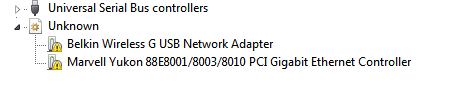
The comp started BSOD'ing out of nowhere, a new adapter I think called ISATAP or something like that shows up under network adapters in device manager which had a yellow exclamation icon. (Code: 31). Disabling or uninstalling its drivers resulted in BSOD's. Googled around and found the only way to fix it was to delete some registry entries, so without backing up the registry I deleted some keys.
 I don't remember which keys but the image above is the result. I got Ubuntu live booted up and using it to post this because my Win 7 installation obviously can't connect to the Internet.
*I tried reinstalling drivers (Marvel Yukon & Belkin), disabling and enabling stuff but nothing seems to be happening.
*Got some registry fixing tools or whatever, still the same.
Any idea how to fix this, guys ? Thanks for any help.
My Computer
- OS
- Windows 7 32bit
