Private Ryan
New member
- Local time
- 4:01 AM
- Messages
- 2
Dear Experts,
I have a 6 year old Dell Inspiron 5010 laptop. 3 months back I had a blue screen error and then I took it to an authorized Dell Service Center. They mentioned that there's a problem with the existing motherboard with inbuilt Graphics card which caused this issue & that the motherboard needs to be replaced. I paid the money to get this replaced. Problems started soon after.
Initially the laptop power on button wouldn't start the laptop unles pressed 2-3 times. The start LED light would blink and then turn off on pressing power on button. After 3-4 days usage it became really difficult to start the laptop. Sometimes I had to press 25-30 times before it would start. Even if power cord is connected, same issue happened. Battery was always full (I never had any battery issues). After2-3 trips to the service centre, still it didn't help. Everytime they managed to start it somehow and then it worked in front of me. I used to bring it home and then problem recurred.
Funny thing is once it started there was never any issues and laptop worked fine.
Even restart never had any issues.
Only power on from a switched off state had this issue.
Later on I found an interesting workaround if it didn't start. I used to power on the mains and then press power on button once. Then leave the laptop as it is. Every 5-6 seconds automatically the start button LED would glow and go off. After 15-20 minutes the laptop would start automatically and then it worked fine again. After few such workaround, again this also stopped working.
Again a few rounds to the service center followed, and they replaced (or claimed to) replace with a new motherboard. Next time the laptop started fine each time and then after 5-6 minutes of remaining on it would switch off automatically (if used or unused). This time I went to the Service Center and asked for a refund and they asked for one last chance or they would refund.
So now I am at a stage again where some new type of issues is happening for the past few days:
1. This time there is no issue with the power on button, laptop switches on each time.
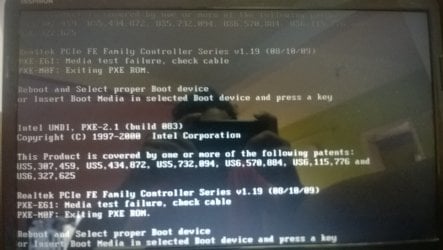
2. But now almost everytime on switching on laptop, I am getting the following error:
*** Realtek PCIe FE Family Controller Series v1.19 (08/10/09)
PXE-EGI: Media test failure, check cable
PXE-M0F: Exiting PXE ROM
Reboot and Select proper Boot device
or Insert Boot Media in selected Boot device and press a key
Intel UNDI, PXE-2.1 (build 083) ***
Now, On pressing Alt+Ctrl+ Del, the laptop switches off & restarts.
After 2-3 attempts Windows gets loaded normally.
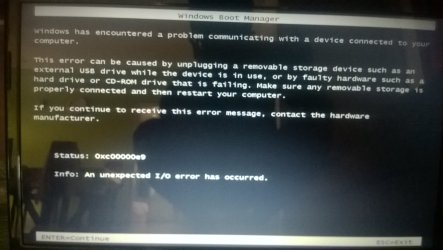
On many occasions, it gets to Windows repair & then I have to click repair & load to a restore point of Windows before it can start properly.
By the way I have Windows7 Home edition with the laptop.
On one or 2 rare occasions, laptop started normally as well.
Also once laptop starts with Windows properly loaded, there is absolutely no issue.
Guessing it to be a booting problem, I went to setup & checked if boot sequence was alright or not. It was fine, pointing to harddrive.
I also downloaded memtest86+ and did a thorough test on my RAM and it ran for 11 passes without any error.
I checked the hard disk with Windows diagnostics for any error but hard disk has no issues.
Device Manager shows no issues in device drivers.
Dell diagnostics also shows no issues with any hardware or software component.
So as a last resort, I have turned to this forum for help as I don't have any faith on the Service Center.
So experts please help with any suggestions.
Don't want to get rid of this laptop just because it has a startup issue when all hardware seems fine.
Motherboard details are as follows:
-------------------------------------
System Board
Manufacturer Dell Inc.
Product 0WXY9J
Chipset Intel PCH HM57
BIOS
Vendor Dell Inc.
Release Date 07/19/2011
BIOS Version String A15
ROM Size 2.00 MB
SMBIOS
Version 2.6
----------------------------------------
System Summary
Product Inspiron N5010
BIOS Version String A15
Operating System
Name Microsoft Windows 7 Home Premium Edition (64-bit)
Service Pack Service Pack 1
Build Number 7601
DirectX Version 11
Intel(R) Core(TM) i5 CPU M 480 @ 2.67GHz (CPU:0)
Name Intel(R) Core(TM) i5 CPU M 480 @ 2.67GHz
Cores 2
Threads 4
System Memory
Total Physical Memory 4.00 GB
Maximum Supported Memory 8.00 GB
--------------------------------------------------
Looking for some valuable advice.
Best regards
Private Ryan
I have a 6 year old Dell Inspiron 5010 laptop. 3 months back I had a blue screen error and then I took it to an authorized Dell Service Center. They mentioned that there's a problem with the existing motherboard with inbuilt Graphics card which caused this issue & that the motherboard needs to be replaced. I paid the money to get this replaced. Problems started soon after.
Initially the laptop power on button wouldn't start the laptop unles pressed 2-3 times. The start LED light would blink and then turn off on pressing power on button. After 3-4 days usage it became really difficult to start the laptop. Sometimes I had to press 25-30 times before it would start. Even if power cord is connected, same issue happened. Battery was always full (I never had any battery issues). After2-3 trips to the service centre, still it didn't help. Everytime they managed to start it somehow and then it worked in front of me. I used to bring it home and then problem recurred.
Funny thing is once it started there was never any issues and laptop worked fine.
Even restart never had any issues.
Only power on from a switched off state had this issue.
Later on I found an interesting workaround if it didn't start. I used to power on the mains and then press power on button once. Then leave the laptop as it is. Every 5-6 seconds automatically the start button LED would glow and go off. After 15-20 minutes the laptop would start automatically and then it worked fine again. After few such workaround, again this also stopped working.
Again a few rounds to the service center followed, and they replaced (or claimed to) replace with a new motherboard. Next time the laptop started fine each time and then after 5-6 minutes of remaining on it would switch off automatically (if used or unused). This time I went to the Service Center and asked for a refund and they asked for one last chance or they would refund.
So now I am at a stage again where some new type of issues is happening for the past few days:
1. This time there is no issue with the power on button, laptop switches on each time.
2. But now almost everytime on switching on laptop, I am getting the following error:
*** Realtek PCIe FE Family Controller Series v1.19 (08/10/09)
PXE-EGI: Media test failure, check cable
PXE-M0F: Exiting PXE ROM
Reboot and Select proper Boot device
or Insert Boot Media in selected Boot device and press a key
Intel UNDI, PXE-2.1 (build 083) ***
Now, On pressing Alt+Ctrl+ Del, the laptop switches off & restarts.
After 2-3 attempts Windows gets loaded normally.
On many occasions, it gets to Windows repair & then I have to click repair & load to a restore point of Windows before it can start properly.
By the way I have Windows7 Home edition with the laptop.
On one or 2 rare occasions, laptop started normally as well.
Also once laptop starts with Windows properly loaded, there is absolutely no issue.
Guessing it to be a booting problem, I went to setup & checked if boot sequence was alright or not. It was fine, pointing to harddrive.
I also downloaded memtest86+ and did a thorough test on my RAM and it ran for 11 passes without any error.
I checked the hard disk with Windows diagnostics for any error but hard disk has no issues.
Device Manager shows no issues in device drivers.
Dell diagnostics also shows no issues with any hardware or software component.
So as a last resort, I have turned to this forum for help as I don't have any faith on the Service Center.
So experts please help with any suggestions.
Don't want to get rid of this laptop just because it has a startup issue when all hardware seems fine.
Motherboard details are as follows:
-------------------------------------
System Board
Manufacturer Dell Inc.
Product 0WXY9J
Chipset Intel PCH HM57
BIOS
Vendor Dell Inc.
Release Date 07/19/2011
BIOS Version String A15
ROM Size 2.00 MB
SMBIOS
Version 2.6
----------------------------------------
System Summary
Product Inspiron N5010
BIOS Version String A15
Operating System
Name Microsoft Windows 7 Home Premium Edition (64-bit)
Service Pack Service Pack 1
Build Number 7601
DirectX Version 11
Intel(R) Core(TM) i5 CPU M 480 @ 2.67GHz (CPU:0)
Name Intel(R) Core(TM) i5 CPU M 480 @ 2.67GHz
Cores 2
Threads 4
System Memory
Total Physical Memory 4.00 GB
Maximum Supported Memory 8.00 GB
--------------------------------------------------
Looking for some valuable advice.
Best regards
Private Ryan
My Computer
At a glance
Windows 7 Home Premium 64bitIntel Core i5 M480 @ 2.67 GHz4 GM RAM
- Computer type
- Laptop
- Computer Manufacturer/Model Number
- Dell Inspiron N5010
- OS
- Windows 7 Home Premium 64bit
- CPU
- Intel Core i5 M480 @ 2.67 GHz
- Motherboard
- Intel PCH HM57
- Memory
- 4 GM RAM
- Antivirus
- Norton 360