
Dell Studio 1555 to factory settings,no Dell Factory Image option

stois21

New member
Local time
8:40 PM
Messages
1
My problem is that I am trying to restore a friend's Dell Studio 1555 laptop back to its factory settings, I follow the procedure mentioned on Dell's website however there is no Dell Factory Image Restore option. I have checked the laptop's Disk Management and there is a Recovery partition, in fact there are 3 partitions:

1. A 39MB OEM partition with no letter assigned.

2. C: Simple Basic NTFS with Status Healthy (Boot, Page File, Crash Dump, Primary Partition) 451GB.

3. Recovery: Simple Basic NTFS with Status Healthy (System, Active, Primary Partition) 14.65GB.

In short, when the computer starts I hit F8, I enter the Advanced Boot Options and select Repair Your Computer. I then select the language and login with the administrative account, however there is no Dell Factory Image Restore option there. My options are shown the image below:
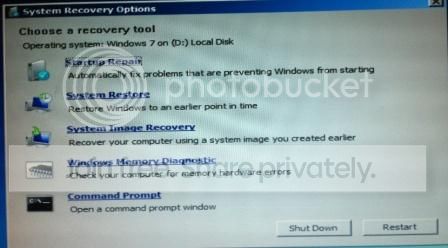
scsh_zps5bfdfbfd.jpg


Another issue that concerns me is that on the picture above it says Windows 7 on (D: ) Local Disk, however there is no such partition on the laptop's disk.

I would be thankful if anyone could give some advise on how to restore the laptop to its factory settings using the recovery partition. Thank you.
 

My Computer My Computer

At a glance

Windows 7 Ultimate x64Intel Core 2 Duo
Computer type
Laptop
Computer Manufacturer/Model Number
Dell
OS
Windows 7 Ultimate x64
CPU
Intel Core 2 Duo
On a Dell, if some other OS was installed, the Dell "PC Restore" (Recovery Partition) is no longer valid (corrupted) and the only way to reinstall is with a Windows OS installation disc and then download whatever device drivers you need from the Dell downloads.
 

My Computer My Computer

At a glance

Windows 10 64 bitIntel i7 6700K16GB Corsair DominatorIntel CPU Graphics
Computer type
PC/Desktop
Computer Manufacturer/Model Number
My Own Build
OS
Windows 10 64 bit
CPU
Intel i7 6700K
Motherboard
ASUS ROG Maximus VIII Hero
Memory
16GB Corsair Dominator
Graphics Card(s)
Intel CPU Graphics
Sound Card
RealTek
Monitor(s) Displays
27" Dell S2719dgf
Screen Resolution
2560X1440
Hard Drives
1 TB Samsung 850 EVO SSD for Win 10 Pro
500GB Samsung 850 EVO SSD for Win 10 Insider
2 TB drive for backup
PSU
EVGA Supernova 750G2
Case
BeQuiet Silent Base 600
Cooling
Deepcool Captain 120EX
Keyboard
Microsoft Wireless 2000
Mouse
Microsoft wireless
Internet Speed
100 MB/sec (Cable)
Antivirus
Microsoft Defender and Malwarebytes
Browser
Edge/Firefox
Other Info
Cakewalk (Sonar) by BandLab and Studio One 4.1 Pro recording studio software. MOTU 896Mk3 Hybrid recording interface, Frontier Tranzport wireless control unit, Behringer X-Touch Control Surface.
Five USB connected optical drives for CD Audio production using Nero BurningROM
Clean Reinstall - Factory OEM Windows 7
Everything is in the blue link to get and keep a perfect Install. Be sure to read the SPecial Note for Dell OWners at end. Be sure to run the Dell diagnostics by booting the Utility partiiton from the F12 menu at boot to see if they will diagnose the hardware to know its true state. If so then save only the OEM partition at beginning of drive since all other partitions will not work or are not needed after a Clean Reinstall.

You can also try this if you want to try to force the inferior Dell Factory Recovery install: Dell Recovery Partition - restoring F8 link .

If you can boot into an OS you can try to Boot Recovery Partition using EasyBCD
 
My problem is that I am trying to restore a friend's Dell Studio 1555 laptop back to its factory settings, I follow the procedure mentioned on Dell's website however there is no Dell Factory Image Restore option. I have checked the laptop's Disk Management and there is a Recovery partition, in fact there are 3 partitions:

1. A 39MB OEM partition with no letter assigned.

2. C: Simple Basic NTFS with Status Healthy (Boot, Page File, Crash Dump, Primary Partition) 451GB.

3. Recovery: Simple Basic NTFS with Status Healthy (System, Active, Primary Partition) 14.65GB.

In short, when the computer starts I hit F8, I enter the Advanced Boot Options and select Repair Your Computer. I then select the language and login with the administrative account, however there is no Dell Factory Image Restore option there. My options are shown the image below:

scsh_zps5bfdfbfd.jpg


Another issue that concerns me is that on the picture above it says Windows 7 on (D: ) Local Disk, however there is no such partition on the laptop's disk.

I would be thankful if anyone could give some advise on how to restore the laptop to its factory settings using the recovery partition. Thank you.

Hi stois21,

Welcome to Seven forums.

It seems factory restore partition has been corrupted on the system. It would be better that you reinstall the windows as suggested by others.

If you have made a backup using Dell Datasafe program then you can perform a manual restore following the link below:

http://dell.to/19boJUM

Once windows are installed you need to download and install the drivers as well. Check this link below which would helpful in doing the same:

Updating Dell Drivers

Keep us posted with the results so we can advise you further.
 

My Computer My Computer

At a glance

Winndows 7 32 bit
Computer type
PC/Desktop
OS
Winndows 7 32 bit
Back
Top