BTW chk disk was OK, zero malware also ran all dell diagnostic and everything passed.
Attachments
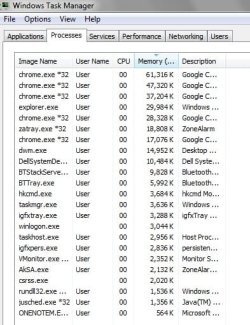
task.jpg
45.1 KB
· Views: 8
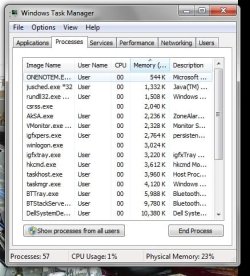
task after clicking on mem.jpg
44.7 KB
· Views: 8
My Computer
At a glance
Microsoft Windows 7 Professional 64-bitIntel(R) Core(TM) i7-4790 CPU @ 3.60GHz16.00 GB Hynix/Hyundai HMT451U6BFR8A-PBNVIDIA GeForce GT 720 1920 x 1080 x 32 bits (...
Computer type
PC/Desktop
Computer Manufacturer/Model Number
DELL XPS 8700 DESKTOP
OS
Microsoft Windows 7 Professional 64-bit
CPU
Intel(R) Core(TM) i7-4790 CPU @ 3.60GHz
Motherboard
Dell Inc.Base Board 0KWVT8
Memory
16.00 GB Hynix/Hyundai HMT451U6BFR8A-PB
Graphics Card(s)
NVIDIA GeForce GT 720 1920 x 1080 x 32 bits (4294967296 colo
Microsoft Windows 7 Professional 64-bitIntel(R) Core(TM) i7-4790 CPU @ 3.60GHz16.00 GB Hynix/Hyundai HMT451U6BFR8A-PBNVIDIA GeForce GT 720 1920 x 1080 x 32 bits (...
Computer type
PC/Desktop
Computer Manufacturer/Model Number
DELL XPS 8700 DESKTOP
OS
Microsoft Windows 7 Professional 64-bit
CPU
Intel(R) Core(TM) i7-4790 CPU @ 3.60GHz
Motherboard
Dell Inc.Base Board 0KWVT8
Memory
16.00 GB Hynix/Hyundai HMT451U6BFR8A-PB
Graphics Card(s)
NVIDIA GeForce GT 720 1920 x 1080 x 32 bits (4294967296 colo
Don't really know JJR but have you recently updated the BIOS or any drivers if not you can check the updates here Support | Dell US < look for your machine could be an audio driver perhaps.
My Computer
At a glance
Desk1 7 Home Prem / Desk2 10 Pro / Main lap A...Desk1 i5 3750K / Laptop i7 GTX 860M / Desk2 i...Desk1 8GB (1866) / Desk2 16GB (1333) / Laptop...Desk 1& 2NVidia GTX 650 & Laptops on board Intel
Computer type
PC/Desktop
Computer Manufacturer/Model Number
Own build (new) Desk1 / Asus ROG Win 7 / Desk2 1st build
OS
Desk1 7 Home Prem / Desk2 10 Pro / Main lap Asus ROG 10 Pro 2 laptop Toshiba 7 Pro Asus P2520 7 & 10
One other Desktop (tester) and spare Toshba laptop both with SSD's
Running Kaspersky 2016 ISS on all machines config'd identically
Logitec audio stereo systems on each machine (x3)
Canon MG5250MFC
Router/modem TP-Link running WPA2SK
Thanks, but that is where I originally started. Everything is up to date and all Dell tests passed A-OK. Again I see that there are other people w/ the same issue but no answers?
On another note I have a Anlieware Aurora Area 51 in which I have my music stored on the slave drive and if I'm playing music while browsing I get the same issus and that PC has gobs of power. I'm at a loss, perhaps its just the nature of the beast.
What it seems like you will be browsing with the music playing and it will go for awhile unltill it happens something like a cache is filling up is about the only way I can describe it.
My Studio 540 here boots up in under 2 min and I feel that is fast enough and at this point I really do not see spending the money for a different master drive unless that perhaps would fix the issue.
Don't really know JJR but have you recently updated the BIOS or any drivers if not you can check the updates here Support | Dell US < look for your machine could be an audio driver perhaps.
Microsoft Windows 7 Professional 64-bitIntel(R) Core(TM) i7-4790 CPU @ 3.60GHz16.00 GB Hynix/Hyundai HMT451U6BFR8A-PBNVIDIA GeForce GT 720 1920 x 1080 x 32 bits (...
Computer type
PC/Desktop
Computer Manufacturer/Model Number
DELL XPS 8700 DESKTOP
OS
Microsoft Windows 7 Professional 64-bit
CPU
Intel(R) Core(TM) i7-4790 CPU @ 3.60GHz
Motherboard
Dell Inc.Base Board 0KWVT8
Memory
16.00 GB Hynix/Hyundai HMT451U6BFR8A-PB
Graphics Card(s)
NVIDIA GeForce GT 720 1920 x 1080 x 32 bits (4294967296 colo
Got me stumped JJR as I cannot find the motherboard I don't know what drivers are needed - the machine maker or the Windows feature (that I am not a fan of) I prefer to go to whoever makes the sound chip or whatever.
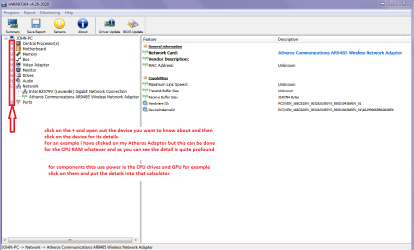
You can test the volts on the PSU with HWInfo HWiNFO, HWiNFO32/64 -Download < download the right bit version andclose the right hand window select Sensors and scroll down to the power sectionwhere you will see what the volts are doing see my pic.
The original right hand window shows themachine running and is handy for that but for looking at the components in some detail close it and use themain left hand side panel
FOR OTHER COMPONENTS
Open each + down into the componentitself and then click on it - in theright hand side will appear all sorts of details including brands speeds andother essential info that device. See pic for example.
Attachments
HW INFO DEVICES.PNG
32.3 KB
· Views: 0
My Computer
At a glance
Desk1 7 Home Prem / Desk2 10 Pro / Main lap A...Desk1 i5 3750K / Laptop i7 GTX 860M / Desk2 i...Desk1 8GB (1866) / Desk2 16GB (1333) / Laptop...Desk 1& 2NVidia GTX 650 & Laptops on board Intel
Computer type
PC/Desktop
Computer Manufacturer/Model Number
Own build (new) Desk1 / Asus ROG Win 7 / Desk2 1st build
OS
Desk1 7 Home Prem / Desk2 10 Pro / Main lap Asus ROG 10 Pro 2 laptop Toshiba 7 Pro Asus P2520 7 & 10
One other Desktop (tester) and spare Toshba laptop both with SSD's
Running Kaspersky 2016 ISS on all machines config'd identically
Logitec audio stereo systems on each machine (x3)
Canon MG5250MFC
Router/modem TP-Link running WPA2SK
Microsoft Windows 7 Professional 64-bitIntel(R) Core(TM) i7-4790 CPU @ 3.60GHz16.00 GB Hynix/Hyundai HMT451U6BFR8A-PBNVIDIA GeForce GT 720 1920 x 1080 x 32 bits (...
Computer type
PC/Desktop
Computer Manufacturer/Model Number
DELL XPS 8700 DESKTOP
OS
Microsoft Windows 7 Professional 64-bit
CPU
Intel(R) Core(TM) i7-4790 CPU @ 3.60GHz
Motherboard
Dell Inc.Base Board 0KWVT8
Memory
16.00 GB Hynix/Hyundai HMT451U6BFR8A-PB
Graphics Card(s)
NVIDIA GeForce GT 720 1920 x 1080 x 32 bits (4294967296 colo
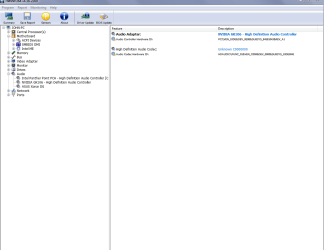
Well JJ mate trying to find that motherboard is a nightmare the only thing I can suggest is to open up the audio as in my pic and see what it actually is. Now I have opened to inbuilt one for your info the one I use is the Xonar
I did go look for the chipset but the Dell site and even HW Info are not much help
Attachments
AUDIO.PNG
24.2 KB
· Views: 0
My Computer
At a glance
Desk1 7 Home Prem / Desk2 10 Pro / Main lap A...Desk1 i5 3750K / Laptop i7 GTX 860M / Desk2 i...Desk1 8GB (1866) / Desk2 16GB (1333) / Laptop...Desk 1& 2NVidia GTX 650 & Laptops on board Intel
Computer type
PC/Desktop
Computer Manufacturer/Model Number
Own build (new) Desk1 / Asus ROG Win 7 / Desk2 1st build
OS
Desk1 7 Home Prem / Desk2 10 Pro / Main lap Asus ROG 10 Pro 2 laptop Toshiba 7 Pro Asus P2520 7 & 10
One other Desktop (tester) and spare Toshba laptop both with SSD's
Running Kaspersky 2016 ISS on all machines config'd identically
Logitec audio stereo systems on each machine (x3)
Canon MG5250MFC
Router/modem TP-Link running WPA2SK
Sorry I'n not about to pay for that software to find the drivers for me, I have tried software like that in the past and only found it to be a waste of money especially when they can not give you a price up front. My Dell site has the drivers for the 540, I had it do a scan of what was needed and updated what was shown for my pc, the only thing shown was a realtek driver which I did a update .
Then did another scan and My Dell showed that all my drivers were up to date.
About the power supply my thoughts are that it most likly is not the issue as the PC is built to run 2 hard drives.
Here are some problems like mine from the Dell site:
Microsoft Windows 7 Professional 64-bitIntel(R) Core(TM) i7-4790 CPU @ 3.60GHz16.00 GB Hynix/Hyundai HMT451U6BFR8A-PBNVIDIA GeForce GT 720 1920 x 1080 x 32 bits (...
Computer type
PC/Desktop
Computer Manufacturer/Model Number
DELL XPS 8700 DESKTOP
OS
Microsoft Windows 7 Professional 64-bit
CPU
Intel(R) Core(TM) i7-4790 CPU @ 3.60GHz
Motherboard
Dell Inc.Base Board 0KWVT8
Memory
16.00 GB Hynix/Hyundai HMT451U6BFR8A-PB
Graphics Card(s)
NVIDIA GeForce GT 720 1920 x 1080 x 32 bits (4294967296 colo
Ok JJR that is some way to finding the drivers but if they are up to date then that other link looks promising for a fix.
By the by I see that board supports DDR3 RAM and up to 8GB whereas my tester using that Q9650 is limited to 4GB and DDR2 at that. Could be a Dell feature I suppose as this was a local store build that was given to me.
Thanks for the heads up mate and please keep me updated when you get back. Hopefully it is pleasure but if not enjoy yourself anyway.
John
PS Have done some digging and found this site for the chipset maybe you can get the driver via that machine JJ - this is the way I usually get drivers form the horses mouth so to speak. http://www.intel.com/p/en_US/support/detect
Last edited:
My Computer
At a glance
Desk1 7 Home Prem / Desk2 10 Pro / Main lap A...Desk1 i5 3750K / Laptop i7 GTX 860M / Desk2 i...Desk1 8GB (1866) / Desk2 16GB (1333) / Laptop...Desk 1& 2NVidia GTX 650 & Laptops on board Intel
Computer type
PC/Desktop
Computer Manufacturer/Model Number
Own build (new) Desk1 / Asus ROG Win 7 / Desk2 1st build
OS
Desk1 7 Home Prem / Desk2 10 Pro / Main lap Asus ROG 10 Pro 2 laptop Toshiba 7 Pro Asus P2520 7 & 10
One other Desktop (tester) and spare Toshba laptop both with SSD's
Running Kaspersky 2016 ISS on all machines config'd identically
Logitec audio stereo systems on each machine (x3)
Canon MG5250MFC
Router/modem TP-Link running WPA2SK
I uninstalled the Dell software Dell System Detect (DSD) as well as Dells PC doctor. I have been listing to tunes and browsing for quite some time no w/o any of the issues that I mentioned above. Currently I have been using the Cowon Media Player. Will continue this for awhile and if there is no problem I will test with my WMP.......
Then report back
My Computer
At a glance
Microsoft Windows 7 Professional 64-bitIntel(R) Core(TM) i7-4790 CPU @ 3.60GHz16.00 GB Hynix/Hyundai HMT451U6BFR8A-PBNVIDIA GeForce GT 720 1920 x 1080 x 32 bits (...
Computer type
PC/Desktop
Computer Manufacturer/Model Number
DELL XPS 8700 DESKTOP
OS
Microsoft Windows 7 Professional 64-bit
CPU
Intel(R) Core(TM) i7-4790 CPU @ 3.60GHz
Motherboard
Dell Inc.Base Board 0KWVT8
Memory
16.00 GB Hynix/Hyundai HMT451U6BFR8A-PB
Graphics Card(s)
NVIDIA GeForce GT 720 1920 x 1080 x 32 bits (4294967296 colo