Deny Access to this Computer from the Network Win7 Home Premium

Matthew23

New member
Local time
6:30 PM
Messages
4
I have been trying to set up a homegroup to share between a desktop and two laptops. After many attempts I got the two laptops to work by removing guest from "deny access to this computer from the network" in the local security settings. Both of the laptops were running windows 7 professional. Unfortunately my desktop is running windows 7 home premium which doesn't have the local security settings option. So my question is can I remove the guest account from "deny access to this computer from the network" in windows 7 home premium through some interesting bit of registry editing or something? I really don't want to upgrade to professional if possible.
 

My Computer My Computer

At a glance

Windows 7 home premium
OS
Windows 7 home premium
I have been trying to set up a homegroup to share between a desktop and two laptops. After many attempts I got the two laptops to work by removing guest from "deny access to this computer from the network" in the local security settings. Both of the laptops were running windows 7 professional. Unfortunately my desktop is running windows 7 home premium which doesn't have the local security settings option. So my question is can I remove the guest account from "deny access to this computer from the network" in windows 7 home premium through some interesting bit of registry editing or something? I really don't want to upgrade to professional if possible.

You shouldn't need to remove guest from anywhere in order to set up a Homegroup. It appears as if you are working around another problem.

Most Homegroup problems can be solved by going through the Homegroup trouble shooter.

Ultimate Troubleshooting Guide for Windows 7 HomeGroup Connection Issues - Help Desk Geek
 

My Computer My Computer

At a glance

Windows 7 Ult, Windows 8.1 Pro,Q9650-4.275GHz, E8600 4.5GHz, E6750-3.8GHzG.Skill PC2 9600 1200Mhz 5 5 5 15 2TGTX480
Computer type
PC/Desktop
Computer Manufacturer/Model Number
Home built
OS
Windows 7 Ult, Windows 8.1 Pro,
CPU
Q9650-4.275GHz, E8600 4.5GHz, E6750-3.8GHz
Motherboard
Evga 780i FTW
Memory
G.Skill PC2 9600 1200Mhz 5 5 5 15 2T
Graphics Card(s)
GTX480
Sound Card
Asus Xonar D2
Monitor(s) Displays
HannsG
Screen Resolution
1680X1050
Hard Drives
GSkill Phoenix Pro 120GB SSD
PSU
ThermalTake Toughpower 1000Watt modular
Case
ThermalTake XaserV
Cooling
Xigmatek S1283
Keyboard
Logitech G15
Mouse
Logitech G9
Internet Speed
T1
I have run the homegroup trouble shooter and it couldn't find the problem. I've run through all of the settings in the link provided. I have done a number of other things besides. The only thing that has made it work was the method described above.

So, I know this is beating a dead horse and all but is there some way to do the above in Windows 7 Home Premium?
 

My Computer My Computer

At a glance

Windows 7 home premium
OS
Windows 7 home premium
I have run the homegroup trouble shooter and it couldn't find the problem. I've run through all of the settings in the link provided. I have done a number of other things besides. The only thing that has made it work was the method described above.

So, I know this is beating a dead horse and all but is there some way to do the above in Windows 7 Home Premium?

It sounds like you are using the guest accounts on these machines, you really need to set up an Admin account on each machine in order to use Homegroups.
 

My Computer My Computer

At a glance

Windows 7 Ult, Windows 8.1 Pro,Q9650-4.275GHz, E8600 4.5GHz, E6750-3.8GHzG.Skill PC2 9600 1200Mhz 5 5 5 15 2TGTX480
Computer type
PC/Desktop
Computer Manufacturer/Model Number
Home built
OS
Windows 7 Ult, Windows 8.1 Pro,
CPU
Q9650-4.275GHz, E8600 4.5GHz, E6750-3.8GHz
Motherboard
Evga 780i FTW
Memory
G.Skill PC2 9600 1200Mhz 5 5 5 15 2T
Graphics Card(s)
GTX480
Sound Card
Asus Xonar D2
Monitor(s) Displays
HannsG
Screen Resolution
1680X1050
Hard Drives
GSkill Phoenix Pro 120GB SSD
PSU
ThermalTake Toughpower 1000Watt modular
Case
ThermalTake XaserV
Cooling
Xigmatek S1283
Keyboard
Logitech G15
Mouse
Logitech G9
Internet Speed
T1
I am using admin accounts. Basically the problem was that I could see each of the other machines and shared folders on those machines but I couldn't access them. I would click on the folders get the little spinny ball thing for a few seconds and then nothing. Couldn't get anything to work until did the above.
 

My Computer My Computer

At a glance

Windows 7 home premium
OS
Windows 7 home premium
I am using admin accounts. Basically the problem was that I could see each of the other machines and shared folders on those machines but I couldn't access them. I would click on the folders get the little spinny ball thing for a few seconds and then nothing. Couldn't get anything to work until did the above.

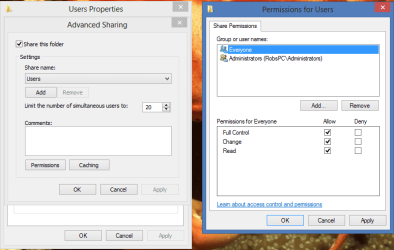
That is a permissions issue. You need to make sure that the C:>Users folder is shared out by checking the Properties of the Sharing tab of that folder, there should be a check mark under the Advanced Sharing tab like the picture shows.
 

Attachments

  • Sharing User Folder.PNG
    Sharing User Folder.PNG
    21.8 KB · Views: 14

My Computer My Computer

At a glance

Windows 7 Ult, Windows 8.1 Pro,Q9650-4.275GHz, E8600 4.5GHz, E6750-3.8GHzG.Skill PC2 9600 1200Mhz 5 5 5 15 2TGTX480
Computer type
PC/Desktop
Computer Manufacturer/Model Number
Home built
OS
Windows 7 Ult, Windows 8.1 Pro,
CPU
Q9650-4.275GHz, E8600 4.5GHz, E6750-3.8GHz
Motherboard
Evga 780i FTW
Memory
G.Skill PC2 9600 1200Mhz 5 5 5 15 2T
Graphics Card(s)
GTX480
Sound Card
Asus Xonar D2
Monitor(s) Displays
HannsG
Screen Resolution
1680X1050
Hard Drives
GSkill Phoenix Pro 120GB SSD
PSU
ThermalTake Toughpower 1000Watt modular
Case
ThermalTake XaserV
Cooling
Xigmatek S1283
Keyboard
Logitech G15
Mouse
Logitech G9
Internet Speed
T1
Attempted and there was no change.

Some other information which might be useful. If I try to access the computer by typing the ip \\192.168.*.* in the start menu menu it says logon failure: the user has not been granted the requested logon type at this computer.
 

My Computer My Computer

At a glance

Windows 7 home premium
OS
Windows 7 home premium
Access problems are from improper permissions settings or the NTFS security settings were somehow misconfigured.

The only other thing that can block file access would be a third party anti virus software or firewall.

If you can post the NTFS permissions on the security tab of the C:>Users folder it may show some problems with the default access permission settings.
 

My Computer My Computer

At a glance

Windows 7 Ult, Windows 8.1 Pro,Q9650-4.275GHz, E8600 4.5GHz, E6750-3.8GHzG.Skill PC2 9600 1200Mhz 5 5 5 15 2TGTX480
Computer type
PC/Desktop
Computer Manufacturer/Model Number
Home built
OS
Windows 7 Ult, Windows 8.1 Pro,
CPU
Q9650-4.275GHz, E8600 4.5GHz, E6750-3.8GHz
Motherboard
Evga 780i FTW
Memory
G.Skill PC2 9600 1200Mhz 5 5 5 15 2T
Graphics Card(s)
GTX480
Sound Card
Asus Xonar D2
Monitor(s) Displays
HannsG
Screen Resolution
1680X1050
Hard Drives
GSkill Phoenix Pro 120GB SSD
PSU
ThermalTake Toughpower 1000Watt modular
Case
ThermalTake XaserV
Cooling
Xigmatek S1283
Keyboard
Logitech G15
Mouse
Logitech G9
Internet Speed
T1
I'm having the same issue with Windows 8 Home(no secpol tool)
My Situation
- The Guest account has a password
- The folder has Guest added to the Network user Share list
- NTFS permissions(ACL) has both a "verified User"as well as "Guest"in the list of acces
(although i think a guest with password is a veriefied user) the User "Everyone" is not added for security reasons

The network share works fine with the admin account(which is also password protected

Was there ever a solution to this? or is the registry Key corresponding the this secpol setting known?
 

My Computer My Computer

At a glance

win 7 x64
Computer type
PC/Desktop
OS
win 7 x64
Back
Top