Desktop backgrounds not working like I anticipated

jboggs

New member
So, I got my second 22" widescreen monitor, and downloaded some backgrounds that are made specifically to extend across two monitors, smoothly flowing from one to another... however I've got my monitors set as "extend these displays" but it's not extending... The second monitor acts like the extension of the left monitor (in functionality), but the desktop background is merely a copy of the left screen, not a continuation of the same pic. Is what I'm wanting not possible, or am I just stoopid, and doing something wrong???
 

My Computer

Computer Manufacturer/Model Number
ME
OS
Windows 7
CPU
i7 920 Nehalem 2.66GHz
Motherboard
GIGABYTE GA-EX58-UD3R
Memory
mushkin 6GB (3 x 2GB) Triple channel of course
Graphics Card(s)
GeForce GTX 285 1GB
Sound Card
Decent onboard
Monitor(s) Displays
Acer 22" widescreen
Hard Drives
WD VelociRaptor 300GB
PSU
Antec - 850W
Case
Antec Twelve-hundred
Cooling
Air
Keyboard
blah
Mouse
Logitec mx5500
Internet Speed
6 MBits/s - DSL
Hello jboggs

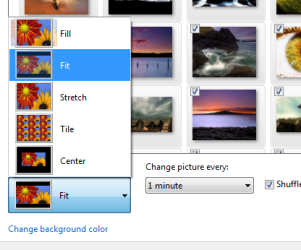
Have you tried changing some of the position settings and see if it makes any difference?
 

Attachments

  • Untitled.png
    Untitled.png
    109.2 KB · Views: 566

My Computer

Computer Manufacturer/Model Number
ENIAC
OS
Windows 7 RC 7100 32bit/64bit
CPU
Intel Core2Duo E4500 2.20 GHz
Motherboard
ASUS P5LD2-X/1333
Memory
2x1GB Kinsgston DDR2 800MHz
Graphics Card(s)
Nvidia 8500GT
Sound Card
Onboard High Definition Audio Device
Monitor(s) Displays
Sony Bravia 42"
Case
LINKW 2222
Cooling
Standard Intel
Keyboard
Some cheap one
Mouse
Microsoft Intellimouse something
Internet Speed
24MBps ADSL
yes, I've tried all of them... no difference
 

My Computer

Computer Manufacturer/Model Number
ME
OS
Windows 7
CPU
i7 920 Nehalem 2.66GHz
Motherboard
GIGABYTE GA-EX58-UD3R
Memory
mushkin 6GB (3 x 2GB) Triple channel of course
Graphics Card(s)
GeForce GTX 285 1GB
Sound Card
Decent onboard
Monitor(s) Displays
Acer 22" widescreen
Hard Drives
WD VelociRaptor 300GB
PSU
Antec - 850W
Case
Antec Twelve-hundred
Cooling
Air
Keyboard
blah
Mouse
Logitec mx5500
Internet Speed
6 MBits/s - DSL
Hello jboggs, i also have dual monitors, the best solution i have found for this is a program called ultramon, i absolutely love it, but there is not one made for windows 7 :( so the one that should work is tile or center, atm im not at my office, ill be there in about half a hour ( Home office is where my dual mons are ) so when i get there ill check for you.
 

My Computer

Computer Manufacturer/Model Number
Custom Built
OS
Windows 7 Ultimate x64
CPU
AMD Athlon II X4 640 3.0GHz
Motherboard
GA-990FXA-UD5
Memory
8.0 GB 1600MHz DDR3
Graphics Card(s)
ATI Radeon HD 5770 x2
Monitor(s) Displays
Acer p221w x2
Screen Resolution
1680x1050 x3
Hard Drives
OCZ Agility 3 60gb SSD
(3)Western Digital Caviar Black 7200RPM 500gb
PSU
OCZ Fatal1ty Modular 550w
Case
Antec P180 (with modded wire management)
Cooling
Cooler Master v8
Keyboard
Microsoft Sidewinder x4
Mouse
Logitech Performance MX
When i used an actual wallpaper that was made for dual screens, using the "TILE" feature worked, putting half of the background on left, other on right. Depending on nvidia/ati, check there to make sure you have both monitors dectected/identified. With my nvidia, i just let windows detect and do most typical changes to display. i hadnt tried using any other "non-dualscreen" wallpaper.
 

My Computer

Computer Manufacturer/Model Number
CUSTOM
OS
XP/win7 x86 build 7127
CPU
Athlon64 X2 DUAL 4200+ 2.21ghz
Motherboard
ASUS K8 PRO SLI
Memory
2GB Dual Chan DDR2 Corsair
Graphics Card(s)
Nvidia 6800GT
Sound Card
nvidia
Monitor(s) Displays
19' LCD
Screen Resolution
1280x1024
Hard Drives
WD 250, 2x500, 2x1TB IDE/USB
WD 250 SATA (system)
SEAGATE 120 Sata
PSU
coolermaster 450
Case
SUPERFLOWER
Cooling
1 HDD bay fan, 5x80mm Case Fans, AEROGATE II Fan/Temp
Keyboard
MS wireless
Mouse
MS Wireless
Internet Speed
fassssssssst
thanks maxwell, I'd appreciate you looking into that for me... I've tried the center, and tile settings, (as well as all of the others)and none of them seem remedy this situation for me
 

My Computer

Computer Manufacturer/Model Number
ME
OS
Windows 7
CPU
i7 920 Nehalem 2.66GHz
Motherboard
GIGABYTE GA-EX58-UD3R
Memory
mushkin 6GB (3 x 2GB) Triple channel of course
Graphics Card(s)
GeForce GTX 285 1GB
Sound Card
Decent onboard
Monitor(s) Displays
Acer 22" widescreen
Hard Drives
WD VelociRaptor 300GB
PSU
Antec - 850W
Case
Antec Twelve-hundred
Cooling
Air
Keyboard
blah
Mouse
Logitec mx5500
Internet Speed
6 MBits/s - DSL
Tile worked for me too, ill look into a ultramon for windows 7 though ( sorry it took me so long to reply, ive been working ;)
 

My Computer

Computer Manufacturer/Model Number
Custom Built
OS
Windows 7 Ultimate x64
CPU
AMD Athlon II X4 640 3.0GHz
Motherboard
GA-990FXA-UD5
Memory
8.0 GB 1600MHz DDR3
Graphics Card(s)
ATI Radeon HD 5770 x2
Monitor(s) Displays
Acer p221w x2
Screen Resolution
1680x1050 x3
Hard Drives
OCZ Agility 3 60gb SSD
(3)Western Digital Caviar Black 7200RPM 500gb
PSU
OCZ Fatal1ty Modular 550w
Case
Antec P180 (with modded wire management)
Cooling
Cooler Master v8
Keyboard
Microsoft Sidewinder x4
Mouse
Logitech Performance MX
Hello jboggs, i also have dual monitors, the best solution i have found for this is a program called ultramon, i absolutely love it, but there is not one made for windows 7 :( so the one that should work is tile or center, atm im not at my office, ill be there in about half a hour ( Home office is where my dual mons are ) so when i get there ill check for you.

I used Ultramon for a *long* time - I still have profiles showing my usages and system, starting with my MX 440 and then my ATI Radeon x1650 Pro and finally my nVidia 8800GTS. However, I found a much more robust solution when it comes to a multiple monitor app - DisplayFusion: Multi-Monitor Taskbar and Desktop Wallpaper | Binary Fortress Software - he has more features in it and is actively developing it and it is less than half the price of Ultramon.
thanks maxwell, I'd appreciate you looking into that for me... I've tried the center, and tile settings, (as well as all of the others)and none of them seem remedy this situation for me

Try *not* extending the monitors

Tile worked for me too, ill look into a ultramon for windows 7 though ( sorry it took me so long to reply, ive been working ;)

If you're hell bent on using Ultramon, I am pretty sure it works on W7, except maybe the taskbar - that might still look like Vista....
 

My Computers

System One System Two

  • Computer type
    PC/Desktop
    Computer Manufacturer/Model Number
    The Beast Model A (homebrew)
    OS
    Windows 11 21H2 Current build
    CPU
    AMD Ryzen 9 3950X
    Motherboard
    MSI MEG X570 GODLIKE
    Memory
    4 * 32 GB - Corsair Vengeance 3600 MHz
    Graphics Card(s)
    EVGA GeForce RTX 3080 Ti XC3 ULTRA GAMING (12G-P5-3955-KR)
    Sound Card
    Realtek® ALC1220 Codec
    Monitor(s) Displays
    2x Eve Spectrum ES07D03 4K Gaming Monitor (Matte) | Eve Spec
    Screen Resolution
    3x 3840 x 2160
    Hard Drives
    3x Samsung 980 Pro NVMe PCIe 4 M.2 2 TB SSD (MZ-V8P2T0B/AM) } 3x Sabrent Rocket NVMe 4.0 1 TB SSD
    PSU
    PC Power & Cooling’s Silencer Series 1050 Watt, 80 Plus Plat
    Case
    Fractal Design Define 7 XL Dark ATX Full Tower Case
    Cooling
    SteelSeries Apex Pro Wired Gaming Keyboard
    Keyboard
    SteelSeries Apex Pro
    Mouse
    Logitech MX Master 3S | MX Master 3 for business
    Internet Speed
    AT&T LightSpeed Gigabit Duplex Ftth
    Antivirus
    Windows Defender + MB 3
    Browser
    Nightly (default) + Firefox (stable),Chrome, Edge
  • Computer type
    PC/Desktop
    System Manufacturer/Model Number
    Dell Latitude E5470
    OS
    ChromeOS Flex Dev Channel (current)
    CPU
    Intel(R) Core(TM) i5-6300U CPU @ 2.40GHz, 2501 Mhz, 2 Core(s), 4 Logical Processor(s)
    Motherboard
    Dell
    Memory
    16 GB
    Graphics Card(s)
    Intel(R) HD Graphics 520
    Sound Card
    Intel(R) HD Graphics 520 + RealTek Audio
    Monitor(s) Displays
    Dell laptop display 15"
    Screen Resolution
    1920 * 1080
    Hard Drives
    Toshiba 128GB M.2 22300 drive
    INTEL Cherryville 520 Series SSDSC2CW180A 180 GB SATA III SSD
    PSU
    Dell
    Case
    Dell
    Cooling
    Dell
    Keyboard
    Dell
    Mouse
    Logitech MX Master 3S (shared w. Sys 1) | Dell TouchPad
    Internet Speed
    AT&T LightSpeed Gigabit Duplex Ftth
Ultramon looks horrible with windows 7. ive tryed it, ill try your program tho, thanks :)
 

My Computer

Computer Manufacturer/Model Number
Custom Built
OS
Windows 7 Ultimate x64
CPU
AMD Athlon II X4 640 3.0GHz
Motherboard
GA-990FXA-UD5
Memory
8.0 GB 1600MHz DDR3
Graphics Card(s)
ATI Radeon HD 5770 x2
Monitor(s) Displays
Acer p221w x2
Screen Resolution
1680x1050 x3
Hard Drives
OCZ Agility 3 60gb SSD
(3)Western Digital Caviar Black 7200RPM 500gb
PSU
OCZ Fatal1ty Modular 550w
Case
Antec P180 (with modded wire management)
Cooling
Cooler Master v8
Keyboard
Microsoft Sidewinder x4
Mouse
Logitech Performance MX
Word of warning - this is a new version that was just released about 22+ test builds (yes, I bought it and am beta testing as needed) and it is not nearly perfect in W7 either - especially the taskbar. However, the coding is simple, feature rich and the dual wallpaper works *extremely* well.

I'll post my current desktop in W7 in a minute - it's over 8 MB in size, so...it's uploading :P

Here it is - Picasa Web Albums - johnlgalt - My Desktops
 

My Computers

System One System Two

  • Computer type
    PC/Desktop
    Computer Manufacturer/Model Number
    The Beast Model A (homebrew)
    OS
    Windows 11 21H2 Current build
    CPU
    AMD Ryzen 9 3950X
    Motherboard
    MSI MEG X570 GODLIKE
    Memory
    4 * 32 GB - Corsair Vengeance 3600 MHz
    Graphics Card(s)
    EVGA GeForce RTX 3080 Ti XC3 ULTRA GAMING (12G-P5-3955-KR)
    Sound Card
    Realtek® ALC1220 Codec
    Monitor(s) Displays
    2x Eve Spectrum ES07D03 4K Gaming Monitor (Matte) | Eve Spec
    Screen Resolution
    3x 3840 x 2160
    Hard Drives
    3x Samsung 980 Pro NVMe PCIe 4 M.2 2 TB SSD (MZ-V8P2T0B/AM) } 3x Sabrent Rocket NVMe 4.0 1 TB SSD
    PSU
    PC Power & Cooling’s Silencer Series 1050 Watt, 80 Plus Plat
    Case
    Fractal Design Define 7 XL Dark ATX Full Tower Case
    Cooling
    SteelSeries Apex Pro Wired Gaming Keyboard
    Keyboard
    SteelSeries Apex Pro
    Mouse
    Logitech MX Master 3S | MX Master 3 for business
    Internet Speed
    AT&T LightSpeed Gigabit Duplex Ftth
    Antivirus
    Windows Defender + MB 3
    Browser
    Nightly (default) + Firefox (stable),Chrome, Edge
  • Computer type
    PC/Desktop
    System Manufacturer/Model Number
    Dell Latitude E5470
    OS
    ChromeOS Flex Dev Channel (current)
    CPU
    Intel(R) Core(TM) i5-6300U CPU @ 2.40GHz, 2501 Mhz, 2 Core(s), 4 Logical Processor(s)
    Motherboard
    Dell
    Memory
    16 GB
    Graphics Card(s)
    Intel(R) HD Graphics 520
    Sound Card
    Intel(R) HD Graphics 520 + RealTek Audio
    Monitor(s) Displays
    Dell laptop display 15"
    Screen Resolution
    1920 * 1080
    Hard Drives
    Toshiba 128GB M.2 22300 drive
    INTEL Cherryville 520 Series SSDSC2CW180A 180 GB SATA III SSD
    PSU
    Dell
    Case
    Dell
    Cooling
    Dell
    Keyboard
    Dell
    Mouse
    Logitech MX Master 3S (shared w. Sys 1) | Dell TouchPad
    Internet Speed
    AT&T LightSpeed Gigabit Duplex Ftth
Back
Top