
I looked in the tutorials but I couldn't find anything on what I'm after there so I thought I should post here.
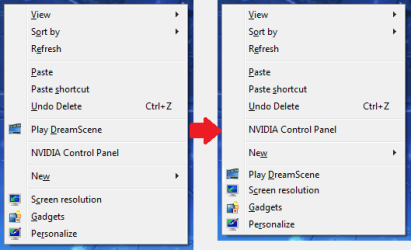
I want to edit the context menu that appears when you right-click on the desktop. I don't want to add or take any options from it, but I do want to move an item down in it and remove a spacer. All the editors I found out there just deal with adding or removing links and items and things and doesn't do anything for their order within the menu. It's just an ascetics thing to me but it's one I really want. I'm willing to jump through any hoops to get it the way I want it too!
I have attached a JPG to show exactly what I want. Is there anyone out there that can help me get this!? You who can shall have my undying, unwavering gratitude!
I want to edit the context menu that appears when you right-click on the desktop. I don't want to add or take any options from it, but I do want to move an item down in it and remove a spacer. All the editors I found out there just deal with adding or removing links and items and things and doesn't do anything for their order within the menu. It's just an ascetics thing to me but it's one I really want. I'm willing to jump through any hoops to get it the way I want it too!
I have attached a JPG to show exactly what I want. Is there anyone out there that can help me get this!? You who can shall have my undying, unwavering gratitude!
Attachments
Last edited:
My Computer
At a glance
Windows 7 Ultimate x64
- OS
- Windows 7 Ultimate x64


