
Desktop & file icons not showing up, only certain programs, files open
I did an update to AdWords Editor and my screen flashed afterwards and now most file type icons have reverted to no icon. Some are still there but most are not. They are missing in the folders and desktop. I have already deleted the IconCache.db several times and rebooted. The default program associations are working fine. Every file opens as it should. Even if I do change this, the icon does not return. I tried changing .txt files to open by default with Word but still nothing. Please help.
I did an update to AdWords Editor and my screen flashed afterwards and now most file type icons have reverted to no icon. Some are still there but most are not. They are missing in the folders and desktop. I have already deleted the IconCache.db several times and rebooted. The default program associations are working fine. Every file opens as it should. Even if I do change this, the icon does not return. I tried changing .txt files to open by default with Word but still nothing. Please help.
Attachments

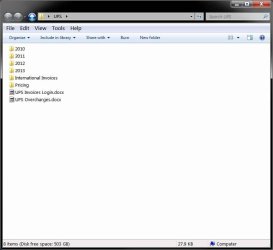
My Computer
At a glance
Windows 7, x64
- Computer type
- Laptop
- Computer Manufacturer/Model Number
- Dell
- OS
- Windows 7, x64
