Desktop Windows Manager stopped working after restart, other problems

blue4fun,

Please list the model number of your system. Fill in your system specs with this link

:ar: System Specs


You currently show a Alienware (Dell) laptop that may use optimus technology. If this is the case, you need specific drivers from Dell (alienware) , not Intel and you have options in your Nvidia control panel and BIOS to make certain settings.
 

My Computer My Computer

At a glance

Windows 10 Pro X64Intel(R) Core(TM) i5-3570K CPU OC@ 4.5GHZ Turbo8.00 GB DDR3 1600MhzMSI Gaming X GTX 1070
Computer type
PC/Desktop
Computer Manufacturer/Model Number
Dude Build
OS
Windows 10 Pro X64
CPU
Intel(R) Core(TM) i5-3570K CPU OC@ 4.5GHZ Turbo
Motherboard
MSI Z77A-G45 Gaming
Memory
8.00 GB DDR3 1600Mhz
Graphics Card(s)
MSI Gaming X GTX 1070
Sound Card
Realtek High Definition
Monitor(s) Displays
Dell S23O9W, HP L1710
Screen Resolution
DELL-1920 x 1080 HP-1280 x1024
Hard Drives
Crucial m4 256 SSD, WD 7200RPM 500GB WD 1TB
PSU
Seasonic X650 GOLD
Case
Zalman Z12
Cooling
Antec Kuhler 920
Keyboard
Logitech
Mouse
MSI DS100 Interceptor
Internet Speed
50 down and 5 up
Antivirus
MSE
Browser
Chrome, IE 11
Other Info
Logitech X-620 Speakers
Type Nvidia in Start Search box, Check if you have switchable graphics in the Nvidia Control Panel.

Otherwise on Dells with an onboard GPU chip where a video card has been added, there may be a setting in BIOS setup accessed by rebooting and tapping the key given on first screen, usually F1 or F2.

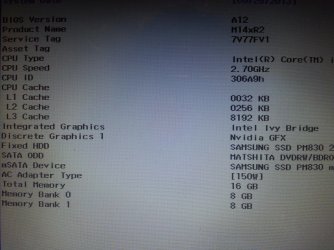
Okay, all it said was
Integrated Graphics: Intel Ivy Bridge
Discrete Graphics: NVIDIA GT
 

My Computer My Computer

At a glance

Microsoft Windows 7 Home Premium 64-bit 7601 ...Intel(R) Core(TM) i7-3820QM CPU @ 2.70GHz16.00 GB(1) Intel(R) HD Graphics 4000 (2) NVIDIA GeFo...
Computer type
Laptop
Computer Manufacturer/Model Number
Alienware
OS
Microsoft Windows 7 Home Premium 64-bit 7601 Multiprocessor Free Service Pack 1
CPU
Intel(R) Core(TM) i7-3820QM CPU @ 2.70GHz
Motherboard
Alienware M14xR2
Memory
16.00 GB
Graphics Card(s)
(1) Intel(R) HD Graphics 4000 (2) NVIDIA GeForce GT 650M
Sound Card
(1) Bluetooth Audio (2) Sound Blaster Recon3Di (3) Intel
Screen Resolution
0 x 0 x 0 bits (0 colors) @ 0 Hz
Hard Drives
M14XR2_RAID0

My Computer My Computer

At a glance

Windows 10 Pro X64Intel(R) Core(TM) i5-3570K CPU OC@ 4.5GHZ Turbo8.00 GB DDR3 1600MhzMSI Gaming X GTX 1070
Computer type
PC/Desktop
Computer Manufacturer/Model Number
Dude Build
OS
Windows 10 Pro X64
CPU
Intel(R) Core(TM) i5-3570K CPU OC@ 4.5GHZ Turbo
Motherboard
MSI Z77A-G45 Gaming
Memory
8.00 GB DDR3 1600Mhz
Graphics Card(s)
MSI Gaming X GTX 1070
Sound Card
Realtek High Definition
Monitor(s) Displays
Dell S23O9W, HP L1710
Screen Resolution
DELL-1920 x 1080 HP-1280 x1024
Hard Drives
Crucial m4 256 SSD, WD 7200RPM 500GB WD 1TB
PSU
Seasonic X650 GOLD
Case
Zalman Z12
Cooling
Antec Kuhler 920
Keyboard
Logitech
Mouse
MSI DS100 Interceptor
Internet Speed
50 down and 5 up
Antivirus
MSE
Browser
Chrome, IE 11
Other Info
Logitech X-620 Speakers

Attachments

  • 20130525_225958.jpg
    20130525_225958.jpg
    995.1 KB · Views: 5

My Computer My Computer

At a glance

Microsoft Windows 7 Home Premium 64-bit 7601 ...Intel(R) Core(TM) i7-3820QM CPU @ 2.70GHz16.00 GB(1) Intel(R) HD Graphics 4000 (2) NVIDIA GeFo...
Computer type
Laptop
Computer Manufacturer/Model Number
Alienware
OS
Microsoft Windows 7 Home Premium 64-bit 7601 Multiprocessor Free Service Pack 1
CPU
Intel(R) Core(TM) i7-3820QM CPU @ 2.70GHz
Motherboard
Alienware M14xR2
Memory
16.00 GB
Graphics Card(s)
(1) Intel(R) HD Graphics 4000 (2) NVIDIA GeForce GT 650M
Sound Card
(1) Bluetooth Audio (2) Sound Blaster Recon3Di (3) Intel
Screen Resolution
0 x 0 x 0 bits (0 colors) @ 0 Hz
Hard Drives
M14XR2_RAID0
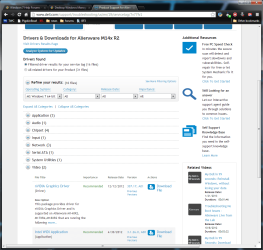
blue4fun, Download the Nvidia driver from here Product Support for Alienware M14x R2 | Dell US

dell.png

I can not see the bios version on your screen shot, as there are a new versions available. Make sure you have all off the updated drivers from the link.
 

My Computer My Computer

At a glance

Windows 10 Pro X64Intel(R) Core(TM) i5-3570K CPU OC@ 4.5GHZ Turbo8.00 GB DDR3 1600MhzMSI Gaming X GTX 1070
Computer type
PC/Desktop
Computer Manufacturer/Model Number
Dude Build
OS
Windows 10 Pro X64
CPU
Intel(R) Core(TM) i5-3570K CPU OC@ 4.5GHZ Turbo
Motherboard
MSI Z77A-G45 Gaming
Memory
8.00 GB DDR3 1600Mhz
Graphics Card(s)
MSI Gaming X GTX 1070
Sound Card
Realtek High Definition
Monitor(s) Displays
Dell S23O9W, HP L1710
Screen Resolution
DELL-1920 x 1080 HP-1280 x1024
Hard Drives
Crucial m4 256 SSD, WD 7200RPM 500GB WD 1TB
PSU
Seasonic X650 GOLD
Case
Zalman Z12
Cooling
Antec Kuhler 920
Keyboard
Logitech
Mouse
MSI DS100 Interceptor
Internet Speed
50 down and 5 up
Antivirus
MSE
Browser
Chrome, IE 11
Other Info
Logitech X-620 Speakers
How about in the Nvidia Control Panel? Is there a way to select Intel or Nvidia?
 
How about in the Nvidia Control Panel? Is there a way to select Intel or Nvidia?

Only for certain programs. I think my laptop has Optimus technology as Dude suggested.
 

My Computer My Computer

At a glance

Microsoft Windows 7 Home Premium 64-bit 7601 ...Intel(R) Core(TM) i7-3820QM CPU @ 2.70GHz16.00 GB(1) Intel(R) HD Graphics 4000 (2) NVIDIA GeFo...
Computer type
Laptop
Computer Manufacturer/Model Number
Alienware
OS
Microsoft Windows 7 Home Premium 64-bit 7601 Multiprocessor Free Service Pack 1
CPU
Intel(R) Core(TM) i7-3820QM CPU @ 2.70GHz
Motherboard
Alienware M14xR2
Memory
16.00 GB
Graphics Card(s)
(1) Intel(R) HD Graphics 4000 (2) NVIDIA GeForce GT 650M
Sound Card
(1) Bluetooth Audio (2) Sound Blaster Recon3Di (3) Intel
Screen Resolution
0 x 0 x 0 bits (0 colors) @ 0 Hz
Hard Drives
M14XR2_RAID0
blue4fun, Download the Nvidia driver from here Product Support for Alienware M14x R2 | Dell US

View attachment 269825

I can not see the bios version on your screen shot, as there are a new versions available. Make sure you have all off the updated drivers from the link.

I believe that is where I normally got my drivers but before the problem happened I was directed elsewhere. Do I need to do a system restore before I install or can I just do a clean install?
If you couldn't see the BIOS version, it's A12.
 

My Computer My Computer

At a glance

Microsoft Windows 7 Home Premium 64-bit 7601 ...Intel(R) Core(TM) i7-3820QM CPU @ 2.70GHz16.00 GB(1) Intel(R) HD Graphics 4000 (2) NVIDIA GeFo...
Computer type
Laptop
Computer Manufacturer/Model Number
Alienware
OS
Microsoft Windows 7 Home Premium 64-bit 7601 Multiprocessor Free Service Pack 1
CPU
Intel(R) Core(TM) i7-3820QM CPU @ 2.70GHz
Motherboard
Alienware M14xR2
Memory
16.00 GB
Graphics Card(s)
(1) Intel(R) HD Graphics 4000 (2) NVIDIA GeForce GT 650M
Sound Card
(1) Bluetooth Audio (2) Sound Blaster Recon3Di (3) Intel
Screen Resolution
0 x 0 x 0 bits (0 colors) @ 0 Hz
Hard Drives
M14XR2_RAID0

My Computer My Computer

At a glance

Windows 10 Pro X64Intel(R) Core(TM) i5-3570K CPU OC@ 4.5GHZ Turbo8.00 GB DDR3 1600MhzMSI Gaming X GTX 1070
Computer type
PC/Desktop
Computer Manufacturer/Model Number
Dude Build
OS
Windows 10 Pro X64
CPU
Intel(R) Core(TM) i5-3570K CPU OC@ 4.5GHZ Turbo
Motherboard
MSI Z77A-G45 Gaming
Memory
8.00 GB DDR3 1600Mhz
Graphics Card(s)
MSI Gaming X GTX 1070
Sound Card
Realtek High Definition
Monitor(s) Displays
Dell S23O9W, HP L1710
Screen Resolution
DELL-1920 x 1080 HP-1280 x1024
Hard Drives
Crucial m4 256 SSD, WD 7200RPM 500GB WD 1TB
PSU
Seasonic X650 GOLD
Case
Zalman Z12
Cooling
Antec Kuhler 920
Keyboard
Logitech
Mouse
MSI DS100 Interceptor
Internet Speed
50 down and 5 up
Antivirus
MSE
Browser
Chrome, IE 11
Other Info
Logitech X-620 Speakers
It appears that Optimus is part of the Nvidia graphics driver available on the Dell Support Downloads webpage. Optimus Technology

I see no other software for enabling it after reinstall, although the Dell-provided Intel chipset might be needed after trying the ones Win7 wants from installer and Windows Updates. Be sure to enable Automatically get recommended drivers and updates for your hardware (Step 3) before running all rounds of Important and Optional Updates with reboots.

Make sure the Dell Downloads model page Dude linked matches your tag number for specificity and if not reinput your tag number on the Driver downloads page. Product Support for Alienware M14x R2 | Dell US
 

My Computer My Computer

At a glance

Microsoft Windows 7 Home Premium 64-bit 7601 ...Intel(R) Core(TM) i7-3820QM CPU @ 2.70GHz16.00 GB(1) Intel(R) HD Graphics 4000 (2) NVIDIA GeFo...
Computer type
Laptop
Computer Manufacturer/Model Number
Alienware
OS
Microsoft Windows 7 Home Premium 64-bit 7601 Multiprocessor Free Service Pack 1
CPU
Intel(R) Core(TM) i7-3820QM CPU @ 2.70GHz
Motherboard
Alienware M14xR2
Memory
16.00 GB
Graphics Card(s)
(1) Intel(R) HD Graphics 4000 (2) NVIDIA GeForce GT 650M
Sound Card
(1) Bluetooth Audio (2) Sound Blaster Recon3Di (3) Intel
Screen Resolution
0 x 0 x 0 bits (0 colors) @ 0 Hz
Hard Drives
M14XR2_RAID0
blue4fun, try the clean install for nvidia and see if it helps.
 

My Computer My Computer

At a glance

Windows 10 Pro X64Intel(R) Core(TM) i5-3570K CPU OC@ 4.5GHZ Turbo8.00 GB DDR3 1600MhzMSI Gaming X GTX 1070
Computer type
PC/Desktop
Computer Manufacturer/Model Number
Dude Build
OS
Windows 10 Pro X64
CPU
Intel(R) Core(TM) i5-3570K CPU OC@ 4.5GHZ Turbo
Motherboard
MSI Z77A-G45 Gaming
Memory
8.00 GB DDR3 1600Mhz
Graphics Card(s)
MSI Gaming X GTX 1070
Sound Card
Realtek High Definition
Monitor(s) Displays
Dell S23O9W, HP L1710
Screen Resolution
DELL-1920 x 1080 HP-1280 x1024
Hard Drives
Crucial m4 256 SSD, WD 7200RPM 500GB WD 1TB
PSU
Seasonic X650 GOLD
Case
Zalman Z12
Cooling
Antec Kuhler 920
Keyboard
Logitech
Mouse
MSI DS100 Interceptor
Internet Speed
50 down and 5 up
Antivirus
MSE
Browser
Chrome, IE 11
Other Info
Logitech X-620 Speakers
blue4fun, try the clean install for nvidia and see if it helps.

It had me restart twice, and the first time, in between installations, it was fixed. I was prompted for a restart a second time, and after that the problem still occurred.

EDIT: I had another NVIDIA update, something with GeForce, and it again works in between restarts. I'm afraid to restart it just in case the problem comes up again, so I guess I'm just waiting for my laptop to restart on it's own. I really don't want to turn it on and DWM's not working.
 
Last edited:

My Computer My Computer

At a glance

Microsoft Windows 7 Home Premium 64-bit 7601 ...Intel(R) Core(TM) i7-3820QM CPU @ 2.70GHz16.00 GB(1) Intel(R) HD Graphics 4000 (2) NVIDIA GeFo...
Computer type
Laptop
Computer Manufacturer/Model Number
Alienware
OS
Microsoft Windows 7 Home Premium 64-bit 7601 Multiprocessor Free Service Pack 1
CPU
Intel(R) Core(TM) i7-3820QM CPU @ 2.70GHz
Motherboard
Alienware M14xR2
Memory
16.00 GB
Graphics Card(s)
(1) Intel(R) HD Graphics 4000 (2) NVIDIA GeForce GT 650M
Sound Card
(1) Bluetooth Audio (2) Sound Blaster Recon3Di (3) Intel
Screen Resolution
0 x 0 x 0 bits (0 colors) @ 0 Hz
Hard Drives
M14XR2_RAID0
Let us know, I hope the update solved it.
 

My Computer My Computer

At a glance

Windows 10 Pro X64Intel(R) Core(TM) i5-3570K CPU OC@ 4.5GHZ Turbo8.00 GB DDR3 1600MhzMSI Gaming X GTX 1070
Computer type
PC/Desktop
Computer Manufacturer/Model Number
Dude Build
OS
Windows 10 Pro X64
CPU
Intel(R) Core(TM) i5-3570K CPU OC@ 4.5GHZ Turbo
Motherboard
MSI Z77A-G45 Gaming
Memory
8.00 GB DDR3 1600Mhz
Graphics Card(s)
MSI Gaming X GTX 1070
Sound Card
Realtek High Definition
Monitor(s) Displays
Dell S23O9W, HP L1710
Screen Resolution
DELL-1920 x 1080 HP-1280 x1024
Hard Drives
Crucial m4 256 SSD, WD 7200RPM 500GB WD 1TB
PSU
Seasonic X650 GOLD
Case
Zalman Z12
Cooling
Antec Kuhler 920
Keyboard
Logitech
Mouse
MSI DS100 Interceptor
Internet Speed
50 down and 5 up
Antivirus
MSE
Browser
Chrome, IE 11
Other Info
Logitech X-620 Speakers
If the Nvidia Update continues to cause problems try rolling back to the last working driver

Try also disabling Nvidia software from starting with Windows in msconfig>Startup and >Services tabs after Hiding all MS Services. However it may need to be running due to Optimus. Try it and see.
 
Back
Top