Solved Determining virtual memory usage & load balancing

bbbl67

New member
I got two questions about paging files:
  1. Is there a command in Windows 7 (or even earlier versions of Windows) that will tell you how much of the total Windows paging file is being used? For example, you might have a total of 10,000MB of virtual memory, but 7000MB might only be used. The Advanced Settings tab under Computer Properties only tells you the total amount of virtual memory you have, but not how much of it is actually being used.
  2. If you have multiple internal hard disks, and you decide to spread the virtual memory workload around, you would create a small amount of paging file in several of those drives. So for example, if you have 4GB of RAM and 4 drives, you might give each drive a minimum of 1GB each. My question is how does Windows make use of each of those separate paging files? Does it do it sequentially, where it uses up all of the space in first drive's paging file, and then uses up the second drive's paging file, etc.? Or does it do it simultaneously, where it uses each file in each drive simultaneously, allocating them in some sort of round-robin fashion?
 

My Computer

Computer Manufacturer/Model Number
Homebuilt
OS
Windows 7 Ultimate x64
CPU
AMD Phenom II X6 1100T Black Edition
Motherboard
Asus M4A785-M
Memory
8GB DDR2 Corsair PC2-6400
Graphics Card(s)
AMD Radeon HD 6870
Monitor(s) Displays
LG W2343 23" monitor
Screen Resolution
1920 x 1080 (1080p)
Hard Drives
system boot: Corsair Force 3 240GB.
additional: Seagate 750GB, Samsung 750GB, Hitachi 1.0TB, WDC 1.5TB, Seagate 1.5TB.
PSU
OCZ-ZT750W
Case
Cooler Master Haf X
Keyboard
Logitech 920 Illuminated Keyboard
Internet Speed
25Mbps
I can help you with #1 (I personally let windows manage the page file until I got my SSD. I now have it set to 1GB and no issues)

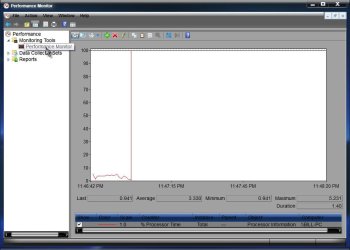
Start> In search box type perform

Enter

Click on Performance Monitor in left pane

PM.jpg

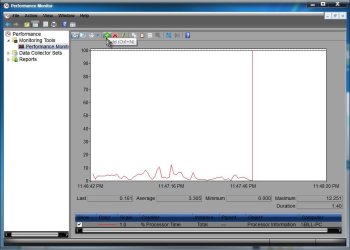
Click on the add button in top toolbar (The green plus sign)

Add.jpg

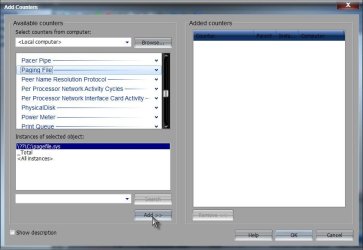
Scroll to find paging file on the list and click on it

Click the add button at bottom

add2.jpg

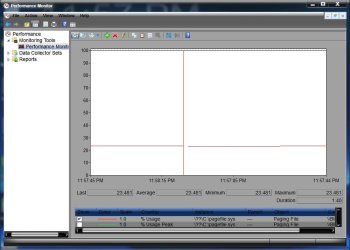
Click the OK button at bottom will get you the page file graph. The red line represents the percentage of page file usage.

usage.jpg

A Guy
 

My Computer

Computer type
PC/Desktop
OS
Windows 10 Home x64
CPU
INTEL Core i5-750 Quad-Core 3.37GHz
Motherboard
ASUS P7P55D
Memory
HyperX Fury Black Series 8GB (2 x 4GB) 1866Mhz
Graphics Card(s)
EVGA GeForce GTX 750 Superclocked 1GB 128-Bit GDDR5
Monitor(s) Displays
LG 32MA68HY 32" IPS
Screen Resolution
1920 x 1080
Hard Drives
Samsung 840 Evo 120GB, SEAGATE 500GB Barracuda® 7200.12, SATA 3 Gb/s, 7200 RPM, 16MB cache
PSU
ANTEC TruePower New TP-550, 80 PLUS, 550W
Case
ANTEC Three Hundred Illusion
Cooling
COOLER MASTER Hyper 212 Plus, 4 x 120mm 1 x 140mm Noctua's
Internet Speed
85 + Mbps
Antivirus
Avast
Browser
Vivaldi
Thanks "A Guy", right on the mark, what I was looking for! :thumbsup:
BTW, how do you save this arrangement? It seems I have to redo it everytime I restart Perfmon.
 
Last edited:

My Computer

Computer Manufacturer/Model Number
Homebuilt
OS
Windows 7 Ultimate x64
CPU
AMD Phenom II X6 1100T Black Edition
Motherboard
Asus M4A785-M
Memory
8GB DDR2 Corsair PC2-6400
Graphics Card(s)
AMD Radeon HD 6870
Monitor(s) Displays
LG W2343 23" monitor
Screen Resolution
1920 x 1080 (1080p)
Hard Drives
system boot: Corsair Force 3 240GB.
additional: Seagate 750GB, Samsung 750GB, Hitachi 1.0TB, WDC 1.5TB, Seagate 1.5TB.
PSU
OCZ-ZT750W
Case
Cooler Master Haf X
Keyboard
Logitech 920 Illuminated Keyboard
Internet Speed
25Mbps
I don't know if you can. But I'll ask the Gurus to see if someone knows, and if they know the answer to your 2nd question in the 1st post. A Guy
 

My Computer

Computer type
PC/Desktop
OS
Windows 10 Home x64
CPU
INTEL Core i5-750 Quad-Core 3.37GHz
Motherboard
ASUS P7P55D
Memory
HyperX Fury Black Series 8GB (2 x 4GB) 1866Mhz
Graphics Card(s)
EVGA GeForce GTX 750 Superclocked 1GB 128-Bit GDDR5
Monitor(s) Displays
LG 32MA68HY 32" IPS
Screen Resolution
1920 x 1080
Hard Drives
Samsung 840 Evo 120GB, SEAGATE 500GB Barracuda® 7200.12, SATA 3 Gb/s, 7200 RPM, 16MB cache
PSU
ANTEC TruePower New TP-550, 80 PLUS, 550W
Case
ANTEC Three Hundred Illusion
Cooling
COOLER MASTER Hyper 212 Plus, 4 x 120mm 1 x 140mm Noctua's
Internet Speed
85 + Mbps
Antivirus
Avast
Browser
Vivaldi
I would not recommend spreading paging files over multiple drives. While it may be faster assuming that Windows uses each in parallel, I have seen it cause systems to stop working correctly, and it can interfere with .dmp files being created for analysis if you have any blue screen crashes.

http://www.sevenforums.com/performa...ce-monitor-perfmon-save-settings-session.html may help with saving the settings.
 

My Computer

Computer Manufacturer/Model Number
HP Pavilion e9110t
OS
Windows 7 Home Premium 64 Bit
CPU
Intel(R) Core(TM)2 Quad CPU Q9550 @ 2.83GHz
Motherboard
Pegatron IPIEL-LA3
Memory
6.00 GB Hundai HMT125U6BFR8C-H9
Graphics Card(s)
ATI Radeon HD 4850
Sound Card
Realtek High Definition Audio/ATI High Definition Audio
Monitor(s) Displays
Acer AL2216W
Screen Resolution
1680x1050
Hard Drives
Hitachi HDP725050GLA360 ATA Device 500 GB
PSU
Unknown/installed by HP
Case
HP generic case
Cooling
Intel Stock Cooling
Keyboard
HP Keyboard
Mouse
HP Mouse
Internet Speed
Download: 19.15 Mbps Upload: 1.67 Mbps
Other Info
Network Adapter Realtek RTL8168D/8111D Family PCI-E Gigabit Ethernet NIC (NDIS 6.20)
Network Adapter 802.11n Wireless PCI Express Card LAN Adapter
Thanks Mike :thumbsup:

A Guy
 

My Computer

Computer type
PC/Desktop
OS
Windows 10 Home x64
CPU
INTEL Core i5-750 Quad-Core 3.37GHz
Motherboard
ASUS P7P55D
Memory
HyperX Fury Black Series 8GB (2 x 4GB) 1866Mhz
Graphics Card(s)
EVGA GeForce GTX 750 Superclocked 1GB 128-Bit GDDR5
Monitor(s) Displays
LG 32MA68HY 32" IPS
Screen Resolution
1920 x 1080
Hard Drives
Samsung 840 Evo 120GB, SEAGATE 500GB Barracuda® 7200.12, SATA 3 Gb/s, 7200 RPM, 16MB cache
PSU
ANTEC TruePower New TP-550, 80 PLUS, 550W
Case
ANTEC Three Hundred Illusion
Cooling
COOLER MASTER Hyper 212 Plus, 4 x 120mm 1 x 140mm Noctua's
Internet Speed
85 + Mbps
Antivirus
Avast
Browser
Vivaldi
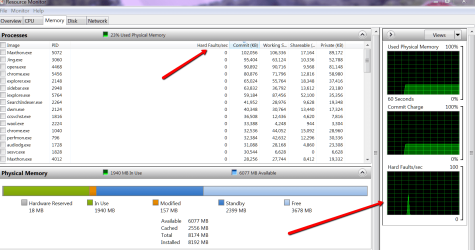
You can get a quick glance in the bottom right graph of Performance Monitor > Memory tab. There you can also see which process triggered the hard page fault.
 

Attachments

  • 2012-05-01_2335.png
    2012-05-01_2335.png
    205.8 KB · Views: 63

My Computer

Computer Manufacturer/Model Number
HP, Dell, Gateway, Toshiba - 4 laptops and 2 desktops
OS
Vista, Windows7, Mint Mate, Zorin, Windows 8
CPU
from 1.6GHz Duo to i7
Monitor(s) Displays
2x HP w2207
Hard Drives
5x HDD, 7x SSD, 12x Externals
Keyboard
with trackball - no mices
Mouse
Trackball mice
Internet Speed
DSL 6000
I would not recommend spreading paging files over multiple drives. While it may be faster assuming that Windows uses each in parallel, I have seen it cause systems to stop working correctly, and it can interfere with .dmp files being created for analysis if you have any blue screen crashes.

http://www.sevenforums.com/performa...ce-monitor-perfmon-save-settings-session.html may help with saving the settings.
Thanks for the tip on saving the settings.

Regarding the memory dumps, I usually only save the mini-dumps which are only 128KB, rather than the full memory dumps. I think a mini-dump will easily fit into any of the multiple page files, without having to go across drives.
 

My Computer

Computer Manufacturer/Model Number
Homebuilt
OS
Windows 7 Ultimate x64
CPU
AMD Phenom II X6 1100T Black Edition
Motherboard
Asus M4A785-M
Memory
8GB DDR2 Corsair PC2-6400
Graphics Card(s)
AMD Radeon HD 6870
Monitor(s) Displays
LG W2343 23" monitor
Screen Resolution
1920 x 1080 (1080p)
Hard Drives
system boot: Corsair Force 3 240GB.
additional: Seagate 750GB, Samsung 750GB, Hitachi 1.0TB, WDC 1.5TB, Seagate 1.5TB.
PSU
OCZ-ZT750W
Case
Cooler Master Haf X
Keyboard
Logitech 920 Illuminated Keyboard
Internet Speed
25Mbps
I believe that Windows uses multiple pagefiles in the order of least used partition\drive first and so on. I can't see the advantage unless you have other physical drives that are faster than the boot drive.
 

My Computer

Computer Manufacturer/Model Number
DIY
OS
Windows 7 home premium x64
CPU
AMD FX-4100 AM3+ 3.6GHz 12MB Black Edition
Motherboard
Asus M5A97 Pro
Memory
Crsair vengeance 12Gb DDR3 1600MHz CL9
Graphics Card(s)
Asus GTX 560 1GB
Sound Card
Realtek onboard
Monitor(s) Displays
Hanns G 1680x1050 native
Hard Drives
OCZ 128Gb Petrol ssd
2x500 Gb Samsung
PSU
OCZ StealthXstream II 500W
Internet Speed
8Mb or better
Thanks for the tip on saving the settings.

Regarding the memory dumps, I usually only save the mini-dumps which are only 128KB, rather than the full memory dumps. I think a mini-dump will easily fit into any of the multiple page files, without having to go across drives.

The problem is that when the pagefiles reside on other drivers, the .dmp files are not always created in the C:\Windows\Minidump folder. Sometimes they can be found elsewhere, but often, they are never created at all...


Thanks Mike :thumbsup:

A Guy
No problem. :)
 

My Computer

Computer Manufacturer/Model Number
HP Pavilion e9110t
OS
Windows 7 Home Premium 64 Bit
CPU
Intel(R) Core(TM)2 Quad CPU Q9550 @ 2.83GHz
Motherboard
Pegatron IPIEL-LA3
Memory
6.00 GB Hundai HMT125U6BFR8C-H9
Graphics Card(s)
ATI Radeon HD 4850
Sound Card
Realtek High Definition Audio/ATI High Definition Audio
Monitor(s) Displays
Acer AL2216W
Screen Resolution
1680x1050
Hard Drives
Hitachi HDP725050GLA360 ATA Device 500 GB
PSU
Unknown/installed by HP
Case
HP generic case
Cooling
Intel Stock Cooling
Keyboard
HP Keyboard
Mouse
HP Mouse
Internet Speed
Download: 19.15 Mbps Upload: 1.67 Mbps
Other Info
Network Adapter Realtek RTL8168D/8111D Family PCI-E Gigabit Ethernet NIC (NDIS 6.20)
Network Adapter 802.11n Wireless PCI Express Card LAN Adapter
I leave it alone, even on two of my three systems that have SSDs. The point of an SSD is to be a faster drive than HDDs, right? So I don't understand the rationale behind using SSDs for as little as possible.
 

My Computer

OS
Windows 7 Ultimate x64 SP1
CPU
Intel Core i7-2600
Motherboard
Gigabyte GA-P67A-UD3P-B3
Memory
12 GB Patriot Extreme DDR3-1333
Graphics Card(s)
Nvidia GTX 470
Monitor(s) Displays
Dell UltraSharp 2209WA
Hard Drives
OCZ Agility3 240 GB, WD5001AALS, WD7501AALS
PSU
OCZ ModStream 700W
Case
CoolerMaster HAF 912 Advanced
Cooling
CoolerMaster Hyper 212 Plus
I leave it alone, even on two of my three systems that have SSDs. The point of an SSD is to be a faster drive than HDDs, right? So I don't understand the rationale behind using SSDs for as little as possible.
Absolutely right. I do not understand either why people want to save their SSDs for beyond the year 2022.
 

My Computer

Computer Manufacturer/Model Number
HP, Dell, Gateway, Toshiba - 4 laptops and 2 desktops
OS
Vista, Windows7, Mint Mate, Zorin, Windows 8
CPU
from 1.6GHz Duo to i7
Monitor(s) Displays
2x HP w2207
Hard Drives
5x HDD, 7x SSD, 12x Externals
Keyboard
with trackball - no mices
Mouse
Trackball mice
Internet Speed
DSL 6000
Could i disable the pagefile ?
I have 8 GB DDR3 ram.
Thanks
 

My Computer

Computer type
PC/Desktop
OS
Windows 7 Ultimate x64
CPU
Intel7 4790K
Motherboard
Gigabyte GA-Z97X UD5H
Memory
8 GB DDR3
Graphics Card(s)
GTX 980Ti G1
Sound Card
SoundBlaster X-FI XtremeGamer
Monitor(s) Displays
Samsung UE40JU6550 UHD
Screen Resolution
3840 X 2160
Hard Drives
1 SSD Intel 330
2 x Western Digital 6400 AAKS
1 x Western Digital 3200 AAKS
PSU
Corsair 750W
Case
Cooler Master HAF 922
I would not disable it completely. Set it to 1GB - that should suffice.
 

My Computer

Computer Manufacturer/Model Number
HP, Dell, Gateway, Toshiba - 4 laptops and 2 desktops
OS
Vista, Windows7, Mint Mate, Zorin, Windows 8
CPU
from 1.6GHz Duo to i7
Monitor(s) Displays
2x HP w2207
Hard Drives
5x HDD, 7x SSD, 12x Externals
Keyboard
with trackball - no mices
Mouse
Trackball mice
Internet Speed
DSL 6000
The virtual memory pagefile is still important, no matter how much physical RAM you have. Windows and most other OS's use it to offload unused sections of memory in the background continuously.
 

My Computer

Computer Manufacturer/Model Number
Homebuilt
OS
Windows 7 Ultimate x64
CPU
AMD Phenom II X6 1100T Black Edition
Motherboard
Asus M4A785-M
Memory
8GB DDR2 Corsair PC2-6400
Graphics Card(s)
AMD Radeon HD 6870
Monitor(s) Displays
LG W2343 23" monitor
Screen Resolution
1920 x 1080 (1080p)
Hard Drives
system boot: Corsair Force 3 240GB.
additional: Seagate 750GB, Samsung 750GB, Hitachi 1.0TB, WDC 1.5TB, Seagate 1.5TB.
PSU
OCZ-ZT750W
Case
Cooler Master Haf X
Keyboard
Logitech 920 Illuminated Keyboard
Internet Speed
25Mbps
You could disable it, but as mentioned, it's not even necessary. Set it as WHS said, and don't worry ;)

A Guy
 

My Computer

Computer type
PC/Desktop
OS
Windows 10 Home x64
CPU
INTEL Core i5-750 Quad-Core 3.37GHz
Motherboard
ASUS P7P55D
Memory
HyperX Fury Black Series 8GB (2 x 4GB) 1866Mhz
Graphics Card(s)
EVGA GeForce GTX 750 Superclocked 1GB 128-Bit GDDR5
Monitor(s) Displays
LG 32MA68HY 32" IPS
Screen Resolution
1920 x 1080
Hard Drives
Samsung 840 Evo 120GB, SEAGATE 500GB Barracuda® 7200.12, SATA 3 Gb/s, 7200 RPM, 16MB cache
PSU
ANTEC TruePower New TP-550, 80 PLUS, 550W
Case
ANTEC Three Hundred Illusion
Cooling
COOLER MASTER Hyper 212 Plus, 4 x 120mm 1 x 140mm Noctua's
Internet Speed
85 + Mbps
Antivirus
Avast
Browser
Vivaldi
Back
Top