Dial up issue

desouzaalex

New member
I've installed Windows 7 a few days ago and everything seemed to be okay, till yesterday. I have a dial up connection and all of a sudden it just froze. I tried reconnecting and it did, but after establishing connection it just freezes, immediately. I tried changing provider, creating a new connection; I even installed a different modem! Nothing seems to help.

I thought it was because of something going on my phone line, but it works properly on Windows XP, just like right now.

Well, that's it, whevener I try it on Windows 7 it does connect but I can't surf and when I check its status I see the received data just froze right after reaching connection.

If someone can help...
 

My Computer

OS
Windows 7 Ultimate x86
First, I am sorry your still using dial-up!

Who is your ISP?

What brand is your PC/Model or if custom built brand/model number of your 56k dial-up modem?
 

My Computers

System One System Two

  • Computer type
    PC/Desktop
    Computer Manufacturer/Model Number
    PowerSpec G164
    OS
    WIN10
    CPU
    AMD Ryzen 5 3600 6-Core Processor 3.59 GHz
    Memory
    16.0 GB
    Internet Speed
    VERY FAST>>>!!!
  • Antivirus
    ESET Security Premium
Sure you have the dial up connection in right slot on the back of your computer?
 

My Computer

Computer Manufacturer/Model Number
HP M9077c
OS
Windows 7 Home Premium 64bit
CPU
Intel(R)Core(TM)2 quad [email protected] 2.39GHz
Motherboard
ASUSeK
Memory
6GB DDR2 6400
Graphics Card(s)
GeForce 8500/512MB
Sound Card
Realtek High Def Audio
Monitor(s) Displays
HP w2408 LCD 24" widescreen
Screen Resolution
1920x1200
Cooling
6 pack of Bud
Keyboard
MS wireless Inteli
Mouse
MS wireless Inteli
First, I am sorry your still using dial-up!

Me too.

Who is your ISP?

Usually Ibest and Orolix, but you may not know them, as I'm in Brazil.

What brand is your PC/Model or if custom built brand/model number of your 56k dial-up modem?

Motherboard: Gigabyte GA-8VM800M
Modems: Conexant and Intel (I've tried both of them).

Thank you for replying quickly.
 

My Computer

OS
Windows 7 Ultimate x86
Do you have a separate PCI 56k modem, there's no modem built into your motherboard!

The one of the back of the motherboard is a LAN connection (Ethernet cable)
 

Attachments

  • 13-128-314-02.jpg
    13-128-314-02.jpg
    77.9 KB · Views: 5

My Computers

System One System Two

  • Computer type
    PC/Desktop
    Computer Manufacturer/Model Number
    PowerSpec G164
    OS
    WIN10
    CPU
    AMD Ryzen 5 3600 6-Core Processor 3.59 GHz
    Memory
    16.0 GB
    Internet Speed
    VERY FAST>>>!!!
  • Antivirus
    ESET Security Premium
Welcome to the forums desouzaalex,

I to am using dial-up as my area hasn't gotten high-speed yet. :( ...Have you've updated the modem driver? also is it a external USB.. or?
also tell me the config that you have it set up as.
 

My Computer

Computer type
PC/Desktop
OS
Win7 Home Premium x64 SP1, Archlinux x86_64. Elementary Luna
Do you have a separate PCI modem, there's no modem built into your motherboard!

I have two PCI modems: conexant and intel, as I said.

The one of the back of the motherboard is a LAN connection (Ethernet cable)

Look, it worked properly till yesterday on Windows Seven and is working on Windows XP right now, so doesn't seem like a "cable on the wrong place" issue, huh? ^^
 

My Computer

OS
Windows 7 Ultimate x86
Welcome to the forums desouzaalex,

I to am using dial-up as my area hasn't gotten high-speed yet. :( ...Have you've updated the modem driver? also is it a external USB.. or?
also tell me the config that you have it set up as.


My cousin in Aguadilla, PR got DSL. WOW I wouldn't even use computers anymore if I had to settle for that.
 

My Computers

System One System Two

  • Computer type
    PC/Desktop
    Computer Manufacturer/Model Number
    PowerSpec G164
    OS
    WIN10
    CPU
    AMD Ryzen 5 3600 6-Core Processor 3.59 GHz
    Memory
    16.0 GB
    Internet Speed
    VERY FAST>>>!!!
  • Antivirus
    ESET Security Premium
Do you have a separate PCI modem, there's no modem built into your motherboard!

I have two PCI modems: conexant and intel, as I said.

The one of the back of the motherboard is a LAN connection (Ethernet cable)

Look, it worked properly till yesterday on Windows Seven and is working on Windows XP right now, so doesn't seem like a "cable on the wrong place" issue, huh? ^^


Don't get upset.. Relax... Did you at some point buy a modem? We just need the model number of the model? There isn't one in the motherboard. You can check for yourself.
 

My Computers

System One System Two

  • Computer type
    PC/Desktop
    Computer Manufacturer/Model Number
    PowerSpec G164
    OS
    WIN10
    CPU
    AMD Ryzen 5 3600 6-Core Processor 3.59 GHz
    Memory
    16.0 GB
    Internet Speed
    VERY FAST>>>!!!
  • Antivirus
    ESET Security Premium
Welcome to the forums desouzaalex,

I to am using dial-up as my area hasn't gotten high-speed yet. :( ...Have you've updated the modem driver? also is it a external USB.. or?.

Thank you, man.

It's the same about me, no high-speed in my city yet. Yeah, I tried updating the modem driver. And it's PCI, as I said.

also tell me the config that you have it set up as

What you mean? I just used the dial up connection wizard and put on the ISP phone number and username and password.
 

My Computer

OS
Windows 7 Ultimate x86
Don't get upset.. Relax... Did you at some point buy a modem? We just need the model number of the model? There isn't one in the motherboard. You can check for yourself.

Sorry, man, didn't mean to sound upset.

Also didn't mean I have an onboard modem. I use PCI modem. I can't recall right now its model, I only know the brands. I have to modems: conexant and intel. I'll try to get the model.
 

My Computer

OS
Windows 7 Ultimate x86
Okay sorry :), Right-click the network icon in your system tray, you dial-up connection should be in the connection list..right-click on it and hit status..it should bring up a different window..on that window hit properties..then there should be 5 tabs
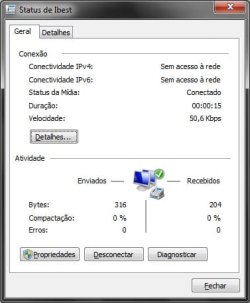
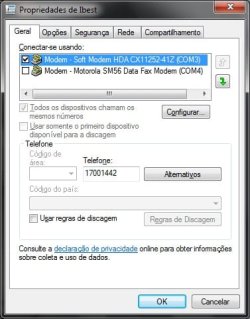
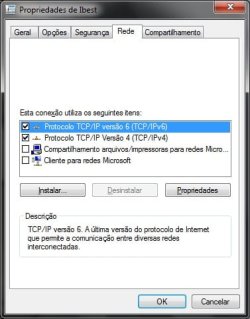
General, Options, Security, Networking and Sharing..Give the settings on each tab except Sharing(I don't need that one.)

EDIT: Because i remember accidentally messed with a setting on these tabs and i had same problem you have now, lol.
 

My Computer

Computer type
PC/Desktop
OS
Win7 Home Premium x64 SP1, Archlinux x86_64. Elementary Luna
Don't get upset.. Relax... Did you at some point buy a modem? We just need the model number of the model? There isn't one in the motherboard. You can check for yourself.

Sorry, man, didn't mean to sound upset.

Also didn't mean I have an onboard modem. I use PCI modem. I can't recall right now its model, I only know the brands. I have to modems: conexant and intel. I'll try to get the model.


No problem, you got to install the latest drivers for Windows 7, mostly likely need to install them in compatibility mode. Because I'm sure there none for Windows 7. I won't settle for just getting back online, I would check that they were installed properly the first time when you installed Windows 7. And since you are using two different modems and two sets of drivers, you might be complicating your computer.
 

My Computers

System One System Two

  • Computer type
    PC/Desktop
    Computer Manufacturer/Model Number
    PowerSpec G164
    OS
    WIN10
    CPU
    AMD Ryzen 5 3600 6-Core Processor 3.59 GHz
    Memory
    16.0 GB
    Internet Speed
    VERY FAST>>>!!!
  • Antivirus
    ESET Security Premium
Okay sorry :), Right-click the network icon in your system tray, you dial-up connection should be in the connection list..right-click on it and hit status..it should bring up a different window..on that window hit properties..then there should be 5 tabs

General, Options, Security, Networking and Sharing..Give the settings on each tab except Sharing(I don't need that one.)

Ok. I will boot up in Windows 7 to get the screenshots.
 

My Computer

OS
Windows 7 Ultimate x86
Okay sorry :), Right-click the network icon in your system tray, you dial-up connection should be in the connection list..right-click on it and hit status..it should bring up a different window..on that window hit properties..then there should be 5 tabs
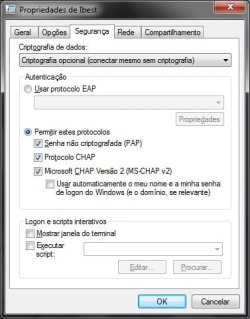
General, Options, Security, Networking and Sharing..Give the settings on each tab except Sharing(I don't need that one.)

Ok. I will boot up in Windows 7 to get the screenshots.

You could also try to goto Device Manager and uninstall the modem there and have windows 7 reinstall it again. :)
 

My Computer

Computer type
PC/Desktop
OS
Win7 Home Premium x64 SP1, Archlinux x86_64. Elementary Luna
also tell me the config that you have it set up as
I've attached screenshots.

No problem, you got to install the latest drivers for Windows 7
I tried to, but it says Windws 7 already have the upated drivers.

And since you are using two different modems and two sets of drivers, you might be complicating your computer.
I use only one, just put the other on to test it, after finding problems to connect.

You could also try to goto Device Manager and uninstall the modem there and have windows 7 reinstall it again.
I've tried it a lot of times.
 

Attachments

  • frozen.jpg
    frozen.jpg
    45.3 KB · Views: 1
  • modems.png
    modems.png
    2.6 KB · Views: 111
  • settings1.jpg
    settings1.jpg
    64.8 KB · Views: 1
  • settings2.jpg
    settings2.jpg
    58.4 KB · Views: 1
  • settings3.jpg
    settings3.jpg
    63.2 KB · Views: 1
  • settings4.jpg
    settings4.jpg
    57.8 KB · Views: 1
Last edited:

My Computer

OS
Windows 7 Ultimate x86
Hey, you guys, I've solved it! :D

I decided to boot up to try some changes more and found out what was going on:

As I have 56k connection, I use this program called NetLimiter (google it) where I can see whatever is sucking my connection and limit or block any application's bandwidth. So, very useful for whoever has dial up connection. It's like a sort of firewall.

So, yesterday I realized svchost.exe was sucking my connection and just added rules to block its bandwidth. That's what caused all this. I deleted the rules and it's working again!

Thank you very much, guys!
 

My Computer

OS
Windows 7 Ultimate x86
  • Like
Reactions: Nem
Glad you found out what caused it. :)

Edit: Sorry for taking long, hurricane winds knocked down our power lines. :|
 

My Computer

Computer type
PC/Desktop
OS
Win7 Home Premium x64 SP1, Archlinux x86_64. Elementary Luna
Back
Top