I'm new to virtualization machines.
On my system (Win7 Home Premium 32bits) I'm trying VMWare Player and VirtualBox in order to choose the one that suits me best.
Don't know why, but display settings (Control Panel) are different.
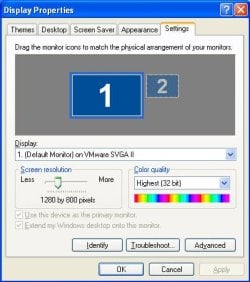
For example, I'm running 1280x800 pixels 32bits on VMWare, what gives me access to a full window screen without those annoying side and bottom slide bars.
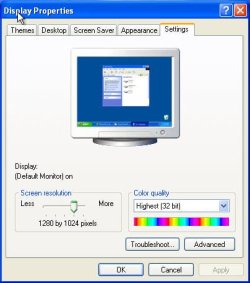
On VirtualBox, on the contrary, the available display settings are not the same (1280x800 pixels) is not available using the display settings slide bar)and I choose to use 1152x864 pixels 32 bits.
It is not a full screen window and the slide bars are there to use to navigate through the screen what pisses me off.
Is there a way to have both machines running full screen without those slide bars?
What am I doing wrong?
Any help will be appreciated.
Flores
On my system (Win7 Home Premium 32bits) I'm trying VMWare Player and VirtualBox in order to choose the one that suits me best.
Don't know why, but display settings (Control Panel) are different.
For example, I'm running 1280x800 pixels 32bits on VMWare, what gives me access to a full window screen without those annoying side and bottom slide bars.
On VirtualBox, on the contrary, the available display settings are not the same (1280x800 pixels) is not available using the display settings slide bar)and I choose to use 1152x864 pixels 32 bits.
It is not a full screen window and the slide bars are there to use to navigate through the screen what pisses me off.
Is there a way to have both machines running full screen without those slide bars?
What am I doing wrong?
Any help will be appreciated.
Flores
My Computer
- Computer type
- Laptop
- Computer Manufacturer/Model Number
- DELL Vostro 1510
- OS
- Windows 7 Home Premium 32bits
- Hard Drives
- Seagate external HD 500Gb
- Browser
- IE11 and Chrome
- Other Info
- DELL Vostro 1510


 . I used the top toolbar. As in #1, I have no access to the START button, as there are no more slide bars.