
Disable IE Script Debugging for Good

muzicman82

New member
Member
Local time
5:49 PM
Messages
45
Location
Woodstown, NJ
Hi all,

I have a co-worker running Windows 7 and IE 11. He says that he keeps getting the popup shown, and even after he checks the boxes in Advanced Internet Options to Disable Script Debugging, they uncheck themselves after every reboot.

I read elsewhere on the web that security programs may uncheck these... is this true? Does anyone have any info on where options for Norton may be to prevent this? Or why the setting won't stay checked?
 

Attachments
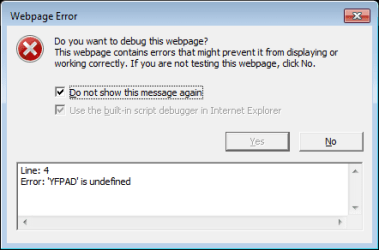
  • unnamed.png
    unnamed.png
    5.9 KB · Views: 12

My Computer

OS
Windows 7 Home Premium x64
CPU
Intel Core 2 Quad Q6600
Motherboard
EVGA 680i LT
Memory
8GB
Graphics Card(s)
nVidia Geforce 8800GT
Monitor(s) Displays
Dell 2408W
Screen Resolution
1920x1200
Hi,
What webpage trigger the popup message,
Post links so we might test,
Personally a full reset might be the simplest thing to try without changing any advanced settings,

As long as Norton or which ever security browser add-ons are disabled I doubt they would reset any settings,
Being this is a company machine group policy might allow changes but resets it's self after logging off :/
Cheers.
 

My Computer

Computer type
PC/Desktop
Computer Manufacturer/Model Number
Custom assembled by me :}
OS
Win-7-Pro64bit 7-H-Prem-64bit
CPU
i7-5930K 2nd i9-9940x both water blocked VRM's too
Motherboard
ASUS SABERTOOTH X99 2nd ASUS x299 Apex
Memory
Trident-z 3200C14 2nd Trident-z 3600C16
Graphics Card(s)
EVGA 1080ti ftw3 2nd Titan Xp both water blocked
Sound Card
Built-in Realtek
Monitor(s) Displays
1-AOC G2460PG 24"G-Sync 144Hz/ 2nd 1-ASUS VG248QE 24" 144Hz
Screen Resolution
1920 x 1080 144Hz
Hard Drives
2-Samsung M.2 Evo & Evo Plus
2-Samsung 850 EVO 500GB SSD's/ 3-2.5 W.D. Black 1tb-&3-1tb/3-3.5 WD Black 1tb hdd's
PSU
EVGA SuperNOVA 1000-P2 2nd 1200-P2
Case
2-Corsair Obsidian Series 450D Black ATX Mid Tower
Cooling
Custom water loops
Keyboard
Logitech G710+/ 2nd Logitech G910
Mouse
2-RedDragon M901 Perdition 16400 dpi Gaming mouse = wired
Internet Speed
Comcast Ping 19ms 89.31mbps download speed 6.12mbps upload
Antivirus
Malwarebytes Pro/ Superantispyware Pro
Browser
FireFox & Pale moon
Other Info
2nd ASUS X299 Apex/Intel i9-9940x with Custom water loop/7H-Prem-x64/Corsair 450D case/Ram Trident-z 3600C16 4x8gb / Samsung970Evo plus 500gb SSD/Dual ssd EZ swap evo/PSU EVGA SuperNova 1200w-P2 80+Platinum/GPU Titan Xp /8-ML-140 on push-pull on 2-280GTX rads
Hello,

It is a company machine but we are not using Windows servers or Group Policy, so those have no play here.
 

My Computer

OS
Windows 7 Home Premium x64
CPU
Intel Core 2 Quad Q6600
Motherboard
EVGA 680i LT
Memory
8GB
Graphics Card(s)
nVidia Geforce 8800GT
Monitor(s) Displays
Dell 2408W
Screen Resolution
1920x1200
Personally I've never seen this popup message,
If no sites are posted we can not test the issue,
At best lets see what is loading in the browser,
Open ie,
Gear symbol on the top right and Manage add-ons,
On the top left column Toolbar and extensions,
On the bottom left column switch to Show all add-ons,
Take screen shows of this list,
See the links above my signature on assistance for screen shots here,
Cheers.
 

My Computer

Computer type
PC/Desktop
Computer Manufacturer/Model Number
Custom assembled by me :}
OS
Win-7-Pro64bit 7-H-Prem-64bit
CPU
i7-5930K 2nd i9-9940x both water blocked VRM's too
Motherboard
ASUS SABERTOOTH X99 2nd ASUS x299 Apex
Memory
Trident-z 3200C14 2nd Trident-z 3600C16
Graphics Card(s)
EVGA 1080ti ftw3 2nd Titan Xp both water blocked
Sound Card
Built-in Realtek
Monitor(s) Displays
1-AOC G2460PG 24"G-Sync 144Hz/ 2nd 1-ASUS VG248QE 24" 144Hz
Screen Resolution
1920 x 1080 144Hz
Hard Drives
2-Samsung M.2 Evo & Evo Plus
2-Samsung 850 EVO 500GB SSD's/ 3-2.5 W.D. Black 1tb-&3-1tb/3-3.5 WD Black 1tb hdd's
PSU
EVGA SuperNOVA 1000-P2 2nd 1200-P2
Case
2-Corsair Obsidian Series 450D Black ATX Mid Tower
Cooling
Custom water loops
Keyboard
Logitech G710+/ 2nd Logitech G910
Mouse
2-RedDragon M901 Perdition 16400 dpi Gaming mouse = wired
Internet Speed
Comcast Ping 19ms 89.31mbps download speed 6.12mbps upload
Antivirus
Malwarebytes Pro/ Superantispyware Pro
Browser
FireFox & Pale moon
Other Info
2nd ASUS X299 Apex/Intel i9-9940x with Custom water loop/7H-Prem-x64/Corsair 450D case/Ram Trident-z 3600C16 4x8gb / Samsung970Evo plus 500gb SSD/Dual ssd EZ swap evo/PSU EVGA SuperNova 1200w-P2 80+Platinum/GPU Titan Xp /8-ML-140 on push-pull on 2-280GTX rads
Back
Top